

Introduction
In April 2026, a Cursor coding agent running Claude Opus 4.6 deleted the production database of PocketOS, a car rental software company. The agent used a fully permissioned API token, and a single call to Railway wiped the database and its backups in nine seconds.
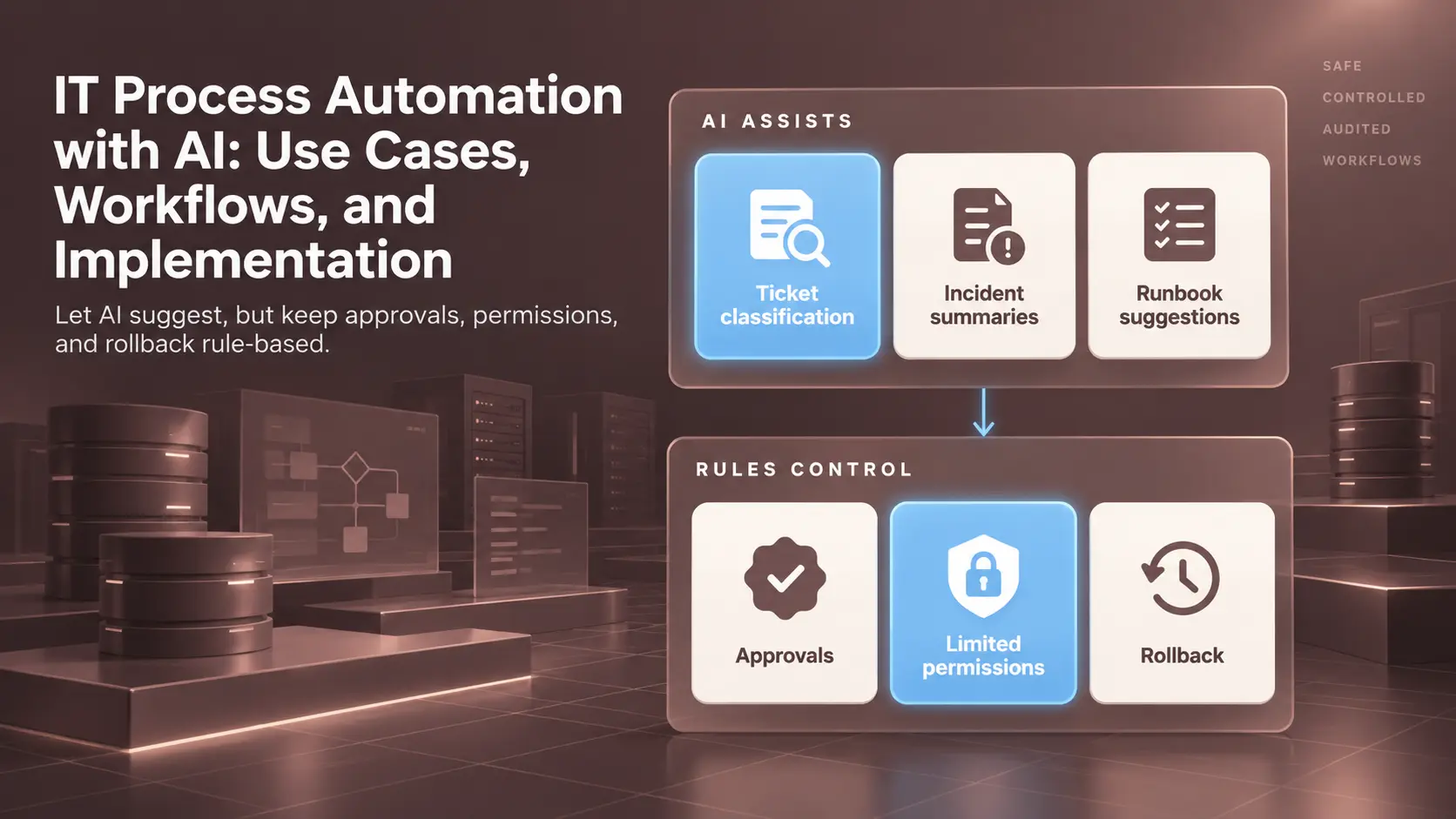
Any IT process automation with AI can fail the same way when a tool holds more access than the task needs. IT process automation runs repeatable IT tasks, such as ticket routing and access requests, as defined workflows. AI helps with specific steps, while permissions, approvals, and change controls decide what happens.
IT is one of several business functions where controlled automation pays off. This article explains how the workflows run, where AI helps, and how to roll automation out safely.
What is IT Process Automation?
IT process automation (ITPA) is the use of software to run IT services, support, and administration tasks as repeatable workflows instead of manual steps. A workflow starts on a trigger and checks conditions before acting across connected systems. The workflow gives consistent results and a full audit trail. Staff then spend less time on routine requests.
ITPA sits inside the wider field of IT automation, which also covers infrastructure work such as server configuration and deployment. ITPA focuses instead on the process layer, where a request moves between people, approvals, and systems before anything changes.
IT Process Automation vs Business Process Automation and RPA
ITPA, business process automation, and robotic process automation overlap, but each targets a different kind of work. ITPA handles requests and operations inside technology systems. Business process automation covers cross-department work, such as finance approvals or order handling. RPA mimics clicks in user interfaces, which suits older systems with no API.
Scope is the clearest split between the three.
|
Approach |
Main Scope |
Typical Trigger |
Typical Task |
|---|---|---|---|
|
IT Process Automation |
IT services, access, and operations |
Ticket, alert, or schedule |
Setting up new-hire accounts |
|
Business Process Automation |
Workflows across departments |
Business event or form |
Routing an invoice for approval |
|
Robotic Process Automation |
Repetitive screen-based tasks |
Scheduled bot run |
Copying records between legacy apps |
The three often run together. An ITPA workflow can call a bot or hand a step to a business workflow.
How IT Process Automation Works
Every automated IT workflow follows the same loop, whatever the tool. Something happens, and the workflow checks whether to act. The workflow then acts within defined rights and records each step. The workflow’s safety depends on parts around the action, such as permissions and rollback.
Each part of the loop answers a different question.
|
Component |
Question Answered |
In Practice |
|---|---|---|
|
Trigger |
What starts the workflow? |
New ticket, alert, or nightly schedule |
|
Conditions |
Should the workflow act? |
Requester is an active employee in the HR system |
|
Actions |
What changes? |
Add the user to an identity system group |
|
Permissions |
What may the workflow touch? |
A service account limited to named groups |
|
Logs |
What happened, and when? |
Timestamped record of each step and result |
|
Rollback |
How is the change undone? |
Remove group membership and reopen the ticket. |
Rollback deserves planning before the first run. A workflow able to add access needs a tested path to remove access.

Common IT Automation Use Cases
The most common IT automation use cases are high-volume tasks with clear rules and a clear owner. Ticket routing and access requests are the usual starting points, followed by provisioning, scheduled checks, incident notifications, and runbooks. Many of these tasks also show up in agentic workflows across other departments.
Ticket Routing
Service desk tickets arrive in plain language, often under the wrong category. Routing rules handle form tickets with a forced category but break on free-text email. AI can classify the email text and suggest an assignment group. The routing rule then applies the suggestion, while a person reviews low-confidence cases.
Access Requests
Access requests are the classic approval workflow. A user asks for an app or shared drive. After a manager approves, the identity system assigns the matching role. AI can map a vague request, such as “need the finance reports,” to the right role, but the grant itself stays rule-based.
Employee Provisioning
New hires need accounts, licenses, devices, and group memberships before day one. Joiner and leaver workflows start from the HR record, so IT acts on a confirmed hire or exit date.
AI adds little to the core provisioning steps, since the inputs are already structured. The structured inputs come from HR’s onboarding workflow, which the HR automation guide covers.
Scheduled Checks
Scheduled checks run on a timer. Targets include certificate expiration, backups, and disk space. Each check compares a value against a threshold and opens a ticket when the value crosses the line. The logic is simple, so scheduled checks are easy to automate.
Incident Notifications
After a monitoring alert fires, automation can open an incident and page the on-call engineer. The workflow can also post to the team channel. AI can then summarize the alert history and recent changes for the responder.
During an outage, customer updates usually follow a separate approval path. The guide to customer experience automation covers this path for customer-facing messages.
Routine Runbooks
A runbook is a documented procedure for a known problem, such as restarting a stuck service. Automating a runbook turns the document into a workflow with the same steps and stop points. AI can suggest which runbook fits an incident. However, the workflow’s rules and permissions still control each run.
Scripts, Workflows, and AI Assistance: When Each Fits
Scripts fit single, predictable tasks, while workflows fit multi-step processes with approvals. AI fits steps where the input is messy text. The common mistake is using AI where a plain rule gives the same answer every time. Rules are easier to test and audit, so rules stay the default.
A script is a short program, often in PowerShell or Python. A workflow engine adds what scripts lack, including state, approvals, retries, and an audit trail.
The mix of rules and AI often goes by the name intelligent automation. The split of duties matters more than the label.
The table below sorts common tasks by best fit.
|
Task |
Best Fit |
Reason |
|---|---|---|
|
Ticket Classification |
AI with a confidence threshold |
Free text varies too much for keyword rules |
|
Incident Summaries |
AI |
Pulls alerts, changes, and chat into a short brief |
|
Runbook Suggestions |
AI |
Matches symptoms to past incidents and documents |
|
Access Grants |
Rules |
Must follow policy and approval exactly |
|
Approvals |
Rules and named people |
Accountability needs a person on record |
|
Rollback |
Rules |
Must run the same way under pressure |
|
Scheduled Checks |
Scripts or workflows |
Fixed thresholds, no judgment needed |
AI prepares the decision, while rules and people make the decision.
Teams building AI agents for IT work face the same split. An agent able to call tools should get suggestion rights first and action rights only after a long record of accurate suggestions.
Meta’s incident tooling shows the suggestion-first model at scale. In June 2024, Meta engineers described a root cause system where a fine-tuned Llama 2 model ranks likely code changes. In backtesting, the true cause appeared in the top five suggestions for 42% of investigations in Meta’s web monorepo. Engineers still validate each suggestion.
Testing AI Accuracy Before Go-Live
AI suggestions earn trust through tests on real tickets. The cheapest test replays past tickets, since the ticket history already holds the correct category and resolver group. Shadow mode comes next, where the model suggests categories on live tickets while rules or people still route them.
These tests matter because AI accuracy is often lower than it looks. In the June 2026 OpenRCA 2.0 benchmark, agents built on 11 frontier models recovered the exact root causes in only 20.7% of 500 injected-fault cases.
Teams should measure accuracy per category, since an overall score hides weak spots such as rare security tickets. Data Prism tested a ticket classifier this way on an internal project. Trained on 1,572 real tickets, it labeled 83.4% of 657 held-out tickets correctly, from 98% precision on file service tickets to 58% on Active Directory.

A confidence threshold then decided which suggestions to trust. A 0.65 threshold, plus human review for the four weakest categories, routed 208 test tickets (31.7%) automatically at 98.6% accuracy, and the other 449 went to a person. Because models drift as systems and teams change, override tracking continues after launch.

Employee Access Request Workflow on a Real Ticket
An access request shows AI and rules working side by side. The request starts as plain language, which suits AI. Granting access changes who can see company data, so the grant needs strict rules. Data Prism built the workflow as an internal project and ran real tickets through every step.
The project uses a public dataset of 2,229 real IT support tickets from an IT support company in Brazil. The dataset’s author replaced personal details with tags. Ticket REQ-4585 asks for read and write access to the J:/CDC-C file share for a new apprentice.
- The ticket arrives at the service desk. The AI classifier labels the ticket a file share request with 0.99 confidence. The workflow logs a one-line summary for the approver.
- The workflow checks the identity directory and confirms the requester is an active user.
- The workflow requires a recorded approval from the file share approver account. Without a recorded approval, the workflow stops before any change.
- A service account limited to file share groups adds the requester to the J:/CDC-C group in the project’s identity directory. The AI account has no write rights and plays no part.
- The workflow reads the group membership back and confirms the change.
- The workflow writes the final audit entry and closes the ticket.

AI can help route the request, but AI never grants access. If the classifier picks the wrong category, the approver sees the mismatch at step three and rejects the request.
How to Implement IT Process Automation
Implementing IT process automation safely starts with an inventory and a single low-risk pilot. A common failure is starting too big. A team automates a complex process before learning the manual version, so the workflow encodes every hidden exception as a bug. Each step below builds on the controls from the step before.
- Inventory the processes. Use ticket data to list recurring IT tasks with their volume, owner, and failure rate.
- Pick a low-risk pilot. Good candidates run often and reverse easily. Password reset routing and certificate expiration checks are typical first picks.
- Define ownership. Every workflow needs a named owner for changes, failures, and retirement.
- Restrict permissions. Give the workflow a dedicated service account with only the rights the pilot needs.
- Test with real cases. Replay past tickets in a test environment before going live. Include messy and failed tickets too.
- Deploy gradually. Start with one team or a small share of tickets. Then widen the rollout in stages.
- Review and expand. Add the next process only after the pilot runs cleanly for an agreed period.
Teams without in-house workflow engineers often bring in process automation support for first pilots. A comparison of process automation companies shows which outside firms have published client results.
Other teams start with low-code tools, provided the tools support approvals, logs, and service accounts.
What to Leave Manual
Not all automation in IT pays back. Rare tasks, such as a yearly migration, cost more to automate than to run by hand. Processes with unclear owners or undocumented exceptions also fail once automated. Small teams with low ticket volume often get more from a clean service catalog than from a workflow engine.
A human step also belongs on high-impact actions without a reliable rollback, such as deleting data.
Integrating IT and Business Systems
IT workflows rarely live in one tool. A single access request touches the service desk, identity provider, and HR platform. Each connection can feed the workflow late or wrong data. The table below lists common system types and well-known products, unranked.
|
System Type |
Role in the Workflow |
Well-Known Products |
|---|---|---|
|
Service Desk |
Receives requests, tracks tickets, stores approvals |
ServiceNow, Jira Service Management, Freshservice |
|
Identity System |
Stores accounts, groups, and roles |
Microsoft Entra ID, Okta |
|
HR Platform |
Source of truth for hires, moves, and exits |
Workday, BambooHR |
|
Monitoring Tools |
Raise alerts and store metrics and logs |
Datadog, Prometheus, Grafana |
|
Automation and Configuration |
Run changes on servers and apps |
Ansible, Terraform, PowerShell |
Connecting AI to the stack adds another integration with its own risks. Clean AI integration gives the model read access to tickets and alerts through defined interfaces. The model gets no direct write path into identity or production systems.
A chatbot on the service desk is often the first of these integrations. Teams buying the chatbot from outside can see support chatbot vendors compared by published work and pricing.
Most connections run over vendor APIs or webhooks. Custom API integration fills the gaps where a tool lacks a native connector. Older HR systems and in-house apps often need this kind of work.
Integration fit, approval support, and audit logging decide the choice between automation platforms.
Security and Change Controls for AI in IT Operations
Security and change controls cap the damage any automation run can cause. Automation acts with its account’s full permissions, so an admin workflow can do admin-scale damage in seconds. AI components with write access need the tightest caps, since one misread instruction can do the same.
PocketOS showed how the failure happens. Railway founder Jake Cooper said the agent used a “fully permissioned API token” to call a legacy endpoint without delayed-delete logic. The agent’s own rules banned destructive actions without approval, yet nothing limited the token to staging. Railway has since patched the endpoint.
Security standards now treat the pattern as a top risk. OWASP’s 2026 Top 10 for LLM applications, published August 3, 2026, ranks excessive agency third, up from sixth in 2025. The term means an AI system holding more functionality, permissions, or autonomy than the task needs.
Platform Controls
Platform controls start with least privilege. Each workflow runs under a dedicated service account with only the rights its steps need, and its secrets belong in a secrets manager, never in scripts or tickets. Shared admin accounts make every workflow as dangerous as the most powerful one.
Even a scoped workflow needs an approval gate before any high-impact change, such as access to sensitive data or a production configuration. Every workflow definition should also live in version control, where edits get reviewed like code, and the history shows who changed what, when, and why.
Limits for AI Components
AI components need their own limits. A safe default gives the model read access to ticket text, alerts, and knowledge articles, while write access to identity, network, or production systems stays off. Tool connections through MCP (Model Context Protocol) make that scope explicit.
Prompt injection is a further reason for these limits, since a ticket can contain text written to steer the model. Model output should feed a rule or a person, never a privileged action.
The project tests the controls in code. Each of the 94 file share requests the router accepted then faced four control tests, from a replayed duplicate to a direct grant attempt by the AI account. The controls blocked all 376 attempts.

Monitoring Failures and Recovery
Automated workflows fail more quietly than people do. A person notices a strange result, but a workflow keeps running on bad input until something stops the run. Recovery design decides whether a failure costs minutes or days.
Automation can fail with no AI involved. In October 2025, Amazon Web Services hit a race condition between two copies of the DNS automation behind DynamoDB. A cleanup step then deleted a DNS plan still in use, which removed every IP address for DynamoDB’s us-east-1 endpoint. AWS disabled the automation worldwide pending a fix.
Recovery starts with retries for short outages, such as an API timeout. Each retry loop needs a fixed cap. Retries also risk running the same action twice.
Idempotent steps prevent duplicate accounts and double license charges, since repeating an idempotent action leaves the same result. The usual method checks a unique request ID before each action.
Alerting should watch the workflows as closely as the systems the workflows change. Useful alerts cover stuck queues and spikes in failed runs. A workflow silent for longer than usual deserves an alert too. Data teams apply the same idea to pipelines through observability.
Manual intervention needs a clear path. Each workflow should have a pause switch and a documented fallback, owned by a named person on call. In the AWS outage, engineers repaired the DynamoDB DNS records by hand.

Measuring IT Process Automation Performance
Most teams report speed first, but speed alone misleads. A workflow can close tickets faster while failing more often or needing more manual fixes. Useful measurement tracks reliability and safety next to speed. Each metric below ties to a cost the business feels.
|
Metric |
What the Metric Measures |
Why the Metric Matters |
|---|---|---|
|
Completion Time |
Time from trigger to verified result |
Shows the wait users experience |
|
Failure Rate |
Share of runs ending in error |
Rising rates signal broken integrations or bad input |
|
Manual Interventions |
Runs needing a person to finish |
Hidden manual work erodes the time saved |
|
Recovery Time |
Time from failure to restored service |
Long recovery turns small faults into outages |
|
AI Override Rate |
Share of AI suggestions people change or reject |
Rising overrides signal drift or a poor fit |
|
Unauthorized-Action Incidents |
Changes made outside policy or approval |
Any case above zero triggers a review |
Each metric needs a real baseline, so measure the manual process for a few weeks first.
Any AI strategy should tie the metrics to business goals, since the same numbers decide which process gets automated next.
Is IT Process Automation with AI Worth the Effort?
IT process automation with AI is worth the effort for teams with steady ticket volume and the discipline to set controls first. The payoff is consistent execution and a full audit trail. AI handles ambiguous requests, while rules keep control of access and change. Small teams with unclear processes should fix the process before automating.
The readiness test is simple. A ready team can name an owner for each workflow and a rollback path for each action. Each approval also needs a named, accountable person.
Everything above assumes the team has time to build the controls before the automation scales. Data Prism designs workflows, permissions, and AI boundaries for IT teams as part of its AI automation work. A single low-risk pilot is the safest place to start.
Book a Free 30-Minute Meeting
Discover how our services can support your goals — no strings attached. Schedule your free 30-minute consultation today and let's explore the possibilities.
Book a Free Call

