

Introduction
An accounts payable team handles 1,200 supplier invoices every month. Most are processed by hand. A rules-based tool already handles invoices from three regular suppliers. Those suppliers use the same template each time.
However, the tool struggles with other invoices. Most vendors send PDFs in different layouts, the line items often don’t match the purchase order, and some invoices are just phone photos. So, what can be used to read these invoices?
AI automation tools are ideal to cover this middle ground. This is because a model can read a document nobody described in advance. This article explains what these tools do, how the categories compare, and how to choose one.
What AI Automation Tools Do?
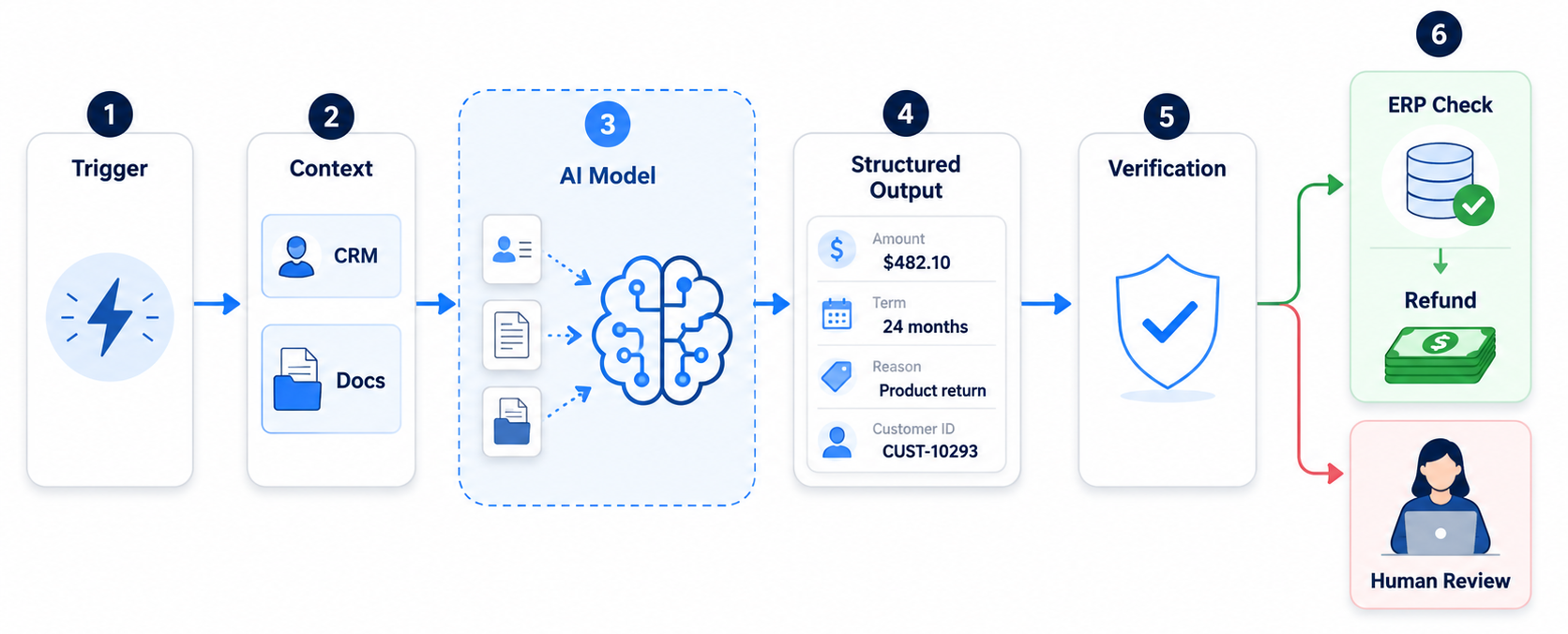
AI automation tools connect your business systems and put a model inside the workflow. The model reads the incoming information and decides what happens next. A person reviews the output wherever a mistake would be costly.
Every workflow follows the same shape. A trigger starts the run, and the workflow gathers context from a CRM or a document store. A model then turns the input into a structured output, so a refund request comes back as typed fields reading $482.10 and 24 months.
A verification step catches what the model got wrong, and it separates a demo from a working system. A verified workflow checks the order in your ERP before issuing a refund under a set limit.
AI Automation vs Traditional Automation
Traditional automation follows rules a human wrote in advance. AI automation adds a model on top of the rules, and the model interprets content the rules can’t describe.
|
Factor |
Traditional Automation |
AI Automation |
|
Input Type |
Form fields, database rows, fixed layouts |
Emails, PDFs, chat, transcripts, images |
|
Decision-Making |
Explicit rules written in advance |
Rules plus model inference |
|
Exceptions |
Routed to a human queue |
Some resolved automatically, the rest routed with a reason |
|
Failure Mode |
Loud and obvious. The bot stops. |
Quiet and plausible. The output looks right and isn’t. |
|
Best Suited |
High-volume, stable, rule-based work |
Language, documents, or judgment |
The failure mode row deserves a second read. Traditional automation fails visibly, while AI automation can fail and still sound confident. That’s why verification design matters more than model choice.
The Seven Categories of AI Automation Tools
The market breaks into seven categories, each suited to a different type of workflow. Knowing which category you’re shopping in prevents most bad buys.
Three of them include platforms that are used to build directly.
- Integration platforms, like Zapier and Make, connect SaaS apps through prebuilt connectors. Both now include AI steps.
- n8n puts models, branching, and agent nodes in the builder itself.
- Robotic process automation (RPA) platforms, such as UiPath, click through legacy interfaces that expose no API. RPA is still the only way into some older systems.
The other four are used to assemble the pieces.
- With an agent framework (such as LangGraph), a model plans its own sequence of tool calls, and you write the guardrails.
- Model APIs provide the reasoning layer. No workflow comes with them.
- Document AI services turn PDFs into structured fields.
- The AI features inside your CRM stop at the vendor’s boundary.
This distinction matters because teams often start in the wrong category. They pick an integration platform because it’s familiar, then find the AI steps too thin. Or they start with a model API and rebuild the queuing mechanism a platform already has.
So, it’s imperative to start by analyzing what you already own. A low-code automation route often beats a procurement cycle. A Microsoft 365 business plan already covers Power Automate flows on standard connectors. The bill only starts at premium connectors or AI Builder.
AI Automation Tools Compared
The table below prices five of the seven categories against each other, with every rate checked in August 2026. Agent frameworks and built-in CRM features stay out, since neither is bought standalone.
|
Tool |
Best for |
AI capabilities |
Integrations |
Pricing model |
|
Zapier |
Fast SaaS-to-SaaS work |
AI steps, agents, and model calls |
Widest connector library |
Per task, per action step |
|
Make |
Multi-branch workflows on a smaller budget |
AI modules and model connectors |
Broad |
Per operation |
|
n8n |
Teams that want control or self-hosting |
Model, agent, and vector nodes, plus code |
Large, plus HTTP |
Per workflow execution, free self-hosted |
|
Power Automate |
Microsoft-centric organizations |
AI Builder, document processing, Copilot Studio |
Deep into Microsoft 365 |
Per user, per bot, or metered |
|
UiPath |
Legacy systems with no API |
Document understanding, agentic orchestration |
Desktop, mainframe, and ERP |
Per robot and per user, annual |
|
Model APIs |
The reasoning layer in a custom system |
Classification, extraction, structured output |
None |
Per token, in and out |
|
Azure AI Document Intelligence |
Invoices and forms at volume |
Prebuilt extraction with per-field confidence |
Azure and Power Platform |
Per page |
Read the table as a shopping list rather than a ranking, because several of these tools are complements. One common stack uses n8n to orchestrate, while a document service extracts the fields and a model API takes the judgment calls.
Pricing changes often, so treat the billing model as a durable fact. Microsoft’s documentation on Power Automate license types separates per-user seats from per-process bots, and budgets break on the jump from seat to bot.
What is an AI Automation Platform?
An AI automation platform is one environment that combines a workflow builder with AI models, the system integrations, and the controls you need in production.
The difference from a pile of individual tools is operational rather than technical. You can switch models without rewriting the workflow, and you can pause a run for approval. A platform also keeps the run history, because a workflow you can’t version is one you can’t safely change.
How to Choose AI Automation Tools?
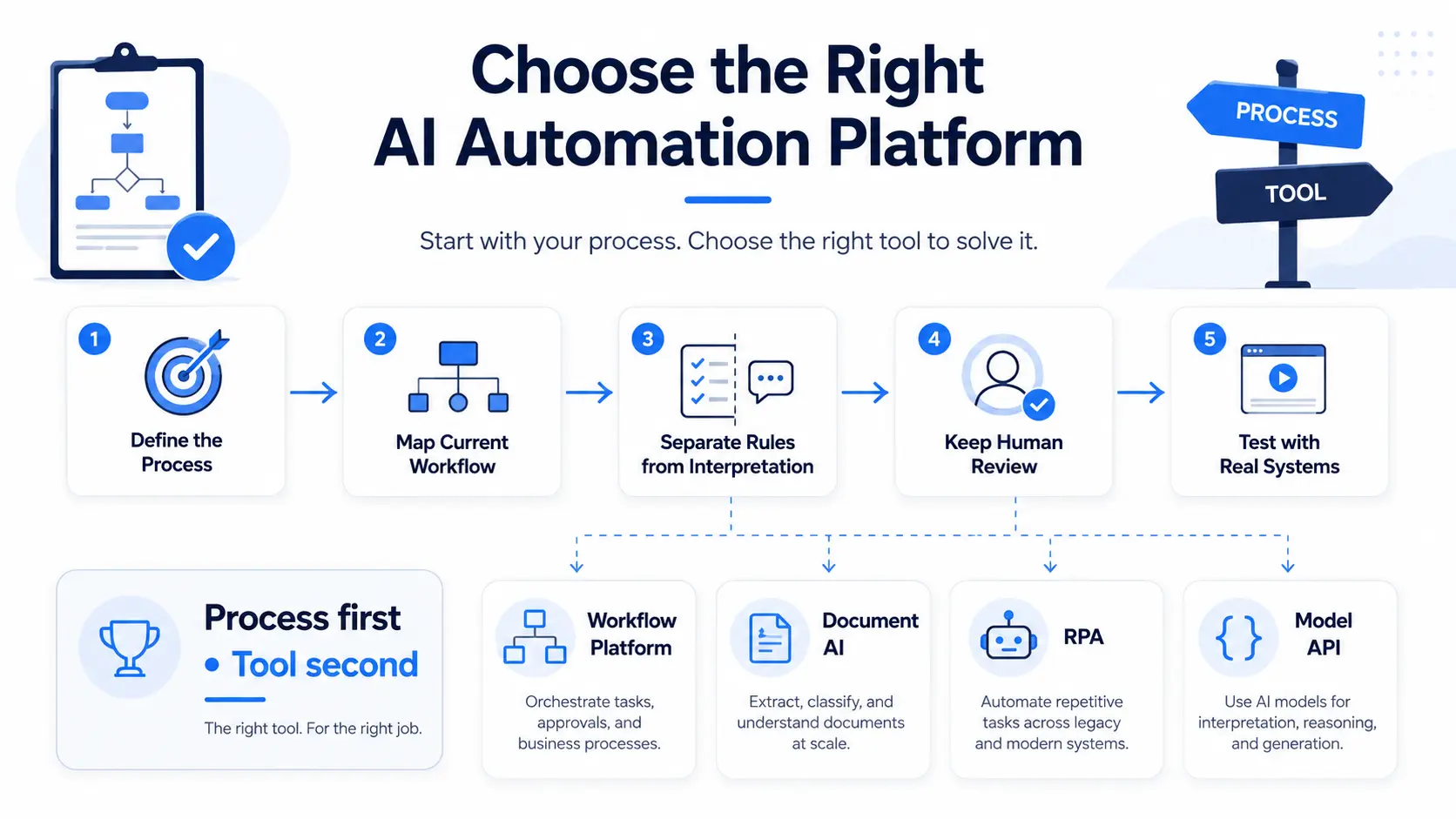
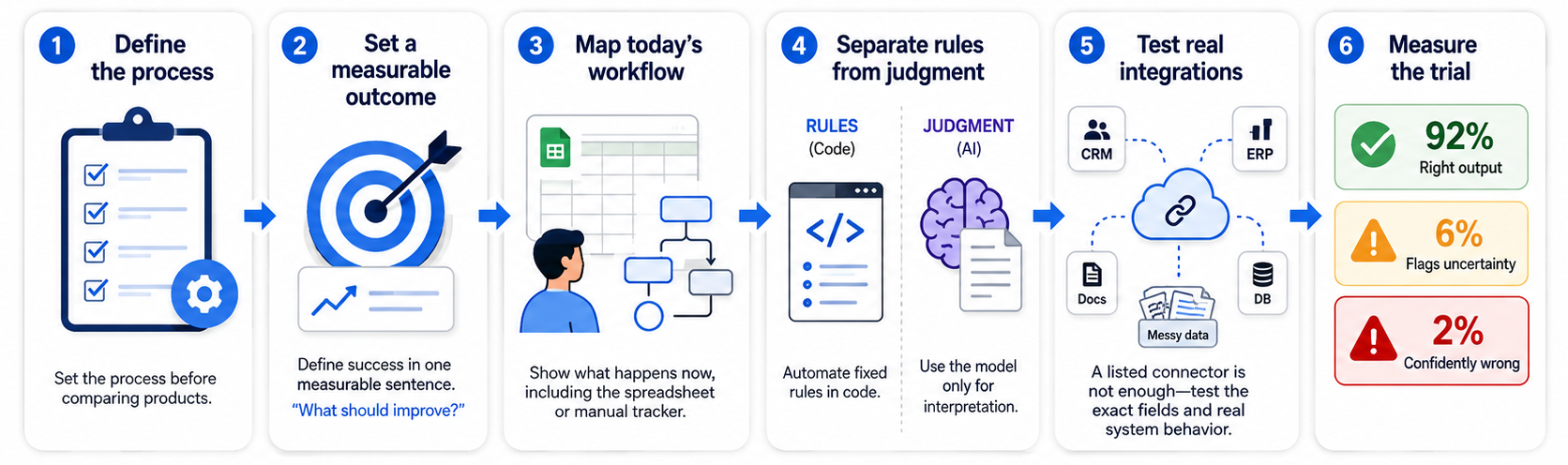
Choose the tool after naming the process, not before, because the process decides which category you need.
- State the outcome in a measurable sentence
- Map what happens today to the spreadsheet someone maintains
- Automate the rules in code, and point the model at the interpretation only
Integration depth then decides the comparison, because a connector in the list is not the same as one supporting the field you need. So, test against your real systems using your ugliest data.
Record three numbers from that test, and the last one decides your design.
- How often the output is right
- How often the tool flags its own uncertainty
- How often it’s confidently wrong
Cost is the one factor you can compute yourself, and the billing model decides it more than the sticker price. A four-step workflow running 3,000 times a month bills 12,000 tasks under per-task pricing, and 3,000 under per-execution pricing.
What is AI Workflow Automation?
AI workflow automation is a multi-step process where a model handles only the interpretation steps. An ordinary workflow engine handles everything around them, from sequencing and integrations to error handling and approvals.
A support triage can help you understand the shape. Let’s imagine a new ticket arrives. The workflow pulls the customer record, recent orders, and the three most relevant help center articles. The model classifies issue type and urgency before extracting the order number.
Routing will take the next step based on the classification. Billing questions under a threshold take the automated path, while anything touching a data privacy request routes to a named team.
The weak spots usually appear in the data the workflow relies on. Customer records may live across four systems that disagree, which means the model can end up reasoning confidently from an incomplete or inconsistent record. Before automating the workflow, teams often need to resolve those data sources and make sure the right information reaches the model at each step.
AI Automation Examples Across Departments
The same shape appears in every department. Only the trigger and the end system change.
AI Sales Automation
Lead qualification is the standard first workflow in sales. A form submission triggers enrichment, and the model scores the lead against your own closed-won criteria rather than a generic template. Routing follows the score, so strong fits reach a rep with a briefing note. Forecasting needs more care so a human is involved, because a model can surface stalling deals but should not set the number.
AI Marketing Automation
Marketing gets its fastest AI wins from segmentation and lead scoring. This is because a model works from behavioral signals rather than the few fields a rules engine compares. Repurposing an approved piece into channel variants is the other quick win. Both raise the same unglamorous question, which is whether the tool writes back cleanly to your CRM.
Finance, Service, and Operations
Finance has the highest-volume candidates. Invoice processing, expense review, and reconciliation share one shape. Each extracts fields from a document and validates them against a system of record, then routes the exceptions to a person.
Service and operations follow the same shape on other inputs. All three fail the same way. The workflow automates a process someone should have simplified or scrapped first.
AI Invoice Automation: OCR vs Intelligent Processing
Traditional invoice automation reads text and maps it to fields by position or template. The template approach works for a few suppliers whose layouts never change, and it fails on the rest.
AI-powered processing works differently, because modern document services return typed fields with a confidence score on each one. Microsoft’s prebuilt invoice model returns vendor, dates, totals, tax, and line items as named fields, with no training on your own layouts.
Per-field confidence makes a sensible workflow possible. Classify the document first, since a credit note needs different handling. Extract the header and line items next, then validate them against the purchase order. Matched low-value invoices post automatically, and anything uncertain reaches a person.
Extraction is now the easy part, while the work sits in validation rules and ERP field mapping. So, hold vendors to a straight-through rate measured on your own documents.
Where AI Automation Goes Wrong?
Five failures show up again and again in abandoned projects.
- Integration That Outgrows The Estimate: The model work lands in a week, and the connector work runs for two months. Prove one full round trip first.
- Confidently Wrong Output: A model invents a policy detail or misreads a total, and the result looks correct. Ground responses in retrieved source data, then sample-audit runs weekly.
- Prompt Injection and Excessive Agency: Instructions hidden in an incoming email redirect the workflow, or an agent reaches more tools than its task needs. The OWASP GenAI Security Project puts prompt injection at the top of its Top 10 risks for LLM applications, so treat retrieved content as untrusted.
- Data Exposure: Sensitive records flow to a model provider or a region your policy doesn’t allow. Map the data flows first, and mask what the model doesn’t need.
- No Monitoring or Owner: Accuracy drifts, and nobody notices until a customer complains. Track accuracy, override rate, and cost per run under a named owner.
NIST’s AI Risk Management Framework organizes the governance work around all five into four functions. Govern, map, measure, and manage.
How to Calculate AI Automation ROI?
Calculate the cost per invoice, ticket, or lead before and after, then say which numbers are assumptions.
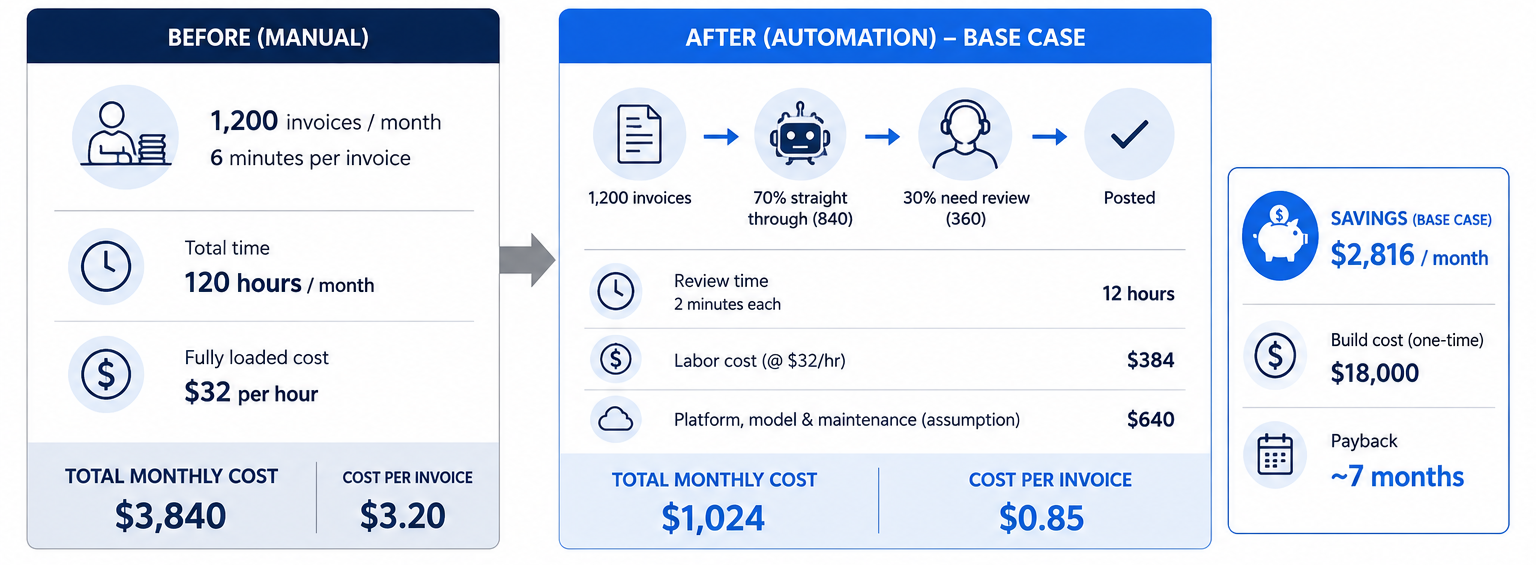
Take the accounts payable team from the start. Manual handling of 1,200 invoices averages six minutes each, or 120 hours a month. At a fully loaded $32 an hour, that costs $3,840.
Now assume 70% process straight through. The remaining 360 need two minutes of review each, which comes to $384. Platform, model, and maintenance costs add $640. The new monthly cost is $1,024, so the saving is $2,816, and an $18,000 build pays back in seven months.
Harder documents fail more often and take longer to fix. At a 40% rate and four minutes per exception, the monthly cost rises to $2,176, and payback passes 10 months.
Nothing about the tool changed there. The assumptions about your own documents did. That’s why a pilot measures both numbers, instead of proving the technology works.
When to Bring in AI Automation Services?
Bring in AI automation services when the process crosses systems that need real AI integration work rather than glue.
Process discovery, integration, and monitoring decide whether an automation lasts. AI agent development joins the list wherever a process needs planning rather than a fixed sequence.
An agency working properly ranks candidate processes first. It then designs the human checkpoints and builds the connections. The connection work and the testing take most of the effort.
AI Automation Consultant vs AI Automation Agency
A consultant tells you what to build, and an agency builds it.
|
Factor |
AI automation consultant |
AI automation agency |
|
Strategy |
Assessment, feasibility, sequencing |
Scoped to the build |
|
Implementation |
Advises, rarely builds |
Builds and ships |
|
Integrations |
Specifies requirements |
Builds the CRM and ERP connections |
|
Ongoing Support |
Ends at handover |
Monitoring under a retainer |
|
Best For |
Teams with engineering capacity |
Teams needing the system maintained |
Some organizations need both and in order. An assessment produces a ranked roadmap, and a build partner then ships the first two workflows. Your bottleneck may be deciding what to automate, and AI strategy and consulting costs less than finding that out through a failed build.
Choosing Your First AI Automation Tool
The first tool matters less than the first process. Pick something you run often, and where you can state the current cost and the target outcome. The first workflow will get things wrong, so pick a recoverable mistake.
After that, choose the narrowest tool that covers the interpretation steps and connects to the systems where your data sits.
Everything above assumes someone has the time to run the discovery and watch the accuracy numbers after launch. Most automation programs quietly stop right there. We’re happy to review one process on a free 30-minute call and tell you whether it’s a good candidate.
Book a Free 30-Minute Meeting
Discover how our services can support your goals — no strings attached. Schedule your free 30-minute consultation today and let's explore the possibilities.
Book a Free Call