

Introduction
Is HR Ready for Automation? A Checklist for Your Team
Which HR Processes Can You Automate With AI?
How to Automate HR Processes With AI: A Step-by-Step Guide
Automating HR processes with AI takes seven steps, and the model arrives at step five. Connecting the model first creates cleanup work. The seven-step order puts the process and its controls in place before any AI step goes live. The same order fits any process automation project.
- Map the process the way the team works today. Record every step, system, and approval. Include the workarounds, since workarounds expose gaps between policy and practice.
- Classify restricted data. Restricted data includes Social Security numbers, bank details, and medical notes. No AI step reads restricted fields without legal approval.
- Define approvals and owners. Decide which steps need a person’s sign-off, and name the approver for each one. Write each approval rule down. For example, managers approve leave up to five days, and HR approves anything longer or medical.
- Connect the systems. Records move between tools through ready-made connectors or APIs, which are programmable connections. Webhooks send event alerts. Newer setups also use MCP servers (Model Context Protocol) to let an AI model call tools within set permissions.
- Add AI to chosen steps only. Give the model the narrowest job possible. A good example is reading a document and returning only the expiration date. Everything else stays as rules, which cost less and are easier to audit.
- Test the exceptions. Run the workflow against real past cases, such as a rehire or a legal name change. A workflow isn’t ready if only the easy cases pass.
- Train the reviewers. Each reviewer should learn the model’s common errors and the override steps.
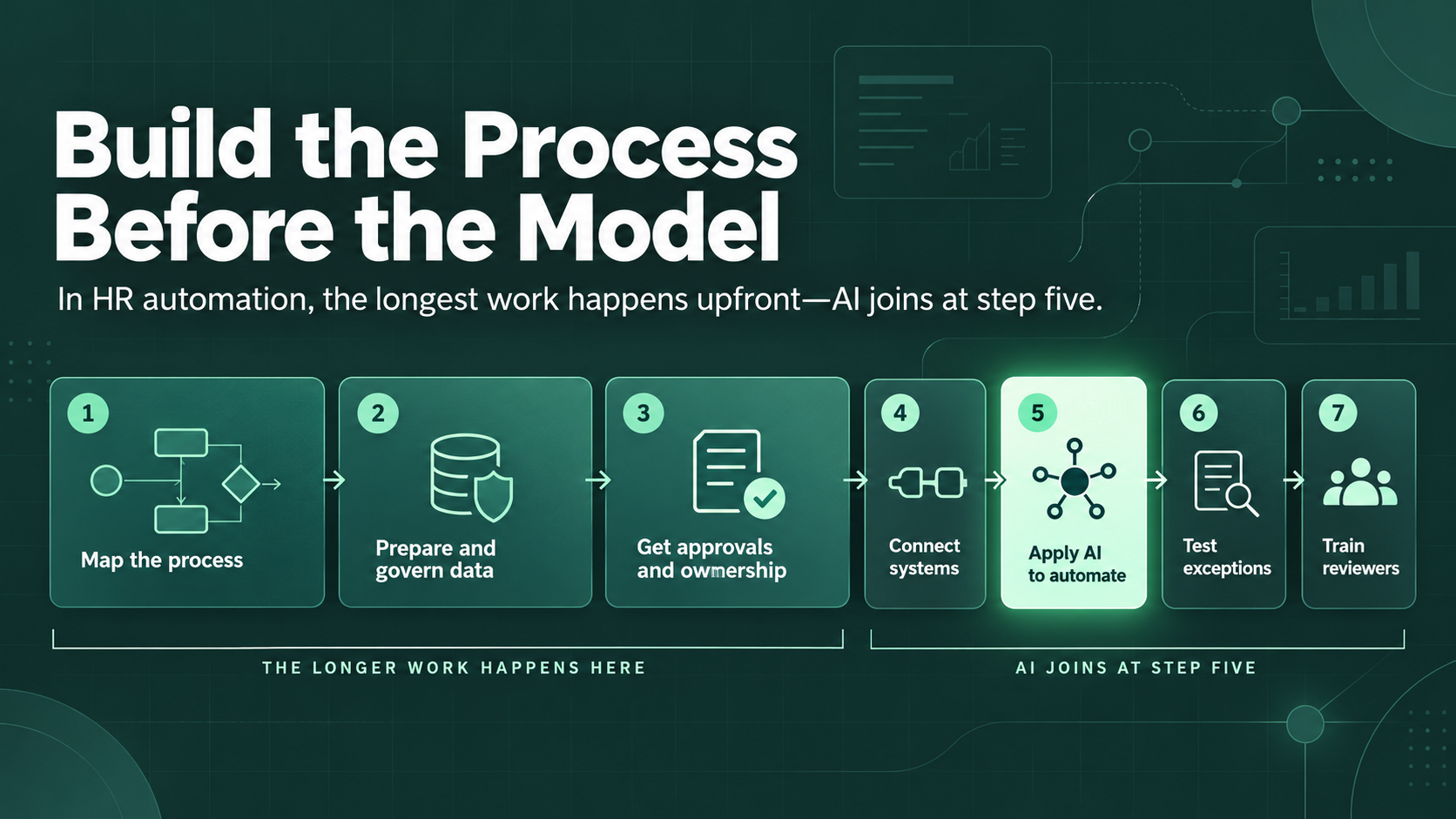
Budget more time for steps one to three than for the build. These early steps force decisions nobody wrote down before.
Choosing Tools: HRIS Assistants, No-Code, or Custom Build
The right tool depends on where the HR data lives. Three routes cover most cases. Built-in HRIS assistants are the first and fastest route, because the data and permissions are in place. The trade-off is reach, since a built-in assistant covers only the HRIS vendor’s product.
No-code automation platforms are the second route. Zapier, Make, and n8n suit teams whose workflows span several systems. The workflow owner can follow each step visually. The risk is permissions, since one connector account can hold broad access.
A custom build is the third route. Custom builds suit unusual rules or strict data residency needs. Teams on this route build narrow AI agents with logged permissions, though upkeep takes engineering time.
What Happens When the AI is Unsure?
When the AI is unsure, the workflow needs a defined path for the result. Many extraction tools return a confidence score with each result. Anything below a set threshold goes to a review queue with a named owner. Without this path, uncertain results either stall the workflow or pass unchecked.
Base the threshold on test results from past documents. Find the confidence score above which the model is almost always right, and send every result under that score to a person. Unreviewed results escalate after one business day. A fallback owner covers the queue during vacations.
AI HR Automation Example: Employee Onboarding Workflow
Rules run five of six onboarding stages, and AI handles one. The demo uses Mesquite Freight Co., a sample name for a 180-person Texas logistics business with 12 hires a month. The demo starts from a common problem, where HR chases missing forms for every hire and many new hires still start with paperwork missing.
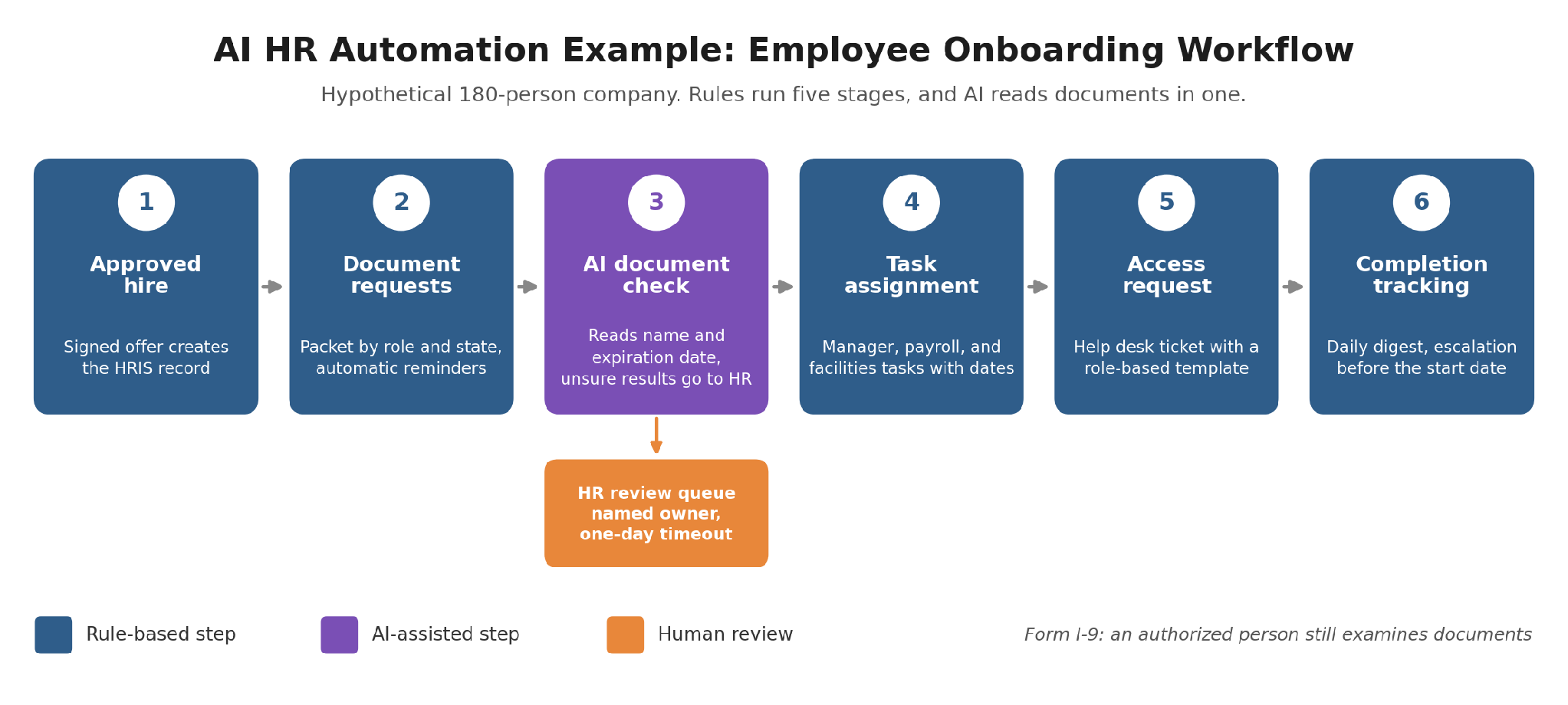
Data Prism built and ran this workflow on sample records before publishing the guide, using the Mesquite Freight Co. name for the demo. The build uses a rule check in place of stage three’s AI step.
- The workflow starts once the offer is signed and HR approves the hire. A rule then creates the HRIS record with the start date, role, location, and manager. No AI touches this stage.
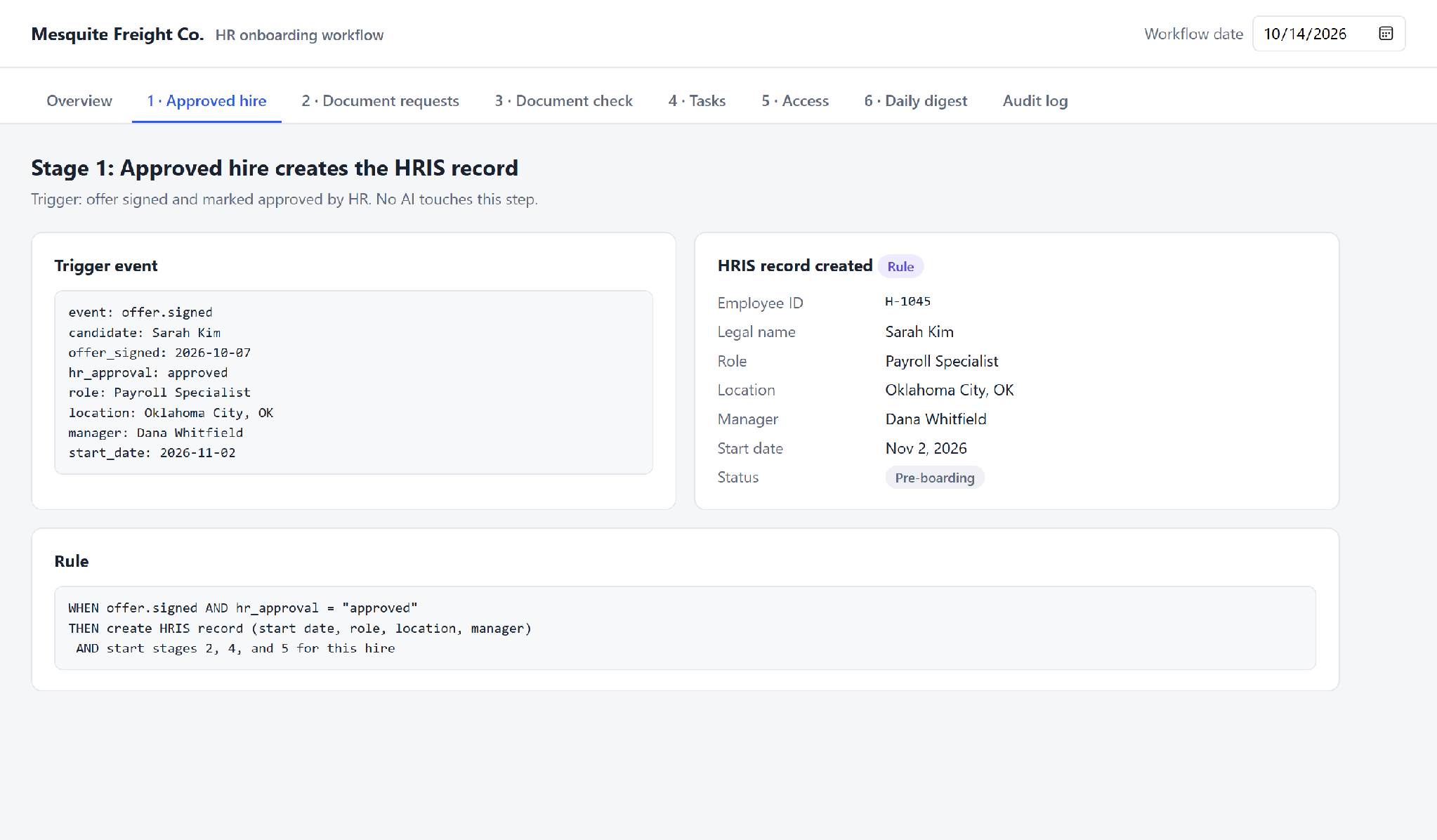
- Rules send the right document packet for the role and state. The packet includes Form I-9, the federal employment eligibility form, plus a W-4 tax form and direct deposit details. The HR coordinator gets an alert for anything still missing five days before the start date.
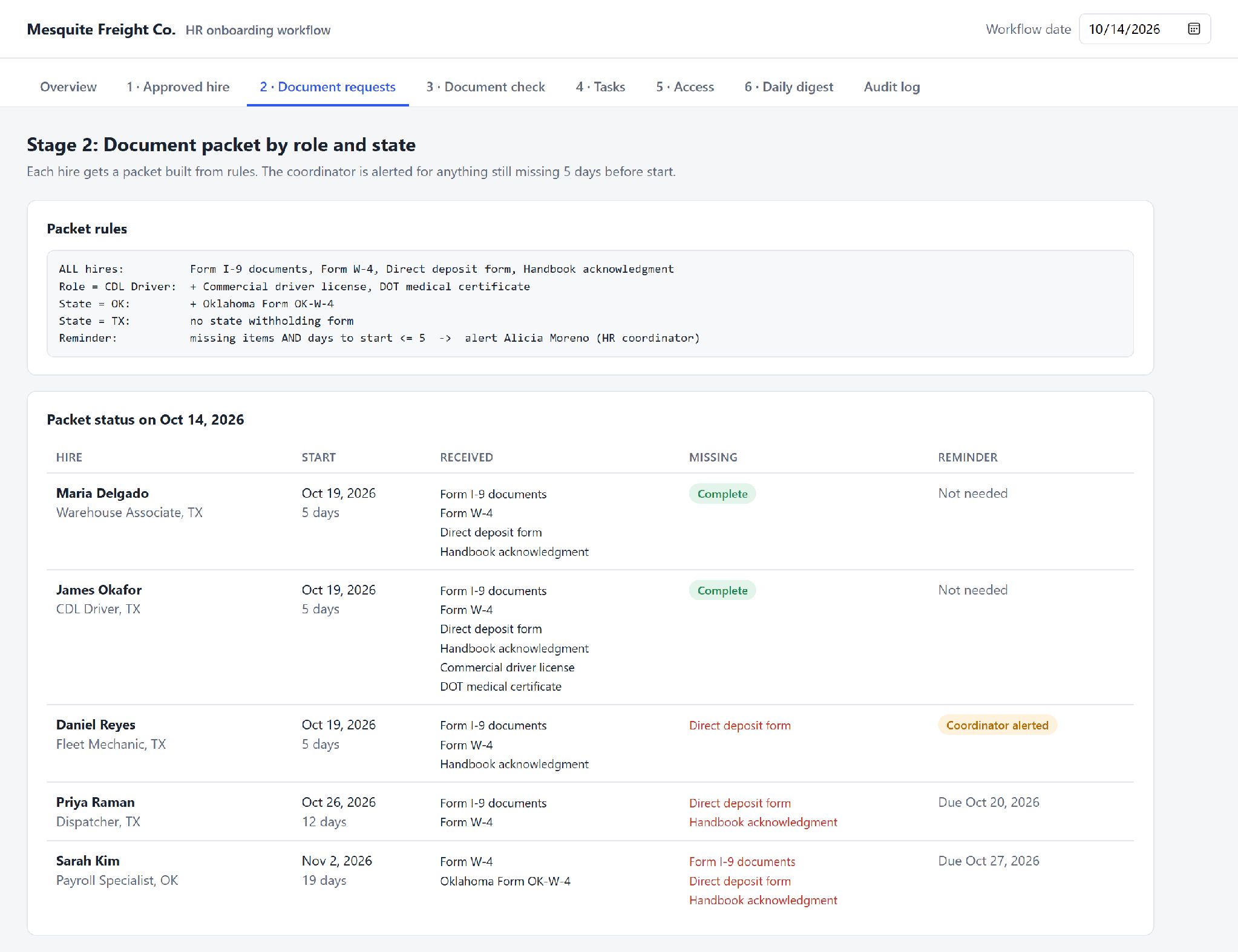
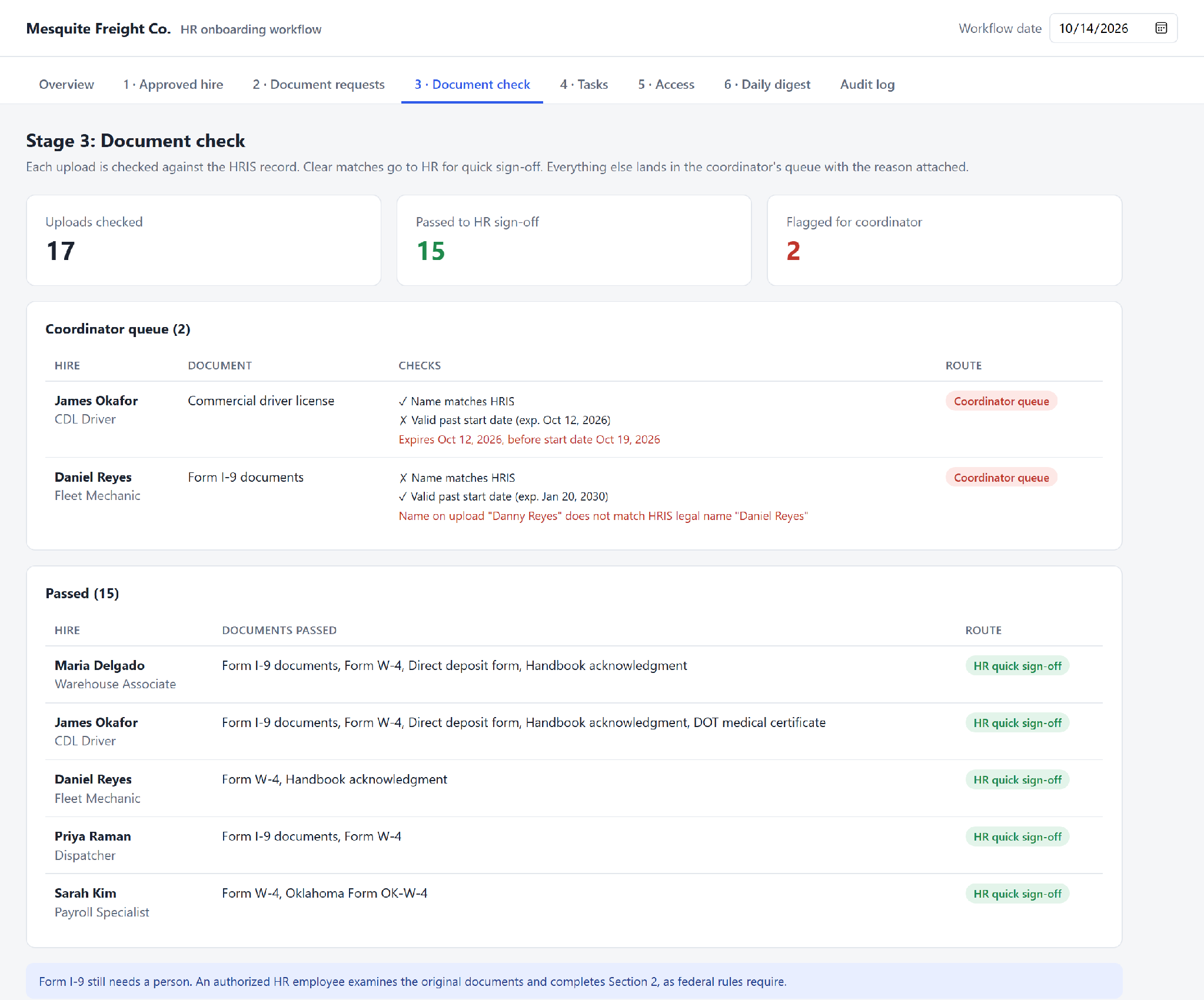
- The AI document check then reads the name and expiration date on each identity document. This data extraction step matches the name to the HRIS record and checks the date. Clean results above the threshold go to HR for quick sign-off. Everything else lands in the review queue.
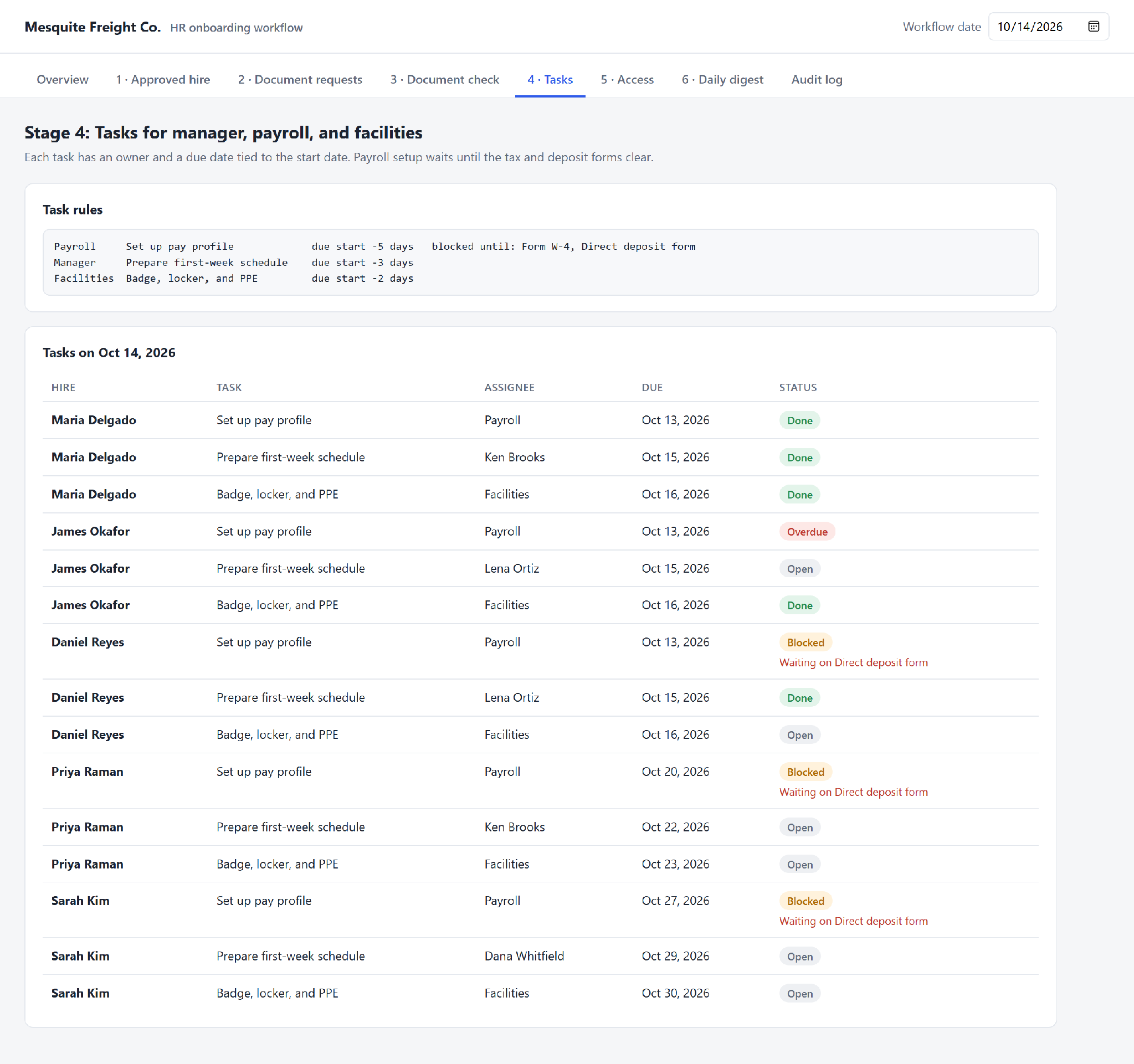
- Rules then assign tasks to the manager, payroll, and facilities. Each task has an owner and a due date tied to the start date.
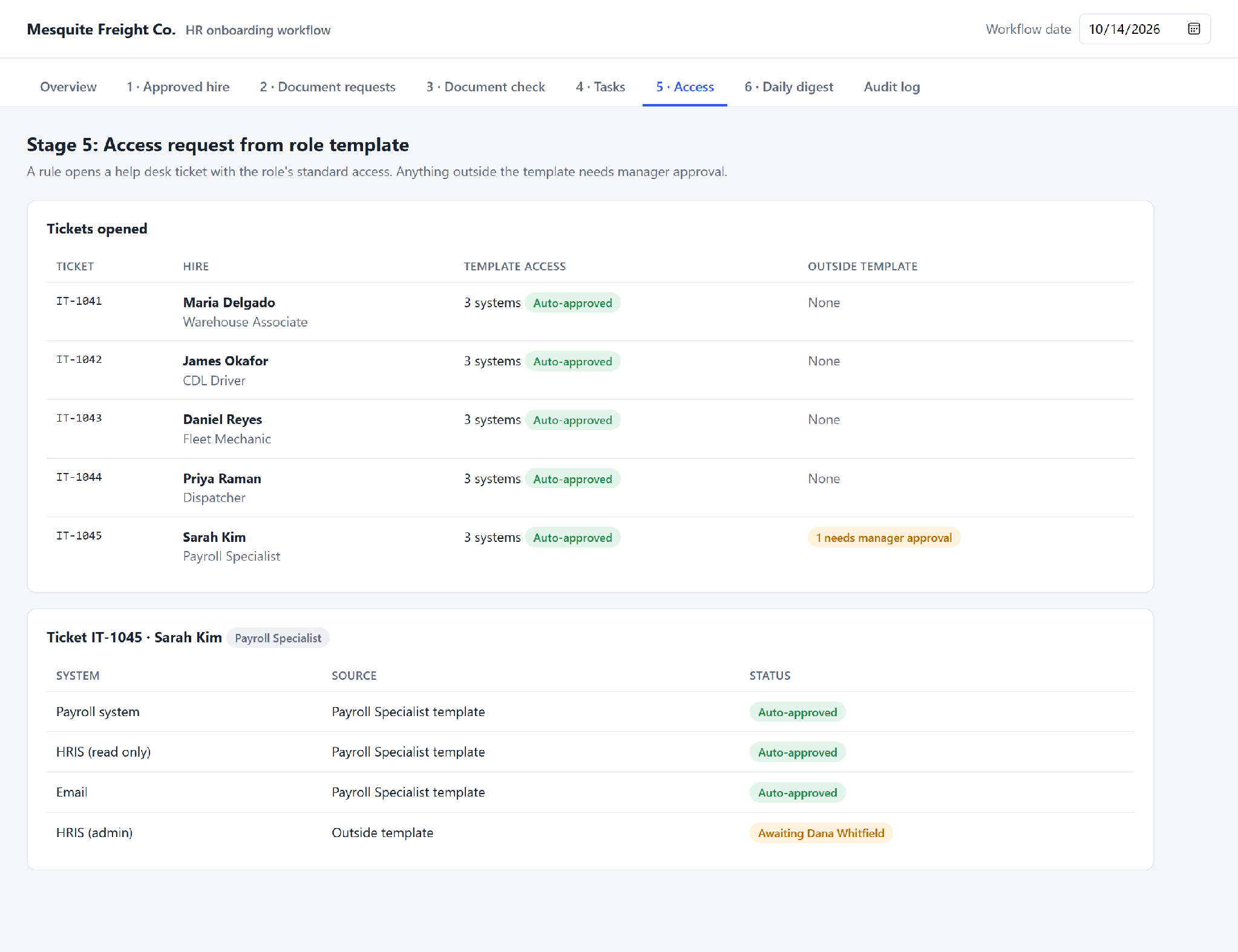
- For system access, a rule opens a help desk ticket from a role-based template. Any access outside the template needs manager approval.
- To track completion, the coordinator gets a daily digest of open items. Open items escalate to the HR manager three days before the start date.
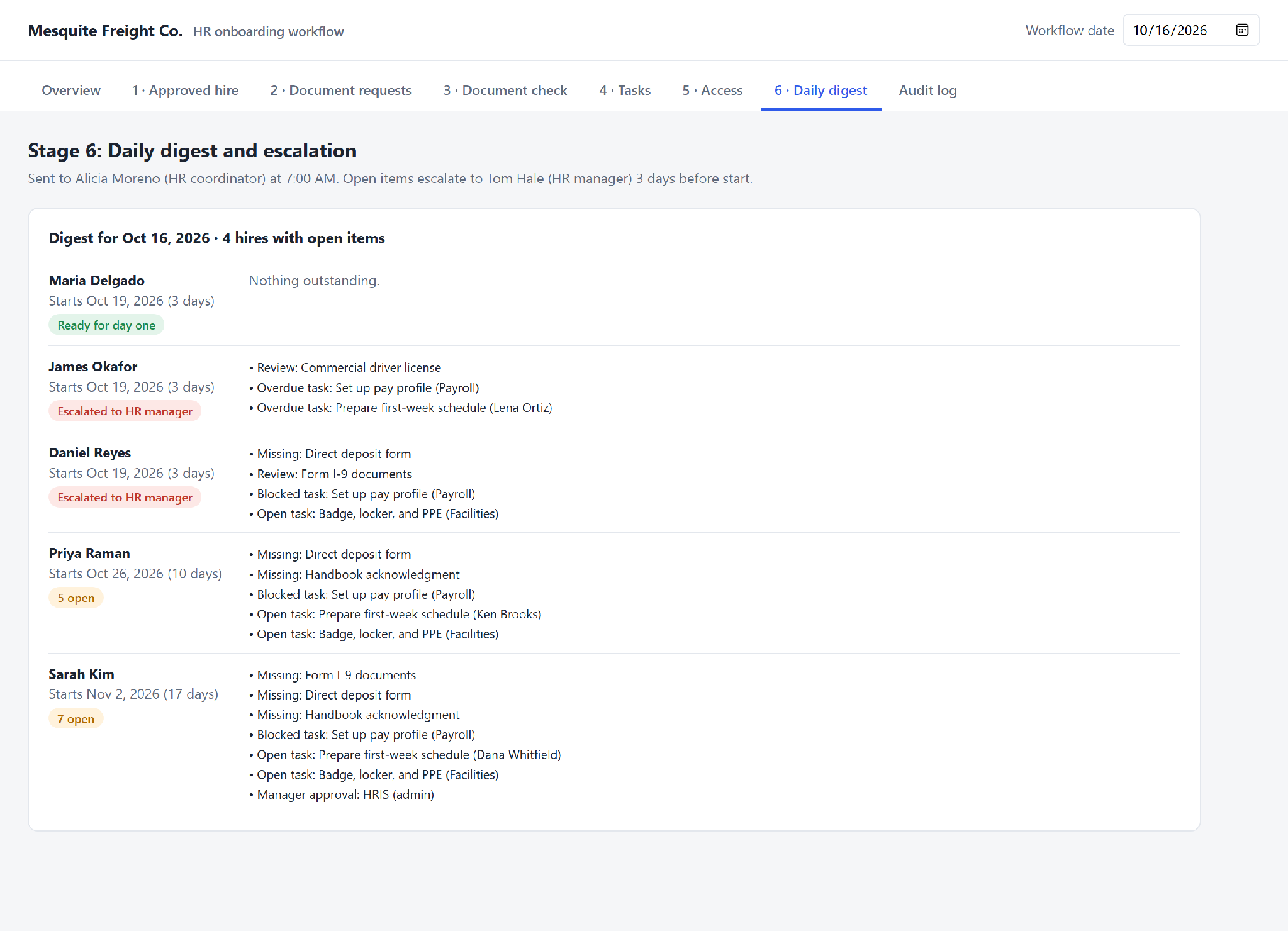
Federal law still requires a person for Form I-9. The model can flag a blurry scan or a mismatched name, but an employer representative must examine the documents and complete the employer section.
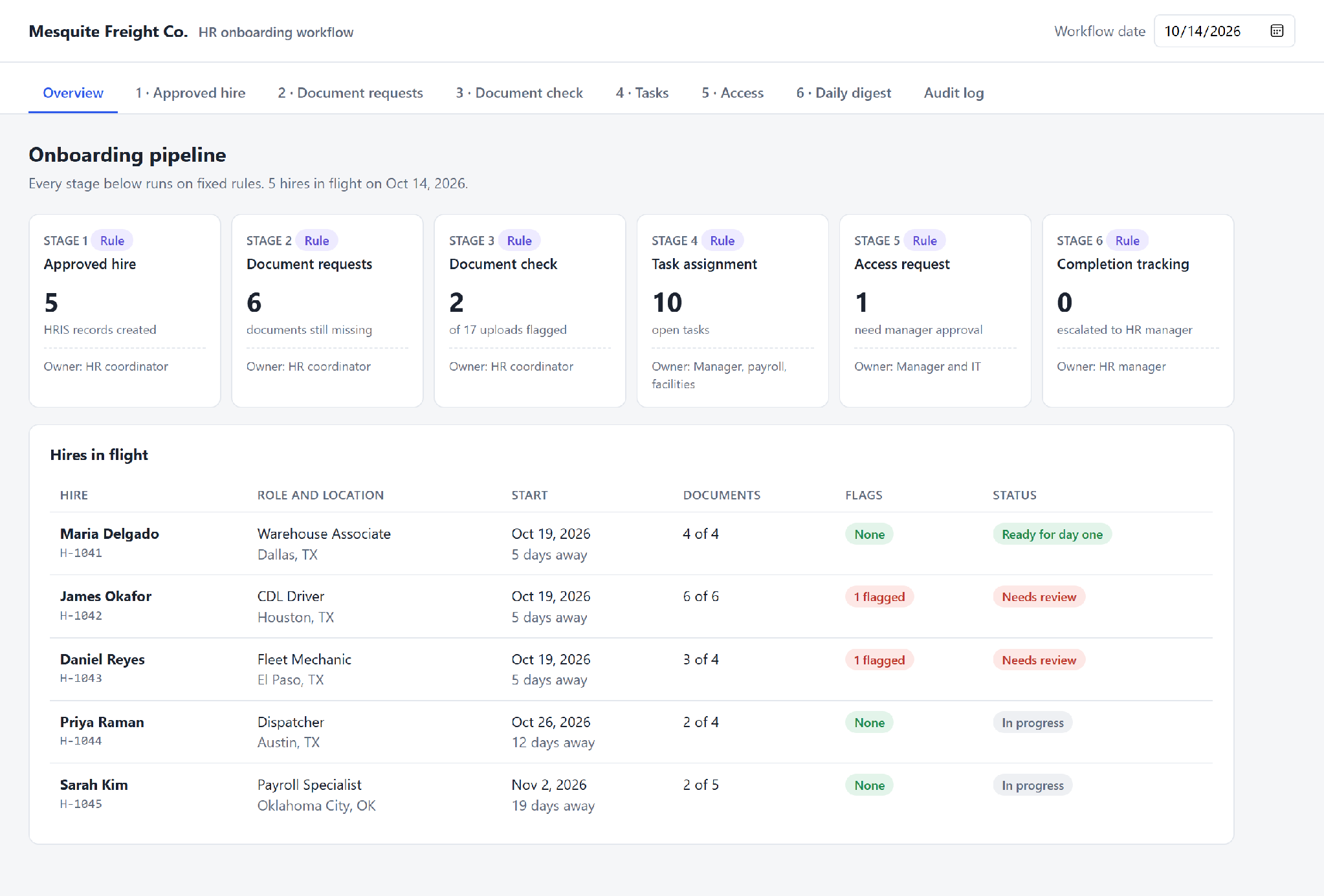
The table below shows what the test run produced. The figures come from five sample hires, so they show how the workflow behaves rather than an industry benchmark.
|
Measure |
Test Run Result |
|---|---|
|
Hires in the Workflow |
Five |
|
Uploads Checked |
17 |
|
Uploads Passed to HR Sign-Off |
15 |
|
Uploads Flagged for Review |
Two, or 12% |
|
Reasons for the Flags |
One license expiring before the start date, one name mismatch |
|
Hires Escalated to the HR Manager |
Two, three days before the start date |
Both flags were problems a person needed to see before the start date. Watch the review queue as closely as the time saved, because an uncleared queue recreates the old problem.
How Automation Improves HR Compliance Workflows
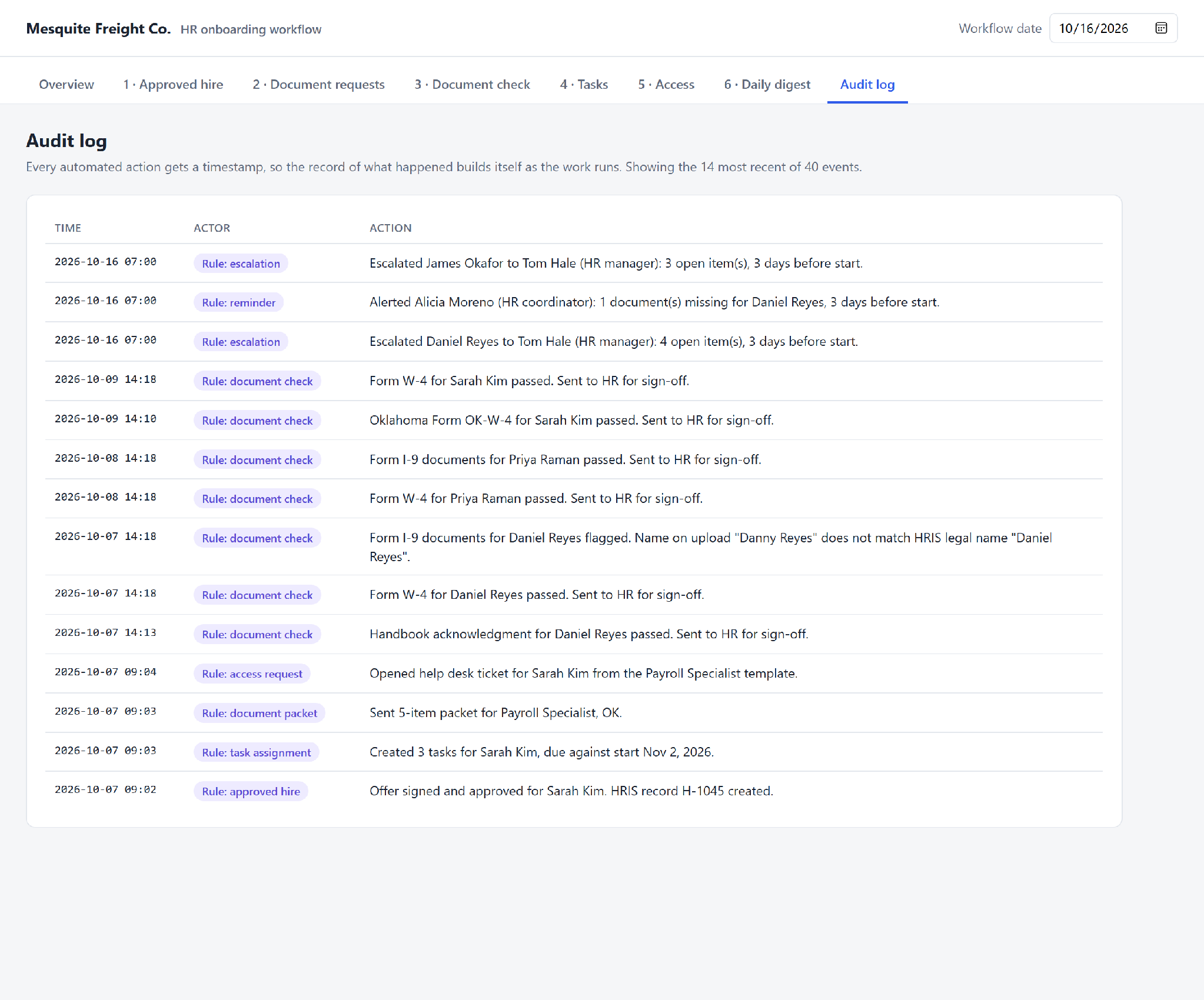
Automation improves HR compliance workflows by producing evidence as the work happens. Every reminder, approval, and action gets a timestamp in the log.
The onboarding example above follows the same pattern. AI automation for HR onboarding documentation writes each document check to the log, so compliance tracking runs alongside the work. None of this evidence makes an employer compliant, because compliance depends on correct policies and decisions. The table below splits each compliance task between automation and a person.
|
Compliance Task |
What Automation Does |
What a Person Still Owns |
|---|---|---|
|
Deadline Reminders |
Tracks training renewals, license expiration, and reverification dates |
Deciding what happens after a missed deadline |
|
Approval Records |
Captures who approved what, and when |
Making the approval decision |
|
Audit Trails |
Logs every automated action and human override |
Reviewing the log and answering auditors |
|
Policy Acknowledgments |
Sends changed policies and records each signature |
Writing the policy and handling refusals |
AI adds less here than rules do. A model can draft a reminder, but a model should never decide whether a practice is legal.
AI in HR Administration: Where the Model Fits
Privacy, Security, and Human Decision Boundaries in AI HR Automation
Privacy in AI HR automation starts with access. Every connector and AI tool is a new identity with access to employee data. At McHire, the exposure started with an old test account nobody removed. Each connector needs the same offboarding discipline as a departing employee.
Access, Retention, and Vendor Data Handling
Access should follow the job for people and software alike. Each connector gets a scoped role and never an admin login. Review service accounts every quarter, and switch off any account nobody can explain. Retention needs the same discipline, so set deletion dates for chat transcripts and extracted document data.
Every AI vendor also becomes a processor of employee data. The vendor contract should name the storage location and every subprocessor with access. The vendor contract should also set prompt retention. A separate clause should say whether employee data trains the vendor’s models.
Decisions Reserved for People
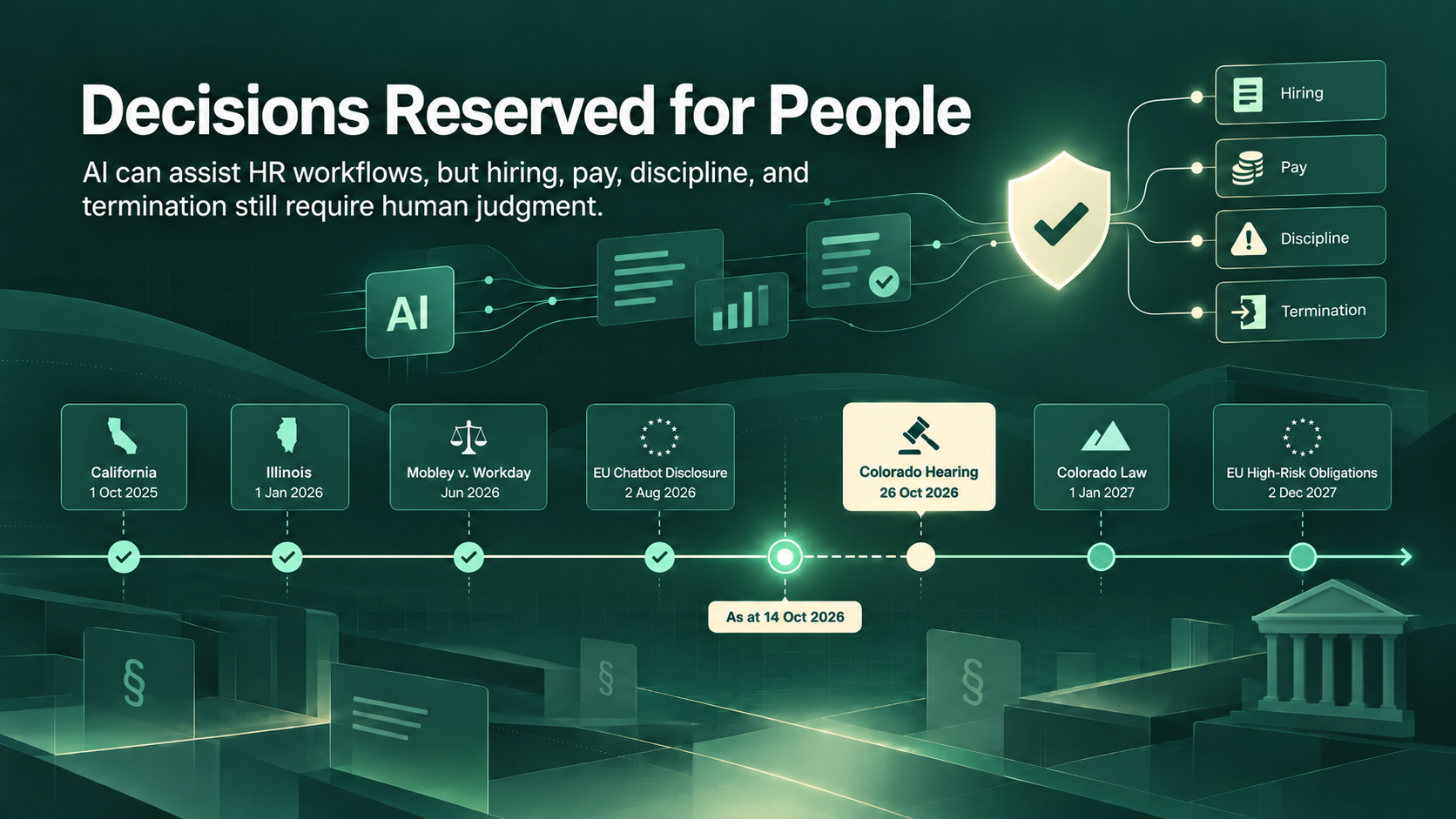
People make the decisions on hiring, performance ratings, pay changes, discipline, and termination. AI only prepares information for the person deciding. In the EU, the AI Act classifies AI for recruitment, promotion, termination, and worker monitoring as high-risk. The EU then delayed the high-risk obligations to December 2, 2027, through the Digital Omnibus on AI.
US states are adding their own laws. California’s Civil Rights Council rules have applied anti-discrimination law to automated decision systems since October 1, 2025. Illinois House Bill 3773 has required notice of AI use in employment decisions since January 1, 2026.
Colorado rewrote its AI law. Senate Bill 26-189 replaced the original version with narrower duties. The new law takes effect on January 1, 2027. The law requires notice and a human review path for adverse decisions. Employers must also keep records for at least three years.
Courts are testing vendor responsibility too. In Mobley v. Workday, a federal judge let most AI hiring bias claims proceed in June 2026. No court has found Workday liable so far. Still, employers can’t treat screening risk as the vendor’s problem alone.
The table below gives the working rule for each decision type.
|
Decision |
AI May Help With |
A Person Must |
|---|---|---|
|
Hiring |
Scheduling interviews, summarizing applications |
Decide who advances and who gets an offer |
|
Performance |
Collecting feedback, drafting summaries |
Set and explain the rating |
|
Pay Changes |
Pulling pay history and market data |
Approve every change |
|
Discipline and Termination |
Assembling the file and checklist |
Make and own the decision |
|
Leave Involving Health |
Routing the request to HR |
Assess eligibility and any accommodation |
The next date to watch is October 26, 2026, when the Colorado Department of Law holds a public hearing on draft rules for the Colorado law.
Measuring HR Workflow Automation Results
Common AI HR Automation Mistakes
Final Verdict on How to Automate HR Processes With AI
Book a Free 30-Minute Meeting
Discover how our services can support your goals — no strings attached. Schedule your free 30-minute consultation today and let's explore the possibilities.
Book a Free Call