

Introduction
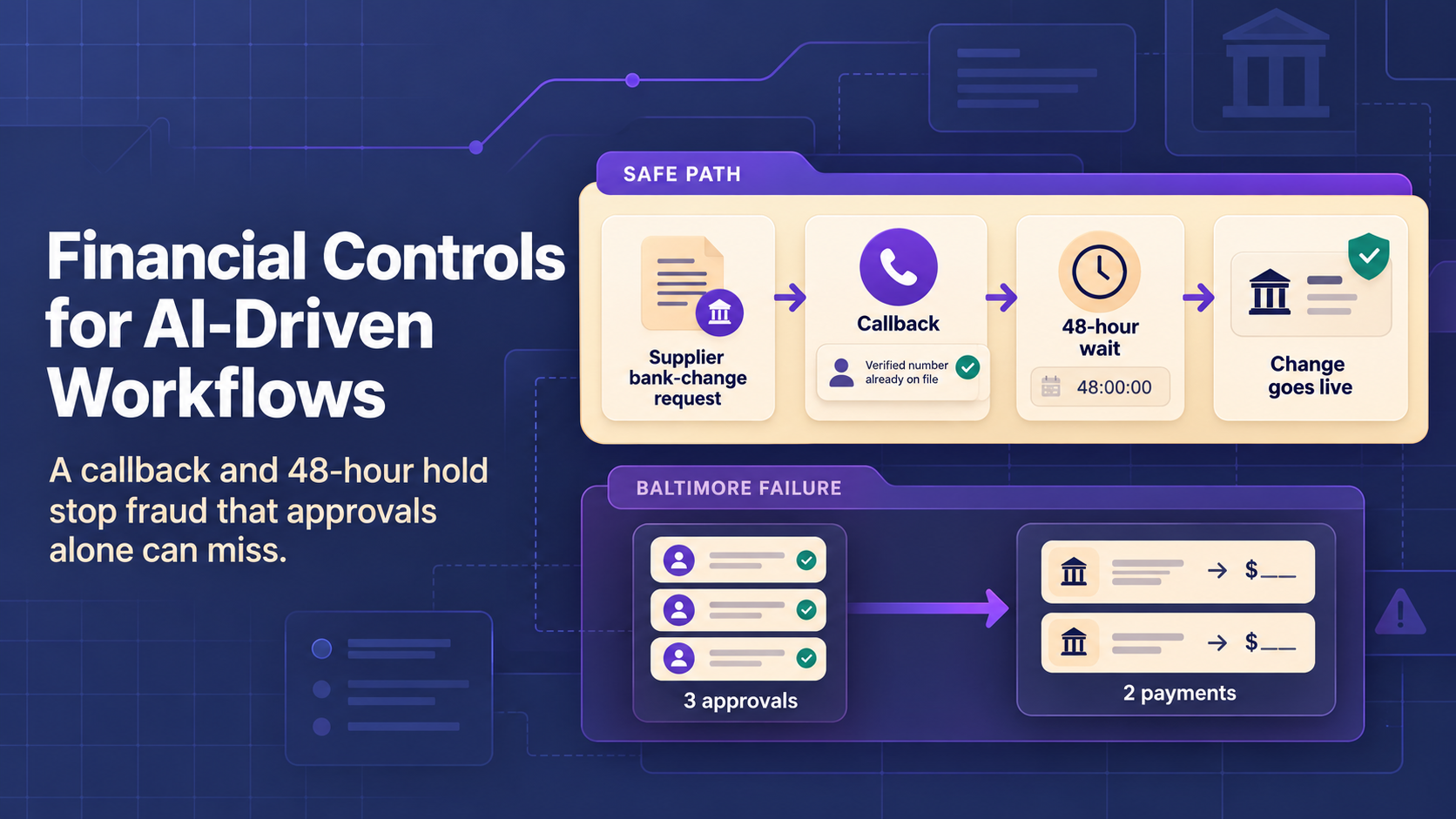
Baltimore lost $803,384 in 2025 after a fraudster changed a supplier’s bank details in Workday, the city’s finance system. Three accounts payable (AP) employees approved the fake contact and the bank change, and none of them phoned the vendor. The Comptroller’s Office then sent two payments worth $1.52 million to the fraudster’s account. The city recovered only the second one.
Workday did exactly what the approvals allowed. AI financial automation moves money faster, so the same gap costs more. The software handles invoice entry, matching, approvals, and posting. AI reads the messy documents fixed rules can’t, but controls still decide where the money goes.
The examples follow a mid-size distributor whose three AP clerks key about 2,000 invoices a month from 300 suppliers into NetSuite by hand. This article explains how automated financial systems work, where AI helps, and which controls stop a Baltimore-style loss. Other business functions get a separate guide.
What is AI Financial Automation?
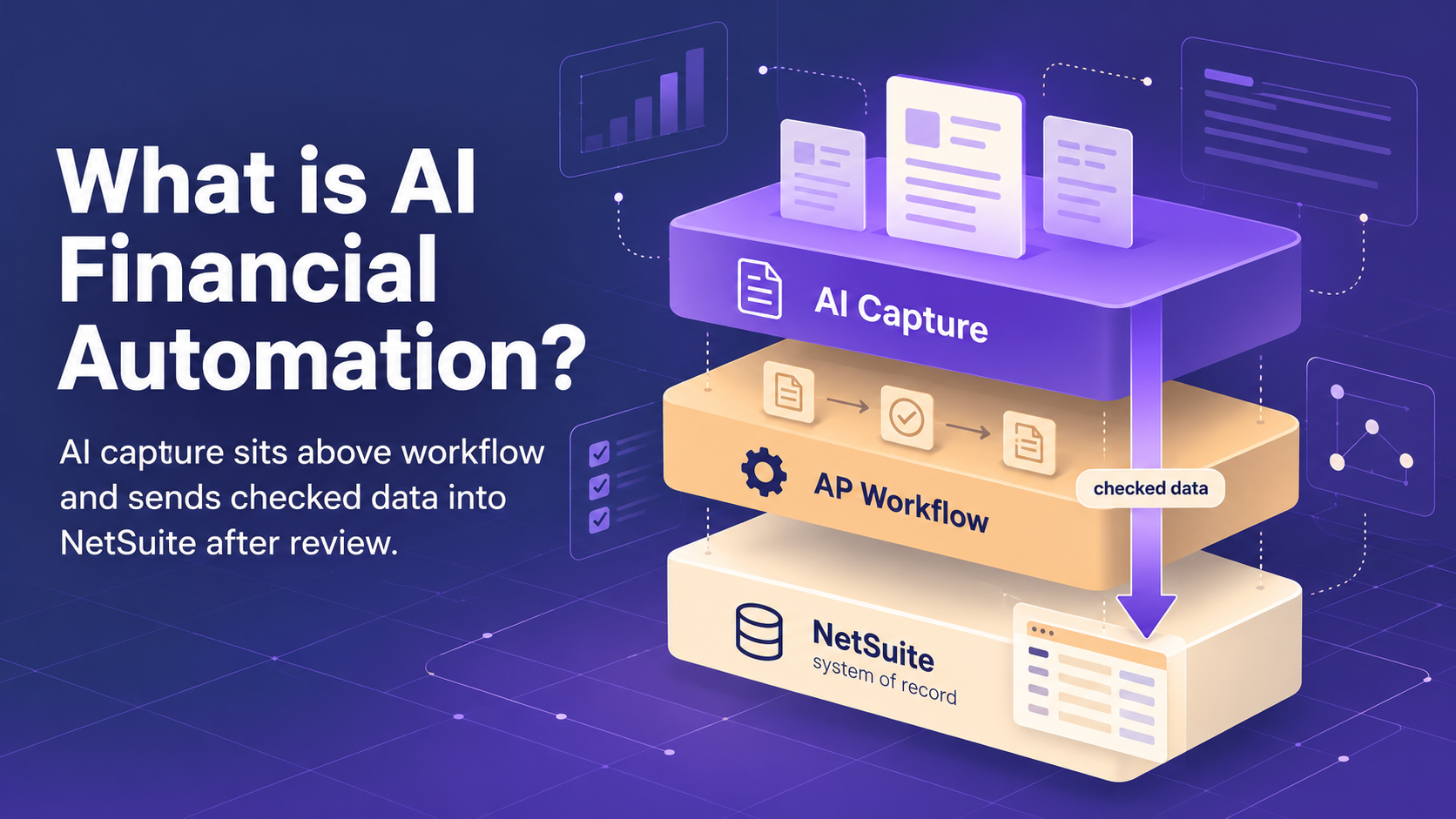
AI financial automation pairs rule-based finance software with AI models able to read documents and judge patterns. Rules check a total or route an approval in a fraction of a second. Rules can’t read a crumpled receipt, though. AI fills the gap and hands clean data back to the accounting system.
So, what are automated financial systems in practice? Automated financial systems are the connected tools a finance team uses to move a transaction from first document to final report. Some vendors use the longer name, automated financial management systems. AI sits on top of the tools and replaces none of them. The broader name for this layering is intelligent automation.
Most setups combine four layers, and the table names common examples of each.
|
Layer |
Main Job |
Common Examples |
Where AI Fits |
|---|---|---|---|
|
Accounting Software |
Keeps the ledger, bills, and invoices |
QuickBooks Online, Xero |
Suggests account codes |
|
ERP System |
Links finance with purchasing and sales |
NetSuite, SAP S/4HANA, Workday |
Receives checked data |
|
AP and Workflow Tools |
Routes invoices and approvals |
BILL, built-in ERP approvals |
Reads invoices on arrival |
|
AI Models |
Read documents and spot odd patterns |
Extraction and anomaly models |
The AI layer itself |
Small firms often stop at QuickBooks Online or Xero plus an AP tool. BILL, for example, reads the vendor name, invoice number, due date, and amount from an uploaded invoice. The tool then fills in the bill for review.
The distributor has outgrown the small-firm setup and already uses NetSuite. AI invoice capture goes on top, and NetSuite stays the system of record.
How Automated Financial Systems Work
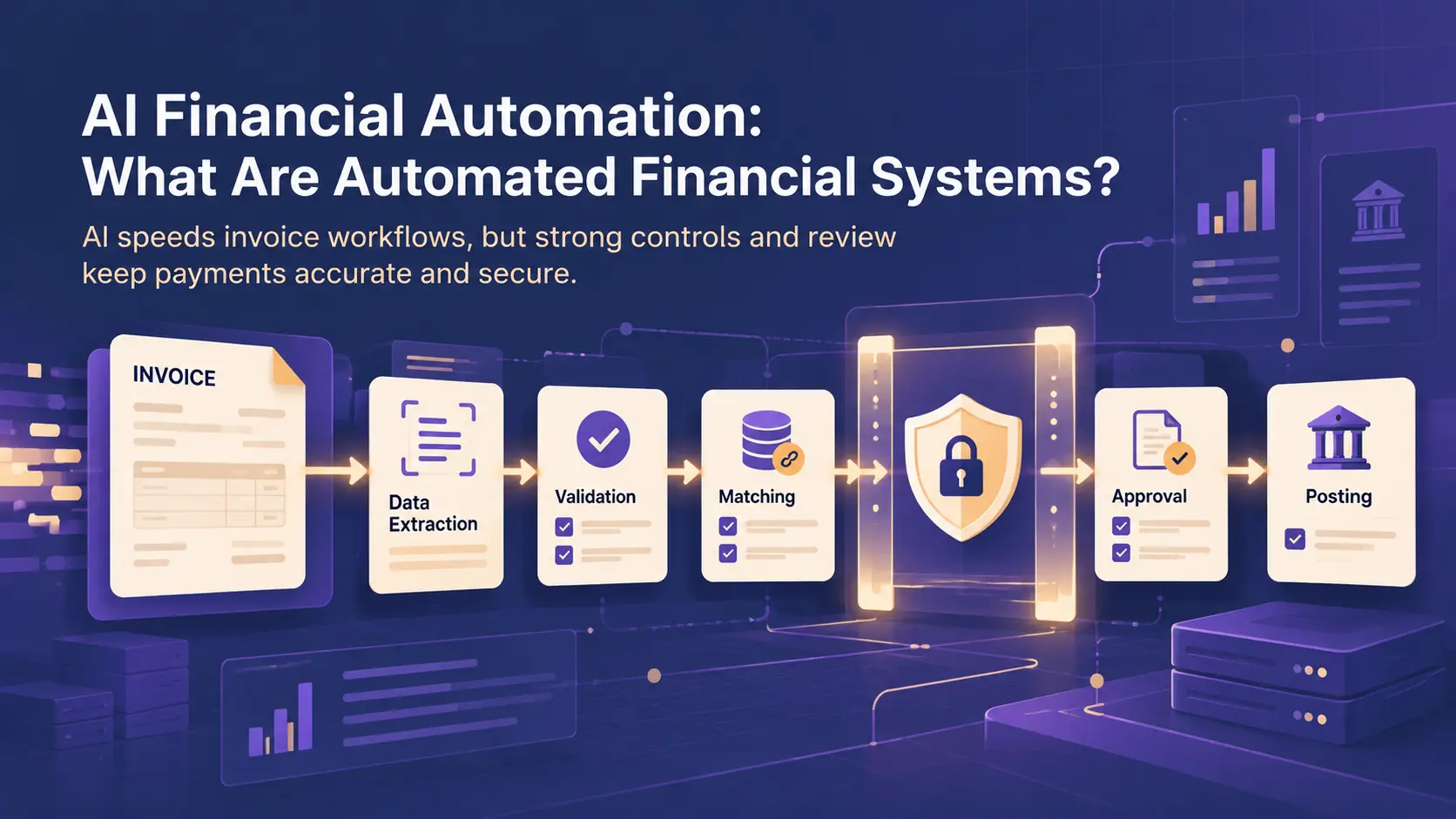
Every automated financial system follows the same basic path. A document passes checks and approvals on the way to the ledger, and the system logs each step. Most of the path runs on fixed rules. AI earns a place only at the steps where the input is messy or the pattern is unclear.
The table below breaks the path into six steps and gives the reason each step uses rules or AI.
|
Step |
What Happens |
Rules or AI |
Why |
|---|---|---|---|
|
Data Intake |
Invoices and receipts arrive |
AI |
Layouts change from supplier to supplier |
|
Validation |
Required fields and totals get checked |
Rules |
Math gives one correct answer |
|
Matching |
Invoice is compared with order and receipt |
Rules, AI for near matches |
Only near matches need judgment |
|
Approvals |
Payment goes to the right approver |
Rules |
Policy sets the limits |
|
Posting |
Entry reaches the general ledger |
Rules, AI suggests codes |
Accounting standards fix the treatment |
|
Audit Records |
Each action gets logged |
Rules |
Auditors need a fixed record |
At the distributor, intake is the real bottleneck. Suppliers send PDFs, scans, and phone photos in dozens of layouts. The three clerks spend most of each day retyping the invoices into NetSuite. Matching causes the second-biggest delay, mostly from rounded totals and split deliveries.
Before AI extraction, the usual fix for retyping was RPA (robotic process automation). RPA uses software bots to copy data between screens by following fixed steps. Bots still work well for older systems without an API, the published connection one system uses to share data with another.
Financial Processes Suitable for AI and Workflow Automation
The best candidates for financial process automation repeat often and follow a clear policy. Each one also leaves an audit trail. Five automated financial processes fit this description in most finance teams. The distributor starts with invoice intake, because 2,000 invoices a month is where the clerks’ hours go.
- Invoice intake is the usual first project. AI turns each emailed or uploaded invoice into structured fields, and staff review only the fields the model is unsure about.
- Expense routing applies AI reading to employee receipts too. The model suggests the expense category, and the workflow sends each claim to the right manager by amount and department for approval.
- Reconciliation support moves from documents to bank data. Rules clear exact bank-to-ledger matches, and AI proposes likely pairs for the rest. An accountant still signs off on each proposed match.
- Payment reminders handle the customer side of the ledger. A daily check finds overdue customer invoices and sends a note. AI can draft the wording, but the amounts come straight from the ledger.
- Recurring reporting rolls the output of all four processes into monthly cash, spend, and aging reports. Automated financial reporting with AI can also add a drafted summary to each report, while the figures still come straight from the ledger. Teams wanting deeper views often add data analytics on top of the standard reports.
AI Accounts Payable Workflow Example
An automated accounts payable workflow shows how rules and AI share the load on one invoice. The walkthrough follows a single invoice at the distributor through steps common to most AI accounts payable automation tools. AI handles the reading and rules handle the checking. People step in only where the model is unsure or policy requires an approval.
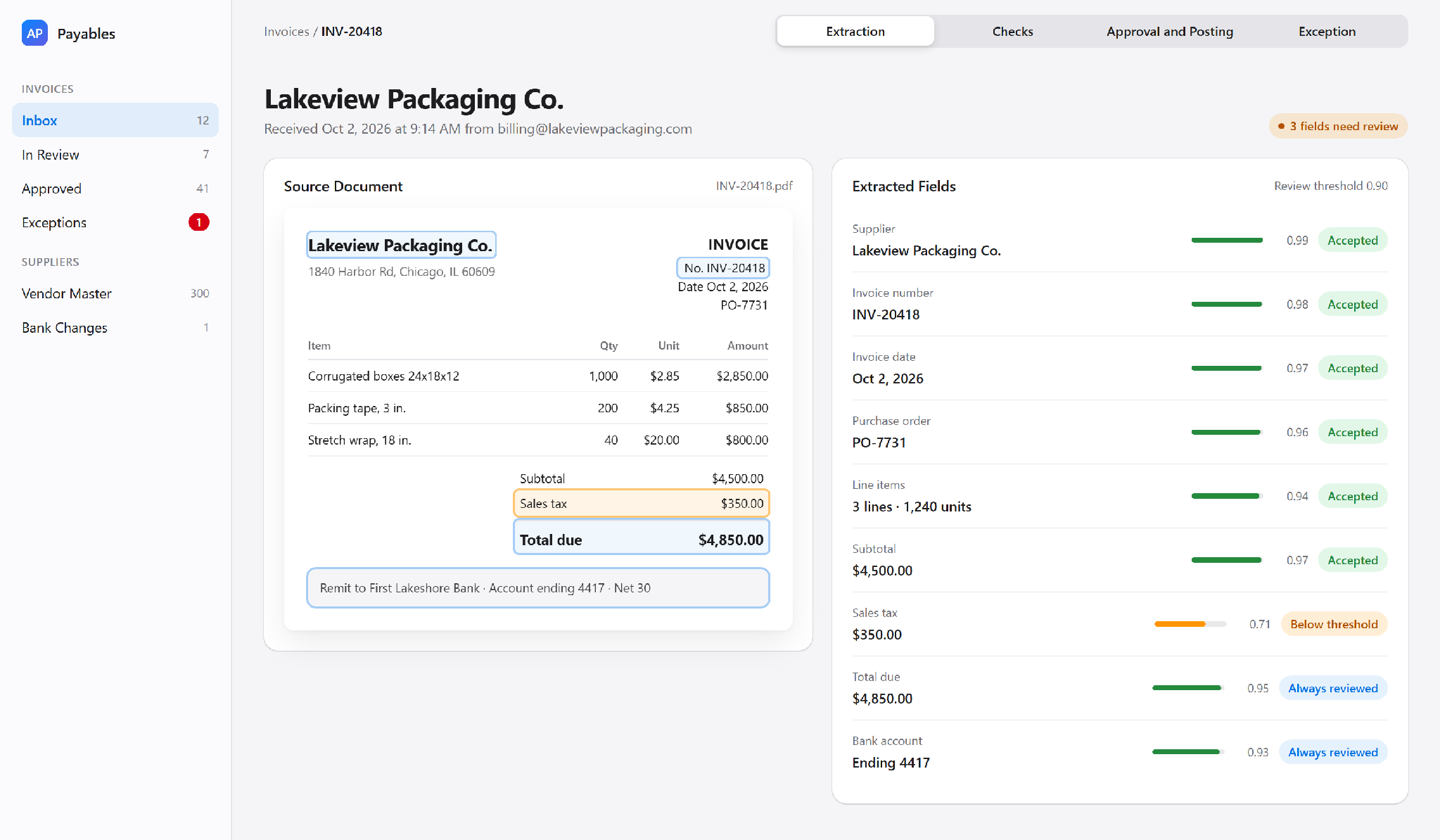
A $4,850 invoice arrives from Lakeview Packaging Co. The invoice passes through 11 steps.
- The invoice arrives as a PDF in the shared AP inbox, and the workflow tool logs the time and sender.
- An AI model reads the supplier name, invoice number, date, line items, and total from the PDF during data extraction.
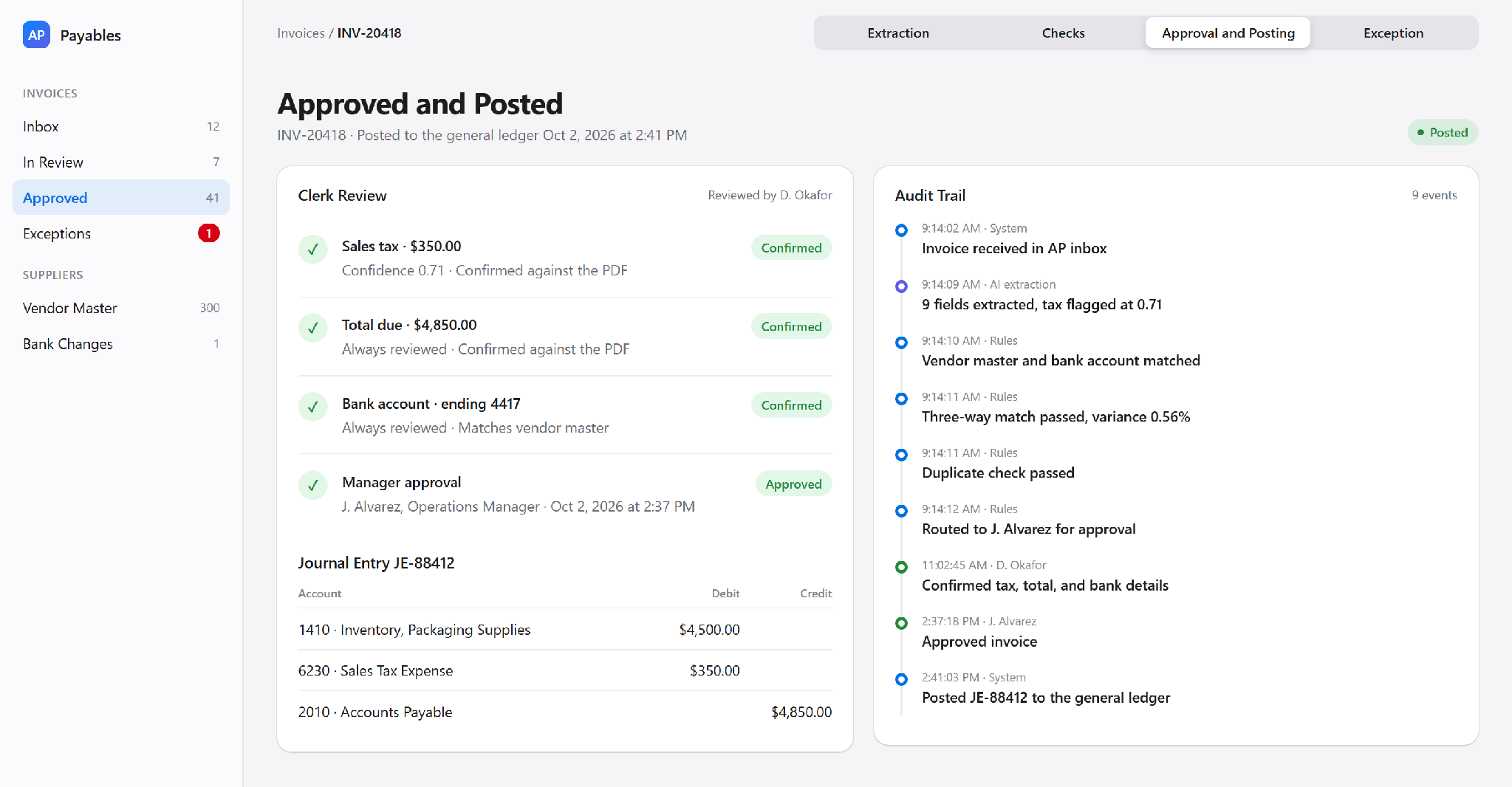
- Each field comes back with a confidence score, and the sales tax score is only 0.71 against a 0.90 threshold.
- The low score sends the invoice to a clerk, who confirms the sales tax against the PDF before any other check runs.
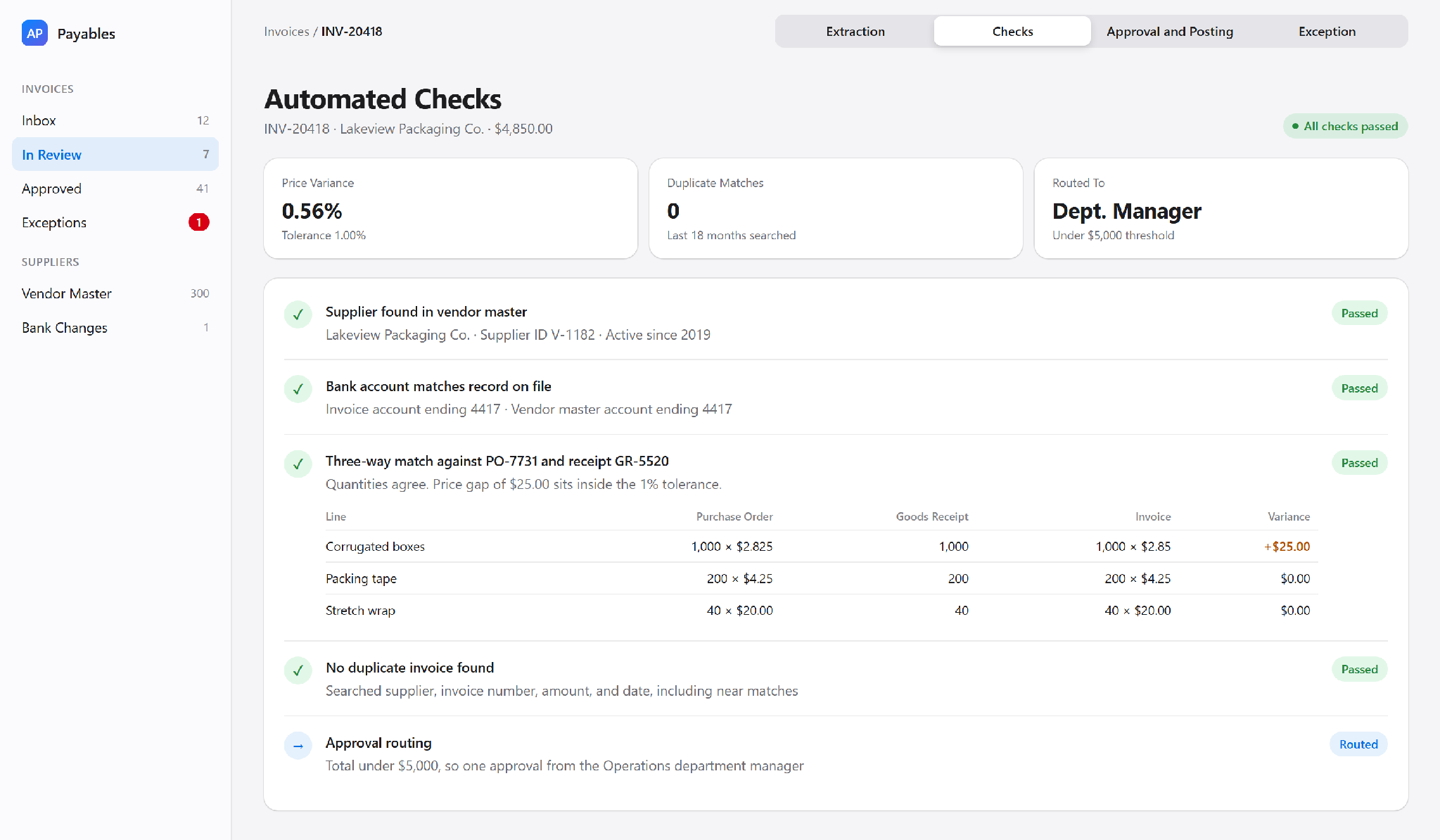
- The system finds the supplier in the vendor master file, the approved list of suppliers.
- The bank account on the invoice matches the account already on file.
- A three-way match compares the invoice with the purchase order and the goods receipt.
- The match finds a $25 price gap (0.56%), inside the 1% tolerance set by policy, so the invoice passes.
- A duplicate check finds no earlier invoice with the same number and amount from the supplier.
- The total is under the $5,000 threshold, so the workflow routes the invoice to the department manager for approval.
- After the manager approves, the system posts the entry to NetSuite.
The audit log records every action along the way, from the first AI read to the NetSuite posting.
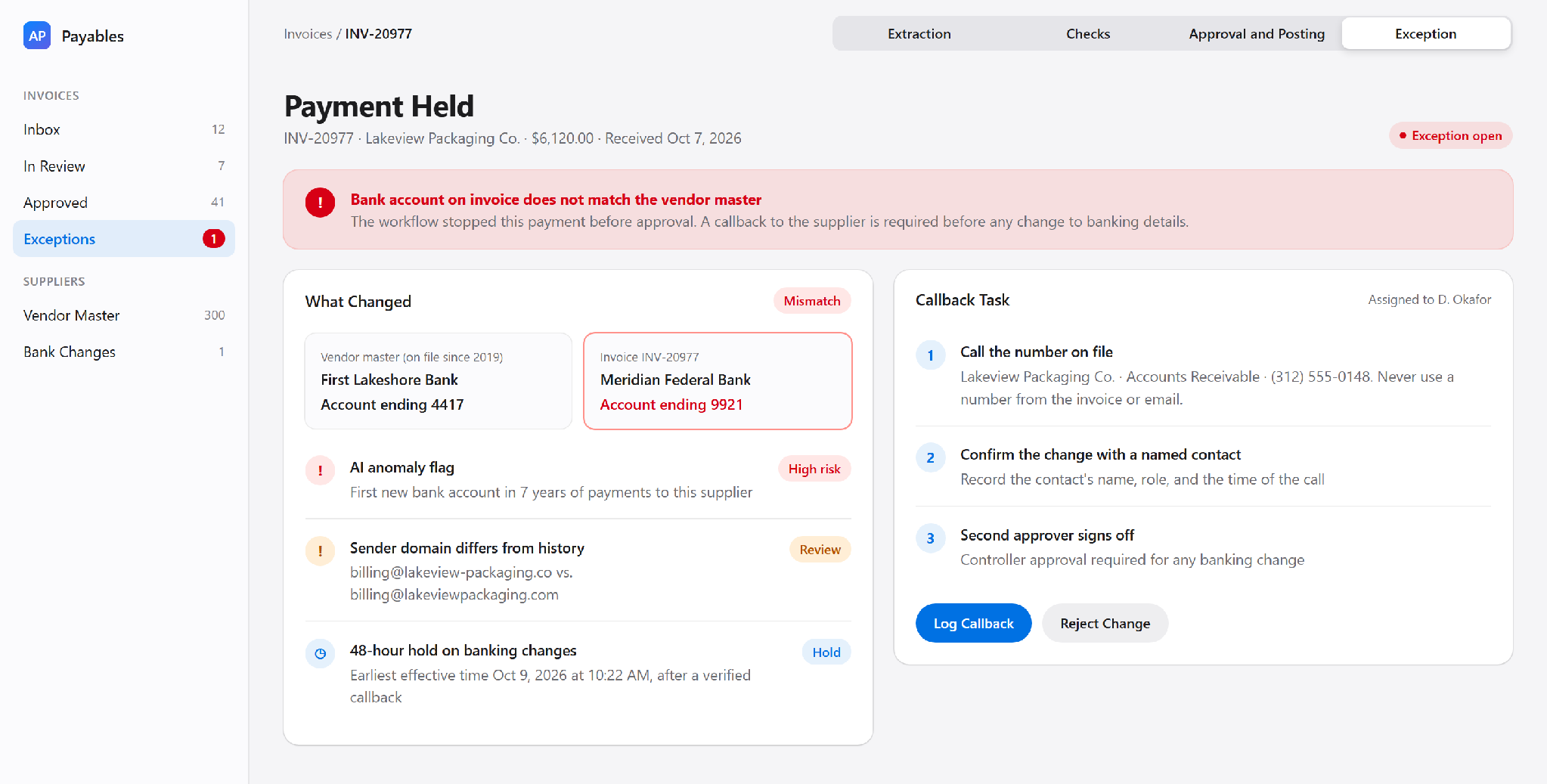
The walkthrough could have changed at step six. Had the bank account differed from the vendor master file, the workflow would have held the payment. A clerk would then call the supplier on a number already on file, which is the step Baltimore skipped.
Where AI Adds Value in Financial Automation
AI adds the most value in two jobs: reading documents and flagging anomalies. Both jobs involve judgment under uncertainty, which fixed rules handle poorly. Everything else in AI accounting automation should stay with rules a person can read and audit. This split keeps posting decisions explainable.
Document interpretation covers invoices, receipts, contracts, and remittance emails. Training on many layouts lets a model find the total or the due date without a template for each supplier. Template-based tools, by contrast, need a new template whenever a supplier redesigns an invoice.
Extraction models return a confidence score with each field, an estimate between 0 and 1 of how likely the value is correct. The distributor sends any field scoring below 0.90 to a clerk. Totals and bank details always go to a clerk, whatever the score.
Anomaly flagging looks for payments outside a supplier’s normal pattern. A typical flag is a new bank account on a long-standing supplier. Another is an amount far above the supplier’s usual range. The anomaly model raises the flag, and a person decides what happens next.
Each flag opens an exception for a reviewer. AI agents can gather the documents for the exception and draft a note, so the reviewer starts with the case already assembled.
How to Implement AI Financial Process Automation
AI financial process automation works best when a team starts with one narrow process. Most failed finance process automation rollouts try to cover every process at once. A narrow start gives a clear baseline and fewer surprises. The five steps below follow the order a finance team would work in, and each step shows the distributor’s plan.
- Select a process. The distributor picks supplier invoices under $5,000 and records a baseline: a 21% exception rate and four days from receipt to approval.
- Establish controls. The controller lists the approvers and the checks for each invoice. The list names the AI fields a clerk always reviews.
- Connect systems. The distributor compares automation tools on price and NetSuite support. Then the distributor links the AP inbox, the extraction tool, and NetSuite through APIs.
- Test with sample records. The AP team runs a few hundred past invoices through the setup. The clerks compare each output with their original entries.
- Introduce a monitored pilot. The new workflow runs beside the old process for a full month-end close. The finance team reviews all exceptions and AI corrections each week.
Teams without in-house capacity often bring in outside process automation help for design and testing. The pilot still needs owners from finance. Only finance staff can tell whether the workflow handled an exception correctly.
Financial Controls for AI-Driven Workflows
Controls matter more once a workflow runs alone, since automation repeats any control gap. Baltimore’s system paid the fraudster quickly because the approval steps had no callback check. AI in finance workflows adds a second risk: a model can be confidently wrong. Automating financial governance means building the six controls below into the setup before the first live payment.
Public companies also face a legal duty, since Section 404 of the Sarbanes-Oxley Act requires management to assess internal control over financial reporting. Auditors usually test the controls against the COSO internal control framework. An automated workflow is part of the control system, so auditors will test the workflow too.
Outside the audit, invoice fraud is common enough to plan for. Ivalua’s March 2026 survey of 800 procurement decision-makers found 40% of organizations hit by invoice fraud in the previous 12 months. Among firms with losses, the average loss was $367,000.
Separation of duties comes first. The person who adds a supplier should never approve the supplier’s payments. At the distributor, the staff who configure the extraction model don’t approve the model’s outputs either.
Approval thresholds route larger amounts to more senior people. The distributor’s invoices over $5,000 need the finance director as well as the department manager. The thresholds sit in the workflow rules, where a model can’t change them.
Duplicate checks compare supplier, invoice number, amount, and date before payment. Fuzzy matching also catches near-duplicates, such as an invoice number with an extra character.
Access restrictions limit who can change vendor bank details, approval limits, and model settings. After the fraud, Baltimore moved to phone verification of all banking changes. The city also added a 48-hour wait before a change takes effect. The distributor adopts both rules from day one.
Audit trails log each action, including the AI output and any human edit. Auditors need to see what the model suggested and what a person accepted.
Human review of AI outputs before posting is the last control. A clerk checks any field below the 0.90 confidence threshold before the invoice reaches the ledger. Any flagged anomaly stops with the clerk too.
Integrating Accounting and Business Systems
Most of the records reaching the ledger start outside finance. Sales creates the customer invoice, and procurement creates the purchase order. Each handoff between systems is a chance for data to drift. Clean integration keeps the numbers consistent from the first record to the final report.
Sales and accounting meet at invoicing. A closed deal in the CRM (customer relationship management system) should create the customer invoice in the ERP without retyping. Teams linking a CRM to accounting often use AI integration to map fields and catch mismatched customer records.
Order data feeds the same invoices and needs clean handoffs too. Data Prism connected WooCommerce, ClickUp, Google Sheets, and SQL Server for Kaemark, a US furniture manufacturer. Order status changes moved between WooCommerce and ClickUp without manual updates. Google Sheets data also synced to SQL Server for reporting. The project’s published results show manual data entry down 50% to 80%.
Procurement feeds accounts payable. At the distributor, purchase orders and goods receipts have to reach NetSuite before the invoice does, or the three-way match fails. Older procurement tools often need custom API integration to share the data.
Costs and Performance Measures
AI financial automation has two kinds of costs. Build costs cover process mapping, integration work, and testing. Running costs cover the software, model usage, and staff time on exceptions. The measures below show whether the spend pays off.
Ardent Partners’ 2026 benchmark puts the average cost to process one invoice at $9.90. The benchmark’s “Best-in-Class” group processes an invoice for $2.67. The group’s exception rate is 11.8%, compared with an industry average of 19.9%.
For the distributor, the pilot targets an exception rate under 12% (close to the group’s 11.8%) and approval within two days. Both targets get measured against the 21% and four-day baseline from the first implementation step.
Keeping the targets after the pilot takes ongoing maintenance, which most budgets miss. Supplier layouts change over time, and models drift when invoice patterns shift. Someone has to retune thresholds and update rules after each policy change.
Five measures tell a team whether the automation is working.
|
Measure |
What the Measure Shows |
How to Track |
|---|---|---|
|
Processing Time |
Days from receipt to approval |
Timestamps in the workflow log |
|
Exception Rate |
Share of invoices needing manual work |
Exceptions divided by total invoices |
|
Error Rate |
Mistakes found after posting |
Corrections and reversals per month |
|
AI Extraction Accuracy |
Share of extracted fields marked correct |
Sample review against source files |
|
Cost per Transaction |
Full cost of processing one invoice |
Total AP cost divided by volume |
Cost per transaction is the best single number for comparing options, since the figure includes staff time as well as software. Measuring the figure before buying software is part of most AI strategy work.
Common AI Financial Automation Mistakes
Most AI financial automation failures trace back to process gaps. The model usually performs as designed. The trouble starts when teams trust outputs nobody checked or automate a broken process. Four mistakes show up again and again.
Posting unverified outputs is the most expensive mistake. A misread total or a wrong account code goes straight into the ledger and then into reports. The 0.90 review threshold exists to stop exactly this.
Automating poor source data multiplies the errors already in the records. A vendor master file full of duplicates and old bank details will produce fast, wrong payments. Clean the vendor master file before switching anything on.
Overlooking reconciliation lets a small matching error repeat for weeks. Automated posting still needs a monthly check against the bank statement to catch the error early.
Treating AI output as final is the hardest habit to break. High scores build trust over time, and reviewers start approving without looking. A monthly spot-check of high-confidence fields catches the errors a hurried review lets through.
Is AI Financial Automation Worth the Cost?
AI financial automation is worth the cost for teams with high invoice volume and many supplier layouts. Small teams with a few regular suppliers may get more from plain workflow rules. The cost of an error matters for both groups, so controls decide the outcome either way.
For the distributor, the answer is yes on paper, since volume and supplier variety are both high. The plan pays off only if the bank-change callback and the review thresholds go live with the first invoice. Baltimore had automation and still lost $803,384 because one phone call never happened.
Everything above assumes a team can map its own process and controls before building. When a finance team lacks the hours for the mapping, outside AI automation services can cover the work from the first process review to a monitored pilot.
Book a Free 30-Minute Meeting
Discover how our services can support your goals — no strings attached. Schedule your free 30-minute consultation today and let's explore the possibilities.
Book a Free Call

