Introduction
On August 11, 2020, Citibank wanted to send $7.8 million in interest to Revlon's lenders. The bank wired $894 million instead, the entire principal on a loan not due for another three years. Three people reviewed the payment under Citi's six-eyes procedure, and all three believed the settings were correct.
Nothing in the chain asked the obvious question. A full early repayment, from a borrower the market treated as insolvent, should have triggered one. The software did what the checkboxes said, and the checkboxes said pay everyone. Getting the money back took two years.
Fast forward to 2026, and one can start wondering whether intelligent automation could have caught the error. A faster bot wouldn't have, and neither would a fourth reviewer. The fix is a system able to read the payment and check the amount against the loan schedule before the money moves.
This article explains what intelligent automation is, how the technology works, where companies already use the approach, what platforms cost, and when buying one is a mistake.
What is Intelligent Automation?
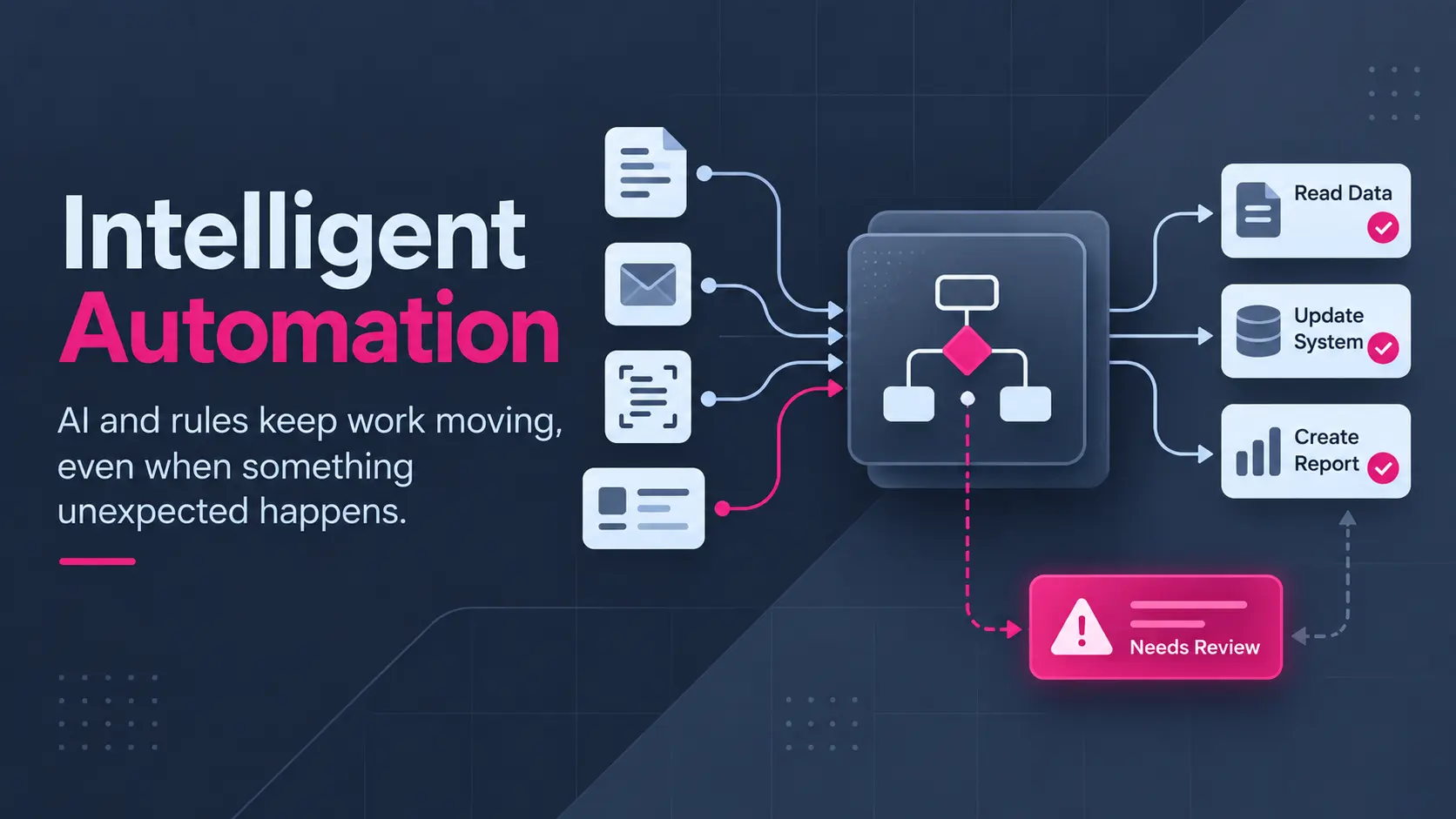
Intelligent automation is the use of artificial intelligence alongside rule-based automation software. This means a single workflow can read unstructured input and finish a task without a person in the middle. The approach combines robotic process automation, machine learning, language models, and business process management into one operating layer across finance, service, and supply chain work.
The term intelligent business automation describes the same approach from the buyer's side of the table. Rule-based software handles the predictable middle of a process. The AI layer handles the messy edges, where the input arrives as a PDF, a phone call, or an email.
Smart process automation is another label for the same thing, used mostly by consultancies. The main purpose of intelligent process automation is to cover the exception path, because exceptions are where rule-based tools stall and where staff time actually goes.
In plain terms, intelligent automation provides a workflow that can keep running when the input changes shape.
Intelligent Automation Capabilities at a Glance
Intelligent automation capabilities can be split into reading, deciding, and acting, and the table below maps each one to the work involved.
|
Capability |
What the Technology Does |
|---|---|
|
Document Understanding |
Reads invoices, contracts, and scanned forms |
|
Language Understanding |
Sorts emails, tickets, and chat messages by intent |
|
Rule Execution |
Clicks through legacy screens and enters records |
|
Decision Logic |
Applies thresholds, scores, and written policy |
|
Workflow Orchestration |
Routes work across systems, queues, and approvals |
|
Exception Handling |
Escalates ambiguous cases to a named person |
|
Data Extraction |
Pulls fields from unstructured files into records |
|
Process Discovery |
Finds automatable steps from system event logs |
|
Audit Logging |
Records every action and decision for later review |
|
Continuous Learning |
Improves accuracy from human corrections |
Implementations vary, so no two intelligent automation platforms cover the table identically. Similarly, several cover only the middle four rows well.
How Intelligent Automation Works?
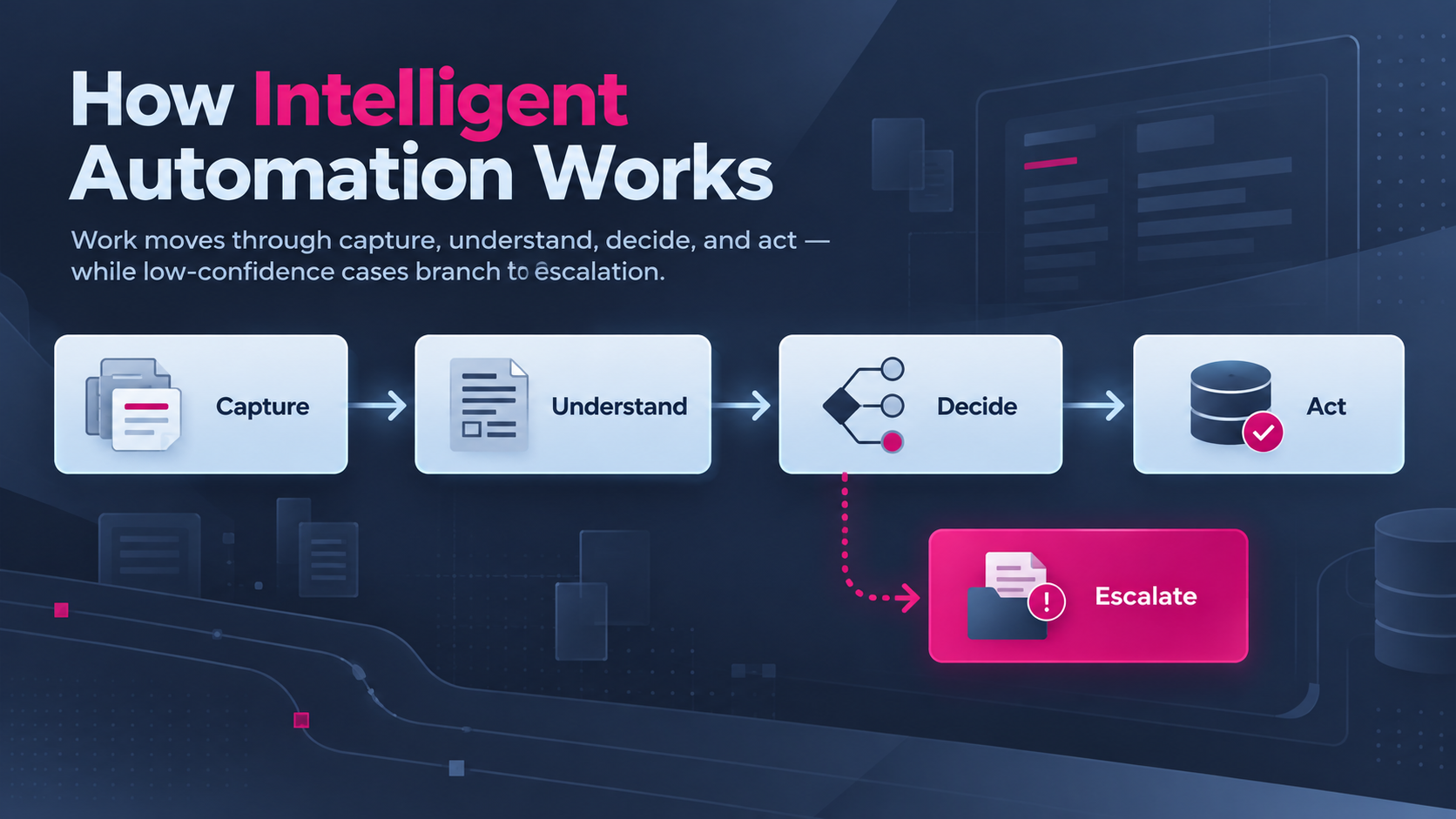
A workflow moves through five stages, running from capture through to escalate.
The first layer (capture) pulls the input from an inbox, a scanner, an API, or a queue. The next layer (understand) then turns the raw file into structured fields through data extraction, optical character recognition, and language models. A purchase order becomes a supplier name, a line-item list, and a total.
The third layer (decide) applies the business rules to the structured fields. Some checks are simple thresholds, while others need a model trained on past outcomes. Then comes Act (4th layer), which writes the result back into the systems of record. API integration handles systems with a proper interface, and screen automation covers the ones without.
The last stage (escalate) is what most teams underbuild. When confidence drops below the threshold, the case goes to a named person with the document, the extracted fields, and the reason for the flag attached. Skip this stage and the workflow either stalls or starts guessing.
Intelligent Automation vs RPA vs Hyperautomation
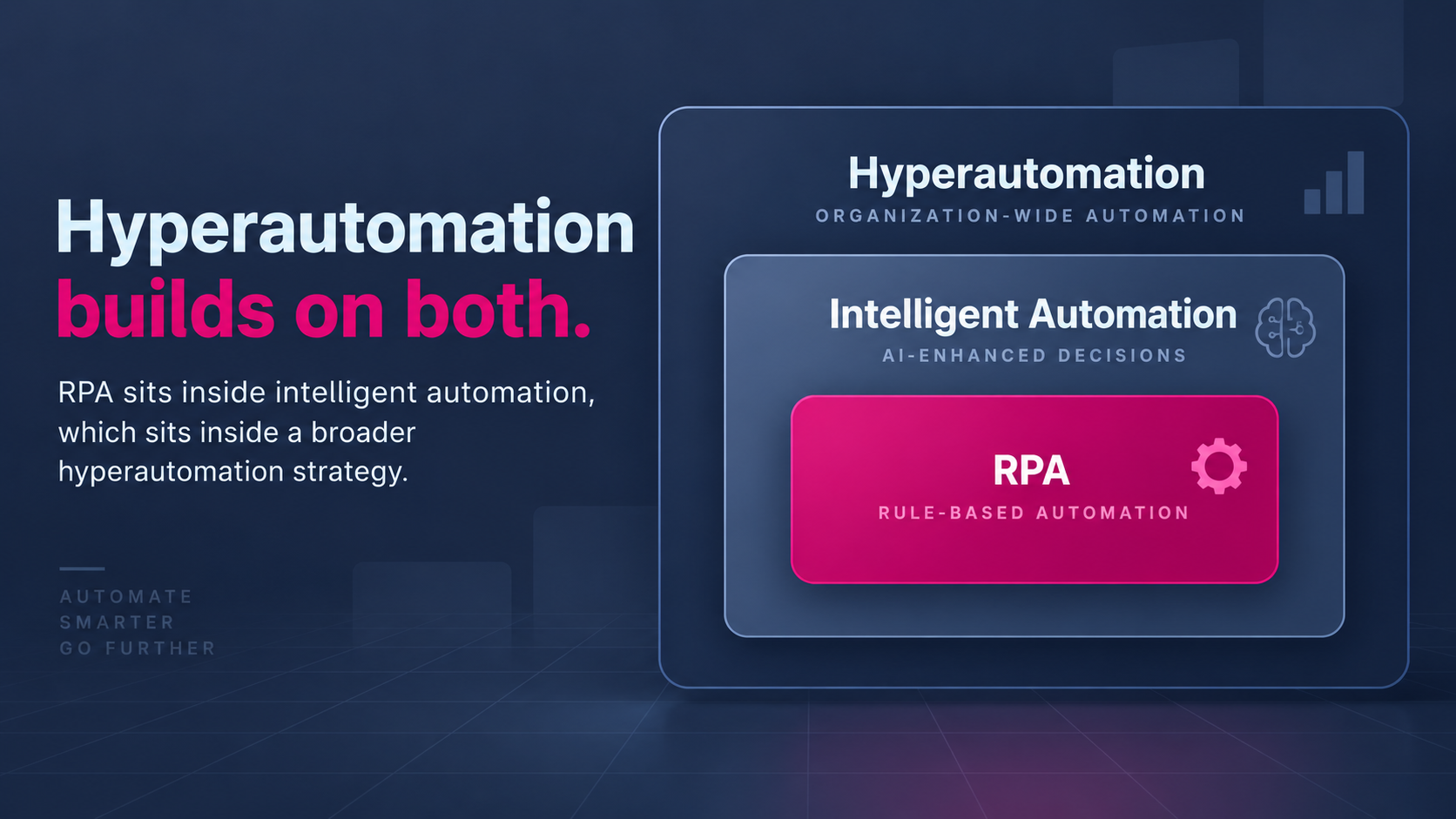
Intelligent automation is not a replacement for robotic process automation. RPA is one component inside a larger system, and the difference shows up the moment the input stops being predictable.
|
Dimension |
Robotic Process Automation |
Intelligent Automation |
|---|---|---|
|
Input |
Structured fields and fixed screens |
Documents, email, speech, images |
|
Behavior on Change |
Breaks when the screen layout moves |
Adapts inside trained limits |
|
Decisions |
Follows written rules only |
Applies models alongside rules |
|
Exceptions |
Stops and queues the case |
Resolves or escalates with context |
|
Setup |
Records an existing process |
Trains on data, then orchestrates |
|
Oversight |
Log review after the fact |
Confidence scores at each step |
|
Best Fit |
Stable, high-volume, repetitive tasks |
Variable input and judgment steps |
So, the relationship is complementary. Robotic process automation remains the only practical route into some mainframe and government systems, which is why most intelligent automation deployments still run software bots underneath.
Hyperautomation sits a level above both. The term covers an organization-wide push to find and automate as many processes as possible, with intelligent automation as one method inside the program. Treat hyperautomation as a strategy word, not a product category.
Benefits of Intelligent Automation
The benefits of intelligent automation are easiest to see in processes where staff currently read something before acting. Invoice coding, claims triage, KYC review, and support routing all fit the pattern.
Cycle time falls first because a process gated by human reading time compresses to the speed of the slowest system call, usually seconds rather than hours. Error rates fall next because extraction accuracy on a trained document type beats a tired person at 4 p.m.
Capacity is the benefit finance teams care about, since intelligent process automation benefits scale with volume. A team absorbing a seasonal spike stops hiring temporary staff to read the same forms. The work doesn't disappear, and the mix changes. Fewer people enter data, and more people resolve flagged cases.
The less obvious intelligent automation benefits are audit-related. Every decision carries a timestamp, a confidence score, and the input version used. All of them make the process reviewable in a way a spreadsheet chain never is.
IMPORTANT: One caution on the benefits of intelligent process automation. Savings projections built on full headcount removal rarely survive contact with the exception rate, and the cost section below explains why.
Real-World Examples of Intelligent Automation
The clearest intelligent automation examples come from customer service, finance operations, and public administration. A couple of examples below are documented deployments, and the third is a labeled walkthrough of the mechanics. Each intelligent automation example shows a different answer to the question of how far the automation should reach before a person takes over.
Klarna's Customer Service Assistant
In February 2024, Klarna launched an assistant built with OpenAI. In month one, the assistant handled 2.3 million conversations, two-thirds of all customer service chats, across 23 markets and more than 35 languages. Average resolution time fell from 11 minutes to under two.
The second half of the story matters as much. By May 2025, Klarna was rehiring human agents after the company concluded quality had slipped on harder cases, and every customer now keeps a route to a person. The AI share of volume stayed roughly level.
Read the two halves together, and you get a lesson about scope rather than capability. The assistant was good at high-volume, authenticated, structured requests and weaker at the long tail.
Invoice Processing, End-to-End
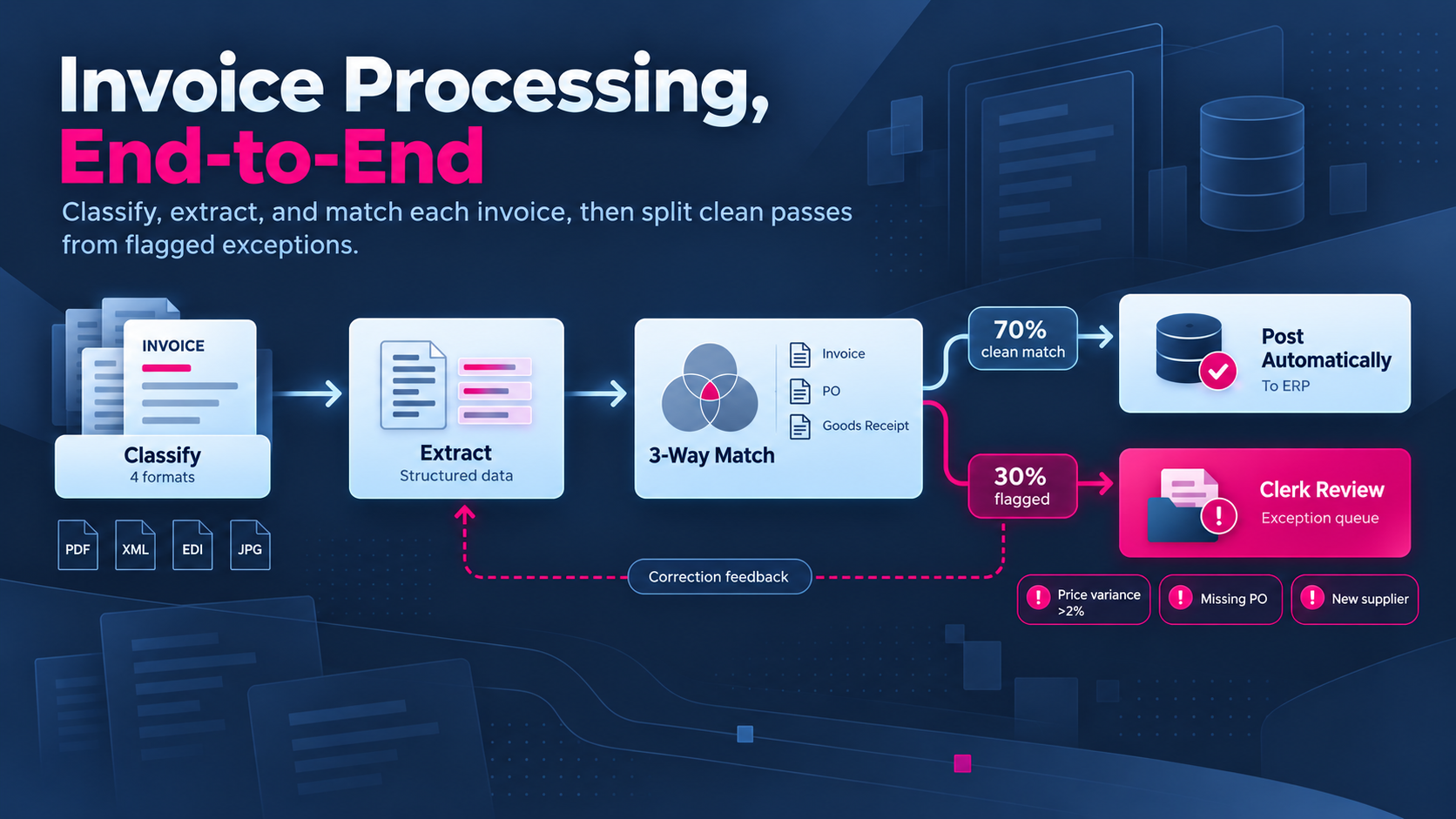
What follows is a hypothetical example of intelligent automation in accounts payable, with hypothetical figures used to show the mechanics.
A mid-size distributor receives 4,000 supplier invoices a month in four formats.
- The workflow reads each incoming file and classifies the document type.
- Extraction pulls supplier, purchase order number, line items, and total.
- A three-way match runs against the ERP and the goods receipt.
- Clean matches are posted automatically with no human step.
- A price variance above 2%, a missing purchase order, or a new supplier routes to a clerk with the discrepancy highlighted.
- The clerk's correction feeds back into the extraction model.
Roughly 70% of invoices clear without a human, and the remaining 30% arrive pre-investigated. Examples of intelligent automation in finance almost always follow this shape.
Public Sector Automation
The US Department of Agriculture runs an intelligent automation center of excellence for its agencies. Under the centralized model, the center procures and delivers the automation on an agency's behalf. Under the federated model, each agency builds with its own team against shared standards.
Government programs make useful intelligent process automation examples, because the constraints are published and the work is ordinary. Forms, eligibility checks, and case routing look much the same inside a bank.
Intelligent Process Automation Use Cases Across Business Functions
The use of intelligent process automation clusters wherever a person currently reads an input, applies a policy, and updates a system. Most AI automation programs pick their first workflow from the five areas below.
Finance and Accounting
Finance teams start with invoice matching, expense audit, collections chasing, and month-end reconciliation. Reconciliation benefits most, because a break needs a judgment about cause rather than a rule.
Customer Service
Intelligent service automation covers ticket classification, order status answers, refund eligibility, and first-draft replies for agents. Chatbots handle the front door, while intelligent service automation earns its keep in the routing logic behind them.
Human Resources
HR work splits into resume screening against defined criteria, onboarding document collection, policy questions, and payroll exception review. Screening carries the most bias risk, so don't remove the human decision at the offer stage.
Technology and Operations
Technology teams automate ticket triage, access requests, log-driven incident classification, and patch scheduling. In practice, a service desk is the cheapest place to start, because the volume is high and a wrong answer is recoverable.
Supply Chain
Supply chain candidates include purchase order creation, shipment exception handling, supplier document checks, and demand signal cleanup. Most of the value here depends on clean data integration between the ERP, the warehouse system, and carrier feeds.
Where Intelligent Automation Fails?
Three failure patterns show up repeatedly, and not one of them is a model quality problem.
The first is scope creep at the pilot stage. A team picks a process with 40 variants, spends six months on the long tail, and ships nothing. Narrow beats broad, so start with one document type, one decision, and one system.
The second is a missing escalation design. When confidence thresholds have no owner, flagged cases pile into a queue nobody watches, and the backlog quietly becomes worse than the manual process. Klarna's reversal is the public version of the same lesson.
Third, and most common, is bad upstream data. A model reading from an ERP with duplicate supplier records will happily pay the duplicate twice. Automation applies existing data management problems faster, which is why the pipeline work usually precedes the AI work.
What Intelligent Automation Costs?
Almost no vendor publishes prices, which makes the search for low-cost intelligent automation harder than the search for capability. Still, public procurement records are the exception worth reading.
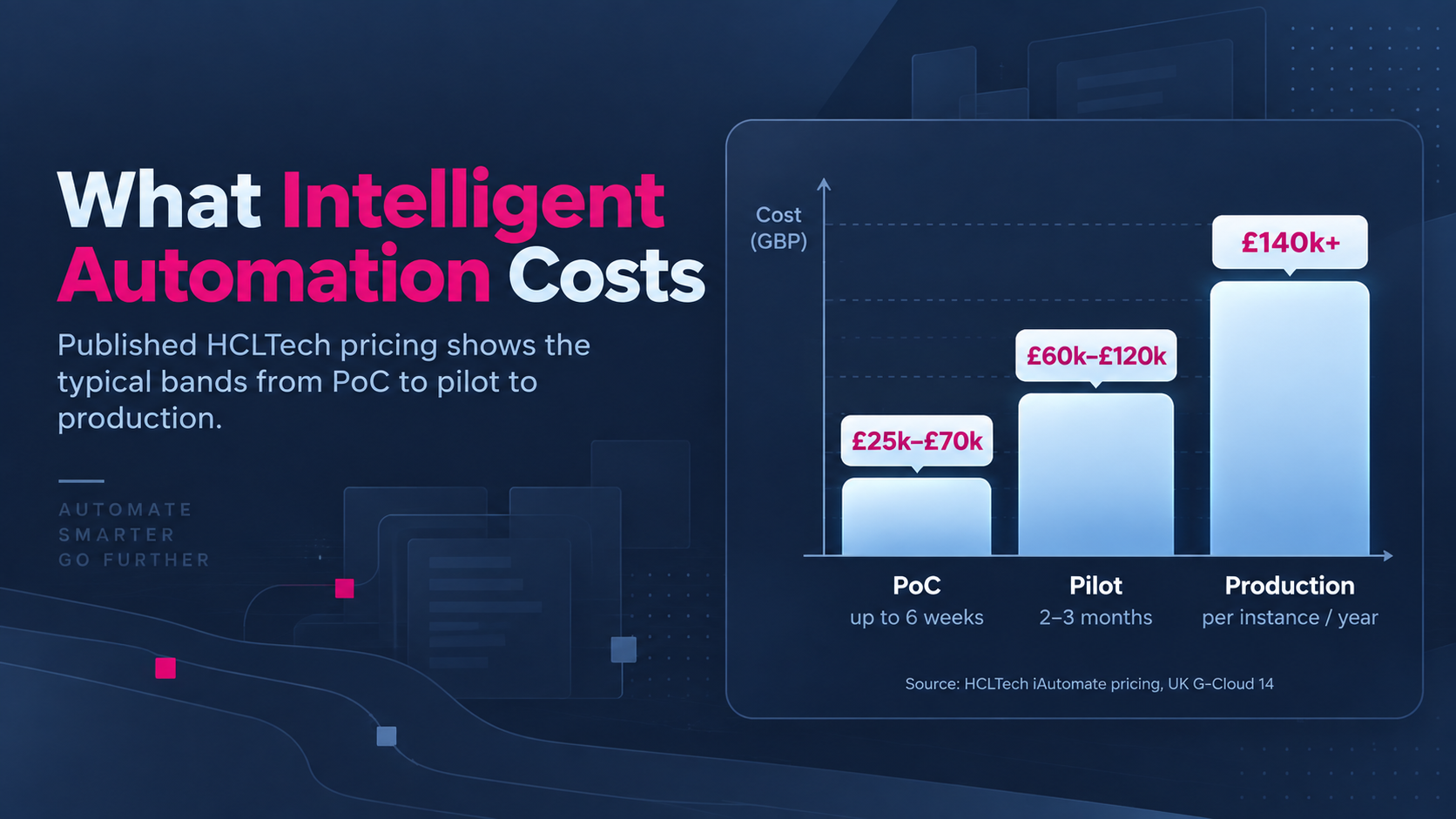
HCLTech listed iAutomate, an intelligent automation service for technology operations, on the UK government's G-Cloud framework with published prices. A proof of concept running up to six weeks costs £25,000 to £70,000. A pilot lasting two to three months runs £60,000 to £120,000, and production starts at £140,000 per instance per year.
Treat the bands as the shape of enterprise pricing rather than a quote, because cheaper routes exist. A single document workflow built on low-code tools and a hosted extraction API costs a fraction of a platform license, and for one process a custom build often wins on total cost.
The number worth comparing is cost per completed case, including the flagged ones a person still handles. License cost on its own hides the exception rate, and the exception rate decides the economics.
Intelligent Automation as a Service
Intelligent automation as a service means a provider runs the platform, builds the workflows, and operates them under an agreed service level, instead of selling software for an internal team to configure.
The model suits organizations without an automation team, which is most organizations. The trade-off is process knowledge. A provider learns the workflow while the client keeps the domain expertise, so the contract has to define who owns the logic when the relationship ends.
Two delivery shapes dominate. Centralized delivery puts one provider in charge of the pipeline of candidate processes, while federated delivery lets each department build against shared standards on a shared platform. Federated moves faster, and drifts faster.
Ask any provider for the exception rate on comparable deployments before signing. A provider unwilling to quote a number hasn't measured one, and you don't want to be the deployment where the measuring starts.
Best Intelligent Automation Tools and Platforms
Intelligent automation tools fall into five categories, and most production stacks use one from each. The categories are process discovery, document and language understanding, rule-based execution, workflow orchestration, and monitoring.
However, buying by category beats buying by brand, because the suite vendors aren't strong in the same layers. UiPath, Automation Anywhere, and SS&C Blue Prism grew out of RPA, so they lead on execution and governance. Microsoft Power Automate wins on price where an organization already pays for the Microsoft stack.
The workflow vendors come at intelligent automation from the opposite direction. Appian, Pega, and Camunda lead on orchestration, while document-first vendors like Rossum and Hyperscience specialize in extraction accuracy.
An intelligent process automation platform earns its license once a company runs many workflows and needs shared governance, credential management, and audit across all of them. For fewer than five workflows, a full automation platform may create more overhead than value.
Newer entrants, built on AI agents, are able to plan multi-step work instead of following a recorded script. Currently, the approach is promising and young. Push for named production references rather than demos, and run intelligent automation testing against your own historical cases before signing anything.
How to Compare Intelligent Automation Platforms?
Feature lists are close to useless, since two products can list the same capability and behave nothing alike at volume. Ask questions with numeric answers instead.
|
Criterion |
Question to Ask the Vendor |
|---|---|
|
Extraction Accuracy |
What accuracy on your own documents, not a vendor benchmark? |
|
Exception Rate |
What share of cases needs a human at month six? |
|
Confidence Scores |
Whether thresholds can be tuned per decision |
|
Change Handling |
What happens when a source screen changes? |
|
Audit Trail |
Whether a decision from a year ago can be reconstructed |
|
Integration |
Which of your systems have a supported connector? |
|
Human Handoff |
What does a flagged case look like for the reviewer? |
|
Pricing Unit |
Per bot, per case, per user, or per seat? |
|
Exit |
Who owns the process logic after a contract ends |
|
Support |
Who fixes a broken workflow, and within what window? |
The answers separate one intelligent process automation platform from another faster than any feature matrix, because most of the questions have a number attached. Vagueness on any of the ten is itself an answer.
Metrics Worth Tracking to Prove Intelligent Automation Benefits
Six numbers tell you whether the intelligent automation benefits are real, and model accuracy on its own isn't one of them.
|
Metric |
Why the Number Matters |
|---|---|
|
Straight-Through Rate |
Share of cases finishing with no human touch |
|
Exception Rate |
Predicts the staffing the process still needs |
|
Cost per Completed Case |
The only figure comparable across vendors |
|
Accuracy by Document Type |
Averages hide the one format causing trouble |
|
Time to Clear a Flag |
Backlogged flags erase the cycle-time gain |
|
Rework Rate |
Wrong automated decisions caught downstream |
Track exception rate weekly for the first quarter. A rate drifting upward usually means the input mix has moved, so the extraction models need retraining.
Who Needs Intelligent Automation, and Who Does Not?
Four conditions make a strong case. High transaction volume is the first, and unstructured input is the second. Third comes a decision step with written rules, and fourth, a real cost attached to delay or error. Meet three of the four, and the business case usually holds.
The counter-case is just as clear. An organization handling fewer than 500 transactions a month, in stable formats, with adequate staffing, will spend more on the platform than the process costs today.
A team with no process automation in place at all should usually fix the workflow before adding a model to run the broken version faster.
Technology also can't fix unclear ownership or an undocumented process. Automating an undocumented process converts a people problem into a software problem, and software problems are much harder to argue with.
Conclusion
So, is intelligent automation worth the investment? For a company processing thousands of unstructured inputs a month against written rules, the answer will be yes. Also, the payback usually arrives within a year. For a company processing hundreds against stable formats, the answer is no. A plain script or a data pipeline will do the same job for a fraction of the cost.
The decision rests on exception rate more than accuracy. A workflow clearing 70% of cases cleanly and handing over a well-prepared 30% beats a workflow claiming 95% accuracy with no handover design, because the second one fails silently.
Everything above assumes the automation gets built against a real process with a named owner. Where a workflow spans several systems and the input arrives unstructured, the integration work usually decides the outcome rather than the model. Data Prism works on the integration-heavy end of the problem.
An AI strategy engagement covers mapping a candidate process and sizing the exception rate, then saying plainly whether a platform is warranted.
Book a Free 30-Minute Meeting
Discover how our services can support your goals — no strings attached. Schedule your free 30-minute consultation today and let's explore the possibilities.
Book a Free Call