Introduction
OpenAI adopted a protocol built by a direct competitor. Anthropic released the Model Context Protocol in November 2024, and Sam Altman announced MCP support across OpenAI’s products four months later. By October 6, 2025, OpenAI’s Apps SDK had put Spotify, Zillow, Canva, and Figma inside ChatGPT. All four apps answer through MCP.
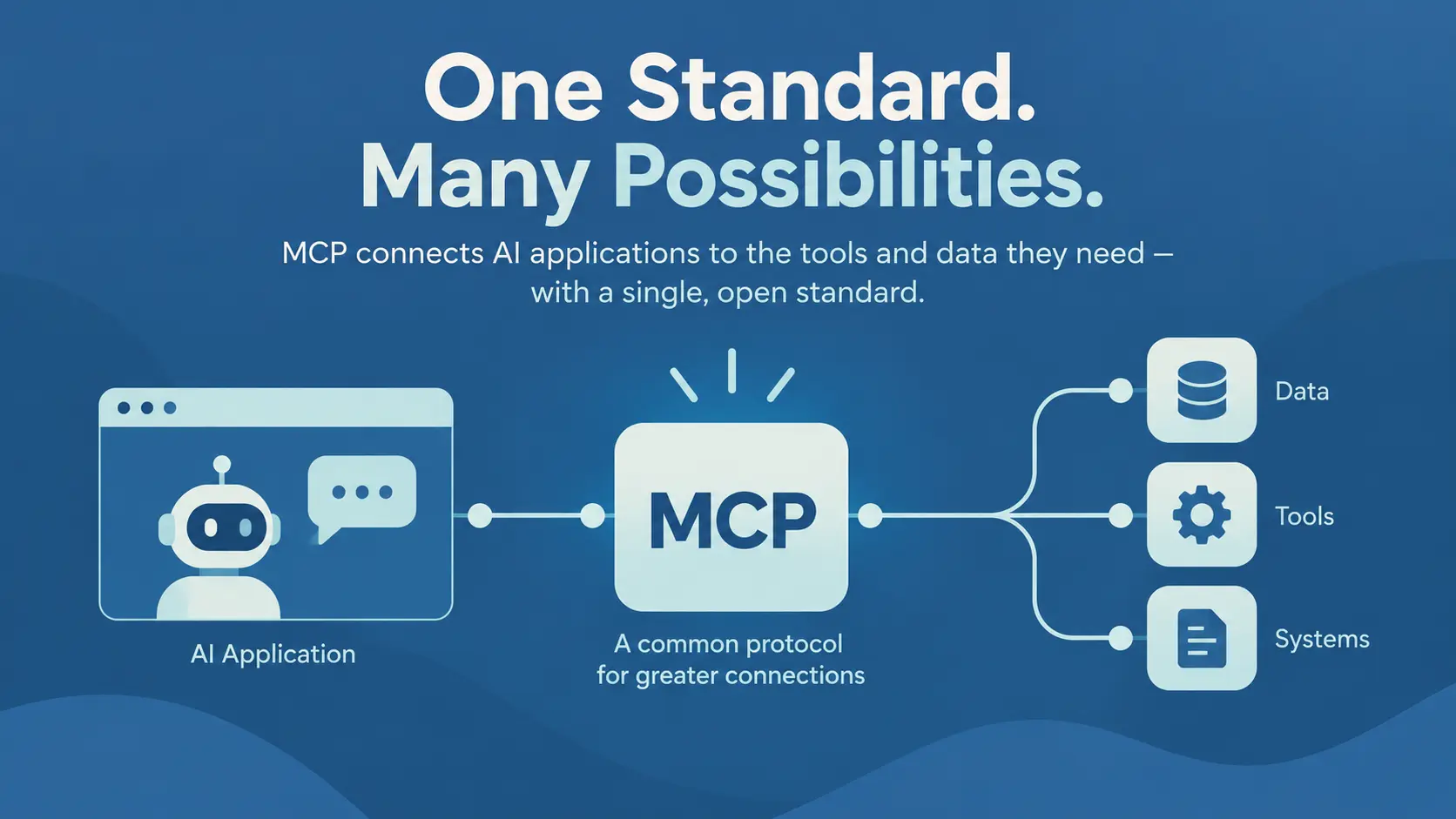
MCP is an open standard for connecting AI applications to outside tools and data. Anthropic donated the protocol to the Linux Foundation’s Agentic AI Foundation on December 9, 2025. No single company owns MCP now.
This article explains what Model Context Protocol is and how the host, client, and server fit together. It also covers where MCP helps an enterprise AI project and where MCP hurts.
What Does MCP Stand For?
MCP stands for Model Context Protocol, and each word carries part of the job.
- Model refers to the language model doing the reasoning.
- Context covers everything the model needs before the model can help.
- Protocol refers to an agreed message format, and the format belongs to no single vendor.
A client and a server work together as soon as both follow the format.
What’s The Need for MCP
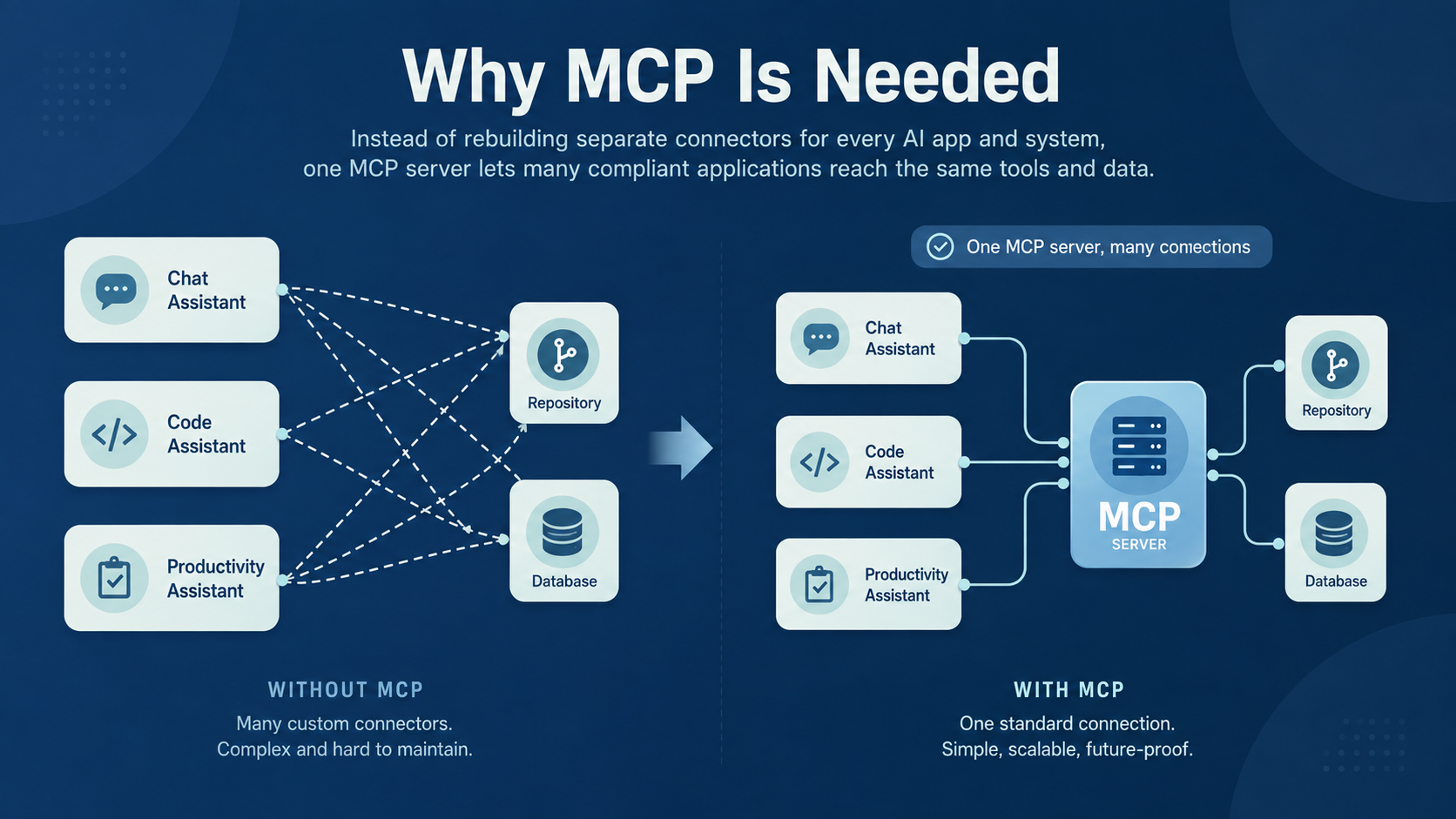
MCP exists because AI applications often need to connect to multiple systems. In the past, each application needed a separate connector for every system it interacted with, making integrations increasingly complex and time-consuming.
Claude Desktop, Microsoft Copilot, and Cursor can all reach GitHub and a Postgres database. Three applications and two systems come to six connectors. Each of these connectors needs a separate login setup and independent upkeep.
And that’s not all. Each connector was written for one vendor’s tool-calling format. This means that switching model providers resulted in rewriting work that had nothing to do with the model. Teams doing AI integration work rebuilt the same GitHub connector for every product they shipped.
MCP borrows the answer from an older standard with the same problem. The Language Server Protocol stopped editor vendors from writing a separate Python plugin for every editor. Write one language server and every editor gets Python support. This is exactly what MCP does.
Write one MCP server and every compliant AI application reaches the same system. The list of compliant applications now includes ChatGPT, Gemini, Microsoft Copilot, Cursor, and Visual Studio Code.
How Does MCP Work?
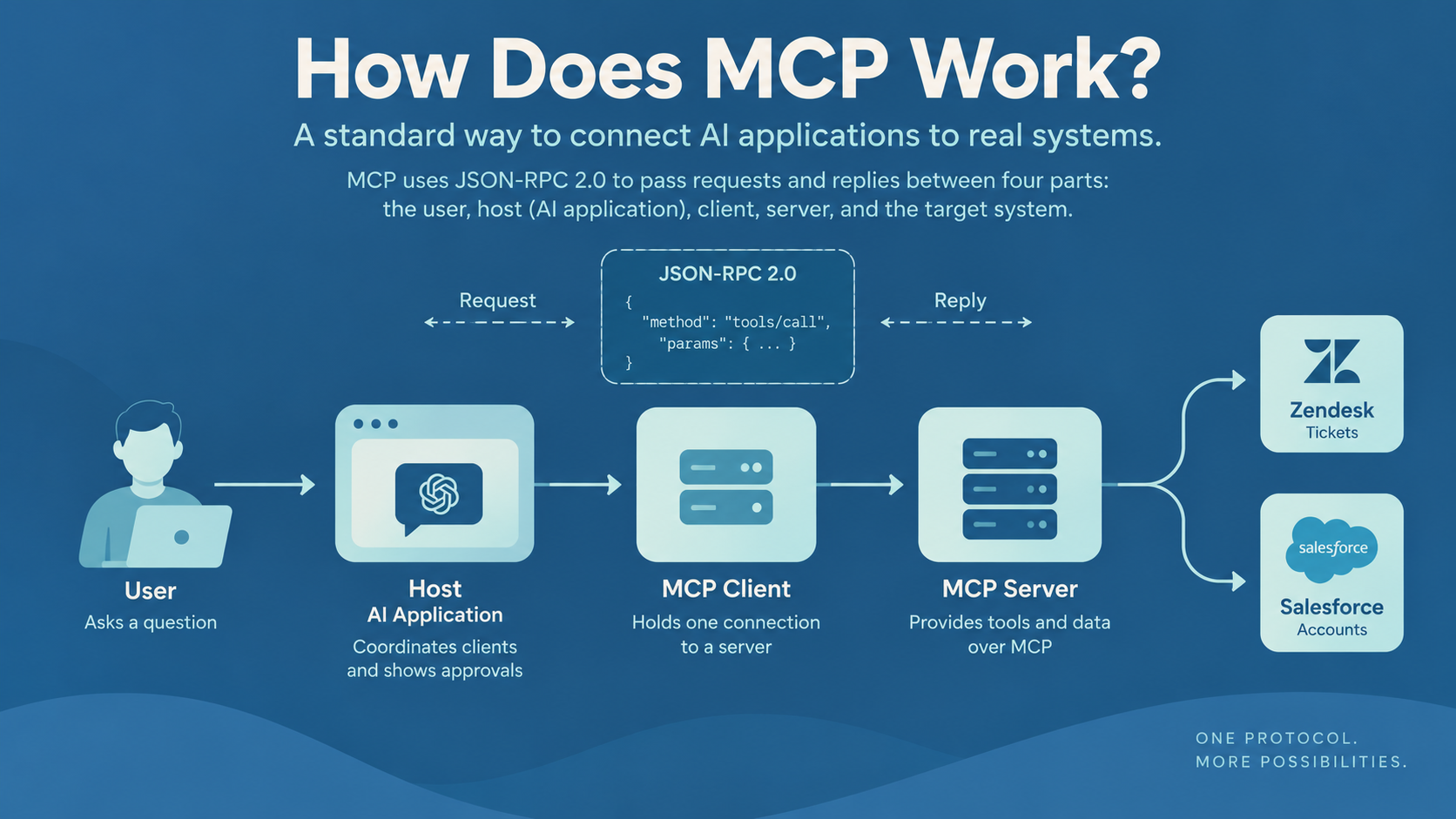
MCP puts one standard message format between the AI application and the target system. The format is JSON-RPC 2.0, so every message is either a request or a reply, written in JSON.
Four participants pass the messages along a line. The user talks to an AI application, which runs a client. The client talks to a server, and the server talks to the target system.
Let’s take the example of a support assistant at a software vendor, wired to Zendesk for tickets and Salesforce for accounts. The assistant has one job. Find the latest open ticket for the customer Shopify and prepare a summary. This example runs through the rest of this guide, so do keep it in your mind as we go along.
The MCP Host
The MCP host is the AI application the user opens. Claude Desktop, Visual Studio Code, and Microsoft Copilot are all hosts. The host coordinates every client and decides which servers to connect to. The host also shows the approval prompt before any tool runs.
The MCP Client
The MCP client is the piece of the host that holds one connection. Each client talks to exactly one server. Connect a host to both a CRM server and a documentation server, and the host runs two clients.
The MCP Server
The MCP server is a small program that offers tools and data over the protocol. Servers come in two kinds. A local server runs on the same machine as the host. The host and the server talk through the machine’s own input and output channel, called stdio. Local servers suit work like reading files on your own laptop.
A remote server runs somewhere else and talks over HTTP. One remote server can serve many clients at once, so a shared CRM connection belongs on a remote server.
How Does an MCP Respond to Requests?
The official architecture documentation walks through the message flow. The steps below follow the support example.
- The host starts one client for each configured server.
- The client can ask the server what the server supports through a call named server/discover.
- The client asks for the tool list. The server sends back each tool’s name, description, and the arguments the tool accepts.
- The host hands the list to the model as the tools the model can use.
- The model picks search_tickets, and the host calls the tool with the account name.
- The server queries Zendesk and returns the results as content.
- The host puts the content back into the conversation, and the model writes the summary.
Nothing here requires the model to know anything about Zendesk. The model knows a tool exists and what arguments the tool takes.
MCP Architecture Explained
MCP splits into two layers. The data layer sets out what the messages say and how a client finds out what a server offers. The transport layer sets out how the messages travel, either over stdio on one machine or over HTTP between machines.
The 2026-07-28 revision reshaped the transport layer. Older versions opened a session first and tracked the session with an ID. The revision dropped both steps, so every request now carries everything the server needs to answer the request. A remote server behaves like any other web service, and an ordinary load balancer can sit in front. A server that needs to remember something between calls hands back an ID, and the model passes the ID into the next call.
Under either transport, every server wraps something else, usually a CRM or an internal API. The server is the standard face on a system that was never designed for a model.
MCP Tools, Resources, and Prompts
MCP servers offer three building blocks. The difference between the three is who decides when each block gets used, as the table below shows.
|
Building Block |
Who Controls the Block |
What the Block Provides |
Example |
|
Tools |
The model |
Actions the model can invoke |
Create a support ticket |
|
Resources |
The application |
Read-only context data |
A refund policy file |
|
Prompts |
The user |
Reusable interaction templates |
Summarize my meetings |
MCP Tools
Each MCP tool declares a name, a description, and the arguments the tool accepts. The host checks every argument against the list before anything runs. The model decides when to invoke a tool, which is why the server documentation describes tools as model-controlled.
Model control is why tool design matters. The support assistant needs search_tickets and get_customer_record, and both only read. The assistant might also need update_ticket, which writes back to Zendesk.
Split the reading tools from the writing tools, and you can then approve search_tickets once and hold update_ticket behind a person. A server can also pause a call and ask the user a question, so a write tool confirms a deletion before the deletion runs.
MCP Resources
MCP resources contain read-only data that the application can pull in as context. Each resource has an address and a file type, so a refund policy might sit at file:///policies/refunds.md. An address can also take a parameter, so crm://accounts/{account_id} looks up any account.
The application controls resources, so the host decides which resources reach the model. Nothing in the protocol lets the model pull a resource directly.
MCP Prompts
MCP prompts are reusable templates a user picks deliberately. A server ships a summarize-account prompt with defined arguments, and the host shows the prompt as a slash command. Nothing fires unless someone picks the prompt. Prompts earn their place in repeatable internal workflows, where you want the same framing every time.
Is MCP an API?
No. MCP is a protocol, and an MCP server is usually a thin layer in front of an existing API.
An API defines how two programs exchange data. MCP defines how an AI application finds out what a system can do and then calls the system. The difference lies in discovery. The table below compares MCP and REST on five properties.
|
Property |
MCP |
A Typical REST API |
|
Primary Purpose |
Give AI applications tools and context |
Software-to-software data exchange |
|
Discovery |
Built-in; the client asks |
Read the docs, write the client |
|
Built for Models |
Yes |
Not specifically |
|
Consent and Approval |
Assumed in the design |
Left to the calling application |
|
Breadth of Use |
Narrow, AI applications only |
Very broad |
Most businesses end up with both. The chain runs from agent to MCP client, then to MCP server, then to the REST API that already exists. MCP adds a layer above your API integration work, and the API underneath keeps serving every consumer the API already has.
MCP, Plugins, and Custom Connectors
Four approaches compete for the same job, and each has a real use.
|
Approach |
Strength |
Limitation |
|
Direct API Integration |
Simple for a single application |
Fragments as applications multiply |
|
Custom Connector |
Fits the target system exactly |
Someone has to maintain the connector |
|
Vendor Plugin |
Fast to adopt inside one product |
Works only inside the same product |
|
MCP Server |
Works with any compliant client |
Needs hosting, access control, and upkeep |
Integration work survives all four approaches, and MCP only changes where the work sits.
Why MCP Matters for AI Agents?
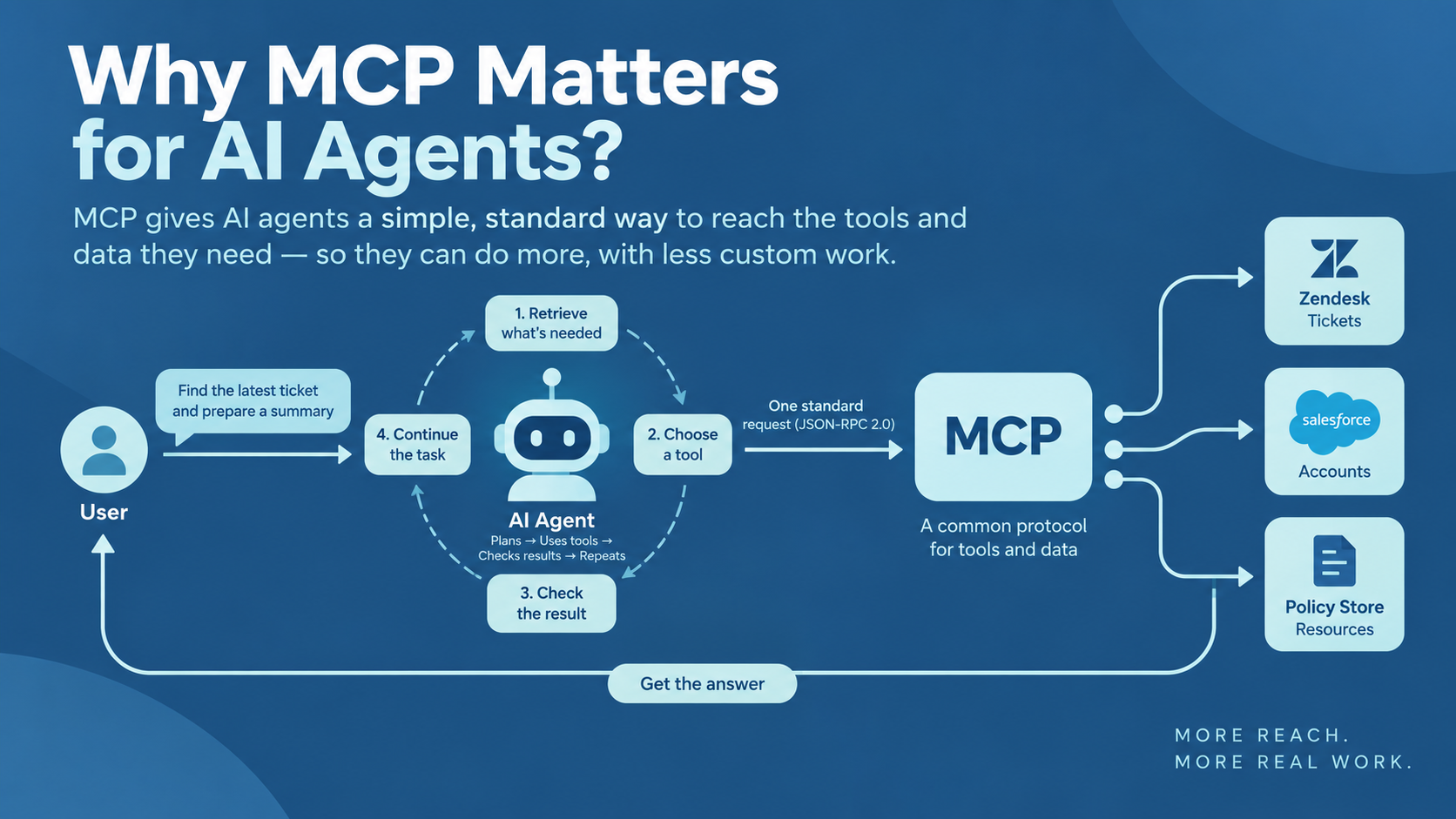
An agent’s usefulness depends on what the agent can reach. Every agent runs the same loop and retrieves what the task needs before picking a tool. It then checks the result and starts again.
MCP standardizes the middle part of the loop. Retrieval and tool selection stop being custom code inside each application. Both become a simple request to a server. The agent can also use tools that did not exist when the agent shipped, because the tool list arrives at runtime.
Agents already do a real share of the work. Austin Parker, Honeycomb’s director of AI strategy, reported in July 2026 that agents now send nearly 20% of the company’s monthly interactive queries.
Let’s run the support example one step further.
The agent has already called search_tickets and get_customer_record. Now, the agent reads the refund policy as a resource and drafts the summary. A person approves the refund, and the agent calls update_ticket. Zendesk, Salesforce, and the policy store all answered in one request through one protocol. Teams building AI agent systems get one connection pattern for all three.
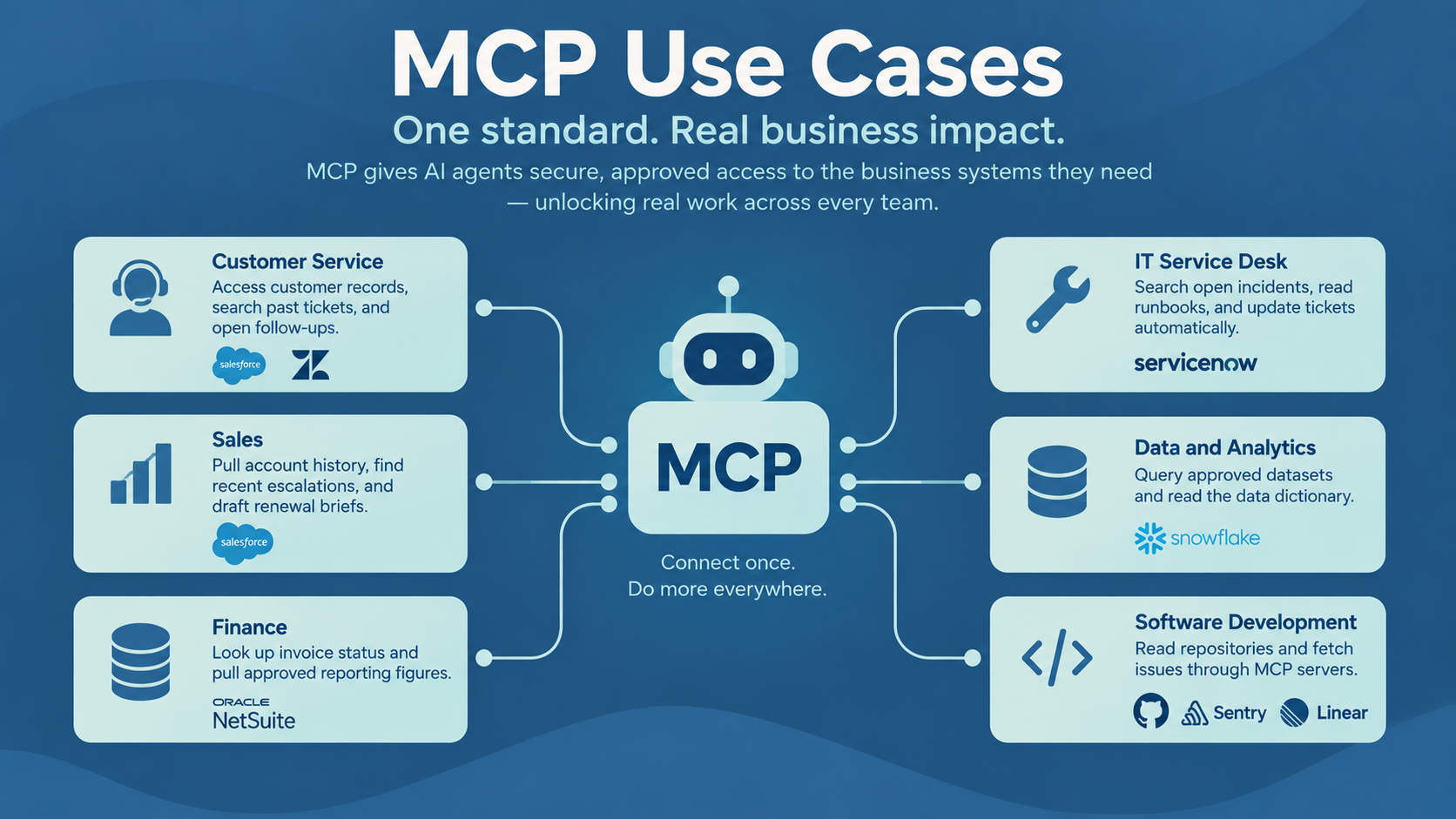
MCP Use Cases
All the use cases of MCP have one thing in common. For all of them, an agent needs approved access to a business system.
- Customer Service: An agent retrieves the customer record from Salesforce and searches past tickets in Zendesk. The agent checks the knowledge base, then opens a follow-up ticket for anything unresolved.
- Sales: An agent pulls account history from Salesforce and finds recent escalations. The agent drafts a renewal briefing before the call, so nobody opens four tabs.
- Finance: An agent looks up invoice status in NetSuite and pulls approved reporting figures. Reconciliation questions stop landing in a person’s inbox.
- IT Service Desk: An agent searches open incidents in ServiceNow and reads the matching runbook. The agent updates the ticket without help, so routine triage stops consuming an engineer’s morning.
- Data and Analytics: An assistant queries approved datasets in Snowflake and reads the data dictionary. NOTE: Governed access matters most here.
- Software Development: Coding agents read repositories and fetch issues through MCP servers from GitHub, Sentry, and Linear. Adoption started in developer tools and remains heaviest there.
Several of these use cases overlap with ordinary business process automation. The main difference is to gauge whether the task needs judgment or not. Deterministic work belongs in a workflow tool.
MCP in Enterprise AI Architecture
A large business runs several AI applications at once, and each one wants the same CRM. The copilot, the coding agent, and the analytics assistant reach one CRM server between them.
One shared server also gives you one place for governance. An MCP gateway can sit between the clients and the servers. The gateway checks who is calling and decides what each caller may do. Since the 2026-07-28 revision, the method and tool names travel in the HTTP headers, so the gateway can route a call without opening the message.
Amazon and Microsoft both ship the gateway pattern as a product. Both Bedrock AgentCore Gateway and the Microsoft Foundry toolbox put many tools behind one MCP endpoint.
The shared server also enforces the data integration rules you already have. Rules about which rows a user may see and which columns stay hidden. This means that no application has to restate the rules in a prompt.
The Main MCP Security Risks
Asana launched an MCP server on May 1, 2025, and found a logic flaw on June 4. The flaw let one customer’s tasks and project data surface in another customer’s AI assistant. Roughly 1,000 organizations were affected, and no attacker was involved. Access control is one of five failure modes worth planning for.
- Prompt Injection Through Tool Results: A page the agent reads can carry instructions aimed at the model. Invariant Labs demonstrated the attack against GitHub’s official MCP server in May 2025. A malicious issue in a public repository pushed an agent into leaking private repository data. Treat every tool result as data the agent reads, and strip any instruction the result carries.
- Tool Poisoning: Instructions hidden inside a tool description reach the model on every call, and the user never sees the hidden instructions. Pin server versions and review each description whenever the description changes.
- Excessive Permissions: One credential with full API access gives the agent everything the API can do. Give each tool a separate credential.
- Credential Exposure: Long-lived keys sitting in config files leak through logs and bad deployments. Use short-lived tokens issued through a login flow like OAuth.
- Untrusted Servers: A server you did not vet runs code against your data. Keep an allowlist and treat a public server the way you treat any third-party dependency.
Logging covers all five risks. Record every tool call with the arguments, the caller, and the result. An agent that can act is an identity, and identities need audit trails.
How to Build an MCP Server?
Building an MCP server is mostly a scoping exercise. The code is the easy part once you decide what to expose.
- Pick one system and one job the system should do for agents.
- List the operations worth exposing, and leave out everything else.
- Split the operations into tools for actions and resources for context.
- Keep each tool’s inputs tight. Fixed choices and number ranges leave the model less room to invent a value.
- Decide which tools write, and mark every write tool for human approval.
- Add authentication through OAuth where the underlying system offers a flow.
- Check every input at the server, since the arguments came from a model.
- Log each call in a format you can search.
- Test against the MCP Inspector, then against a real client.
- Watch how an agent uses the tools, and rename or narrow any tool the agent misuses.
Benefits and Limitations of MCP
The benefits come from standardization. One connector outlives both the original model and the product that shipped first. Supply is not the constraint either, since Anthropic counted more than 10,000 active public MCP servers in December 2025.
The limitations are operational. Every server is another service to host, secure, and monitor. Debugging gets harder because a failure could sit in the agent, the client, the server, or the underlying system. Permission management also needs an owner.
Connected tools cost context as well. Every tool definition loads into the model’s context window before the user types anything. A few busy servers eat a large share of the window. Anthropic shipped Tool Search and Programmatic Tool Calling in November 2025, so an agent can load definitions on demand. Anthropic’s own testing put the savings at about 85%.
When Should a Business Use MCP?
Three conditions make MCP worth the work.
The first is a second AI application reaching for systems the first one already uses. Agents that take actions are the second reason. A stable specification is the third. The people who run the protocol promise at least 12 months’ notice before anything is removed, so a server written today has a known upgrade path. Regulated environments have an extra reason to standardize, since the audit trail already sits on the server.
MCP is overkill when an application makes a single API call, or when a workflow stays fixed and predictable. A direct integration ships faster. Choosing between MCP and a direct integration is usually the first question in any serious AI strategy engagement.
Conclusion
Model Context Protocol gives every AI application one way to reach outside tools and data. However, an MCP server is worth exactly as much as the underlying system. Scope a server tightly over a clean API and the agent becomes useful. A permissive server pointed at messy data makes the agent fail faster.
Everything above assumes someone has already decided which systems an agent should touch, and the decision is usually the hard part. We’re happy to walk through your setup on a free 30-minute call and show you where MCP fits and where it doesn’t.
Book a Free 30-Minute Meeting
Discover how our services can support your goals — no strings attached. Schedule your free 30-minute consultation today and let's explore the possibilities.
Book a Free Call