

Introduction
A data lake starts as an empty storage bucket, and pipelines fill it night after night. Nobody labels the files, because labeling feels like work that can wait. Two years later, the bucket holds thousands of files, and one person still remembers what half of them are.
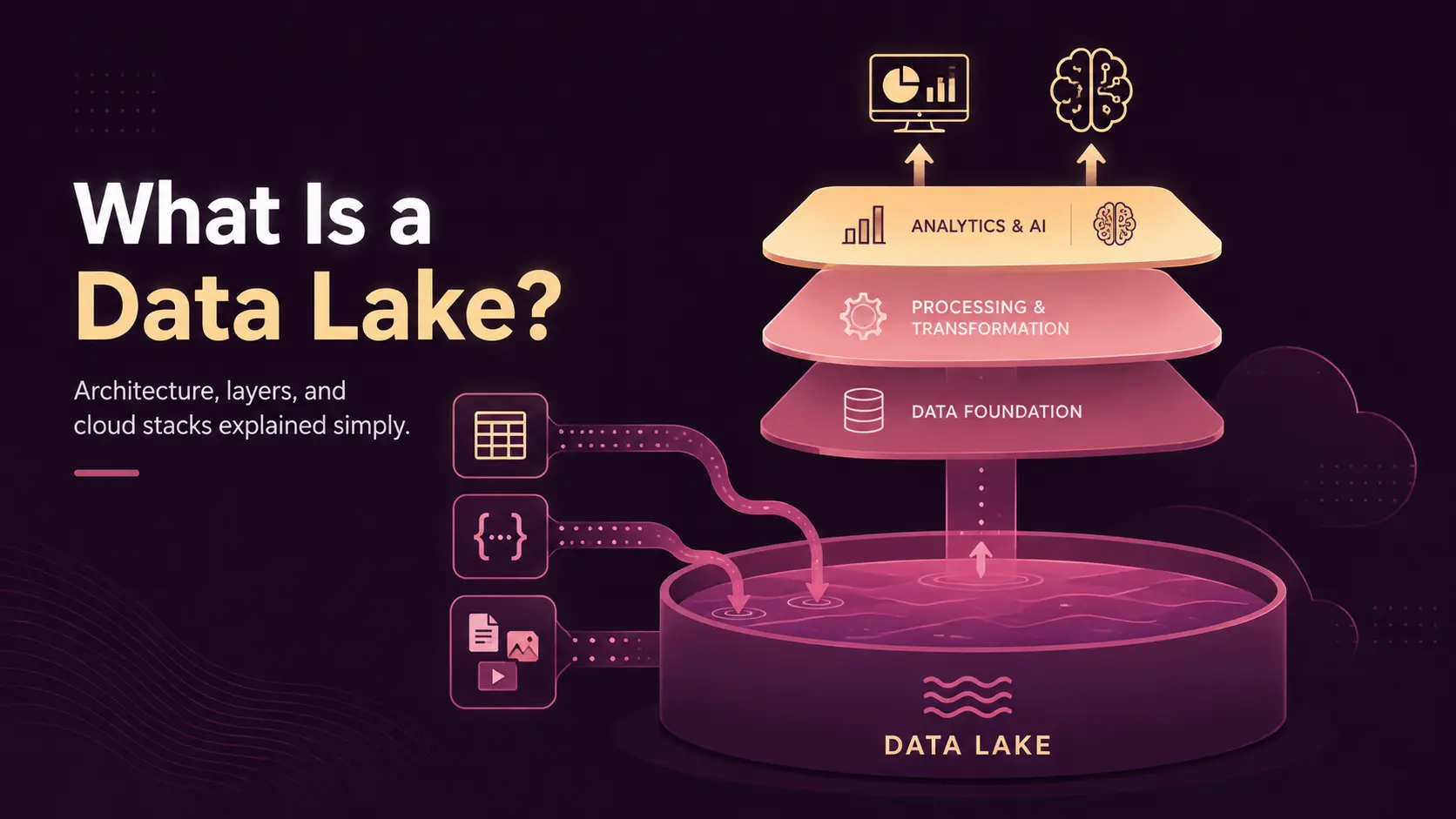
A data lake is a centralized storage architecture that holds large volumes of structured, semi-structured, and unstructured data in one scalable environment, so teams can process and analyze it later. Storage is the part that takes an afternoon. The labels, the owners, and the access rules are the part that takes a quarter.
This article explains what a data lake is, how data lake architecture works layer by layer, and how a lake differs from a database, a warehouse, and a lakehouse.
What is a Data Lake?
A data lake is a centralized repository that stores data in its native format, at a very large scale. Storage, shape, and timing are the three things the definition covers.
Storage: A data lake usually sits on cloud object storage, which separates storage costs from compute costs. You pay to keep the files, then pay again only when an engine reads them.
Shape: The same lake can hold a Postgres table export, a JSON event stream, and a folder of scanned invoices. This lets a lake accommodate many different types of data in one place.
Timing: A warehouse applies a schema when data is written, while a lake usually applies one when data is read. Applying it on read is called schema-on-read, and it trades discipline for flexibility.
This flexibility also means a data lake doesn’t have to contain only raw data. Most production lakes keep raw, cleaned, and curated copies side by side, often labeled bronze, silver, and gold.
Why Use a Data Lake?
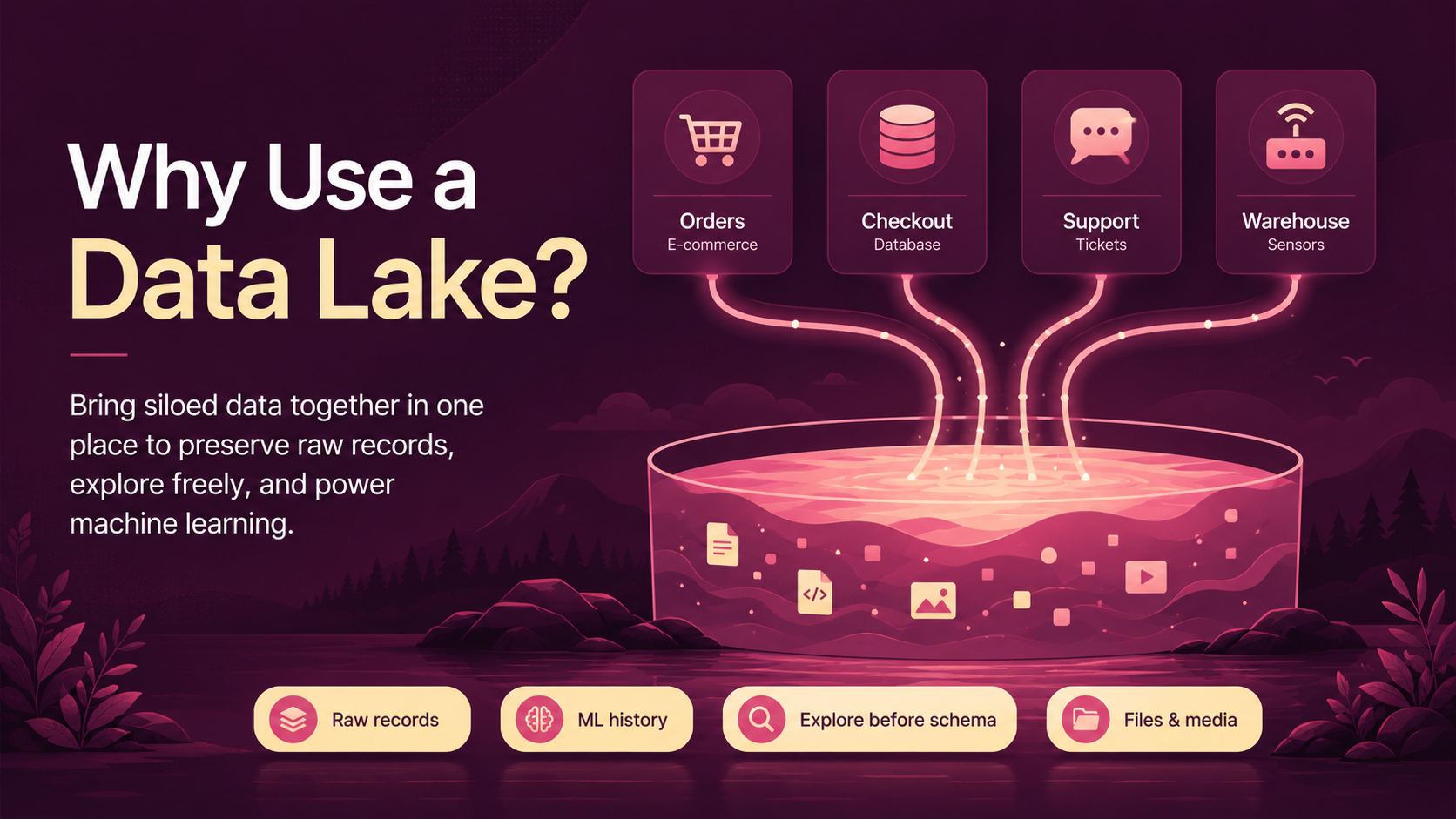
The reason to use a data lake is to bring together data that separate systems keep apart. Take a mid-size retailer. Orders sit in Shopify and in the Postgres database behind the checkout. Support tickets sit in Zendesk. Warehouse sensors write readings to a server nobody queries.
No shared customer key joins the four systems, so a question about repeat buyers takes three days to answer. A data lake gives each system a landing zone inside the same storage account.
So, why use a data lake instead of loading everything straight into a warehouse? Four reasons come up most often.
- Preserving Raw Records: Auditors and reprocessing jobs both need the original file, not a cleaned version of it.
- Feeding Machine Learning: Model training needs history, and history costs far less to keep in object storage than in a warehouse.
- Supporting Exploration: Analysts can query new data before anyone has agreed on a schema for it.
- Holding Non-Tabular Data: Contracts, call recordings, and product photos have no natural home in a relational table.
Feeding machine learning is the reason that grows the fastest. A model trained on five years of raw events needs storage a warehouse would price out of reach for most businesses.
How Does a Data Lake Work?
A data lake works as a pipeline, not as a folder. Data passes through the same stages every time, and the retailer’s four systems show the sequence.
Sources are the systems that create the data. For the retailer, they are Shopify, the Postgres orders database, Zendesk, and a fleet of warehouse sensors. Ingestion then moves the data in through one of three modes. Batch copies whole files on a schedule, streaming writes events as they happen, and change data capture replicates row-level changes out of a database.
Storage then holds the landed files. Processing turns them into usable tables, where a Spark or SQL engine deduplicates records and repairs broken types. The same job writes a curated dataset back inside scheduled data pipelines.
The catalog and governance stages make the result findable and safe. A catalog records what each dataset contains, and access controls decide who may read it. The value shows up at consumption, since one curated table can feed a BI dashboard, a churn model, and a retrieval system behind an AI assistant. Each stage becomes a named layer once you draw the architecture.
Data Lake Architecture
Data lake architecture is the layered design that turns object storage into a working platform. A data lake reference architecture names each of the seven layers and defines what passes to the next.
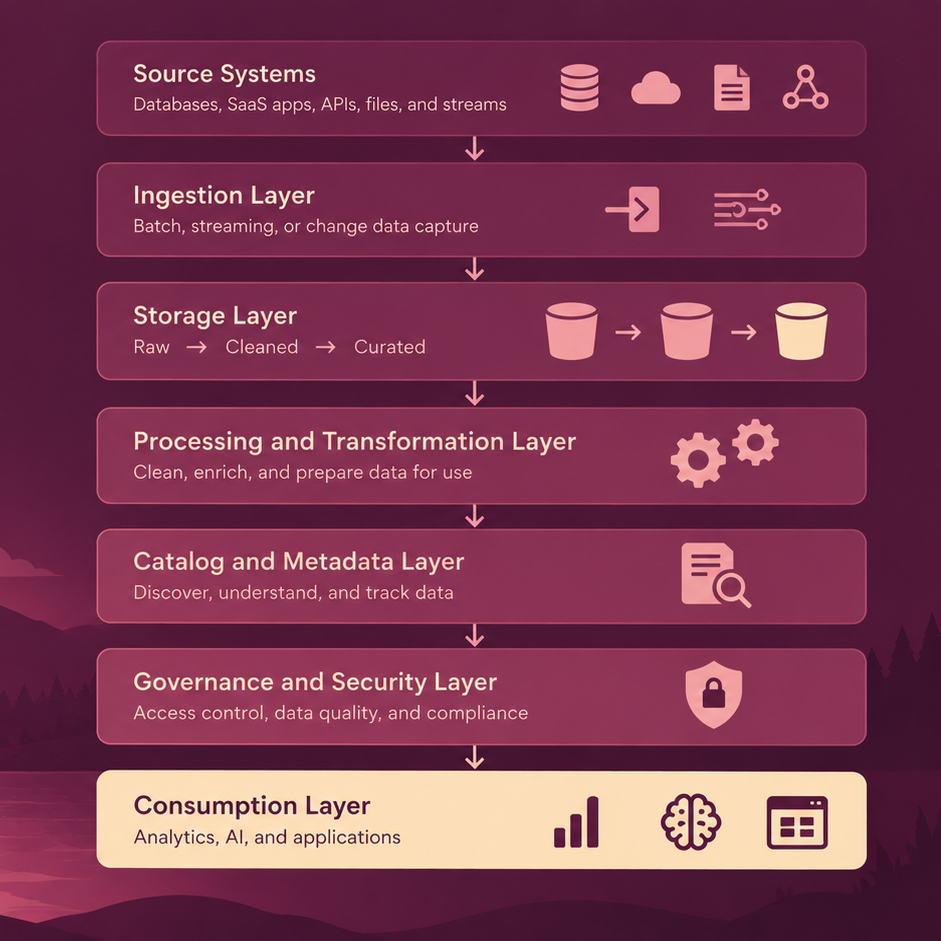
The data lake architecture diagram above shows the shape in its simplest form. Real deployments add orchestration and monitoring across every layer, since one failed schedule becomes a stale number in a dashboard.
Two data lake design principles matter more than the tooling. First, separate storage from compute so each scales on its own budget. Second, keep the raw zone immutable so you can always rebuild the layers above it.
Data Lake Architecture Layers
Each layer solves one problem, but the data lake architecture layers only work as a set.
- Source Layer: Databases, SaaS apps, APIs, log files, and IoT devices create the data.
- Ingestion Layer: Connectors and pipelines move data into storage, in batch or in real time.
- Storage Layer: Object storage holds every file, usually split into raw, cleaned, and curated zones.
- Processing and Transformation Layer: Engines, such as Spark or Trino, clean, join, and aggregate the data that analysts query.
- Catalog and Metadata Layer: The catalog tracks schemas, owners, lineage, and table statistics. Without it, nobody can find a dataset or trust the one they find.
- Governance and Security Layer: Access policies, encryption, retention rules, and privacy controls live here. Row-level and column-level permissions belong at this layer, not inside each tool.
- Consumption Layer: Analytics tools, notebooks, training jobs, and applications read from the curated zone.
The layers pass responsibility downward. Weak metadata makes the consumption layer useless even when storage and processing work perfectly.
Data Lake Components
The components of a data lake are the working parts inside the layers above. The table below maps each component to the job it does.
|
Component |
Purpose |
|
Data Sources |
Systems that produce the raw data |
|
Ingestion Tools |
Move batch and streaming data into storage |
|
Object Storage |
Holds files at petabyte scale |
|
Processing Engines |
Clean, transform, and join datasets |
|
Metadata Catalog |
Records schemas, owners, and lineage |
|
Data Quality Checks |
Validate freshness, volume, and values |
|
Security Controls |
Encrypt data and enforce access rules |
|
Governance Policies |
Set retention, privacy, and ownership rules |
|
Orchestration |
Schedules and sequences pipeline jobs |
|
Monitoring |
Tracks job failures and storage costs |
|
Analytics Tools |
Serve dashboards and ad hoc queries |
|
AI and ML Tools |
Train models and serve features |
Orchestration and pipeline monitoring are the two components teams cut first. Both come back later as unexplained gaps in the data.
What Types of Data Go Into a Data Lake?
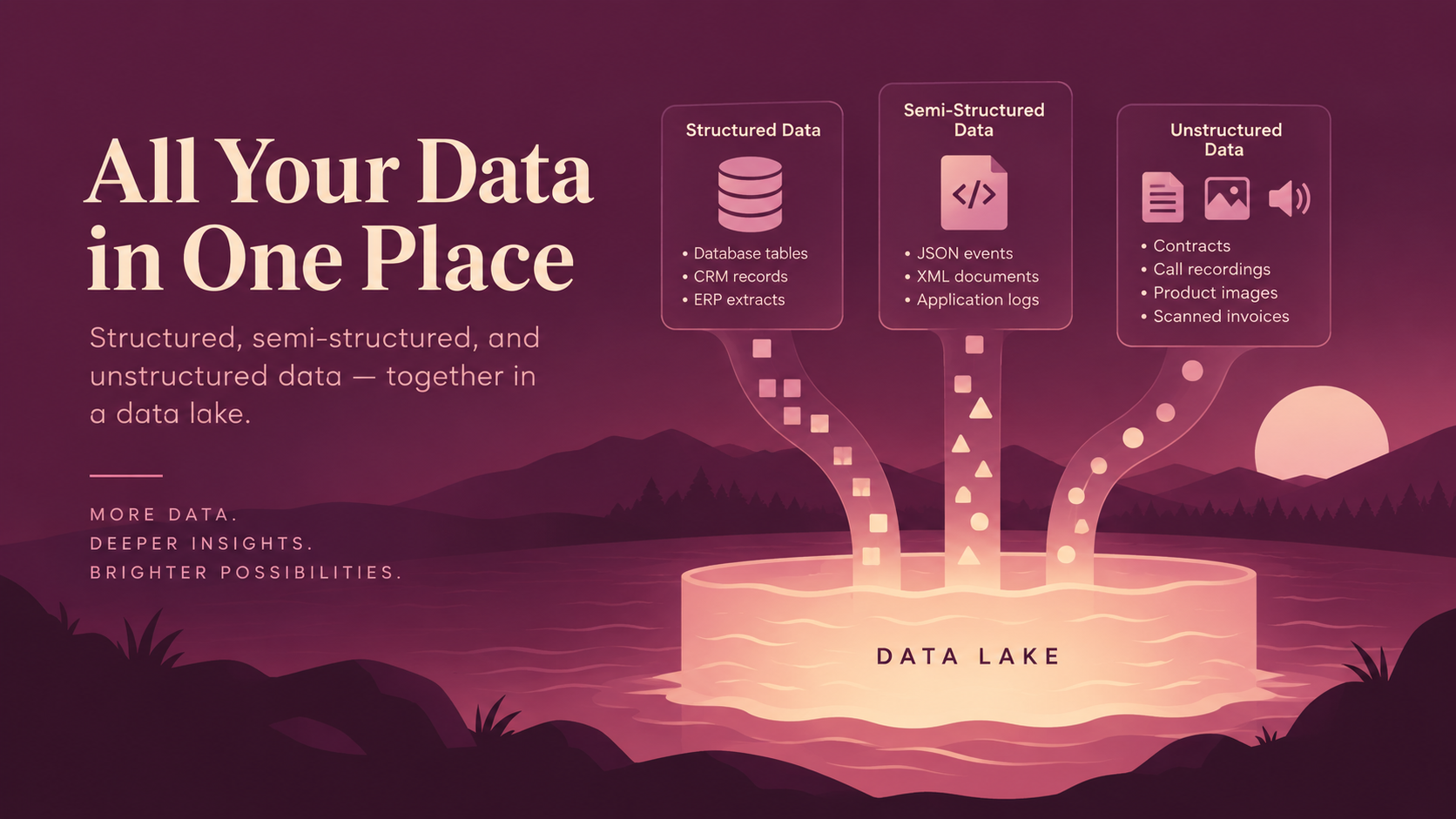
A data lake accepts three broad types of data, and handling all three in one place is why teams choose it.
1. Structured Data
- Arrives in rows and columns
- Follows a predefined schema
- Common examples:
- Database tables
- CRM records
- ERP extracts
2. Semi-Structured Data
- Carries its own schema within the file
- Has some internal organization through keys, tags, or metadata
- Common examples:
- JSON events
- XML documents
- Application logs
3. Unstructured Data
- Does not follow a predefined tabular schema
- Common examples:
- Contracts
- Support call recordings
- Product images
- Scanned invoices
- Turning these files into usable rows and fields is a data extraction problem, involving techniques such as OCR, speech recognition, and document processing.
A relational database would accept the first type and reject the other two. Our retailer needs all three to answer one question about churn, because part of the answer sits in order tables and part in support call transcripts.
Data Lake File Formats
Data lake file formats decide how fast and how cheaply you read back what you stored. Five formats cover most of what you’ll meet.
- CSV: Plain text, readable everywhere, poorly compressed. It suits landing zones rather than analytics.
- JSON: Handles nested records well and dominates API and event data. Engines read it slowly compared to columnar formats.
- Avro: Compact binary rows that carry their own schema. It suits streaming ingestion and schema evolution.
- Parquet: Stores data by column instead of by row. Apache Parquet compresses well and lets an engine read only the columns a query needs.
- ORC: The other columnar option, common in Hive and Spark environments.
Above the file layer sit open table formats such as Apache Iceberg, Delta Lake, and Apache Hudi. These table formats add transactions, schema evolution, and time travel on top of Parquet files, so a folder behaves like a real table. A table format is not a file format, and a lake usually needs both.
What is a Modern Data Lake Architecture?
Modern data lake architecture differs from the Hadoop-era version at the table layer. Early lakes wrote Parquet files into HDFS and hoped nobody needed to update a row. Current designs put an open table format over cloud object storage, which brings transactions and schema evolution to the same files. Six things define a modern data lake technology stack.
- Cloud Object Storage: Amazon S3, Azure Data Lake Storage, or Google Cloud Storage replaces on-premises HDFS clusters.
- Open Table Formats: Iceberg or Delta Lake gives plain files ACID guarantees and time travel.
- A Central Catalog: One catalog serves every engine, instead of one metastore per tool.
- Declarative Pipelines: Transformation code lives in version control and runs on a schedule.
- Built-In Quality Checks: Tests run inside the pipeline rather than in a spreadsheet afterward.
- Streaming and AI Paths: Event data and model training read the same governed tables.
No single vendor owns the definition of a modern data lake. The pattern above turns up across AWS, Azure, Google Cloud, and Databricks under different names. That’s why a modern data architecture review starts with the layers rather than the logos.
Cloud Data Lake Architecture on AWS, Azure, Google Cloud, and Databricks
Cloud data lake architecture follows the same layers everywhere. Only the product names change. Each provider offers object storage, a catalog, a processing engine, a governance service, and a query layer. Some merge the catalog and the governance service into one product.
The four stacks below name the five parts in the same order, and each one is a common example rather than the only official design.
AWS Data Lake Architecture
An AWS data lake reference architecture takes this shape.
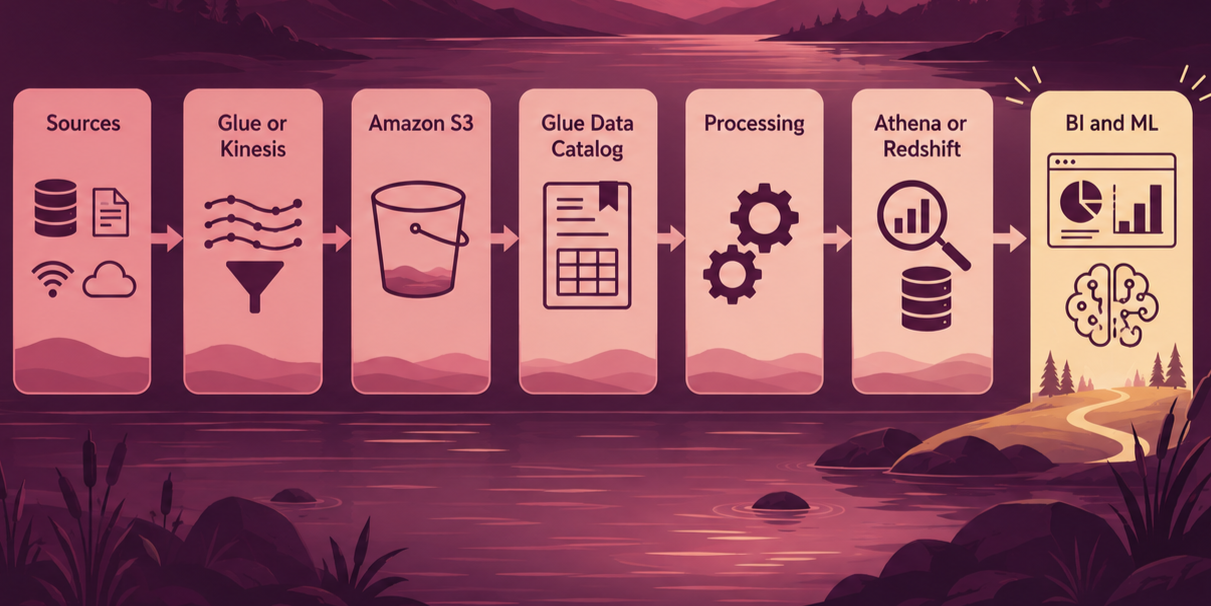
Amazon S3 holds the files, and AWS guidance describes organizing them into raw, processed, and curated zones. The Glue Data Catalog stores schemas and turns folders into logical tables. Glue and EMR run the processing jobs. Lake Formation applies permissions on top of the Glue catalog, down to row and column level.
Athena queries the data in place with SQL, and Redshift handles modeled warehouse workloads. AWS now groups these services under its SageMaker lakehouse architecture, which also covers S3 Tables, an Iceberg-native bucket type.
Azure Data Lake Architecture
Azure Data Lake Storage is not a separate service. Microsoft implements it as capabilities on Blob Storage, switched on through the hierarchical namespace setting. Microsoft Purview catalogs the datasets and applies governance policies across them. Azure Data Factory handles ingestion, while Databricks or Synapse Spark takes care of the processing. Synapse serverless SQL pools answer queries over the files without moving them first.
Microsoft Fabric absorbs most of the services above into one product, which changes the shape of an Azure data lake reference architecture. Every Fabric tenant gets OneLake, a single logical lake built on ADLS Gen2. OneLake shortcuts point at existing storage in ADLS Gen2, Amazon S3, or Google Cloud Storage without copying the files. Microsoft has moved new feature work to Fabric, so Synapse-based designs are worth reviewing at renewal time.
Google Cloud Data Lake Architecture
Google Cloud Storage holds the files. Knowledge Catalog records the schemas and applies governance across them. Processing splits two ways, since Dataflow runs streaming pipelines and Dataproc runs managed Spark. BigQuery serves as the query and warehouse layer.
Two product names changed in 2026. Google renamed Dataplex Universal Catalog to Knowledge Catalog on April 10, 2026, before changing BigLake to Lakehouse for Apache Iceberg on April 20. The APIs, client libraries, and CLI commands kept their old names.
Databricks Data Lake Architecture
Databricks builds on the same cloud object storage and adds its own table and governance layers. Delta Lake is the recommended table format, though Databricks also supports Iceberg reads through UniForm. Pipelines usually run as Lakeflow or Spark jobs.
The medallion pattern of bronze, silver, and gold tables organizes the zones. Unity Catalog governs tables, models, notebooks, and files under one permission model across AWS, Azure, and Google Cloud. Databricks SQL warehouses serve the query layer.
All in all, no provider is universally best. The right choice usually follows the cloud your applications already run in. Moving a lake between clouds is a data migration project in its own right.
Data Lake vs Database
Is a data lake a database? No. A data lake and a database solve different problems, and one usually feeds the other.
|
Factor |
Data Lake |
Database |
|
Primary Purpose |
Large-scale storage and analytics |
Running applications and transactions |
|
Data Types |
Structured, semi-structured, unstructured |
Mostly structured |
|
Schema Approach |
Usually applied on read |
Defined before data is written |
|
Typical Workload |
Analytics, AI, batch processing |
Reads and writes per transaction |
|
Scale |
Petabytes |
Gigabytes to terabytes |
|
Latency |
Seconds to minutes |
Milliseconds |
The retailer’s Postgres database is a source for the lake, not a rival to it. A change data capture pipeline copies each row change into the raw zone while the database keeps serving the checkout page.
Data Lake vs Data Warehouse
A data lake stores data in open formats for many future uses, while a data warehouse stores modeled tables for known reporting questions. Both belong in most serious data platforms.
|
Factor |
Data Lake |
Data Warehouse |
|
Data |
Raw and processed |
Usually curated |
|
Structure |
Flexible |
Modeled in advance |
|
Schema |
Often schema-on-read |
Usually schema-on-write |
|
Primary Use |
Analytics, AI, exploration |
BI and reporting |
|
Data Types |
Broad |
Mostly structured |
|
Typical Users |
Data engineers and data scientists |
Analysts and BI teams |
|
Cost Profile |
Cheap storage, pay per query |
Expensive storage, tuned compute |
In most platforms, the lake and the warehouse run in sequence rather than in competition.
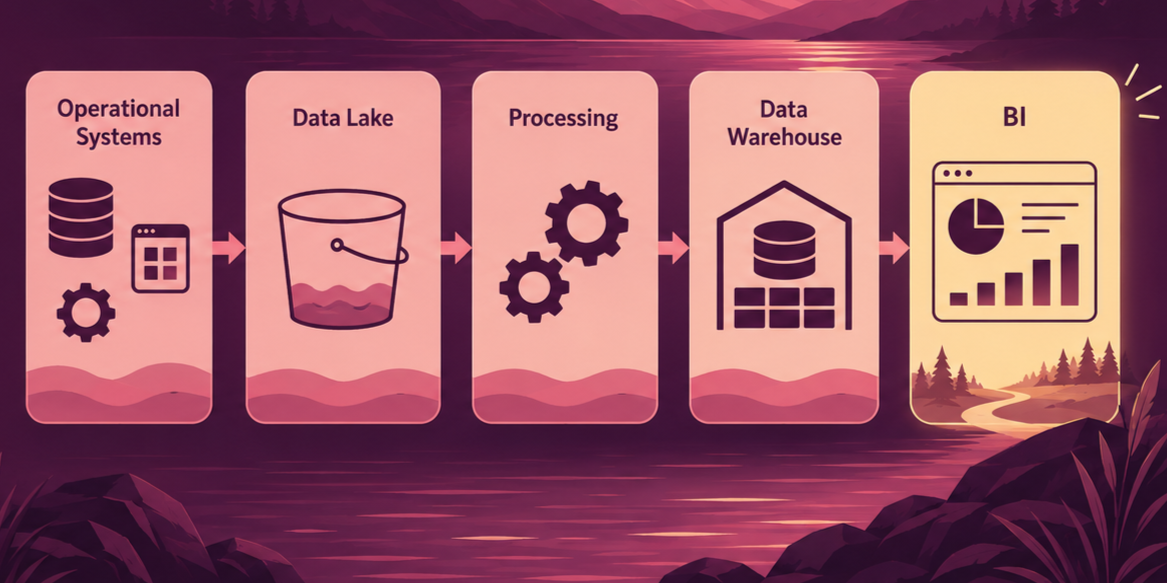
Raw events land in the lake, and processing jobs clean and conform them. Only the modeled result loads into the warehouse, which keeps warehouse storage small and queries fast. Data science and AI teams read from the lake directly, since they need the detail the warehouse drops.
Data Lake vs Lakehouse
A lakehouse is a data lake with warehouse features added at the table layer, not a second system underneath it. The files stay in the same object storage, and an open table format, such as Iceberg or Delta Lake, sits over the files and supplies transactions, schema enforcement, and time travel.
|
Factor |
Data Lake |
Lakehouse |
|
Storage |
Cloud object storage |
The same cloud object storage |
|
Table Layer |
Files and folders |
Open table format over the files |
|
Transactions |
None |
ACID writes and updates |
|
Schema Changes |
Handled by whatever reads the file |
Tracked by the table format |
|
Row Updates |
Rewrite the file |
Update in place |
|
Typical Users |
Data engineers and data scientists |
Engineers, scientists, and BI teams |
Most teams reach a lakehouse by upgrading a lake rather than by replacing it. You register the existing Parquet files as Iceberg or Delta tables, then point the same engines at them. The medallion pattern in the Databricks stack above is the lakehouse version of raw, cleaned, and curated zones.
Data Lake vs Big Data
Big data and data lake describe different things, and the two terms get swapped constantly. Big data describes properties of the data itself, such as volume, variety, and speed of arrival. A data lake describes an architecture for storing it. A lake holding 50 GB of tidy CSV files is still a data lake, and a big-data workload can run without one.
The overlap is real, though. Volume drives teams to object storage, because a warehouse costs more per terabyte. Variety drives them to schema-on-read. Most big-data workloads end up on a lake for practical reasons rather than definitional ones.
Benefits of a Data Lake
The benefits of a data lake come from architecture and governance, never from storage alone. A lake with no catalog delivers none of the advantages below.
- Scalable Storage: Object storage grows into petabytes with no capacity planning exercise.
- One Home for Every Format: Tables, logs, images, and audio sit in the same environment.
- Cheaper History: Five years of raw events cost far less in object storage than in a warehouse.
- Support for AI and Machine Learning: Training sets need raw detail, and the lake is where the detail survives.
- Faster Experiments: Analysts query new data in days instead of waiting for a modeling project.
- Fewer Silos: One access point replaces four separate export requests.
NOTE: Fewer silos is the benefit executives notice first. Cheaper history is the one that pays for the project.
Data Lake Challenges and the Data Swamp Problem
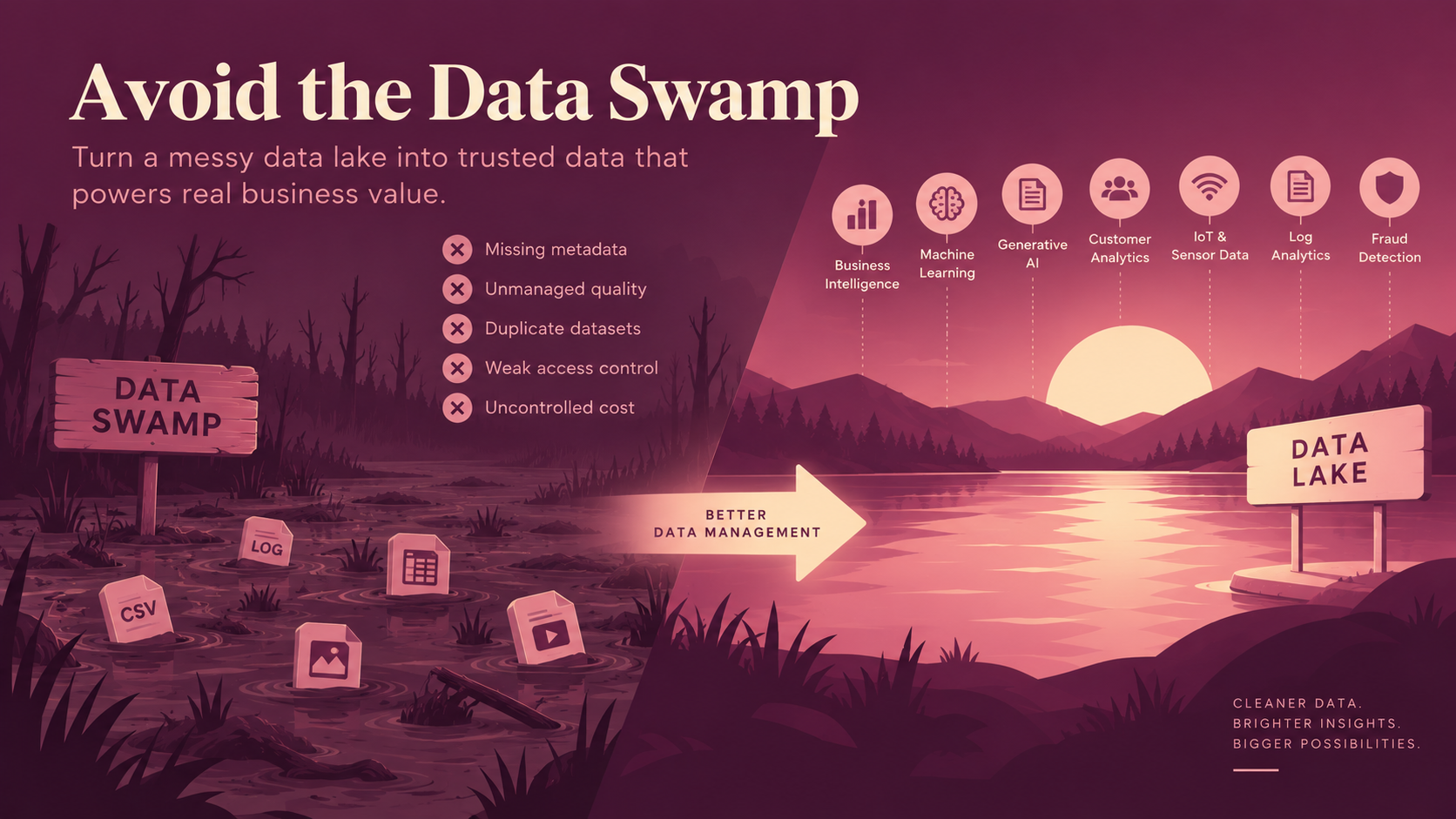
A data swamp is a data lake nobody can use. The files are all there, the catalog is empty, and no one knows which of the four customer tables is correct. Five problems create swamps.
- Missing Metadata: With no catalog, discovery falls back on tribal knowledge and Slack messages.
- Unmanaged Quality: Nothing rejects a broken file, so bad records spread into every model downstream.
- Duplicate Datasets: Three teams land the same source separately, and each copy drifts.
- Weak Access Control: Personal data lands in a shared bucket that half the company can read.
- Uncontrolled Cost: Abandoned pipelines and unpartitioned scans quietly raise the bill.
Ongoing data management is the difference between a lake and a swamp. A regular data lake testing routine catches most of the issues before your users do.
Data Lake Use Cases
Data lake use cases share one condition. The question needs more data than a warehouse would keep.
- Business Intelligence: Central storage feeds dashboards that would otherwise pull from five systems.
- Machine Learning: Training sets get built from raw historical events instead of aggregated summaries.
- Generative AI: Documents and transcripts get chunked and indexed for generative AI assistants.
- Customer Analytics: Order, support, and web behavior data join on one customer key.
- IoT and Sensor Data: High-frequency readings land cheaply and get downsampled later.
- Log Analytics: Application and infrastructure logs stay queryable for months rather than days.
- Fraud Detection: Transaction records join behavioral signals a warehouse would not retain.
Machine learning and generative AI make the heaviest demands on the list above. A data lake matters for AI because model quality depends on the details summaries throw away. Storing the detail doesn’t make it AI-ready, though.
An AI integration project still needs pipelines that refresh features on a schedule. Lineage has to show where each training set came from, and access rules have to keep personal data out of prompts.
When Should You Use a Data Lake?
A data lake earns its cost when several of the conditions below hold at once.
- Many Source Systems: Data arrives from applications, SaaS tools, files, and streams.
- Mixed Data Types: Some of the useful data is not tabular.
- Raw Retention Matters: Audit, reprocessing, or regulation requires the original record.
- AI or ML on the Roadmap: Model work needs history and detail.
- Unclear Future Questions: You want to land data before agreeing on a model for it.
A different architecture fits better in the opposite cases. Small structured reporting workloads run fine on a warehouse alone, and transactional applications belong on a database. Teams with no capacity for governance should start with a warehouse, because an ungoverned lake turns into a swamp inside a year.
Data Lake Strategy and How to Build a Data Lake?
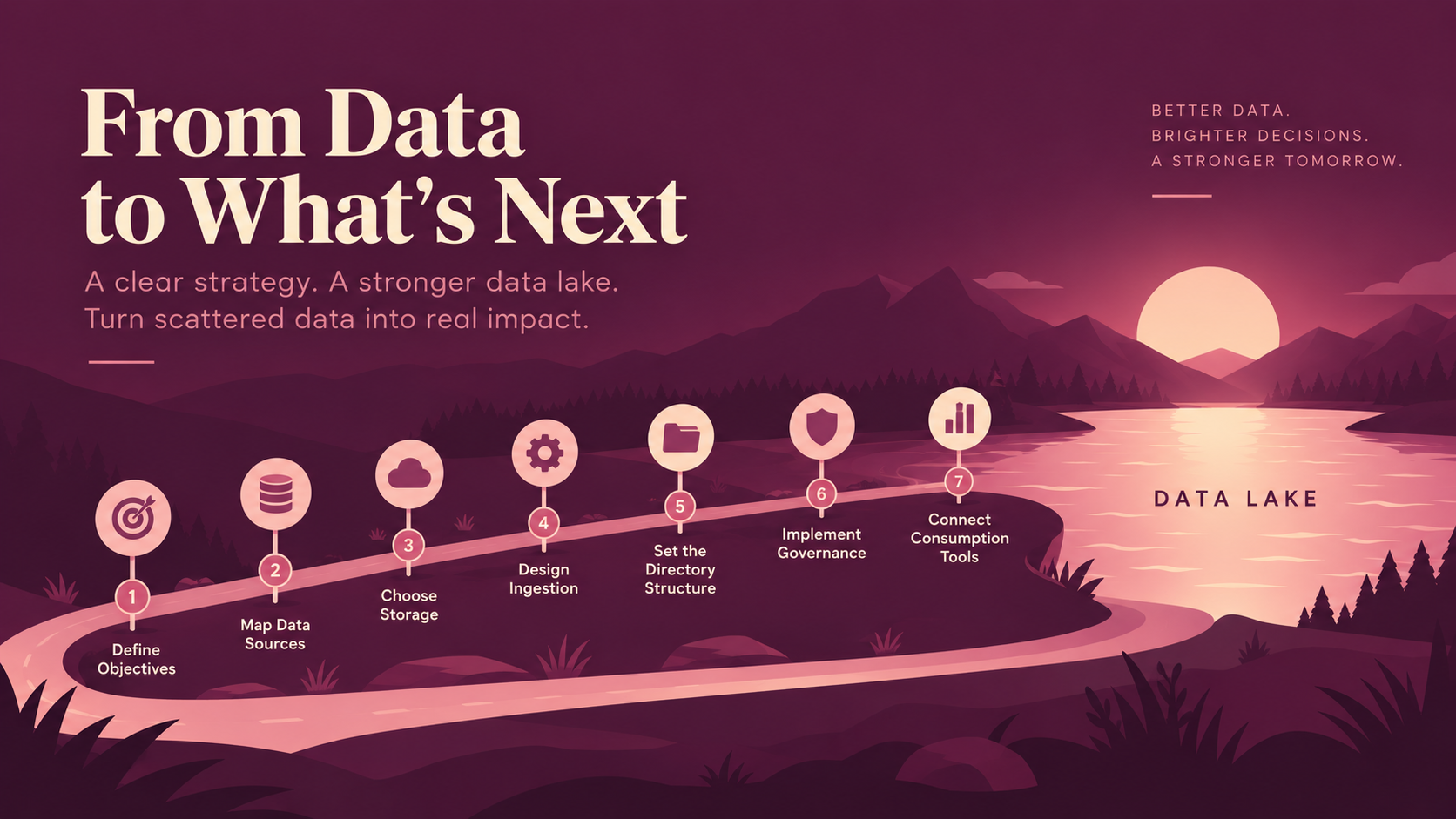
A data lake strategy answers what the lake is for before anyone provisions a bucket. Most of it is data engineering rather than procurement. Seven steps take it from decision to production.
- Define Objectives: Name the business questions the lake must answer. “Churn prediction and daily revenue reporting” is a scope. “Store all our data” is not.
- Map Data Sources: List every database, SaaS app, API, file drop, and stream. Record volume, update frequency, and owner for each, since data integration work scales with the list.
- Choose Storage: Compare cost per terabyte, regional availability, and the engines that can read the format you plan to write.
- Design Ingestion: Decide per source whether batch, streaming, or change data capture fits. A cheap batch beats an unnecessary stream.
- Set the Directory Structure: Agree on naming conventions, partition keys, and zone boundaries up front. A data lake file structure is hard to change once pipelines depend on it.
- Implement Governance: Assign owners, write access policies, and define quality thresholds before the first analyst arrives.
- Connect Consumption Tools: Point BI, notebooks, and ML platforms at the curated zone, never at the raw zone.
Governance is the step teams postpone and the step that decides the outcome. A lake with no owners and no access policies still works on day one, and nobody trusts it by the time the first audit lands.
Conclusion
A data lake is an architecture for storing large volumes of diverse data, so teams can use it for analytics, AI, machine learning, and applications. Storage is the cheap part, but a working data lake needs all of this:
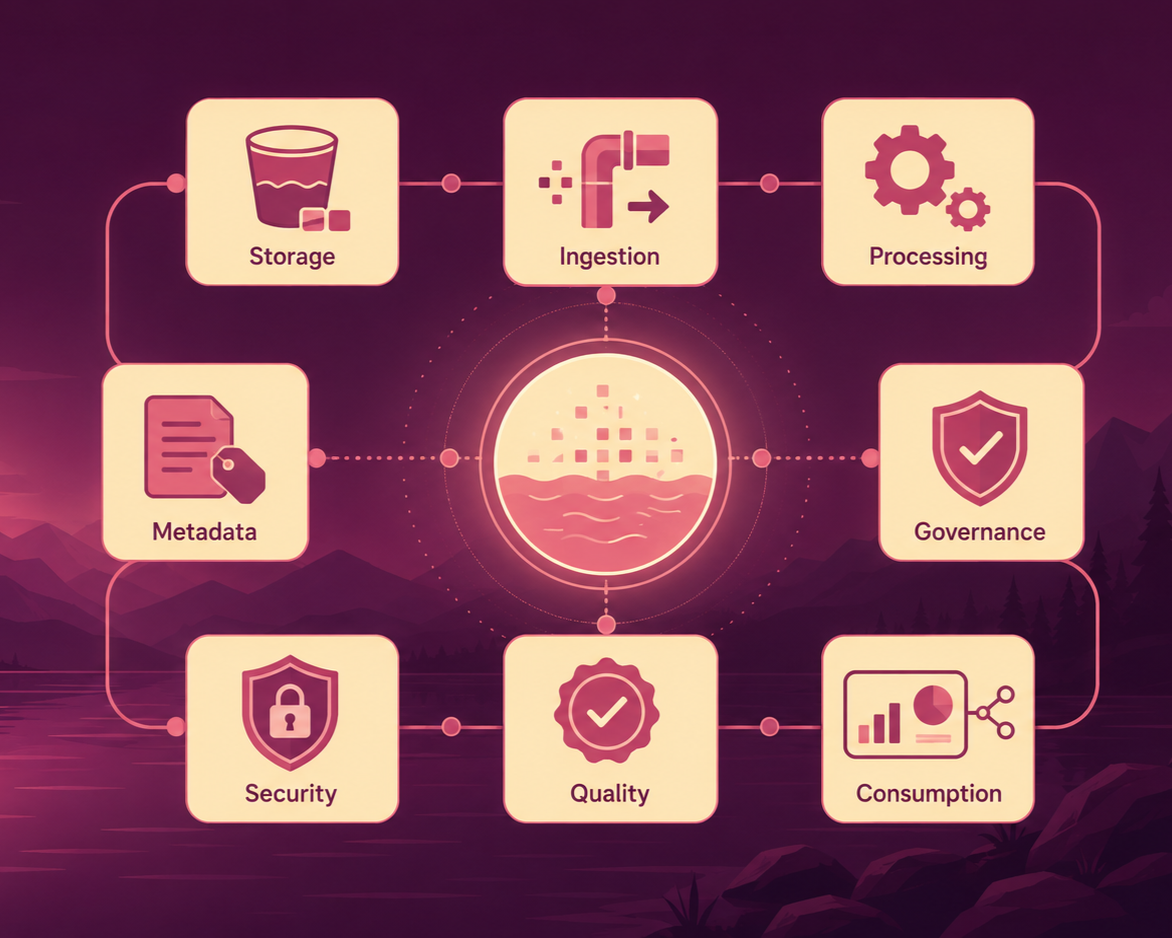
Drop any one term from the line above and the lake degrades. Drop metadata, and nobody finds anything. Drop quality, and every model inherits the errors.
Everything above assumes someone owns the design. Most lakes fail on metadata and governance rather than on storage. By the time the symptom reaches a dashboard, several pipelines already depend on the layout.
Data Prism designs, builds, and modernizes data lake environments across AWS, Azure, Google Cloud, and Databricks. We’re happy to look at your setup on a free 30-minute call and tell you which layer needs attention first.
Book a Free 30-Minute Meeting
Discover how our services can support your goals — no strings attached. Schedule your free 30-minute consultation today and let's explore the possibilities.
Book a Free Call