

Introduction
In mid-January 2025, ZoomInfo began a one-month pilot of the AI sales development rep (SDR) sold by the startup 11x. ZoomInfo, a seller of rival sales automation tools, later stated the 11x product “performed significantly worse” than ZoomInfo’s own SDRs.
ZoomInfo didn’t move forward after the pilot. In interviews with TechCrunch, former 11x employees said customers had to check the AI’s work themselves. However, 11x disputed parts of the TechCrunch report.
The safer way to automate your sales process with AI starts with a map of each sales stage. AI then goes only where a task needs judgment. Every AI action gets an approval step until the AI earns trust.
This article explains which sales tasks to hand to AI, how to build and test a lead routing workflow, and how to keep control of AI agents.
What is AI Sales Automation Software?
AI sales automation software uses AI models to handle sales tasks needing judgment, such as scoring a lead or drafting a follow-up email. The CRM stores the records. Fixed rules move the records from stage to stage. AI handles the reading and writing reps used to do themselves.
Some of this software sits inside the CRM, such as Salesforce Agentforce and HubSpot’s Breeze agents. Other products connect from outside through an API. Either way, a sales stack has three layers, and the table shows each layer’s job. Pairing AI models with fixed rules this way is a form of intelligent automation.
|
Layer |
What the Layer Does |
Example |
|---|---|---|
|
CRM Functions |
Stores contacts, accounts, deals, and activity |
A deal record in Salesforce or HubSpot |
|
Rule-Based Workflow Automation |
Moves records when a fixed condition is met |
Assign every Texas lead to the Dallas team |
|
AI Capabilities |
Classifies, summarizes, or drafts where rules can’t decide |
Tag a form message as a pricing question |
What is Workflow Automation in CRM, and Where Does AI Fit?
Workflow automation in CRM is a set of rules telling the CRM what to do when a record changes. Each rule has a trigger, a condition, and an action. For example, a new lead from a company with more than 200 staff goes to the enterprise team.
AI fits the conditions a field check can’t answer, such as what a free-text message means. Most CRM workflows need AI at only one or two of these steps, where a person used to read a message and decide. Every other step runs faster as a plain rule and is easier to audit.
Good AI CRM automation keeps the AI to these few steps, and the rest of the CRM sales process automation stays rule-based. The inquiry example below shows a full build, tested on sample leads.
Which Sales Tasks Can AI Automate?
AI can automate enrichment, lead scoring, follow-up drafts, call summaries, and account research. Rules should handle lead capture, routing, and most field updates. The table sorts common sales tasks by owner, example tools, and review level.
|
Sales Task |
Rule or AI |
Example Tools |
Human Review |
|---|---|---|---|
|
Lead Capture |
Rule |
HubSpot workflows, Salesforce Flow |
No |
|
Deduplication |
Rule first, AI for fuzzy matches |
Built-in CRM duplicate rules |
Only for uncertain merges |
|
Enrichment |
Data provider plus an AI summary |
Clay, Apollo, ZoomInfo |
Spot checks |
|
Lead Qualification and Scoring |
AI |
Built-in CRM scoring, such as Einstein Lead Scoring |
Yes, until accuracy is proven |
|
Follow-Up Email Drafts |
AI |
Breeze Assistant, Agentforce, Outreach |
Yes, before sending |
|
Call Summaries |
AI |
Gong, Avoma, Fireflies |
Rep confirms next steps |
|
CRM Field Updates |
Rule, or an AI suggestion |
CRM workflows, call tools with CRM sync |
Rep approves AI suggestions |
|
Account Research |
AI |
Claude or ChatGPT through MCP, Clay |
Rep reads the brief before the call |
The tool names are examples in no particular order. Check the CRM’s built-in features before buying anything.
Account research is where AI sales intelligence tools earn their keep. The tools pull company news and hiring signals into a one-page brief before a call.
Call summaries are the safest place to start. A wrong summary costs a rep a minute to fix, while a wrong email to a buyer can cost the deal.
How to Automate Your Sales Process with AI, Step by Step
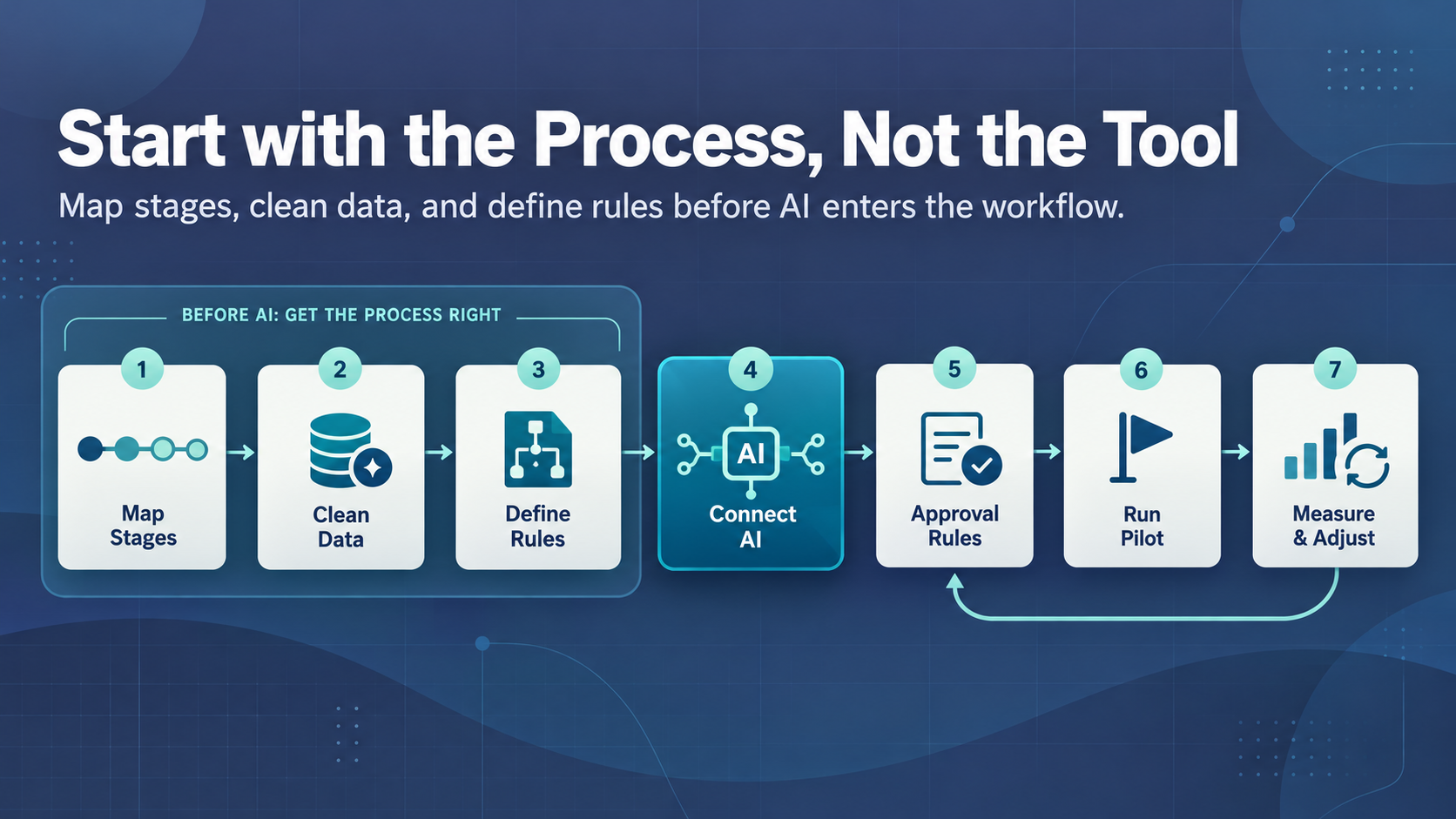
Automating a sales process with AI takes seven steps, starting with the process and ending with measurement. A tool demo is the wrong place to start. Each step depends on the one before, and skipping ahead usually shows up later as bad data or annoyed buyers.
- Map your sales stages. Write down every stage from first touch to closed deal. Then, give each stage an owner and exit criteria. The finished stage map doubles as an AI roadmap, showing which steps repeat often enough to automate.
- Clean the CRM data. Merge duplicates, fill required fields, and archive dead records.
- Define triggers and rules. Decide which events start a workflow, then write the routing rules as plain if-then statements.
- Connect AI tools to the CRM. Give each tool access only to the fields the task needs. External tools connect through API integration with a dedicated user account.
- Set approval rules. List the actions the AI may take alone and the actions needing a person’s approval.
- Run a pilot. Test the new workflow with one team or one lead source for four to six weeks, next to the old process.
- Measure and adjust. Track response time, CRM completeness, and qualification accuracy every week.
Where to Start Based on Team Size
Team size changes the right first step more than the choice of CRM does. A five-person team gains most from cutting admin work, while a large team needs consistent routing and tight control over agents. The table gives a starting point for each size.
|
Team Size |
Start With |
Add Next |
Hold Off On |
|---|---|---|---|
|
Under 10 Reps |
Call summaries synced to the CRM |
Inbound routing with built-in workflows |
AI SDR tools and custom builds |
|
10 to 50 Reps |
Inbound routing plus AI scoring with a review band |
Enrichment and drafted follow-ups |
Fully autonomous outbound |
|
Over 50 Reps |
Native CRM agents under their own user accounts |
Read-only MCP access and custom agents |
Write access without event logs |
At every size, autonomous outbound comes last, after scoring and routing run cleanly for a full quarter.
AI Sales Automation Workflow Example: Inquiry to Sales Handoff
A worked example shows how to design an AI workflow able to enrich inbound leads and route each one into the CRM automatically. The example company is a B2B software firm using HubSpot, with about 400 demo requests a month. The sales ops team builds the workflow on Make, Zapier, or n8n without custom code. The goal is for no lead to wait an hour for an owner.
- Create four custom fields on the lead record. They are named AI Intent, AI Fit Score, AI Reason, and AI Review Needed.
- Trigger the workflow on each new demo form submission, and let a rule create or update the lead record.
- Add a rule checking the email domain. Send free domains such as Gmail to a nurture list with a self-serve demo link.
- Add the data provider to fill in company size and industry. If the provider finds no match, keep the typed fields and set AI Review Needed to yes.
- Add the AI step with the prompt below, and map the answers into the four custom fields. If the output fails to parse, set AI Review Needed to yes.
- Route scores above 60 to the territory’s account executive by round-robin. Send scores from 40 to 60, plus every flagged lead, to an SDR, and scores below 40 to nurture.
- Alert the owner in Slack and create a CRM task showing the score and reason. Escalate any task left untouched for 45 minutes to the sales manager.
- Save the raw AI output as a note on the record for the weekly review.
The enrichment step and the AI step both have fallbacks, so a lead never stalls on a vague answer. Most AI workflow automation for sales teams follows the same pattern. AI reads the input, and rules decide where the lead goes.
Data Prism built and ran this workflow before publishing the guide. The build used Python, a SQLite lead database, and 12 test demo requests. Each request covered a different branch of the workflow, such as a Gmail address, an enrichment miss, or a one-word message.
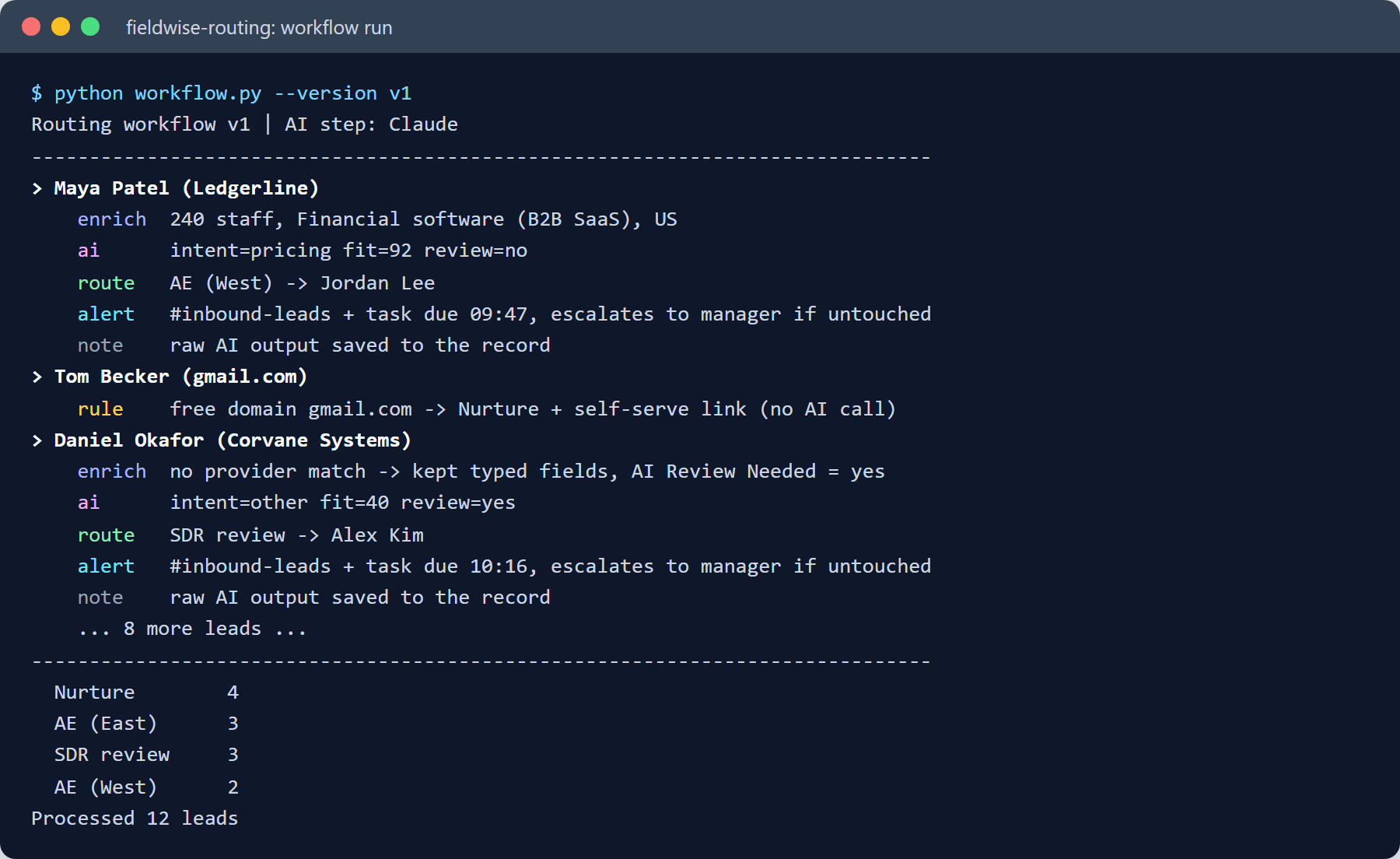
Only 10 of the 12 leads reached the model, because the domain rule removed the two free-email requests first. The run ended with four leads in nurture, five with account executives, and three in SDR review.
The AI Step: Prompt and Output Fields
The AI step does one job and returns four structured fields. Structured output lets plain rules act on the answer without a person reading the reply. The review flag matters most, because the model gets an explicit way to admit uncertainty. The prompt below is a starting point.
You qualify inbound demo requests for [Company].
Ideal customer: B2B software firms in the US with 50 to 1,000 staff.
Read the message and company data below.
Return JSON only, with these keys:
intent: pricing, support, partnership, or other
fit_score: whole number from 1 to 100
reason: one sentence, under 25 words
review_needed: true when the message is unclear, or data is missing
Use only the data provided. Never guess company facts.
Message: {{form_message}}
Company size: {{company_size}}
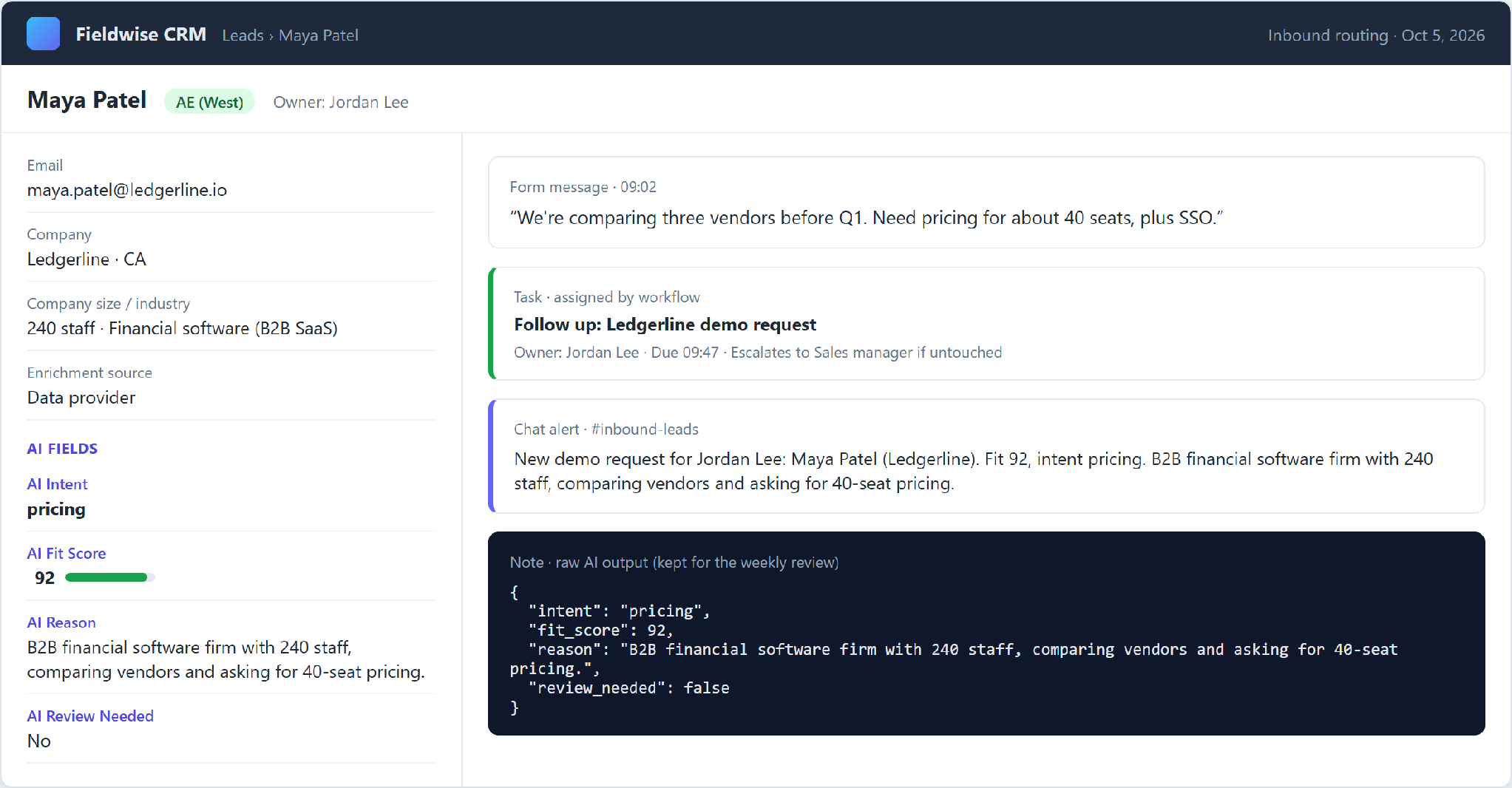
Industry: {{industry}}Each model reply lands on the lead record as four fields, and the raw JSON stays attached as a note. A rep opening the record sees the score, the reason, the task deadline, and the alert in one place.
Test the prompt before launch on the previous quarter’s leads. Compare each score with whether the lead became an opportunity. Then move the 40 and 60 thresholds until the uncertain band catches most of the mismatches.
What the Test Run Caught
The test run routed 10 of the 12 leads correctly. The other two exposed gaps in the workflow as written above, and neither gap came from a bad model answer.
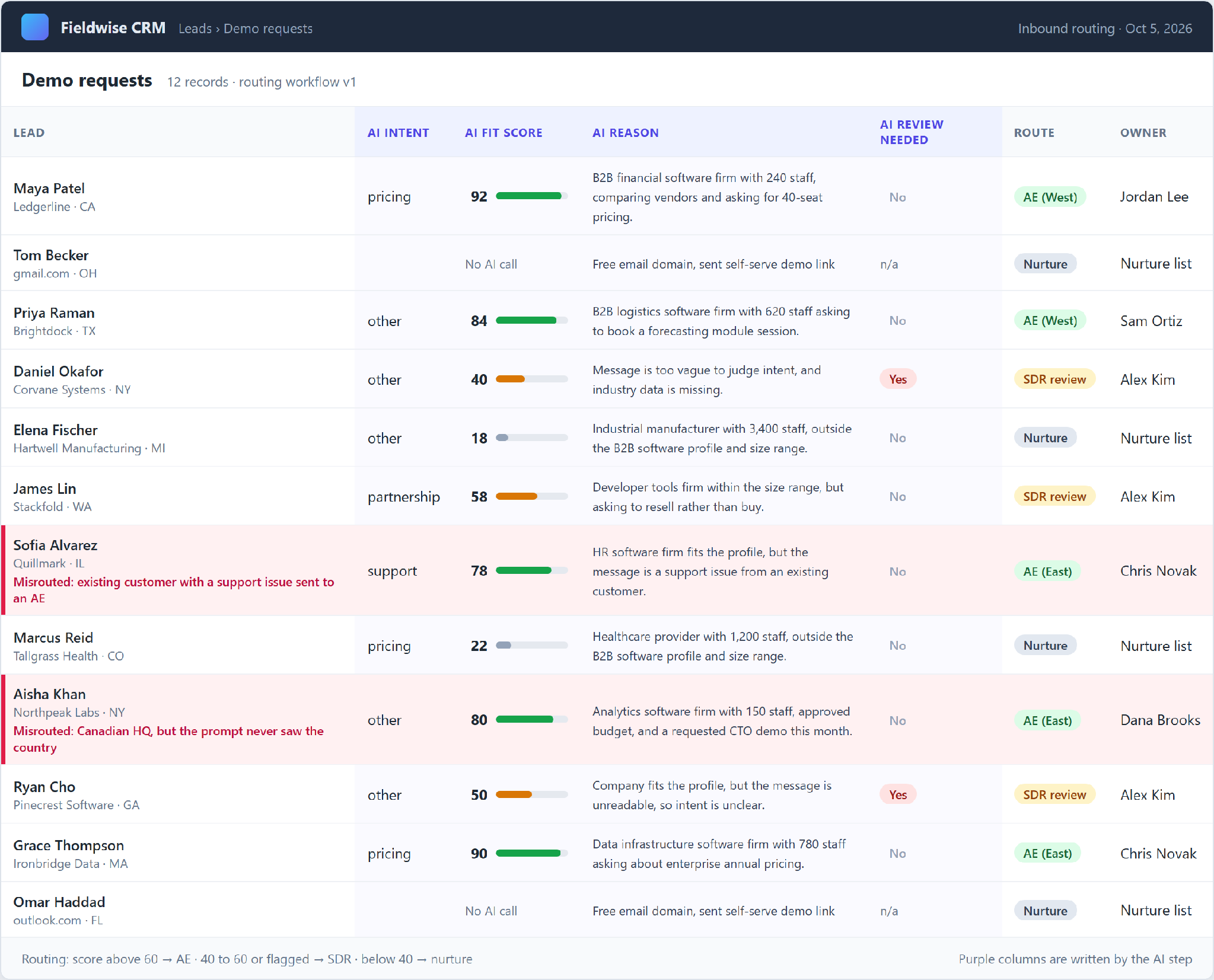
The first misroute was a support request. Quillmark, an existing customer, asked for help with a broken admin login. The model tagged the intent correctly as support, but the company still scored 78 on fit. The routing rule reads only the score, so the ticket went to an account executive.
The second misroute came from the prompt itself. The ideal customer line asks for US firms, but the prompt never passes a country. Northpeak Labs, a Canadian company, scored 80 and reached an account executive. With the country added, the score dropped to 52, and the lead moved to SDR review.
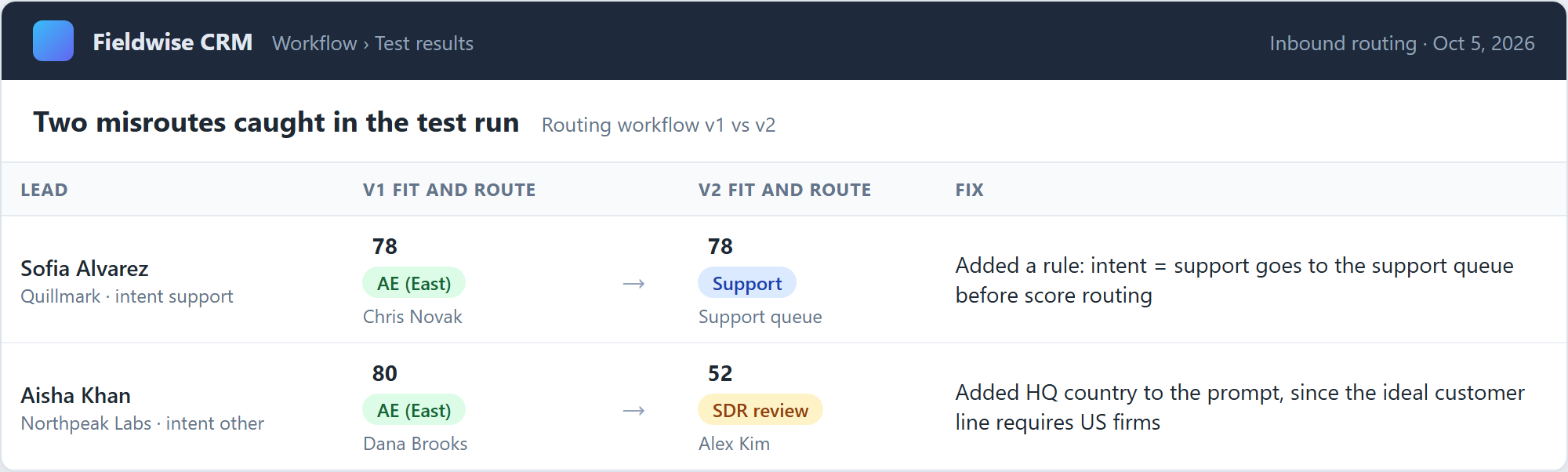
Each fix took one change. A support-intent rule now runs before score routing, and the prompt gains one extra input line.
HQ country: {{hq_country}}The same check applies to any AI routing step. Every field named in the ideal customer line needs a matching input, and every intent value needs a dedicated routing rule.
Building the Workflow in HubSpot, Zapier, or n8n
The test build used Python, but every step maps to a standard building block in the common automation tools. So, teams building custom AI workflows in a sales platform can reuse the same design without starting from scratch. The table shows the closest match for each step in HubSpot workflows, Zapier, and n8n.
|
Workflow Step |
HubSpot Workflows |
Zapier |
n8n |
|---|---|---|---|
|
Form Trigger |
Form submission enrollment trigger |
HubSpot “New Form Submission” trigger |
HubSpot Trigger or Webhook node |
|
Free-Domain Check |
If/then branch on email domain |
Filter by Zapier |
IF node |
|
Enrichment |
Data provider app, such as Clay |
Clay or Apollo action |
HTTP Request node |
|
AI Step |
Custom code action calling a model API |
AI by Zapier or a Claude action |
Basic LLM Chain node |
|
Routing |
If/then branch plus Rotate record to owner |
Paths by Zapier |
Switch node |
|
Alert and Task |
Send Slack notification plus Create task |
Slack and HubSpot actions |
Slack and HubSpot nodes |
|
45-Minute Escalation |
Delay, then a branch on last activity date |
Delay by Zapier, then a HubSpot lookup |
Wait node, then an IF check |
Check the HubSpot plan before choosing the custom code route, because custom code actions are limited to higher tiers. A direct model call gives full control over the prompt and the JSON fields, while Breeze agents trade control for a faster setup.
AI Agents and Human Review: Where to Keep Control
AI agents take several actions in a row, such as researching and emailing a lead. Salesforce’s Agentforce SDR agent can even send interested leads a booking link for the seller’s calendar. More autonomy adds speed and risk. The fix is a clear line between actions an agent takes alone and actions waiting for a person.
Salesforce’s own website shows a well-scoped agent at work. In April 2026, Salesforce launched Piper, an AI SDR from Qualified, on Salesforce.com. Piper follows the same routing rules and territories as the human sales team. The agent draws on approved website content and writes every conversation back to Sales Cloud.
Salesforce’s published results show a 6% conversion rate and more than 60 meetings booked per week, after a 30-day setup. Salesforce is grading Salesforce’s own deployment, so treat the figures as a best case.
Agents can safely work alone on any task a person can reverse in seconds, such as logging a call or tagging an inbound email. Anything a buyer sees needs approval at first, and so does anything changing a deal. Outbound emails, meeting invites, discount offers, and closed-lost decisions all belong here.
Each agent should also act under a separate user account with limited permissions. Salesforce configures the Agentforce SDR agent with a dedicated agent user and an option to keep enhanced event logs. A separate account makes every agent action traceable and easy to switch off.
Teams building custom AI agents should design the handoff rules before the prompts. The handoff rules decide what happens when the model is wrong, and the model will sometimes be wrong.
Choosing AI Sales Automation Tools and CRM Integrations
Every AI sales tool claims to work with Salesforce and HubSpot. The real difference is what the tool can change. A tool reading CRM data carries little risk, while a tool writing to deal records needs closer review. The questions in the table separate a working integration from a logo on a website.
|
Criterion |
Question to Ask the Vendor |
|---|---|
|
CRM Compatibility |
Does the tool support the CRM edition and custom objects in use? |
|
Write-Back Permissions |
Which fields can the tool change, and can admins limit the list? |
|
Logging |
Can admins see every action the AI took, and why? |
|
Data Privacy |
Is customer CRM data used to train shared models? |
|
Cost |
Is pricing per seat, per credit, or per outcome? |
|
Maintenance |
Who fixes the connection when the CRM API changes? |
|
Fallback |
What happens to leads when the AI service is down? |
When the answers fall short, teams need AI integration for a CRM the vendor supports poorly, or for custom objects built over years.
Native Agents, Automation Platforms, AI SDRs, or Custom Builds
Most teams should start with the AI built into the CRM and add other options where gaps appear. The four options differ in control, setup effort, and fit with an unusual process. Native agents switch on fastest. Custom builds fit any process, but they need engineering time.
|
Option |
Examples |
Best For |
Main Trade-Off |
|---|---|---|---|
|
Native CRM Agents |
Salesforce Agentforce, HubSpot Breeze |
Processes matching CRM defaults |
Limited to what the vendor exposes |
|
Automation Platforms |
Make, Zapier, n8n |
Linking several tools with a few AI steps |
Breaks when an app’s API changes |
|
AI SDR Tools |
11x, Artisan |
High-volume outbound with a proven message |
Little control over what gets sent |
|
Custom Builds |
In-house or agency-built agents |
Unusual processes or strict data rules |
Engineering and upkeep cost |
The four options aren’t exclusive. Native agents can handle CRM upkeep while an automation platform covers the steps between tools.
Automation platforms suit teams without developers, because sales ops staff can build no-code automation themselves. Custom builds usually go to an outside firm, and a shortlist of AI automation companies helps compare who builds what.
How AI Sales Tools Are Priced in 2026
AI sales tools now use three pricing models. Per-seat plans charge for every rep with access. Credit plans bill each AI action. Outcome plans bill only when the AI delivers a result, such as a qualified lead.
HubSpot mixes two of the models. Users need seats, and agents use HubSpot Credits. HubSpot’s published rate sheet prices the Prospecting Agent at 100 credits, or $1 at list price, for each lead the agent recommends for outreach. Extra credits cost $10 per 1,000 each month.
Salesforce prices Agentforce by the action. Flex Credits cost $500 per 100,000, and a standard agent action uses 20 credits, or $0.10. Both models look cheap in a pilot and grow with volume. Model the cost at real monthly lead counts, then set a spending cap.
Building the AI step directly costs far less in model fees. Each lead in the test run sent roughly 200 tokens to the model and got about 50 back. At $1 per million input tokens and $5 per million output tokens, Claude Haiku 4.5 would handle 400 leads a month for under $1.
Connecting General AI Assistants to Your CRM with MCP
A newer option skips dedicated sales tools altogether. The Model Context Protocol (MCP) lets assistants such as Claude and ChatGPT read and update CRM records through a standard connector. HubSpot and Salesforce both run official MCP servers in 2026. This MCP explainer covers the setup.
Salesforce’s hosted servers act under each user’s existing permissions, so an assistant can change whatever the rep can change. Start read-only and add write access field by field.
How to Measure AI Sales Automation Performance
Measurement needs a baseline taken before the AI goes live. Record two to four weeks of the old process first. The five metrics in the table then show whether the automation helps buyers or only produces activity.
|
Metric |
What to Measure |
Why the Metric Matters |
|---|---|---|
|
Response Time |
Minutes from inquiry to first approved reply |
Shows how long each lead waits |
|
CRM Completeness |
Share of open deals with all required fields filled |
Forecasts and AI scores read these fields |
|
Qualification Accuracy |
Share of AI-qualified leads a rep agrees with |
Shows whether the scoring deserves trust |
|
Manual Hours Saved |
Rep admin time before and after |
Turns the project into a cost case |
|
Conversion by Stage |
Win rate from each stage to the next |
Catches early gains hiding later losses |
Put the five numbers on one sales dashboard for a weekly review with sales ops.
When AI is the Wrong Tool for a Sales Task
Plenty of sales automation works better without a model. Territory routing, renewal reminders, and contract stage changes all follow fixed logic, where AI only adds cost and a new chance of error. Rules should stay in charge wherever a field can decide, often through plain process automation instead of any AI tool.
Common AI Sales Automation Mistakes
The usual failures trace back to decisions made before launch. Teams automate before the data, the outreach limits, or the ownership is ready. Three mistakes show up more often than the rest.
Automating on Top of Poor CRM Data
AI reads whatever the CRM stores, including duplicates and five-year-old job titles. A scoring model fed messy records learns the mess. An email built on a wrong company name carries the error to the buyer. Cleaning the data first is slower, but the cleanup pays back on every AI step afterward.
Assign an owner to check CRM data quality every month. Written data management rules keep the checks going when the owner changes.
Excessive Automated Outreach
AI makes email nearly free to send, so teams send far more. Higher volume burns sender reputation, and mail then lands in spam for every rep on the domain. Since 2024, Gmail and Yahoo have required bulk senders to authenticate their domains and offer one-click unsubscribe.
Cap daily sends per inbox and warm up new domains slowly. A sudden jump in volume from a new domain is a common route to the spam folder.
Phone outreach carries legal risk too. In February 2024, the FCC ruled AI-generated voices count as “artificial” under the Telephone Consumer Protection Act, so AI voice calls need the same prior consent as robocalls.
Unclear Ownership of AI Decisions
When an AI agent disqualifies a good lead, someone has to notice. In many rollouts, nobody owns the prompts or the routing rules after launch. Sales ops assumes the vendor watches the AI, and the vendor assumes sales ops does. Every AI step needs a named owner.
The owner’s first job is reviewing disqualified leads, since no rep ever sees a lead the AI has thrown out.
Should You Automate Your Sales Process with AI?
Yes, for most teams with a documented sales process and a reasonably clean CRM. The return comes from small, repeated gains, such as faster replies and less data entry. Teams with low lead volume or an undocumented process gain less. For these teams, mapping and cleanup come before buying any tool.
At any company size, automate single steps and keep a person approving anything a buyer sees.
Every step above starts with one mapped workflow. Data Prism’s AI automation engagements start the same way, by mapping one sales workflow and adding AI only where a step needs judgment.
Book a Free 30-Minute Meeting
Discover how our services can support your goals — no strings attached. Schedule your free 30-minute consultation today and let's explore the possibilities.
Book a Free Call

