

Introduction
What is a Failed Cloud Migration?
Cloud Migration Failure Statistics
Cloud migration failure statistics deserve more doubt than they usually get. Most come from vendor surveys, often years old. The useful figures name a source and a sample size. They also define what counts as failure.
A widely cited failure rate comes from Unisys’s 2019 Cloud Success Barometer. It’s a survey of 1,000 senior technology and business leaders in 13 countries. In the US, 37% of businesses said cloud had delivered no notable benefit.
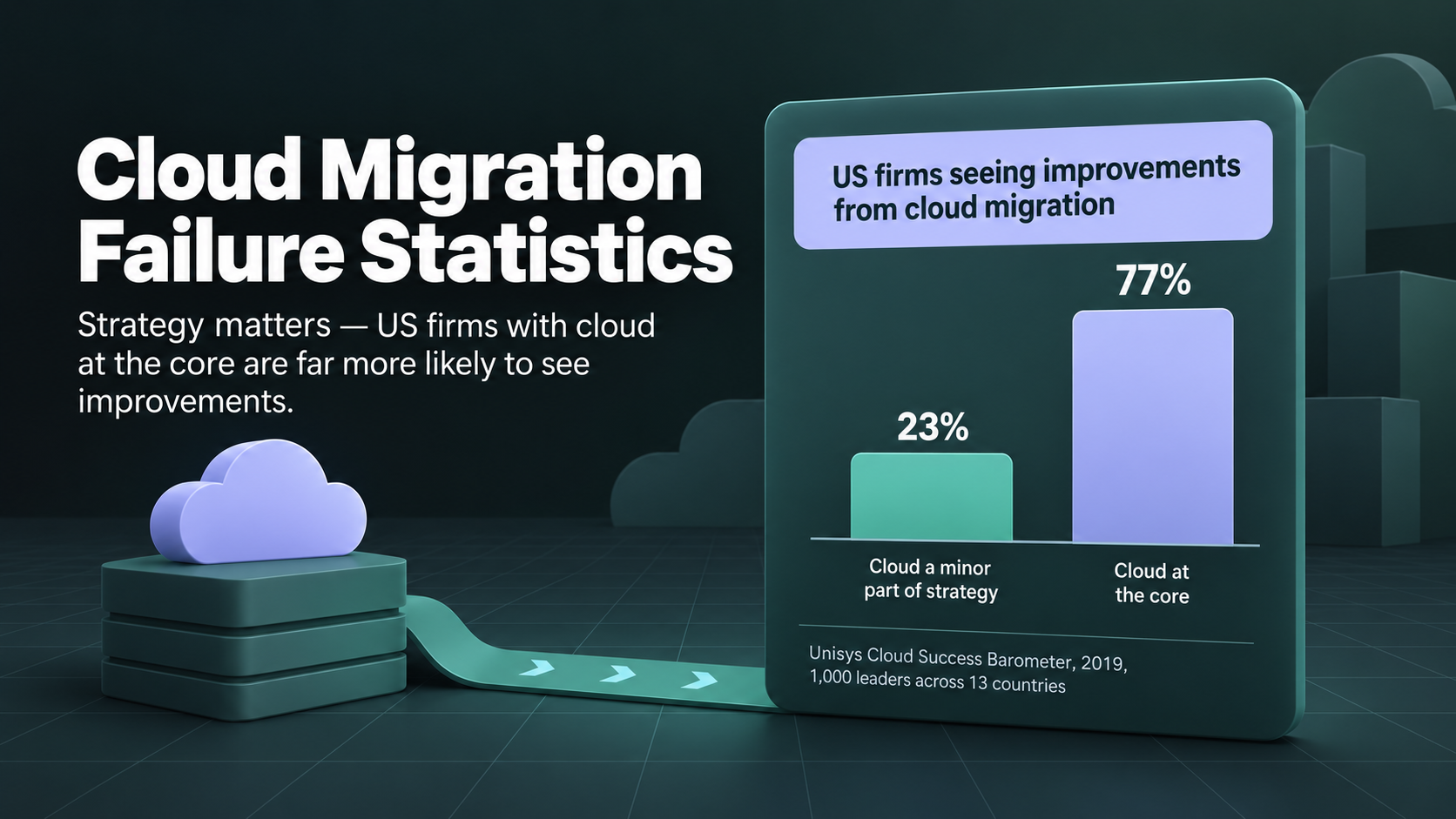
Unisys tied the missing benefit to strategy. Only 23% of US firms with cloud as a minor part of strategy saw great or moderate improvements, compared with 77% of firms with cloud at the core.
Cost data is fresher. Flexera’s 2026 State of the Cloud Report puts estimated wasted spend at 29%, the first rise in five years. In the same survey, 85% of respondents called managing spend a top cloud challenge. Another finding shows 17% went over their public cloud budget in the past year.
Even with named sources, treat any single failure rate with caution. A widely repeated claim says 83% of data migrations fail or overrun, yet pages repeating the figure rarely cite a primary study. Definitions of cloud migration failures also vary, so a late project counts as failed in one survey and succeeds in another.
Why Do Cloud Migrations Fail?
Most cloud migrations fail for reasons set before the first server moves. Six cloud migration mistakes recur in audits, regulator findings, and postmortems. Each mistake is cheap to fix in planning and expensive to fix after cutover. Knowing why cloud migrations fail is the first half of avoiding the outcome.
No Clear Strategy
A migration without a strategy is a list of servers with a deadline. Teams pick a cutover date first and default to lift-and-shift for everything. Each workload needs its own decision about how the workload will run in the cloud. The decision belongs before the move.
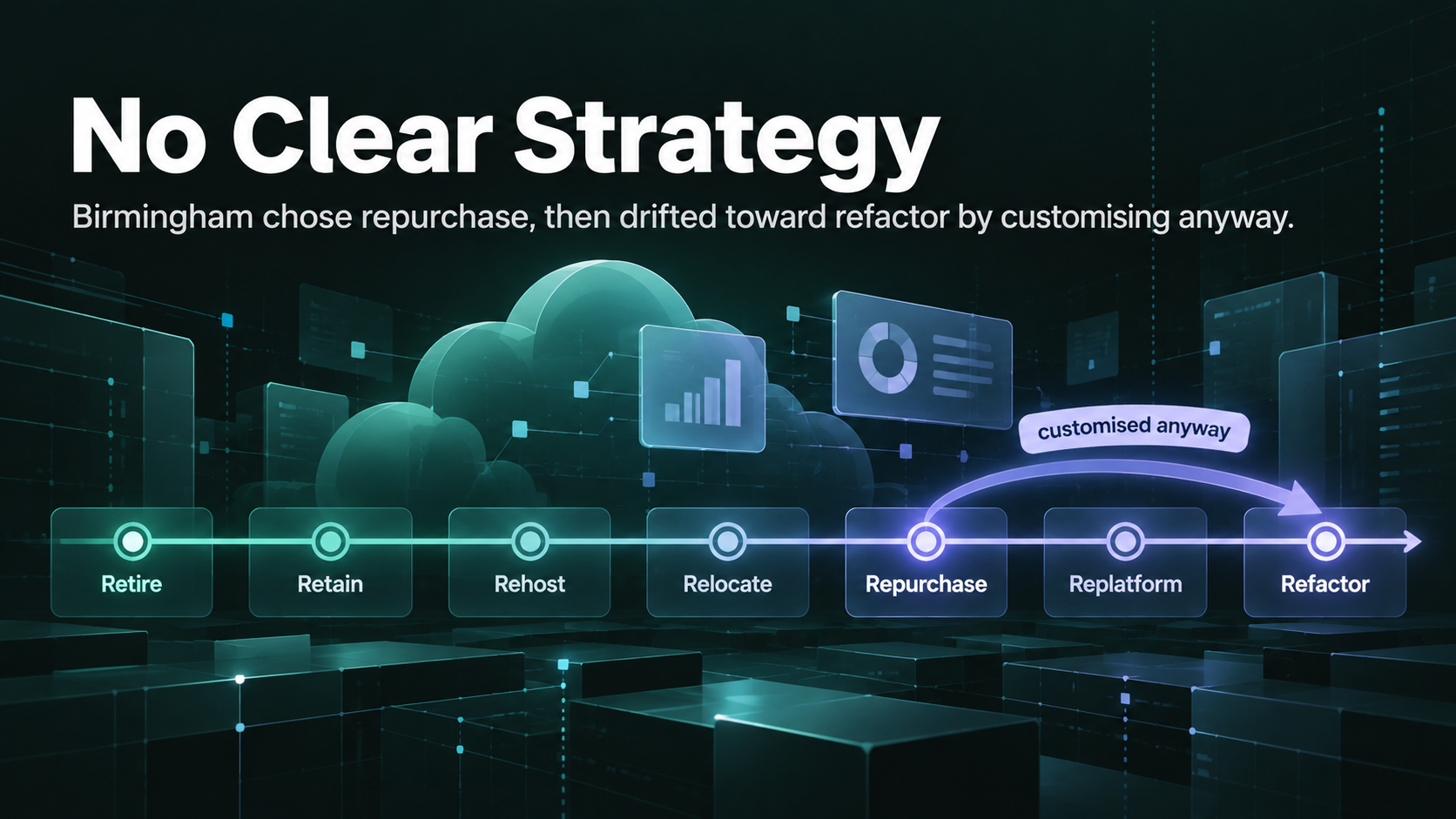
AWS groups the choices for each workload into seven migration strategies, called the 7 Rs. The framework is AWS’s own, though Azure and Google Cloud documentation describe similar options. The table sums up each strategy.
|
Strategy |
What Happens |
Best Fit |
|---|---|---|
|
Retire |
The application is switched off |
Unused or duplicate systems |
|
Retain |
The application stays on-premises for now |
Systems not ready to move |
|
Rehost |
Servers move as-is, often called lift-and-shift |
Large estates on a deadline |
|
Relocate |
Virtual machines move to a hosted copy of the platform |
VMware estates |
|
Repurchase |
A SaaS product replaces the application |
Commodity software such as HR |
|
Replatform |
Small changes, such as a managed database |
Quick wins without a rewrite |
|
Refactor |
The application is rebuilt for cloud services |
Workloads where scale justifies a rewrite |
AWS guidance advises rehosting or replatforming during a large migration and refactoring later. Birmingham’s project shows the cost of mixing strategies. The council chose repurchase by buying a SaaS product, then customized the product anyway.
The strategy also has to fit the target architecture. A rehosted database lands in a very different place from a replatformed one, and downstream reporting changes with the choice.
Skipping the Assessment
An assessment is an inventory of what’s being moved and what each piece depends on. Many teams rush the step because the servers look well known. The missed pieces surface at cutover, when a forgotten batch job or file share stays behind. A proper assessment prevents most dependency failures.
A full assessment covers servers, databases, network flows, licenses, and application owners. Google says a typical discovery with its Migration Center tool takes a few weeks on average.
The assessment also sets the baseline for judging migration risk. Without current performance numbers, every complaint after cutover turns into an argument about whether the cloud version is slower.
Poor Data Planning
Data is usually the hardest part of a cloud migration and the least planned. Servers copy easily, but records carry years of duplicates, gaps, and custom logic. The cloud doesn’t clean the mess on arrival. Every problem in the source system arrives in the new one, often at a larger scale.
Birmingham shows the pattern. Over more than two decades, the council had customized SAP around its finance processes. When the replacement reconciliation tool broke, the council struggled to understand its own cash position. The migration also left the council unable to produce auditable accounts, so compliance audits stalled too.
The fix starts before the move. Every cloud data migration should begin by profiling the source, meaning a measured scan of nulls, duplicates, and broken references. Profiling finds bad records, but engineers can’t decide which version the business trusts. Data quality needs a named owner on the business side for exactly this decision.
Weak Testing and No Rollback Plan
Testing proves the new system works under real conditions. Under deadline pressure, teams test the normal case once and call the result good enough. Any failure then surfaces in front of customers, which is why so many cloud migrations fail in production rather than in testing. A migration without full-load tests and a rehearsed rollback has no safe way back.
TSB, a UK bank, learned the cost of weak testing in 2018. Over one weekend in April, TSB moved data for 5.2 million customers onto a new banking platform. The data itself migrated successfully, yet the platform failed straight away. Full service took until December to return.
The law firm Slaughter and May led an independent review of the failure. The review found TSB had run performance testing on a single data center, so the problems could not surface before go-live. This failure proved expensive, since UK regulators later fined TSB £48.65 million on top of the £32.7 million TSB paid customers.
The move wasn’t a cloud migration, but the lesson carries over directly. Good migration testing compares the old and new systems row by row at production volume. The last test is a rollback rehearsal, because an untested rollback plan tends to fail on the night the team needs one.
Cost Overruns
Cost overruns hit two budgets: the migration project and the monthly bill afterward. The project runs over when timelines slip, and both systems run side by side. The bill runs over when servers keep their old size. Many cloud cost problems trace back to lift-and-shift without resizing.
GEICO shows how far a cloud bill can drift. After 10 years, GEICO’s migration was still not finished. Rebecca Weekly has described the result from her role as GEICO’s VP of platform and infrastructure engineering. The cloud bills rose to 2.5 times their earlier level.
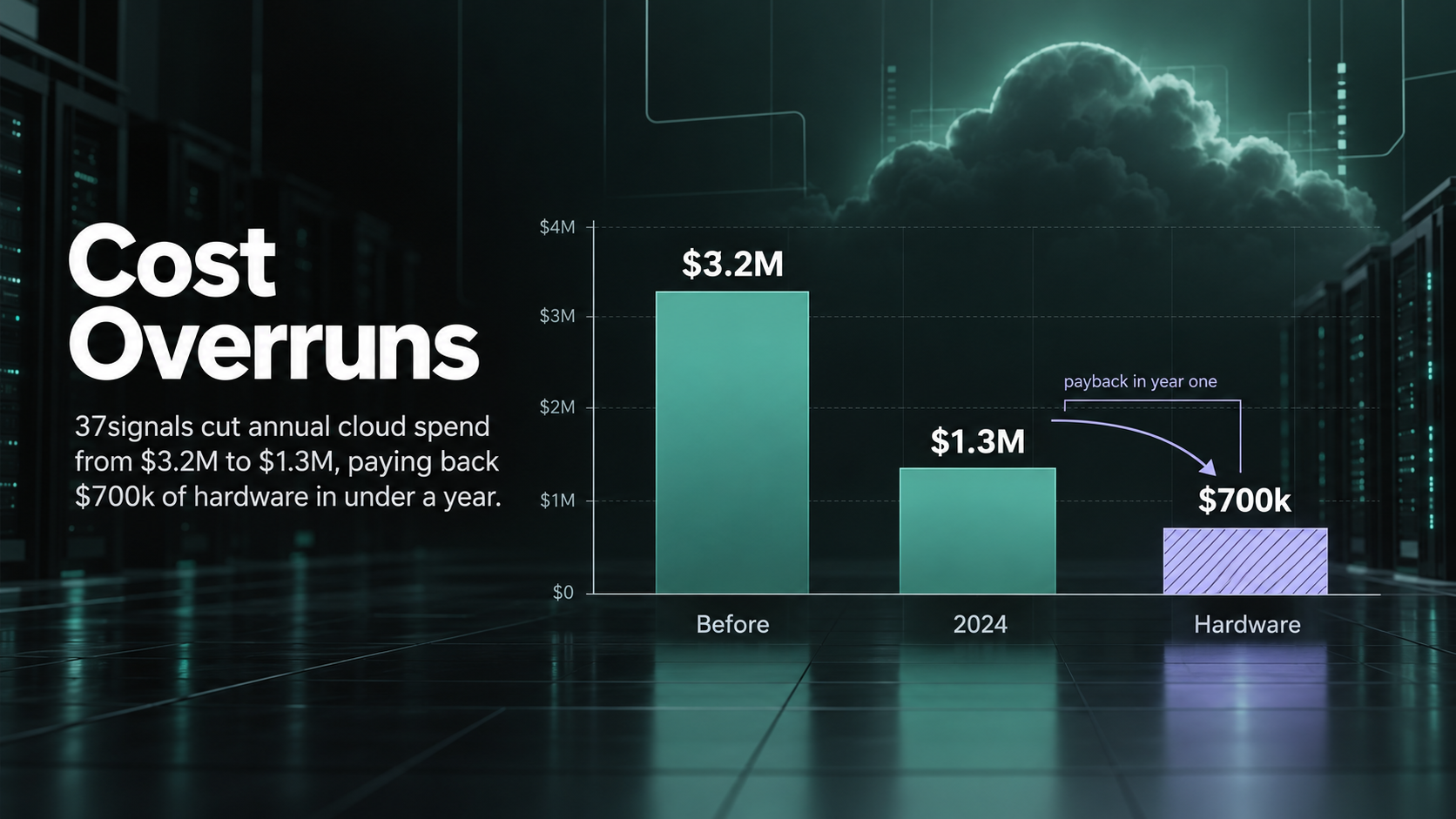
Some companies respond by moving workloads back off the cloud, known as repatriation. 37signals, the maker of Basecamp, moved its applications off AWS and onto its own hardware in 2023. The company’s annual cloud bill fell from $3.2 million to $1.3 million in 2024. The hardware cost about $700,000.
Repatriation is the exception, since most workloads still belong in the cloud once sized properly. The fix is cost forecasting from measured usage before the move. After the cutover, the bill needs a named owner.
Skills Gaps and No Single Owner
Cloud platforms need skills many on-premises teams haven’t built yet. Each cloud handles networking, identity, cost control, and infrastructure as code differently from a data center. A gap in any one area slows the migration. The bigger gap is often ownership, since nobody holds authority over the whole project.
Outside help can close the skills gap. In Unisys’s global results, firms with third-party support were 26% more likely to report improvements than firms working alone. The data dates from 2019, but a first-time team still can’t see which mistakes are coming.
Ownership problems hit strong engineers too. When nobody can settle which revenue number is correct, engineers end up making business decisions in code. The project then drifts.
Cloud Migration Challenges and Solutions
How to Migrate Data to the Cloud
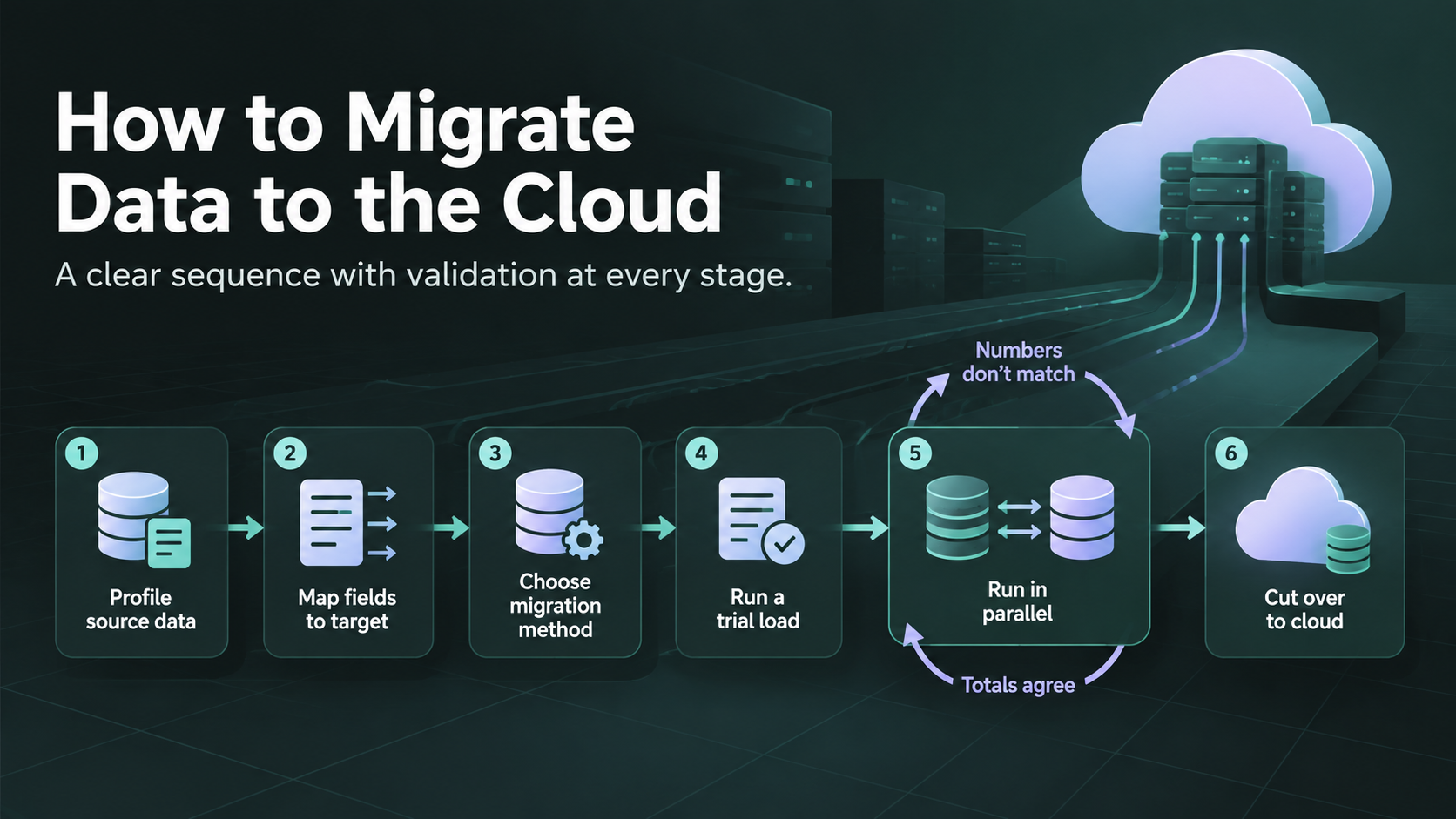
Data migration to cloud platforms follows the same order in almost every successful project. Teams profile the data first and validate at every stage. The sequence works for a single database or a full warehouse.
- Profile the source data and fix the worst quality problems before moving anything.
- Map every field to its target, including fields to split, merge, or drop.
- Pick a method, either a one-time bulk load or change data capture (CDC), which copies changes as they happen.
- Run a trial load into a test environment and reconcile row counts and totals.
- Run old and new systems in parallel until the numbers match for an agreed period.
- Cut over, then keep the old system read-only until a set retirement date.
A full cloud data migration plan adds tool selection and scheduling on top of these steps. The order matters more than the tools, since no tool can fix data nobody profiled.
The steps assume a one-time move. If the old and new systems must keep exchanging records after cutover, the project needs data integration too. Integration is ongoing work, so the budget changes.
Moving a Database to the Cloud
Moving a database to the cloud means choosing between a managed service and a self-managed server. Managed services such as Amazon RDS, Azure SQL Database, and Cloud SQL handle patching and backups. Self-managed servers keep full control, along with the operational work. Most teams pick managed services unless licensing rules them out.
The riskiest step is changing engines, such as Oracle to PostgreSQL, because stored procedures and data types often don’t convert cleanly. Analytics databases add a second choice, since a data warehouse such as Snowflake or BigQuery can replace several old reporting databases at once.
Migrating a Data Center to the Cloud
The migration of a data center to the cloud is a portfolio project made of many smaller moves. Applications move in waves grouped by dependency. A hard exit date, such as a lease ending, usually drives the schedule. The exit date holds only if the wave plan is realistic.
Early waves should carry low-risk applications, so the team learns before touching core systems. The network link needs sizing early too, because large transfers can take weeks over a slow connection. A separate migration guide covers wave planning and cutover risks in detail.
Cloud Migration Tools: Assessment, Discovery, and Migration
Tracking Success With Cloud Migration Analytics
When to Hire Cloud Migration Consulting
Cloud migration consulting pays off when the project carries more risk than the team has experience. A single database with a clean schema rarely needs outside help. Regulated data or a hard deadline changes the math. Failure cost is the real test.
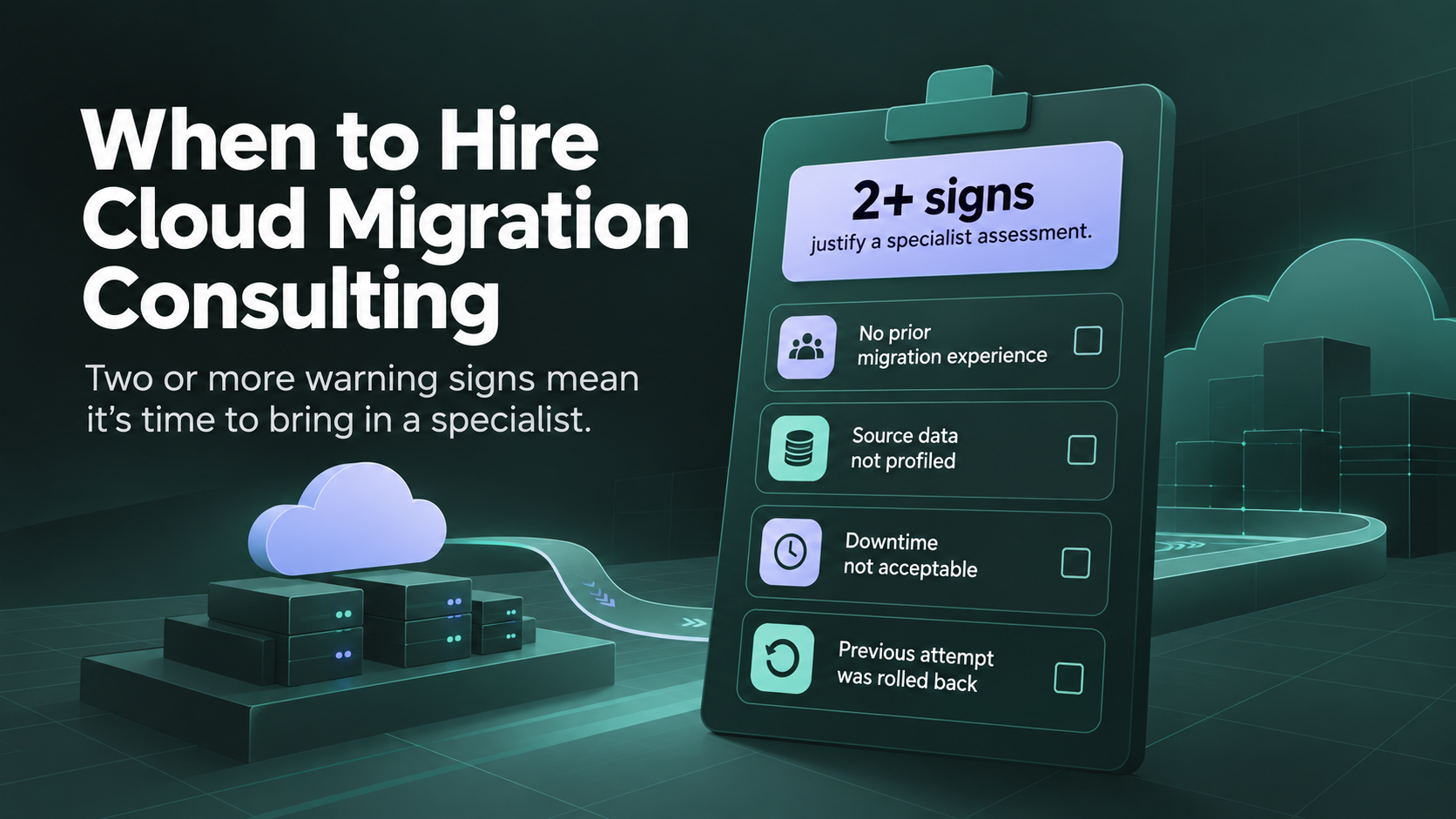
Four signs point to outside help. Two or more justify a specialist assessment before anyone commits to a date.
- The team hasn’t run this type of migration before.
- Nobody has profiled the source data.
- The business can’t tolerate downtime.
- An earlier attempt was rolled back.
A strong consultant shows sample work before signing a timeline. Useful examples include a data profile, a field mapping, and a reconciliation report. A CTO’s guide to data migration consulting explains when the fee pays off.
Keeping the work in-house is reasonable when someone on the team has run the same kind of migration before and can explain the rollback plan from memory.
How to Avoid a Failed Cloud Migration
Book a Free 30-Minute Meeting
Discover how our services can support your goals — no strings attached. Schedule your free 30-minute consultation today and let's explore the possibilities.
Book a Free Call