

Introduction
What Should You Do Before Comparing Tools
What Data Migration Tools Automate (and What They Don't)
The 10 Best Data Migration Tools in 2026
The tools listed below include fully managed platforms, open-source options, cloud services, and enterprise suites. Each one fits a different type of migration project.
1. Fivetran
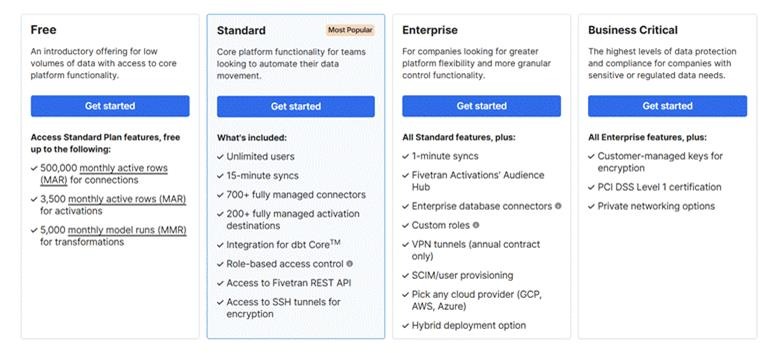
Fivetran is ideal for teams that want a low-maintenance migration tool. It offers more than 700 built-in connectors, handles source schema changes on its own, and keeps data current with incremental syncs. You configure most pipelines in the web console, with little ongoing work after that.
Best for: Organizations moving data from cloud applications into data warehouses such as Snowflake, BigQuery, or Redshift with minimal engineering effort.
Things to consider: Fivetran charges by Monthly Active Rows (MAR), the count of distinct rows inserted, updated, or deleted each month. A bulk historical load can drive MAR up in the first months. Model the cost against your row counts before you begin.
2. Airbyte
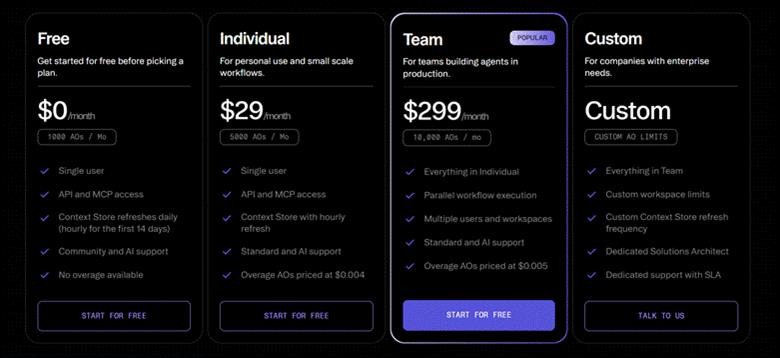
Airbyte is a popular open-source data migration tool. It includes more than 600 connectors, and you can build your own if the connector you need is missing. You can host it on your own infrastructure or use Airbyte Cloud if you prefer a managed service.
Best for: Teams with engineering experience that want more control, need custom connectors, or must keep data on their own systems.
Things to consider: The quality of connectors varies. Popular connectors are usually reliable but less common ones may need patching and extra monitoring.
3. AWS Database Migration Service (AWS DMS)
AWS DMS moves databases into AWS with little downtime. It supports homogeneous migrations (such as Oracle to Oracle) and heterogeneous migrations (such as Oracle to Aurora PostgreSQL). Its ongoing replication mode keeps source and target in sync until you cut over.
Best for: Moving databases to Amazon RDS, Aurora, Redshift, or Amazon S3.
Things to consider: AWS DMS focuses on database migration. It does not move data from SaaS applications, and it skips secondary indexes, users, and stored procedures by default. Pair it with the AWS Schema Conversion Tool for that schema work.
You can check the details on the AWS Database Migration Service pricing page.
4. Azure Data Factory
Azure Data Factory is Microsoft's cloud data integration service. It supports more than 90 data sources and provides a visual interface for building migration workflows. It has native connectors for Azure Synapse, Azure SQL, and Microsoft Fabric.
Best for: Organizations already on Microsoft Azure, and teams moving SQL Server workloads to the cloud.
Things to consider: Azure Data Factory bills per activity run and per hour of data movement. Complex pipelines get hard to cost in advance.
You can check the details on the Azure Data Factory pricing page.
5. Google Cloud Datastream
Google Cloud Datastream is a serverless change data capture (CDC) service that streams database changes into Google Cloud. You have no servers to provision or patch.
Best for: Moving database data into BigQuery or Google Cloud Storage with minimal downtime.
Things to consider: Datastream reads from a short list of sources: MySQL, PostgreSQL, Oracle, SQL Server, MongoDB, Spanner, and Salesforce. For other applications, you will need to add another tool.
You can check the details on the Google Cloud Datastream pricing page.
6. Matillion
Matillion is a cloud data integration platform built around data transformation. It lets you clean, reshape, and prepare data before loading it into cloud data warehouses.
Best for: Projects that require significant data cleaning or transformation during migration.
Things to consider: You maintain the pipelines yourself. A source schema change means editing and retesting the affected jobs.
7. Hevo Data
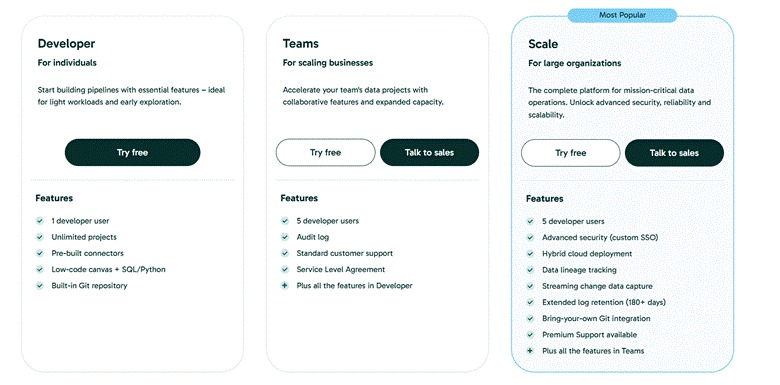
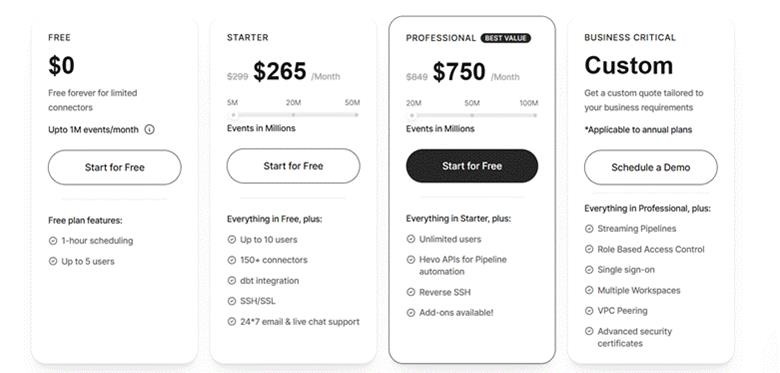
Hevo Data is a no-code platform for moving data from cloud applications and databases. It includes automatic schema mapping and a free plan for smaller projects.
Best for: Mid-sized organizations that want a simple migration tool without a dedicated data engineering team.
Things to consider: Hevo charges by events per month, so a bulk load can push you into a higher tier. Estimate your event volume before a large migration.
8. Stitch
Stitch is a low-cost data migration tool for moving data into cloud data warehouses. It supports more than 130 data sources and is easy to set up.
Best for: Small, straightforward migration projects where keeping costs low is the main goal.
Things to consider: Development has slowed since Talend (now part of Qlik) acquired Stitch, and the feature set trails Fivetran and Airbyte. Use it for simple moves rather than long-term pipelines.
9. Qlik Talend Cloud
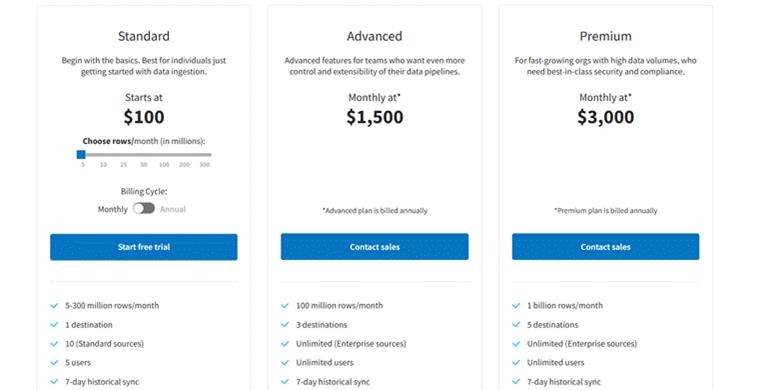
Qlik Talend Cloud combines data migration with built-in data quality tools. You can profile, clean, and validate data as you move it to the new system.
Best for: Large organizations that need to improve data quality as part of the migration.
Things to consider: It targets enterprise projects, pricing is custom, and the learning curve is longer than the managed ELT tools above.
You can check the details on the Qlik Talend Cloud pricing page.
10. Informatica
Informatica is an enterprise data management platform built for large, complex migrations. It moves petabyte-scale volumes and includes lineage, masking, and governance controls.
Best for: Large organizations with complex systems, strict compliance requirements, or petabyte-scale data volumes.
Things to consider: Informatica charges by IPU consumption and assumes dedicated platform admins. For a small or mid-sized project, it is more than you need.
You can check the details on the Informatica pricing page.
|
Tool |
Category |
Best for |
Pricing model |
Main trade-off |
|
Fivetran |
Managed ELT |
SaaS-heavy stacks, minimal maintenance |
Monthly Active Rows |
Bulk loads get expensive |
|
Airbyte |
Open-source ELT |
Custom connectors, self-hosting |
Free self-hosted; capacity-based cloud |
Engineering time to maintain |
|
AWS DMS |
Cloud-native |
Database moves into AWS |
Instance hours |
Databases only, AWS-centric |
|
Azure Data Factory |
Cloud-native |
Azure and SQL Server estates |
Per activity run |
Cost predictability at scale |
|
Datastream |
Cloud-native CDC |
Relational sources into BigQuery |
Per GB processed |
Narrow source coverage |
|
Matillion |
Cloud ELT |
Transformation-heavy migrations |
Credits |
You maintain the pipelines |
|
Hevo Data |
Managed no-code |
Mid-market, fast setup |
Events per month |
Volume costs, connector depth |
|
Stitch |
Managed ELT |
Simple, low-budget moves |
Rows per month |
Slowing development |
|
Qlik Talend Cloud |
Enterprise suite |
Quality-heavy, regulated migrations |
Custom |
Cost and learning curve |
|
Informatica |
Enterprise suite |
Petabyte-scale, compliance-driven |
IPU consumption |
Complexity and price |
How to Choose the Right Data Migration Tool
So, Which Tool Is The Best?
Book a Free 30-Minute Meeting
Discover how our services can support your goals — no strings attached. Schedule your free 30-minute consultation today and let's explore the possibilities.
Book a Free Call