Introduction
People mix up data migration and data integration all the time. They sound similar, and both involve moving data around. But they solve different problems, and treating them as the same thing leads to blown budgets and broken projects.
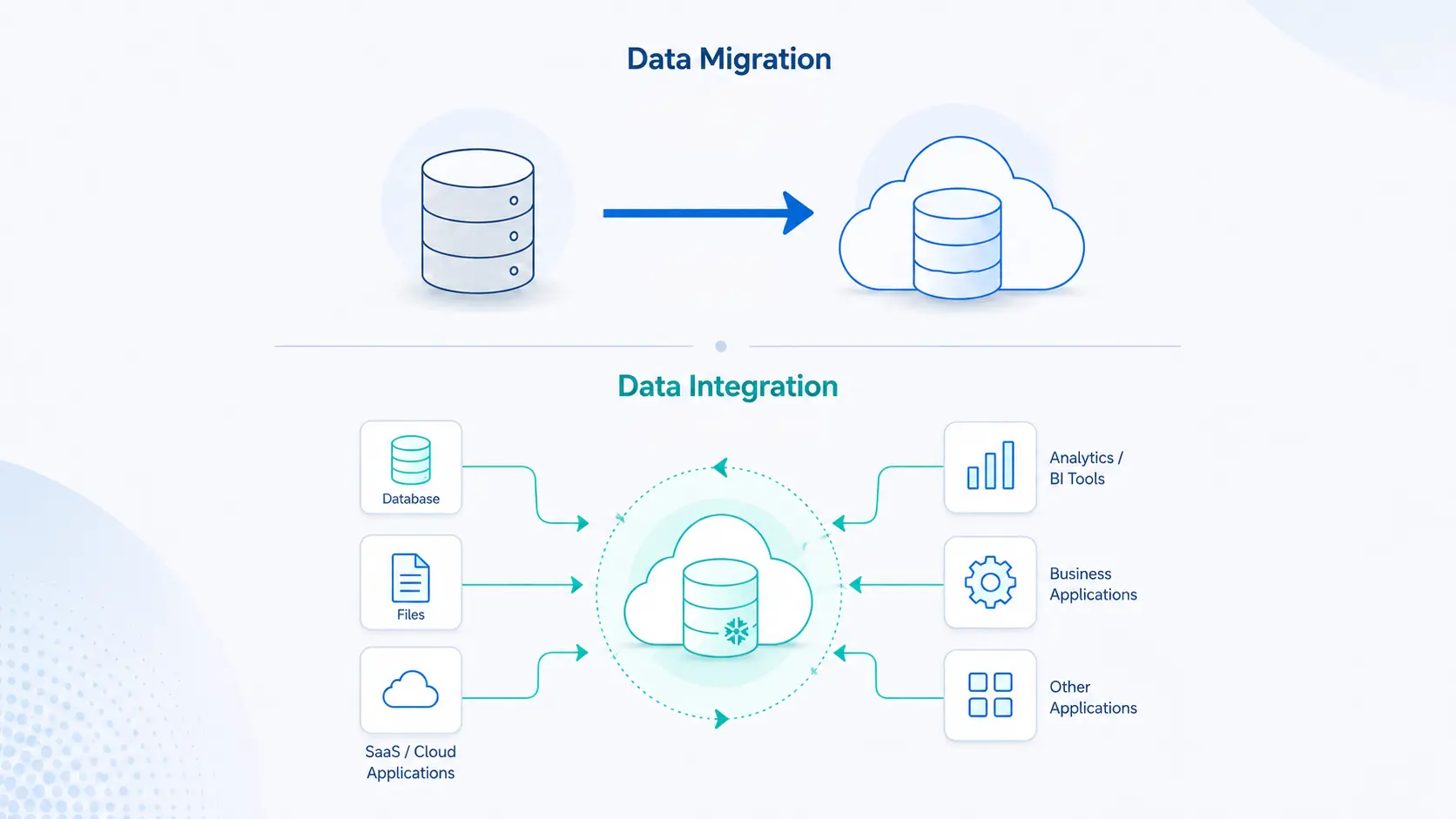
Data migration moves data from one place to another, and then it is done. Data integration keeps data flowing between systems on an ongoing basis. Migration is a move. Integration is a connection.
This guide covers when you need each one, the tools for both, and how they work together in a real data stack.
What Is Data Migration?
Data migration is the process of transferring data from one storage system or computing environment to another (IBM).
It is usually a one-time project tied to a specific goal:
- Replacing old servers
- consolidating data centers
- moving workloads to the cloud
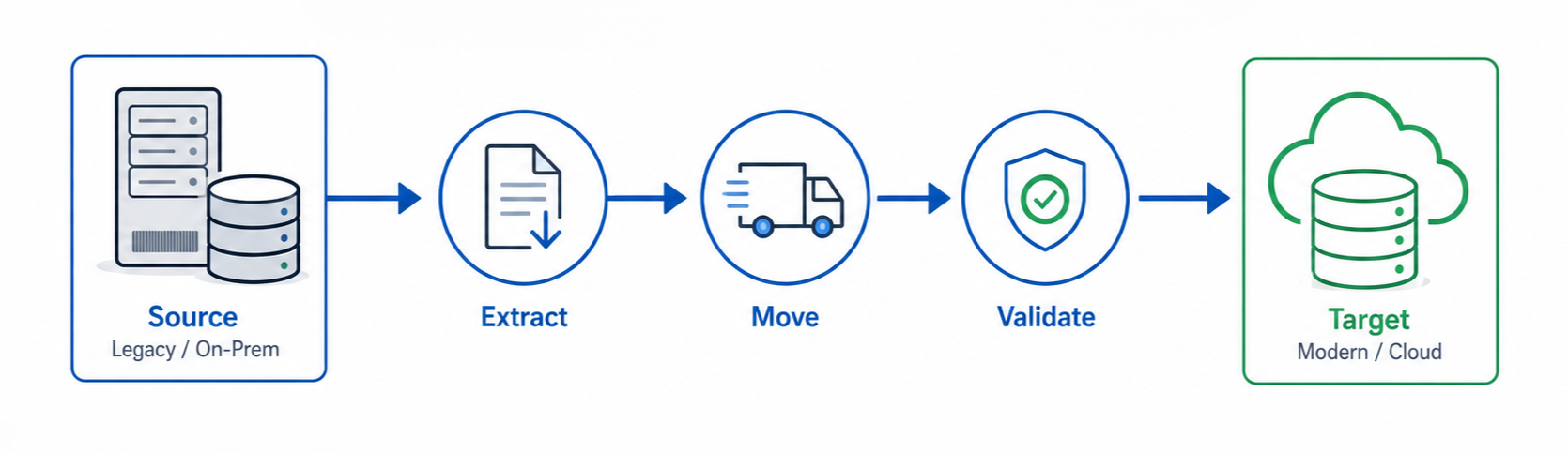
Think of it like shifting your home. You pack everything, transport it, unpack it in the new place, and check nothing broke along the way. Once you have moved in, the move is over.
A migration has a clear start and end. You extract data from the source, reshape it if the new system needs a different format, load it into the target, and verify the data arrived intact. After validation, you often retire the old source system.
Migrations carry real risk. A large one can take weeks and risks data loss, corruption, and surprise costs. Careful planning matters more than raw speed.
What Is Data Integration?
Data integration is the process of combining data from multiple sources into a unified, consistent format that systems and people can actually use (IBM). Unlike a one-time migration, integration repeats. It runs on a schedule, in real time, or on demand to keep data in sync across the business.
Companies keep spending more on it. The global data integration market is projected to grow from $17.58 billion in 2025 to $33.24 billion by 2030, a 13.6% compound annual growth rate (MarketsandMarkets, 2025).
Back to the house analogy: if migration is moving house, integration is the plumbing and wiring that keeps water and power flowing after you have moved in.
Data integration in business usually powers things like:
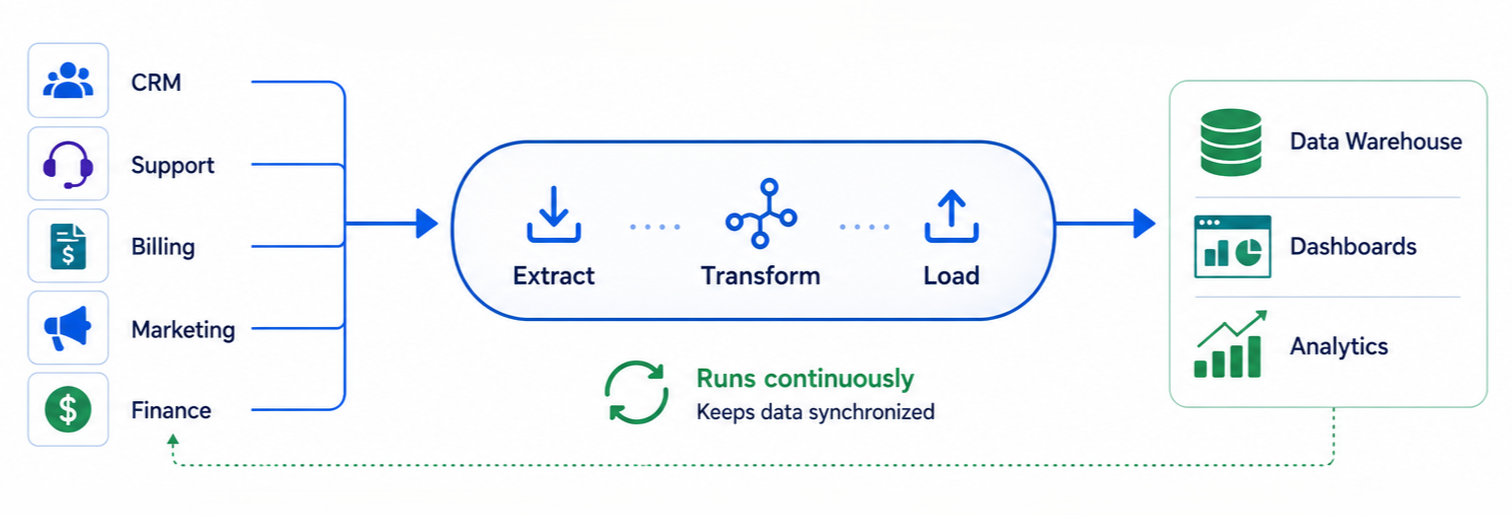
- A single customer view that pulls from your CRM, support tool, and billing system
- Dashboards that combine sales, marketing, and finance data
- A data warehouse that supports analytics and reporting
A typical integration pipeline extracts data from each source, maps and transforms it into a shared structure, and loads it into a warehouse. It runs on a schedule or in real time, so the destination always has the latest data.
The payoff is fewer data silos and faster access to clean data. When every team pulls from the same integrated source, reports stop contradicting each other.
Data Migration vs Data Integration: The Core Difference
The core of data migration vs data integration comes down to time and intent. Data migration has a defined endpoint after the move is complete. Data integration is built to support continuous data exchange between systems. Gartner forecasts worldwide AI spending will pass $2 trillion in 2026, and integration keeps clean data flowing to those AI systems.
If you are weighing data integration vs data migration, you need to know which one your current problem calls for.
One question settles it: after this project is finished, will you still need the old system? If not, it is data migration. If you still need the old system and both must keep sharing data, your business needs data integration.
|
Aspect |
Data Migration |
Data Integration |
|---|---|---|
|
Purpose |
Move data to a new system |
Combine data from many systems |
|
Duration |
One-time project |
Ongoing and continuous |
|
End state |
Source system often retired |
All sources stay active |
|
Direction |
Usually one-way (source to target) |
Often many-to-one or two-way |
|
Common trigger |
Cloud move, upgrade, merger |
Analytics, reporting, customer 360 |
|
Success looks like |
Data arrives intact, project closes |
Systems stay in sync over time |
When Do You Need Data Migration?
You need data migration when moving to a new CRM, upgrading software, or migrating to the cloud. Once the data is moved, the new system becomes your main system.
A few real examples:
- A retailer moves its on-premises database to a cloud warehouse to cut hardware costs.
- Two banks merge and combine customer records into one core system.
- A company replaces an old ERP and migrates years of historical records into the new one.
In each case, the goal is not to keep two systems running together. AWS describes data migration as moving data between locations, formats, or systems, and stresses planning around volume, downtime, and validation. The bigger the dataset, the more this planning matters.
You will underestimate how messy the source data is. Half the migration effort goes into cleaning duplicates and fixing formats before anything moves. If your migration involves large volumes, multiple systems, or strict compliance requirements, it may be worth exploring data migration consulting for your project.
When Do You Need Data Integration in Business?
If your team keeps copying and pasting data between tools, juggling platforms for different tasks, or fighting reports because everyone pulls from a different source, you need better data integration.
Data integration touches most teams:
- Marketing wants campaign data joined with actual sales to measure return on spend.
- Support wants to see a customer's billing history without switching apps.
- Finance wants one dashboard instead of ten spreadsheets.
New orders and tickets arrive throughout the day, so the pipeline keeps merging them to keep the unified view updated. Industry research reported by Gartner found that 95% of IT leaders point to integration as the main barrier to adopting AI.
Data Migration Tools and Platforms
Data migration tools are specialized software that moves data from one system, database, application, or storage environment to another. They automate much of the work, so organizations move data with less downtime and lower risk of loss or corruption. Basic tools only move data. Advanced platforms add scheduling, monitoring, validation, and rollback so the migration runs without surprises.
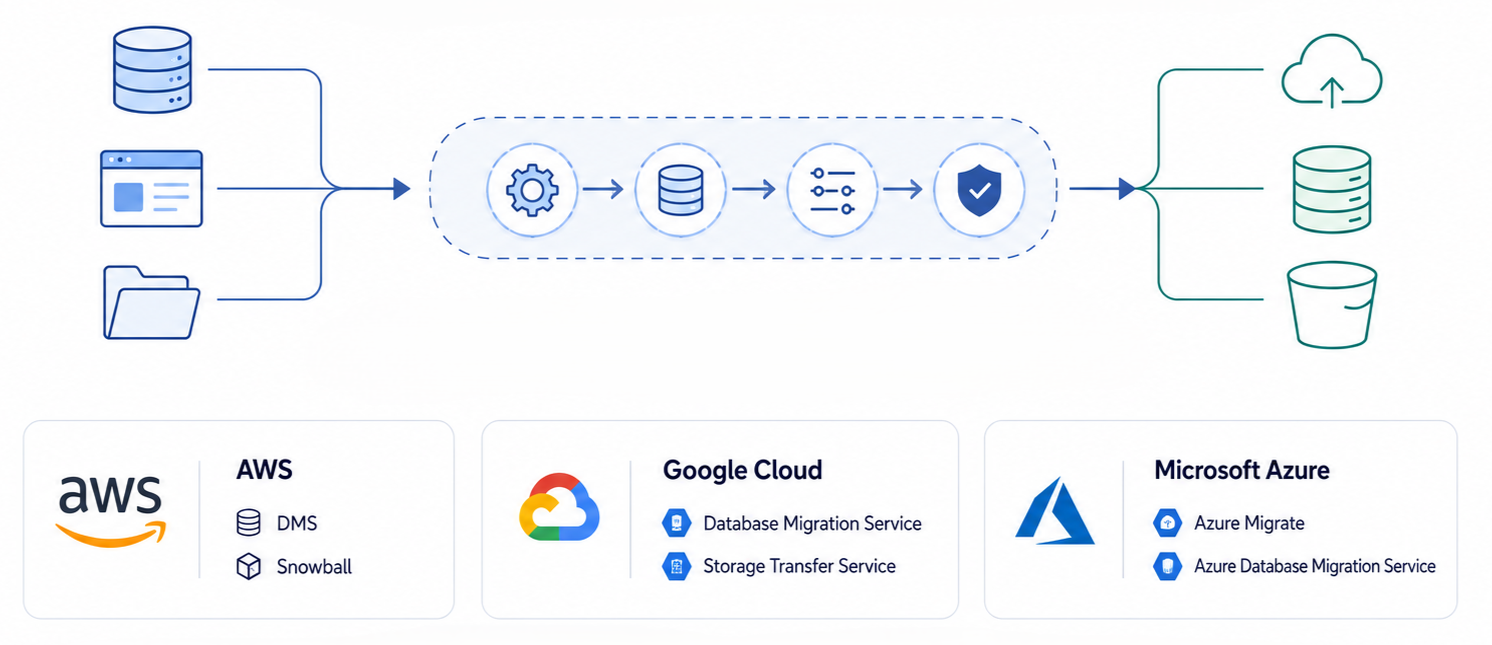
Cloud providers offer native migration tools built for their own ecosystems.
- AWS provides Database Migration Service and Snowball for large-scale offline transfers
- Google Cloud offers Database Migration Service and Storage Transfer Service
- Microsoft includes Azure Migrate alongside Azure Database Migration Service
Choosing a data migration platform comes down to three things: the type of workload, the volume of data, and how fast the move must finish.
Data-Integration-Methods
Data integration methods describe how data gets combined, and the right one depends on speed, volume, and budget. The main approaches are ETL, ELT, real-time streaming, change data capture, data virtualization, and API-based integration (IBM).
- ETL (Extract, Transform, Load): clean and reshape data before loading it. Good when data quality matters most.
- ELT (Extract, Load, Transform): load raw data first, then transform inside the warehouse. Faster, and the modern default for cloud stacks.
- Real-time streaming: process data the moment it arrives. Used for fraud detection and live dashboards.
- Change data capture (CDC): move only what changed since last time. Keeps warehouses fresh without full reloads.
- Data virtualization: query data where it lives without copying it.
- API integration: let applications share data directly, such as syncing your HR and finance apps.
A consultant can also help you choose the right tools for your data stack. While the exact setup depends on your needs, many modern data platforms include:
- Fivetran, for managed ELT connectors
- dbt, for the transformation layer
- Apache Airflow, for orchestration
- Snowflake, as a cloud data platform that serves as a central destination for integrated data
This list is not exhaustive, but it covers the patterns most teams hit first. When you build your own data integration tools list, match the tool to the method. Teams that only need to replicate SaaS data into a warehouse often use managed connectors like Fivetran to automate ingestion without building pipelines themselves.
How Data Migration and Data Integration Work Together
In practice, the two work together. You migrate once to get onto a modern platform, then integrate continuously to keep it useful.
A company might move its local databases to the cloud as a one-time migration. The value starts afterward. Integration pipelines then pull data from systems like CRM, apps, and billing into a central warehouse. This keeps the warehouse current and reliable, a continuous data connection across systems.
Without migration, you never get onto the better platform. Without integration, the platform goes stale the moment the migration ends.
Mixing up the two gets expensive. If you do not plan your migration properly, some data that should have moved gets left behind. To fix it, you scrap the first migration and run it again, and you risk losing data along the way.
Integration has a similar trap. If you do not plan it well, the systems connect but some data does not map across correctly. You end up with gaps, and those gaps cancel out any improvement the integration was supposed to deliver.
Understanding the difference between data integration vs data migration keeps a project scoped correctly from the start.
What This Looks Like in Practice
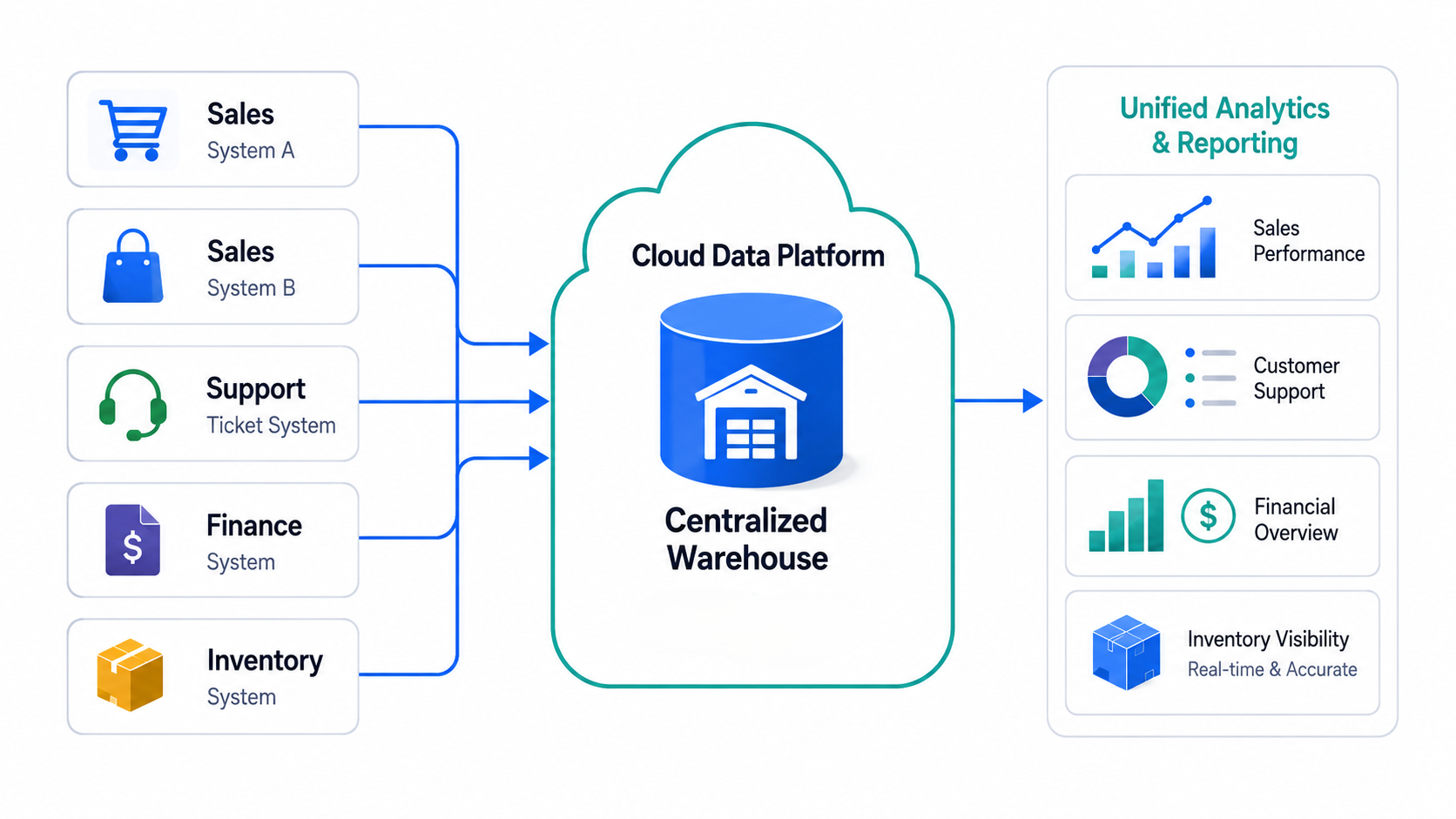
A growing e-commerce company came to us running their whole operation on an aging on-premises database. Sales lived in two separate systems, support tickets in another, and finance rebuilt the same numbers by hand every month. There was no reliable way to track inventory across the business.
We built a cloud data platform that pulled data from every system into one central warehouse. Integration pipelines pulled from sales, support, finance, and inventory on a schedule. The manual reporting stopped, and every team worked from the same current numbers.
Decision Checklist
Run through these before you scope anything. They tell you which problem you are solving.
You need data migration if:
- You are moving to a new system and plan to retire the old one
- The work has a clear finish line (cloud move, ERP upgrade, post-merger consolidation)
- Data only needs to travel one way, source to target
- Success means the data arrives intact and the project closes
Before a migration, check:
- A full inventory of what needs to move, and what can be left behind
- Time budgeted for cleaning the source data, since that is where half the effort goes
- A validation step to confirm nothing was lost or corrupted
You need data integration if:
- Two or more systems have to keep sharing data after the project ends
- Your teams keep copying and pasting between tools
- Reports never line up because everyone pulls from a different source
- Success means systems stay in sync over time, not a one-off delivery
Before an integration, check:
- A clear map of how each source's fields line up in the shared structure
- A schedule or trigger that keeps the destination up-to-date
- A plan for the gaps that break a unified view when mapping is off
If you are weighing a cloud move, a platform upgrade, or you are tired of copying data between tools, we can map out which one your situation calls for. Book a Free Consultation and we will tell you whether you need a migration or an integration (or both) with a clear plan for each.
Book a Free 30-Minute Meeting
Discover how our services can support your goals — no strings attached. Schedule your free 30-minute consultation today and let's explore the possibilities.
Book a Free Call