

Introduction
In February 2024, a British Columbia tribunal ruled against Air Canada after its website chatbot described a bereavement fare policy the airline didn’t have. Air Canada argued the chatbot was responsible for its own words. The tribunal rejected the argument and ordered a $650.88 CAD refund.
So, what is AI customer experience automation, and how does a team avoid the same failure?
AI customer experience automation uses software rules and AI models to answer, route, and resolve customer requests. Clear rules decide when a person takes over.
What is customer experience automation without the AI? Plain CX automation runs fixed rules, such as an order confirmation or a reminder the day before an appointment. AI adds the steps rules can’t handle, like reading a long, messy email about three separate problems.
Chat is only the visible part of the automation. Most of the value sits behind the conversation, where AI automation looks up the customer, checks the order, and updates the ticket.
This article explains how the CX workflow runs, where AI fits beyond chatbots, and how to build human handoffs into the design.
How AI Customer Experience Automation Works
In AI customer experience automation, every service request follows the same basic path. A customer event starts the process, and the system gathers context before deciding what to do. Some steps need AI because customers write in messy, unpredictable language. Other steps work better as plain rules, since the correct answer never changes.
The table below marks which steps use AI and which use rules.
|
Step |
What Happens |
AI or Rules |
|---|---|---|
|
Customer Event |
A message, form, order change, or missed appointment starts the flow |
Rules |
|
Context Retrieval |
The system pulls the customer record, orders, and open tickets |
Rules |
|
Intent and Sentiment |
The model labels topic, urgency, and tone |
AI |
|
Decision |
Policies pick the action, and the model fills gaps in unclear cases |
Rules and AI |
|
Response |
The model drafts a reply from approved knowledge |
AI |
|
Handoff |
Low-confidence, high-value, or upset cases go to a person |
Rules |
Rules follow fixed steps because they are predictable and easy to test. A refund under a set amount can follow the same rule every time. However, a long, angry email about three separate problems needs a model. This mix of rules and AI in one flow is called intelligent automation.
Practical AI CX Automation Use Cases
The best starting points for this mix are high-volume requests with a clear right answer. Customers ask about the same few things again and again. AI CX automation pays off fastest on these repeat requests, because each automated flow saves time on every future contact. Service teams usually begin with the six use cases below.
Inquiry Routing
General support inboxes mix billing, shipping, and legal messages in one pile. An AI model reads each new message and labels the topic, urgency, and tone. Routing rules then send the ticket to the matching queue, and unclear messages go to a person for triage. Customers reach the right team with no manual sorting. The same setup automates customer intake with AI, since every new message gets labeled and routed on arrival.

Inquiry routing dashboard. AI labels each message, and rules pick the queue.
Order and Delivery Updates
Order status questions fill retail support queues every day. An automated workflow looks up the order in the commerce system and checks the carrier's tracking status.
A rule sends a proactive message when a delivery slips past the promised date. Customers get the news early because API integration keeps the order data current. The order data comes from an order sync, which the supply chain guide explains.

Order update dashboard showing late shipments and the message each customer receives.
AI Knowledge Assistance
Support agents lose time searching for help articles and policy documents, and old tickets add more reading. An AI assistant searches the approved knowledge base and drafts an answer for review. The agent edits the draft and sends the reply without searching. Generative AI fits this job well because a person still reviews every answer.

Agent workspace. The AI draft lists the policy version used, and the agent approves before sending.
Appointment Reminders
Missed appointments cost clinics, salons, and repair services real money. A scheduling rule sends a reminder the day before, with an option to confirm or reschedule. AI reads free-text replies, such as a request to move to Thursday afternoon, and offers matching open slots. Customers reschedule without a phone call.

Reminder dashboard, where AI turns free-text replies into open slots.
Feedback Requests
Customers ignore badly timed surveys or answer them in anger. For better timing, a rule sends the survey only after the ticket closes and the customer confirms the fix. AI then groups the open-text comments by theme, such as delivery delays or billing confusion. Support leaders can spot patterns without reading each comment.

Feedback dashboard with comments grouped by theme.
Service Recovery
Some customers never complain after a bad experience, but automation can still spot warning signs. A late delivery or a low survey score signals trouble, and so does a second contact about the same problem. The automation opens a recovery case. AI agents can handle the low-risk steps, while larger gestures stay with people.

Service recovery dashboard, where credits under the cap run automatically and larger ones wait for approval.
AI Chatbots vs Workflow Automation
An AI chatbot answers a question, while workflow automation completes a business action. A chatbot can explain the return policy in plain words. A workflow checks the order before creating the return label and issuing the refund. Most customer problems need both, and the table below shows where each one stops.
|
Dimension |
AI Chatbot |
Workflow Automation |
|---|---|---|
|
Main Job |
Answers questions in conversation |
Completes tasks across systems |
|
Typical Output |
A reply |
A refund, booking, or account change |
|
Data Access |
Knowledge base and help articles |
CRM, order, billing, and scheduling systems |
|
Main Risk |
Wrong or made-up answers |
Wrong action on an account |
|
Best For |
Policy, how-to, and status questions |
Returns, changes, and cancellations |
So, what is CX automation if not a chatbot? CX automation pairs a chatbot with workflow automation. The chatbot handles the conversation, and the workflow does the work behind the conversation. Teams scoping an AI chatbot should list the actions customers expect as well as the questions customers ask. Teams hiring out the build can start with these chatbot development companies compared.
A chatbot without actions becomes a talking FAQ page. The customer hears the policy, then waits for a person to apply the policy. Teams can connect the conversation to process automation to remove the wait. The request then finishes in one contact.
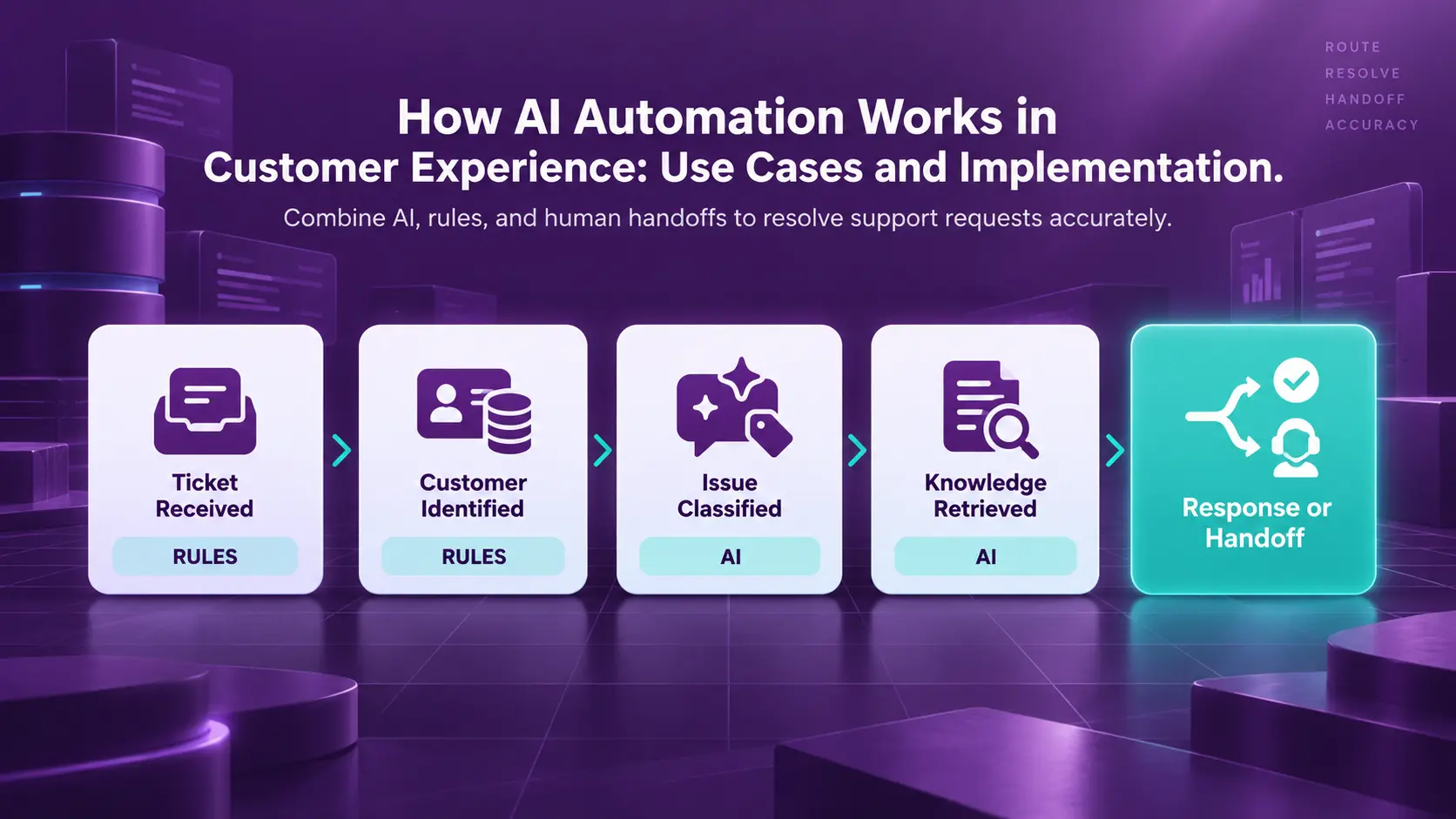
AI Customer Support Workflow, Step by Step
Most AI customer support automation moves a ticket through the same five steps. Rules handle identity and policy limits, while AI handles reading and writing. Teams can test each step alone, so errors stay easy to trace. Every ticket ends as a resolved case or a clean handoff to a person.
- Ticket received. A message arrives by email, chat, or web form. The helpdesk then opens a ticket automatically (rule).
- Customer identified. The system matches the sender to a CRM record. The system then pulls orders, past tickets, and account status (rule).
- AI issue classification. A model labels the topic, urgency, and tone. Language models don't produce a reliable confidence score for these labels on their own. The score comes from a separate classifier or scoring step instead. Teams tune this step against tickets agents have already resolved (AI).
- AI knowledge retrieval. The model pulls the current policy article. The model also records which article version the reply used (AI).
- Response or escalation. Rules check the policy limits and the confidence cutoff. Cases inside both get an AI-drafted reply. Everything else goes to an agent with a summary attached (rule).
The same pattern holds outside a help desk. Data Prism built a Python automation for Lovey Prints, a custom portrait shop. The automation checks Shopify for new orders every five minutes and renames each customer photo with the order ID. The automation then matches finished artwork to each order and emails the proof for approval.
Files the automation can't match never get a guess. Instead, the automation moves them to a manual sending folder for a person to review. The Lovey Prints case study reports up to a 92% drop in manual work across order processing, file handling, customer matching, and proof delivery.

How to Implement AI CX Automation
Most failed CX projects start with a tool and then look for a problem. A better project starts with customers and works backward to the technology. Teams first map customer touchpoints to find the worst friction points and connect the systems behind each one. They test on real conversations last, before launch.
- Map customer touchpoints. Use the last three months of tickets to list every channel and the top reasons customers contact support.
- Select friction points. Pick two or three high-volume requests with clear policies and low risk, such as order status or address changes.
- Connect systems. Give the automation read access to the CRM, order system, and knowledge base, plus write access only where an action needs one.
- Set escalation rules. Decide in advance which topics, customer types, and confidence scores always go to a person.
- Test real scenarios. Replay a few hundred past tickets through the flow and compare each result with what the agent actually did.
Going live works best in stages. In shadow mode, the automation drafts answers but takes no actions. Agents compare each draft with their own reply. Complaints and billing disputes wait for a later stage, once the simple flows prove accurate.
Hard limits come before full launch. Each action gets a cap, such as the largest credit the automation can issue alone. Personal data stays out of prompts unless the task needs the data. AI logs also get the same access controls as the CRM.
The automation can come from three groups of tools. Helpdesk platforms such as Zendesk and Intercom include built-in AI agents. Workflow platforms such as n8n and Zapier connect the helpdesk to order and billing systems. Custom builds on model APIs suit unusual systems. Comparing automation tools gets easier once the friction points are clear.
Connecting CRM and Support Systems with AI
Whichever tool a team picks, customers hate repeating themselves. Trust drops a little whenever a bot asks again for an order number. The fix is a shared customer view across the CRM, helpdesk, and order system. AI only works with the context the systems expose, so connection work comes first.
Identity matching is the first job. A customer might write from a personal email and call from a work phone. Logged-in chat adds a third identity. Data integration links the three identities into one record using email, phone, account ID, and order numbers. Without the match, the automation treats one person as three strangers.
Interaction history comes next. Before replying, the AI should see recent tickets and open orders. Past refunds and the last survey score belong in view too. A third contact about the same late package needs a different tone from the first question. AI integration puts the history in front of the model at reply time.
History from the sale matters as much as support history. Deal notes and the account owner already sit in the CRM before the first ticket arrives. The sales automation guide covers how a new lead becomes a CRM record in the first place.
Movers4Melbourne shows the payoff of one shared record. Data Prism built an automated solution for the moving company where customer records and email history sit next to each job, driver, and invoice in one system. The case study puts routine job processing at 2 minutes, down from about 30.
Customers notice the shared record most through the questions nobody has to repeat. When a chat moves to a person, the agent should see the full transcript. The agent also needs the order details and the AI summary. No customer should hear "Can you give me your order number again?" after a handoff.
Designing Human Handoffs for AI Support
Every AI support system needs a clear exit to a person for requests too risky or emotional for automation. Unusual requests need the same exit. A good handoff gets the customer to the right human quickly, with the full story attached. A bad handoff drops the customer back at the start of a phone queue.
Teams should write down the escalation triggers before launch. A direct request for a person is a common trigger. Legal or safety words and a high-value account also qualify. Strong negative sentiment belongs on the list as well. Google's Dialogflow CX includes a built-in escalation event for moving a conversation to a human agent.
Context transfer decides whether the handoff feels smooth. The receiving agent should get the transcript and a short AI summary. The detected intent and any actions already taken should come along too. The agent then picks up the conversation where the bot left off.
Every handoff path needs a named team as its owner. A billing escalation goes to billing, and a complaint about a delivery partner goes to logistics. Each team's queue also needs a response-time target. Without one, handed-off tickets sit unread while the bot looks successful.
Low AI confidence needs its own handoff path too. A confidence cutoff only means something after tuning. Teams tune the cutoff by replaying past tickets and setting the level where wrong answers become rare. Below the cutoff, the system asks one clarifying question, then routes to a person.
A system guessing on an unclear request gives the kind of wrong answer the Air Canada tribunal held the airline responsible for. The Lovey Prints manual sending folder solves the same problem in a simpler way.
Measuring AI Customer Experience Automation
Measuring AI customer experience automation takes more than one number. Deflection rate, the share of contacts the bot closed, looks good on a dashboard but hides failures. A customer who gives up and calls back still counts as deflected. Six metrics, read together, show whether problems got solved.
|
Metric |
What the Metric Shows |
Warning Sign |
|---|---|---|
|
Resolution Rate |
Share of contacts fully solved with no repeat |
High deflection, low resolution |
|
Repeat Contacts |
Customers returning about the same issue |
Repeats rising after launch |
|
Response Time |
Time to the first useful reply |
Fast replies, low resolution |
|
Customer Satisfaction |
How customers rate the experience |
Lower scores on automated tickets |
|
Incorrect Automated Resolutions |
Automated closures later reopened or reversed |
Agents undoing refunds or changes |
|
AI Answer Accuracy |
Share of sampled answers judged correct |
Accuracy drops after a policy change |
AI answer accuracy needs a person in the loop. A reviewer samples AI answers each week and scores each one against current policy. Data analytics then ties the scores to topics, so the support team sees which knowledge articles need fixing.
Common AI CX Automation Mistakes
Most AI CX failures come from design choices like the wrong goal, and few trace back to the model itself. Some teams also block the way out to a person. Others feed the system old information. Each mistake looks efficient on a cost report, but customers feel the cost first.
Trapping customers in automated loops is a frequent mistake. A customer types "agent" three times and gets the same menu each time. The fix is simple. Always offer an easy-to-find path to a person.
Using outdated knowledge causes confident wrong answers. Policies change, and old help articles stay online. The AI repeats whatever the knowledge base says, so every policy change needs an owner to update the source the same day. Good data management treats the knowledge base like any other production system.
Prioritizing ticket deflection over resolution is the costliest mistake. Klarna moved a large share of support chats to an AI assistant in 2024. By May 2025, Klarna's CEO said the AI-first approach had produced "lower quality" service. Klarna also started hiring human agents again.
Is AI Customer Experience Automation Worth the Effort?
AI customer experience automation is worth the effort when a team starts small and measures resolution. The payoff comes from high-volume, low-risk requests with clear policies. Emotional cases like complaints and disputes still belong with people, supported by AI summaries. The goal is fewer unsolved problems, with people still handling the human conversations.
Everything above starts with choosing which requests to automate first. The next question is which systems need connecting. An AI strategy engagement answers both questions and plans the handoffs before any build starts.
Book a Free 30-Minute Meeting
Discover how our services can support your goals — no strings attached. Schedule your free 30-minute consultation today and let's explore the possibilities.
Book a Free Call

