
Introduction
Figma’s stock price fell about 7% on April 17, 2026, the day Anthropic launched Claude Design. Gizmodo put Figma’s share of the website and app design market at an estimated 80% to 90%, so investors read the launch as a direct threat.
The question is smaller than Wall Street’s for anyone learning how to use Claude Design on a real website. So, can a prompt produce a site worth publishing? The answer depends on setup, plan limits, and testing.
This article explains what Claude Design does, what each plan costs, and how to build and ship your first website.
What is Claude Design and What Does It Do?
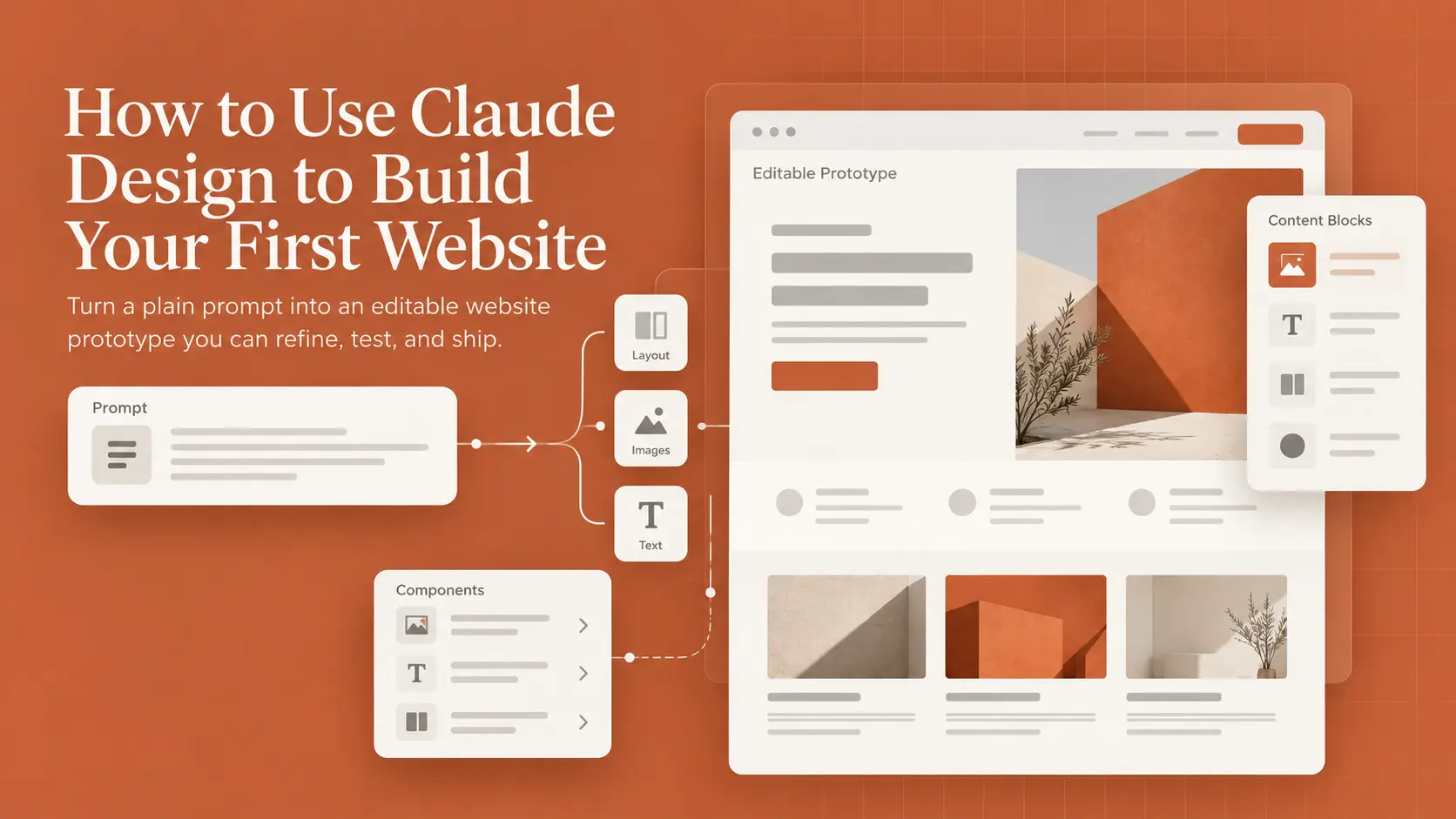
Anthropic Labs launched Claude Design on April 17. It turns a written request into a working visual design, such as a website, app screen, or one-pager. Claude builds the first version on a canvas beside the chat. Users can then refine the result by chat or by editing the canvas directly.
The output is mostly HTML code. So a Claude Design mockup can hold buttons, animations, and forms. Paid plans bundle Claude Design with other Claude features, including Claude Slides for presentations and Claude Code. The table shows where Claude Design fits and where the product stops.
|
Area |
What Claude Design Does |
|
Websites and Landing Pages |
Builds clickable, responsive page prototypes |
|
App Screens and Flows |
Mocks up screens and click-through prototypes |
|
One-Pagers |
Creates printable pages and exports to PDF |
|
Brand Consistency |
Applies saved brand colors, fonts, and components |
|
Production Code |
Hands the real build to Claude Code |
|
Hosting |
Sends projects to outside hosts for publishing |
Can Claude Design a Website?
Yes, Claude Design can design a full website, from the hero section at the top to the footer. The result is a working front-end prototype in HTML, CSS, and JavaScript. Pages respond to clicks and can adapt to phones. A public launch still needs hosting, a form backend, and testing.
The same canvas handles internal pages too. A prompt for a revenue dashboard returns a layout with filters and charts, though live dashboards still need a connected data source.
Capabilities and Limitations
Claude Design is strongest early in a project, while direction is still open. Nate Parrott is the Anthropic product designer behind the tool. He describes Claude Design as a tool for ideas and early buy-in.
His usage notes add a hard limit. Claude Design has no image model, so logos should come from existing files. This tool applies generative AI to layout and interaction, but the beta lacks version history, and shared editing still isn’t reliable.
How to Use Claude Design: Access and Setup
So, how can I use Claude Design without learning a new app? Claude Design now works inside ordinary Claude conversations, with Pro and Max plans getting the change first. The older standalone site at claude.ai/design still works too. Access depends on the plan and, for companies, on an admin setting.
Claude Design on Desktop App and Web
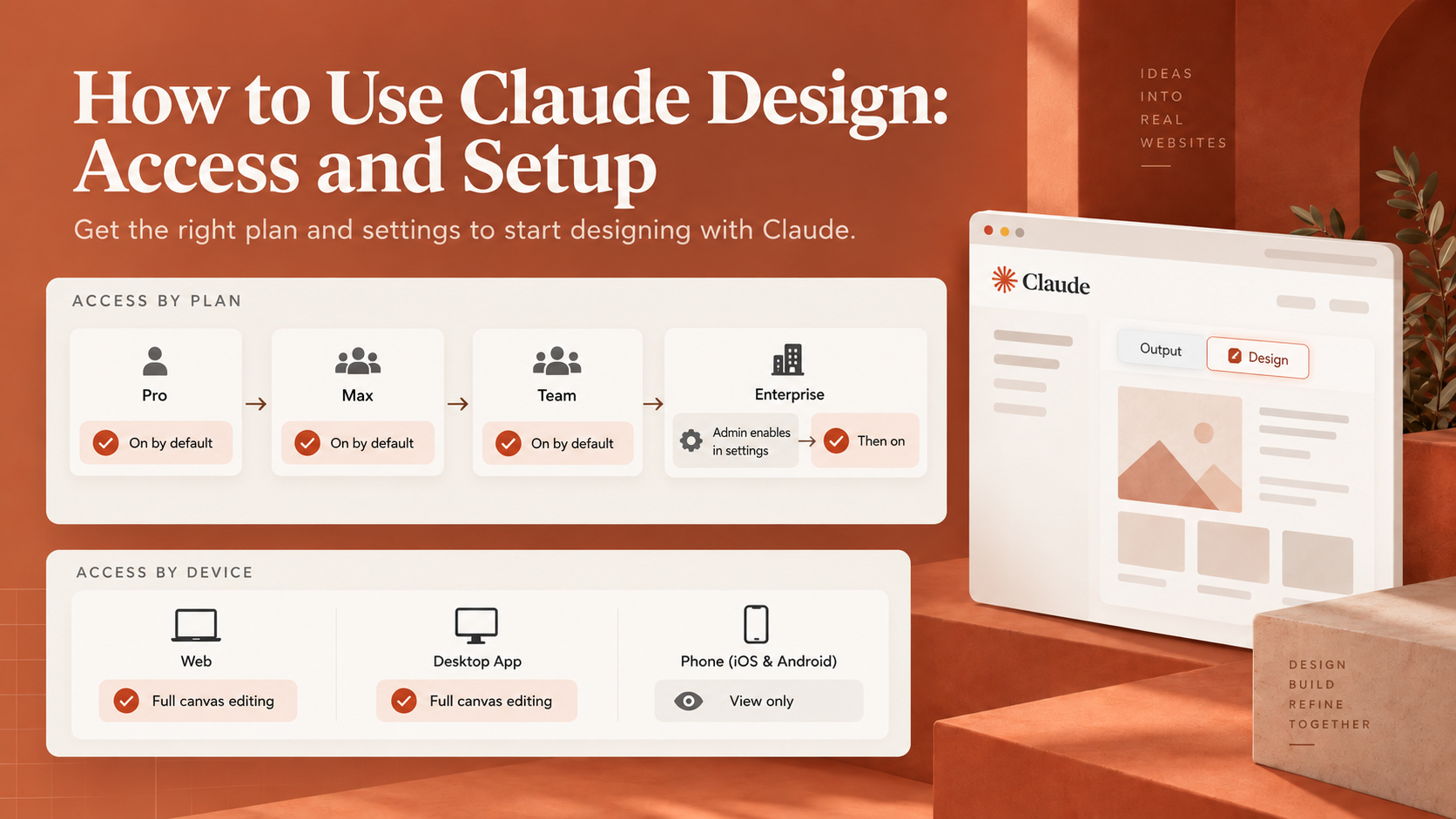
Where to use Claude Design depends on the device. Anthropic’s setup guide lists five entry points, and full canvas editing works on web and desktop. In a normal chat, choosing Output and then Design in the message box starts a project. Claude Code users create and edit designs with the /design command.
The Claude desktop app matches the web version, including templates, canvas edits, and sharing settings. On iOS and Android, a phone can request a design and show the result full screen in the Artifacts tab. Canvas editing still needs a computer.
Account Requirements and Setup
Claude Design needs a paid Claude plan, and the Free plan doesn’t include access. On Pro and Max, Claude Design starts switched on, and the toggle sits under Settings and Capabilities. Team plans also start with design access on. Enterprise plans keep Claude Design off until an owner enables access under Organization settings and Artifacts.
Claude Design Pricing and Usage Limits
Claude Design has no separate price, since access comes bundled with paid Claude plans. The real Claude Design cost is the plan fee plus any usage beyond the plan’s limits. Large projects with many iterations use more of the allowance.
How Much is Claude Design on Each Plan?
Claude Design pricing follows the plan, so the choice comes down to how much usage a project needs. Pro suits occasional design work. Max plans and Team Premium seats suit people iterating on designs every day. Anthropic’s current pricing page lists the figures below, before tax.
|
Plan |
Price |
Usage |
|
Pro |
$20 a month, or $17 billed annually |
Base paid usage |
|
Max |
From $100 a month |
5x or 20x Pro usage |
|
Team Standard |
$25 a seat monthly, or $20 billed annually |
More than Pro |
|
Team Premium |
$125 a seat monthly, or $100 billed annually |
5x Standard usage |
|
Enterprise |
$20 a seat monthly, billed annually |
Usage billed at API rates |
Extra Usage and Website Hosting Costs
Claude Design once had a weekly allowance of its own, separate from chat. Anthropic has since folded design activity into the shared plan limits. Guides written before the change still describe the old quota. Once the shared limit runs out, Claude Design stops until the reset, unless usage credits are on.
Usage credits bill at standard API rates, so model choice changes how fast credits drain. Anthropic’s API pricing puts Fable 5.1 at $10 per million input tokens against $4 for Opus 5.5. The Fable 5.1 premium rarely pays off for layout tweaks.
Hosting is a separate bill. Claude Design share links stay inside Claude. On Pro, Max, and Team plans, every viewer needs a Claude account. A public website needs an export to a host such as Netlify, Vercel, or Wix. Each host sets its own prices.
Claude Design Tutorial: Build Your First Website
Using Claude Design for website building starts before the first prompt. Most weak results in Claude website design trace back to a vague goal or a missing brand file.
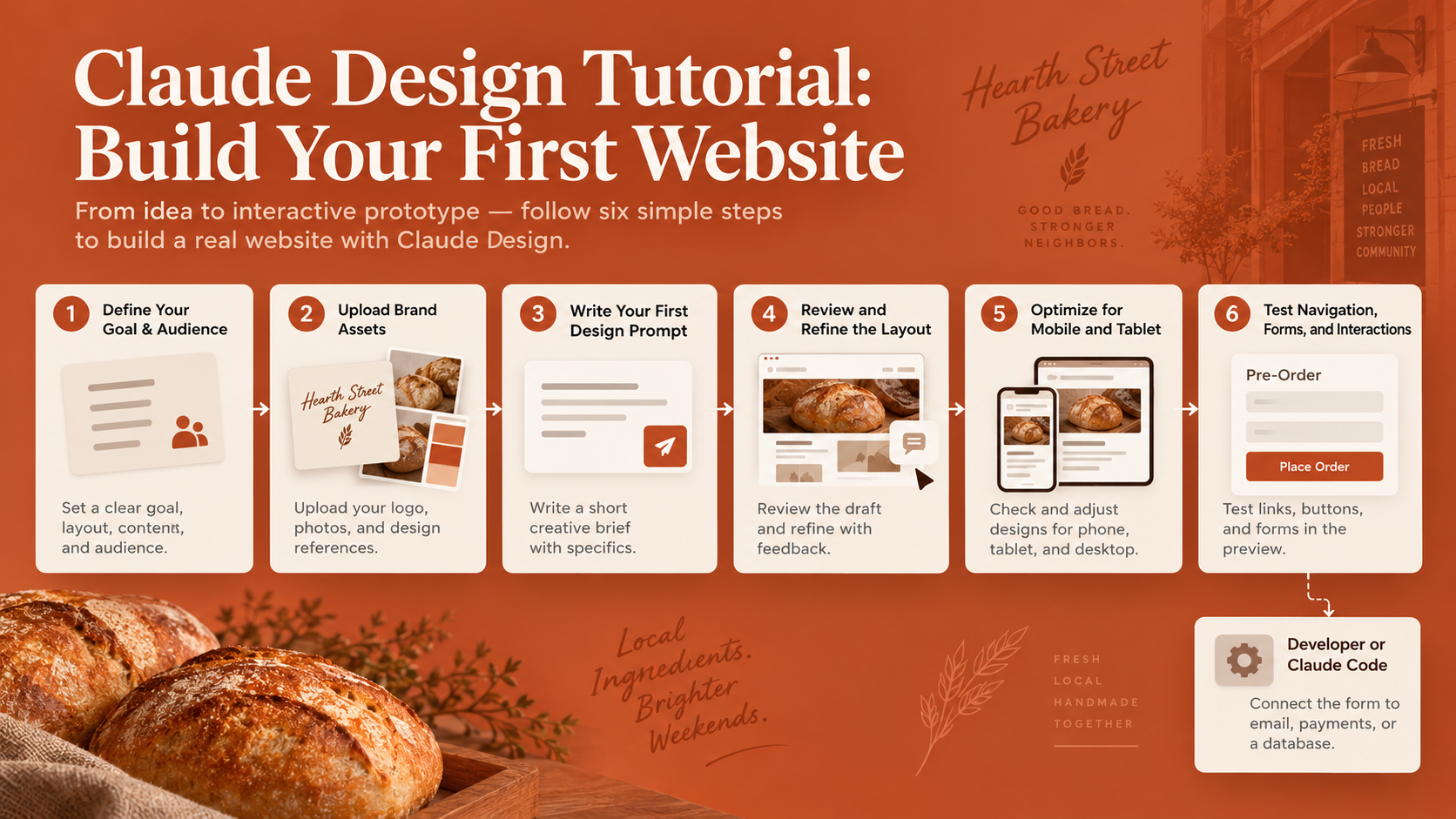
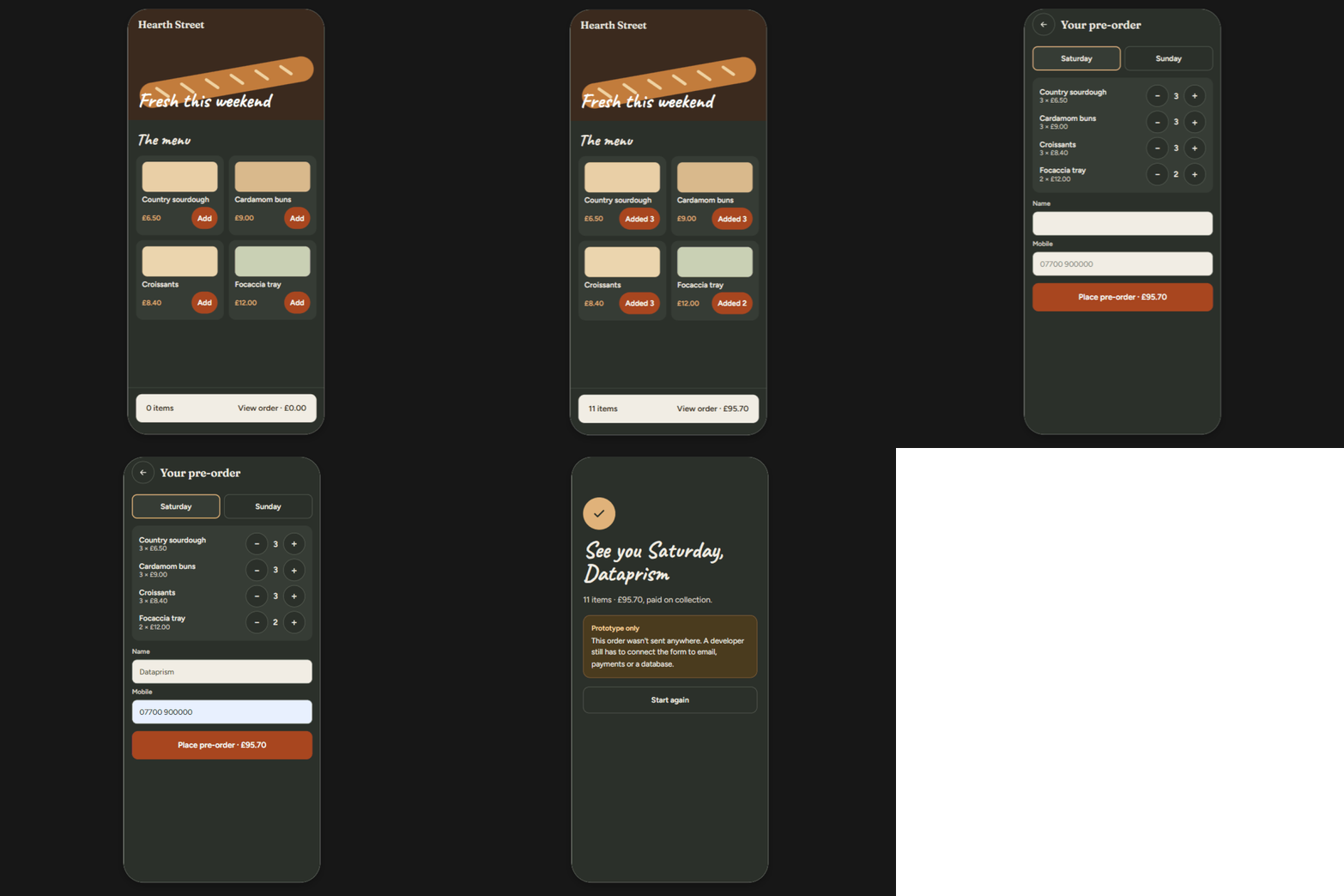
The six steps below follow a hypothetical project. A landing page for a neighborhood bakery called Hearth Street Bakery.
Define Your Website’s Goal and Audience
A clear goal gives Claude something to design toward. Every prompt should cover the goal, the layout, the content, and the audience. Parrott goes further and plans briefs away from the computer, even by voice note on a walk. Claude Design then executes a settled idea instead of guessing.
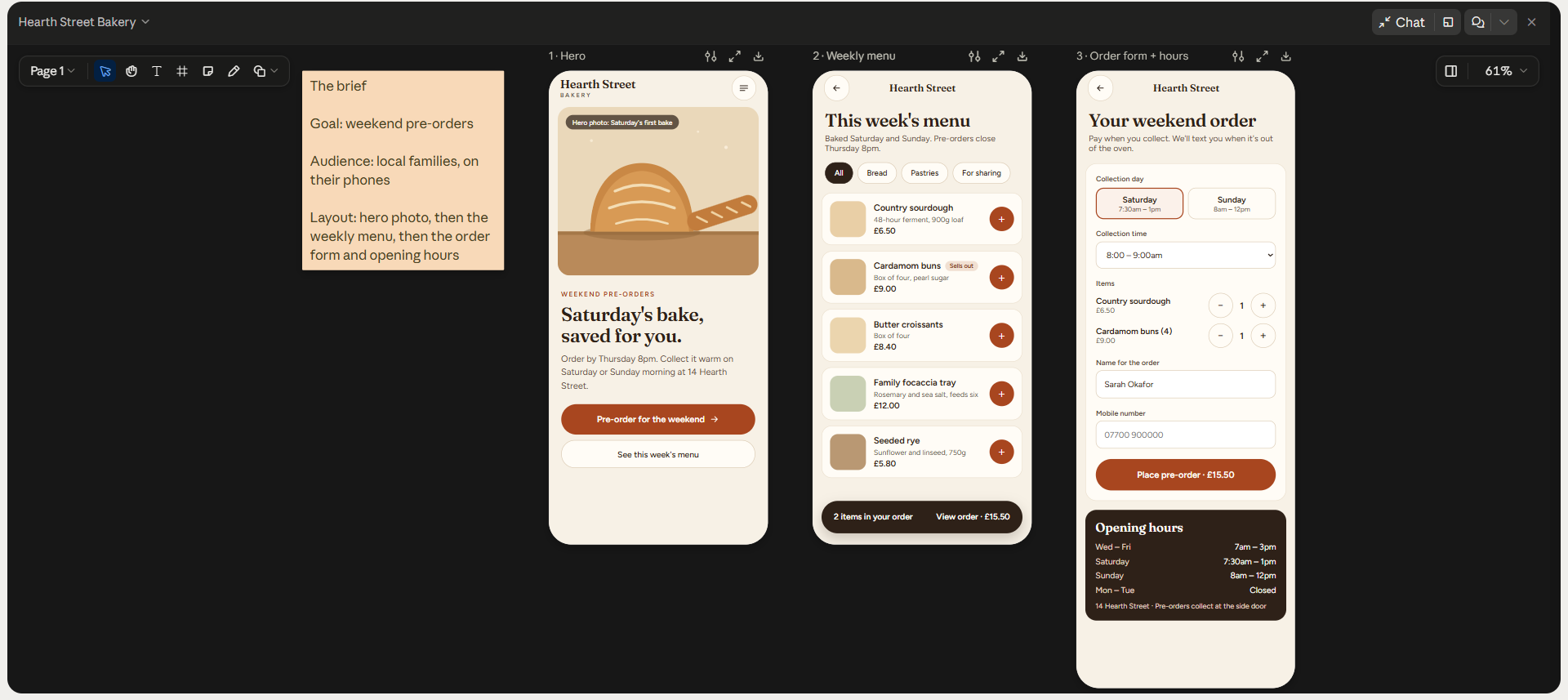
For the hypothetical Hearth Street Bakery, the brief is short. The goal is weekend pre-orders. The audience is local families on phones. The page opens with a hero photo and the weekly menu. The order form and opening hours come after.
Upload Brand Assets and Design References
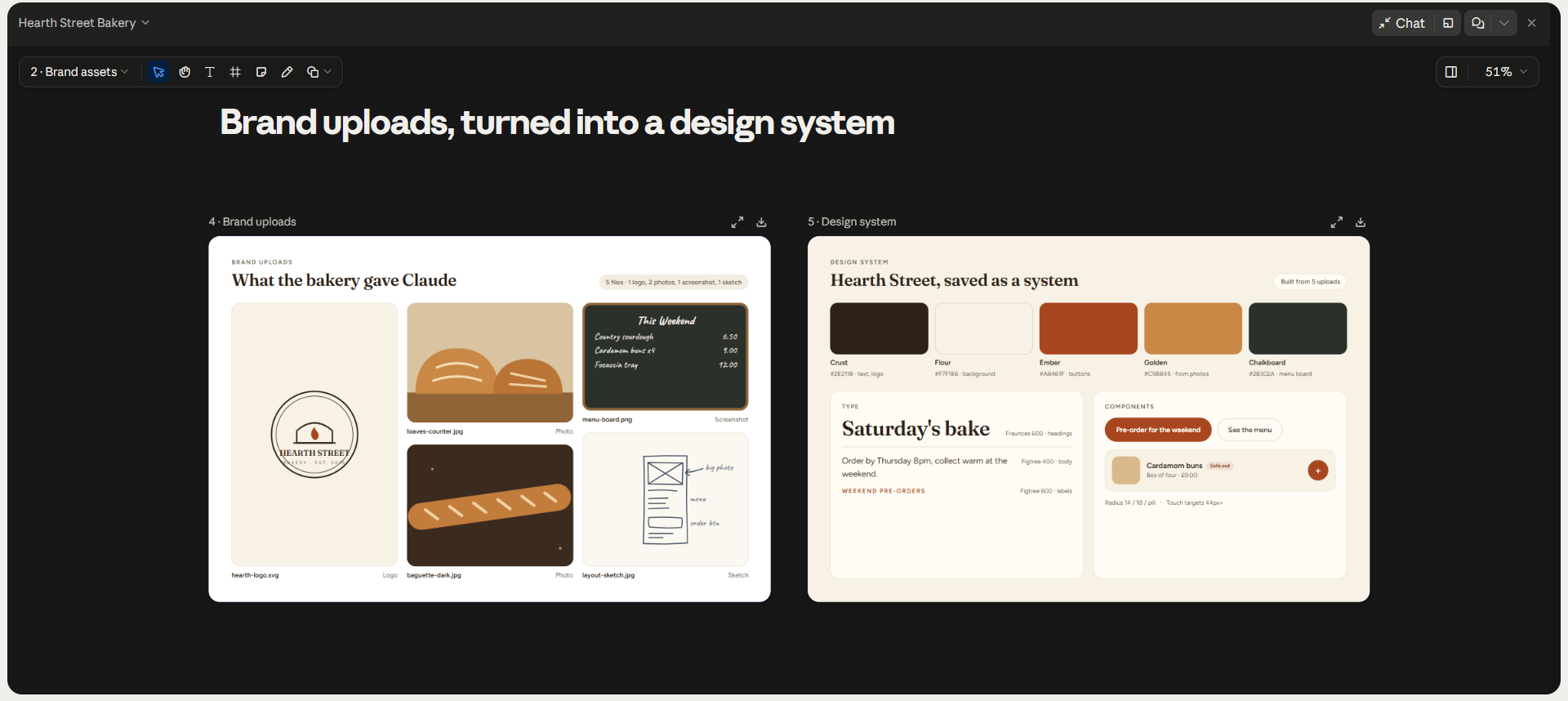
Brand files decide whether the output looks like the business or like every other AI site. Claude Design turns uploaded logos, slide decks, screenshots, and code into a design system, a saved set of colors, fonts, and components. A finished page from the brand tells Claude more than a palette alone.
Context engineering means giving a model the right material up front, and design work follows the same rule. For the bakery, upload the logo and two photos of fresh loaves. A screenshot of the current menu board helps too. Photos of a hand-drawn layout sketch are also fine.
Write Your First Design Prompt
A good first prompt reads like a short creative brief. Plain prompt engineering habits apply, so specifics beat adjectives. Several directions at once cost less than fixing a single weak one.
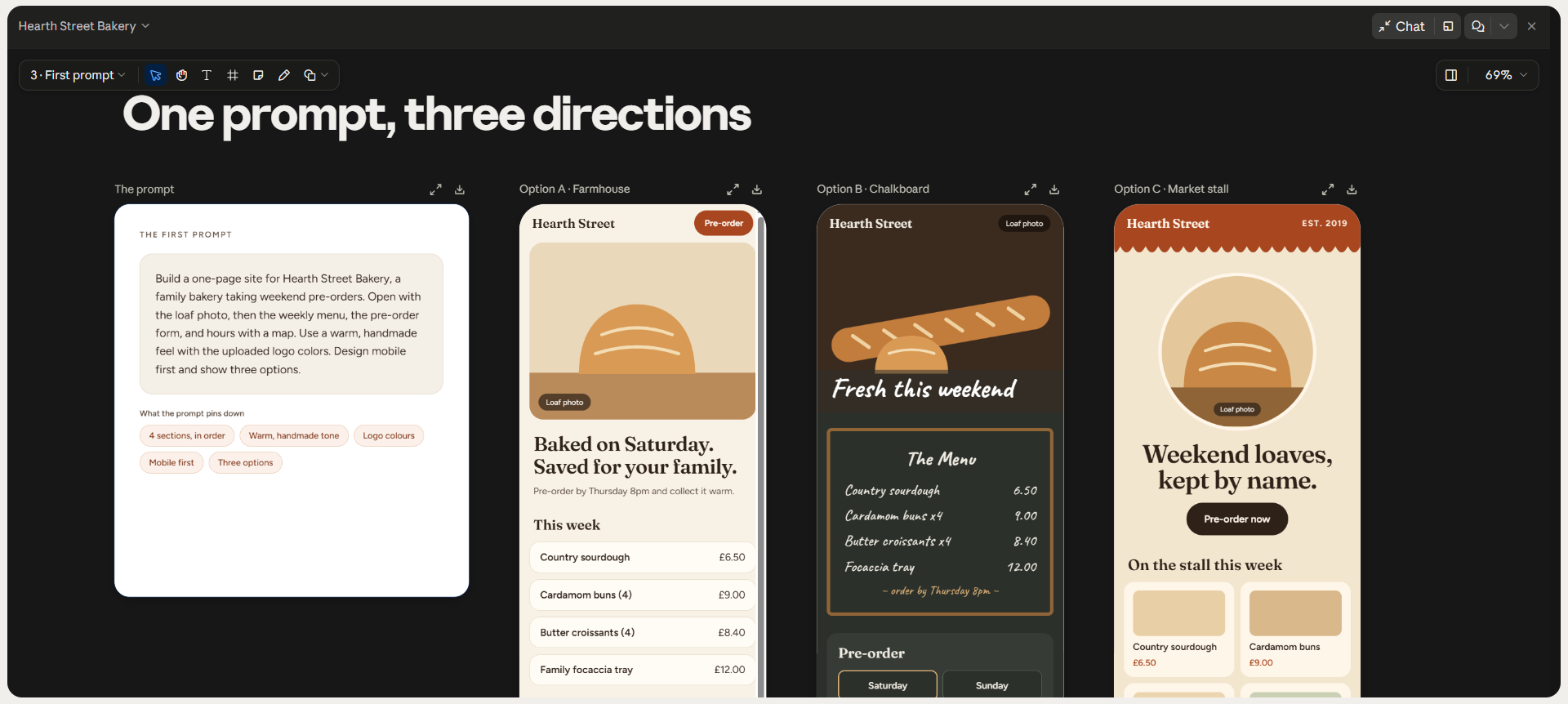
The prompt should name each section in order. The tone and the target devices belong in the prompt too. A workable version for the hypothetical bakery looks like this.
“Build a one-page site for Hearth Street Bakery, a family bakery taking weekend pre-orders.
Open with the loaf photo, then the weekly menu, the pre-order form, and hours with a map.
Use a warm, handmade feel with the uploaded logo colors.
Design mobile-first and show three options.”
Review and Refine the Layout
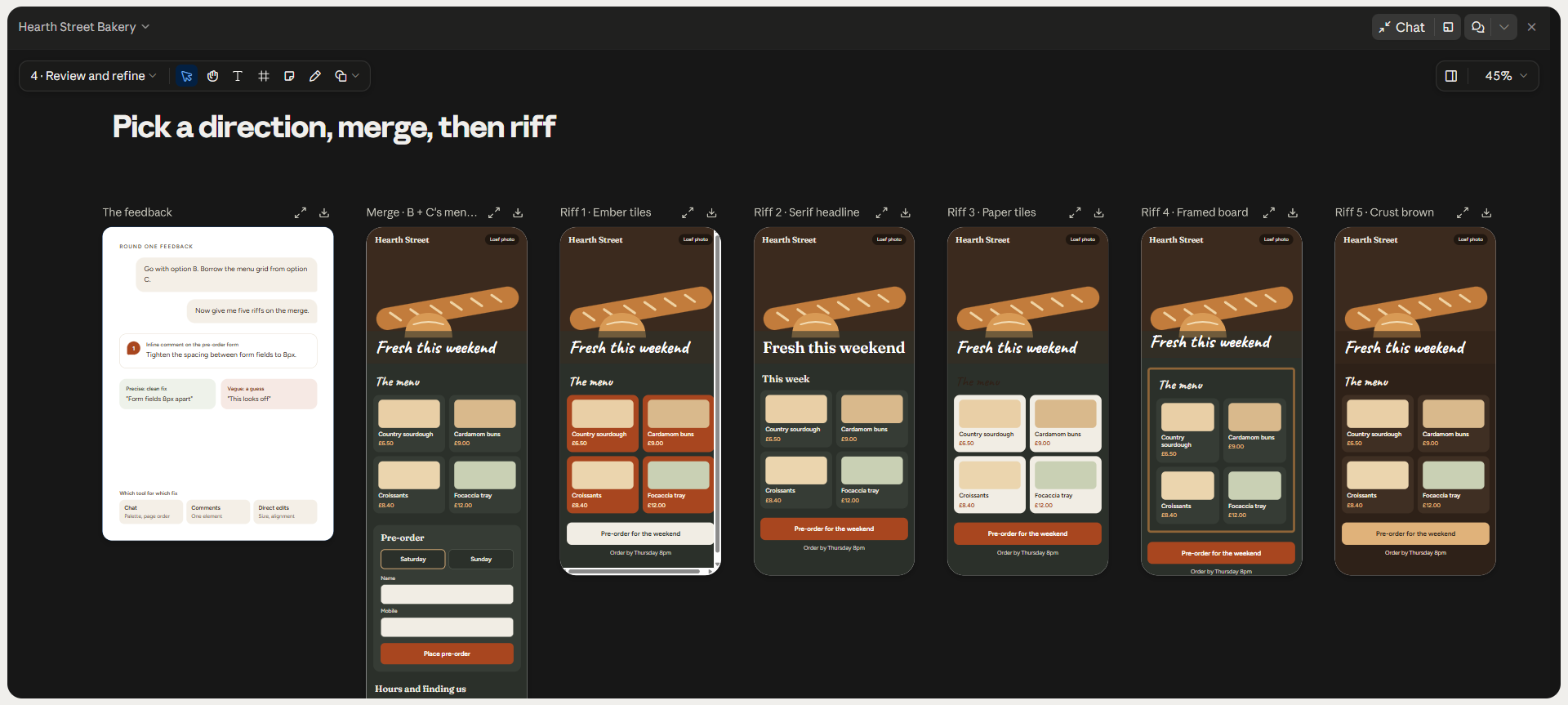
The first result is a draft, and the refining tools decide how fast the draft improves. Chat handles broad changes, such as a darker palette or a reordered page. Inline comments fix single elements. Direct edits on the canvas handle sizing and alignment and cost no usage.
Feedback works best when precise. “Tighten the spacing between form fields to 8px” gets a clean fix, while “this looks off” gets a guess. For the bakery, a strong round picks option B and borrows the menu grid from option C. Then, ask for five riffs on the merge.
Optimize for Mobile and Tablet
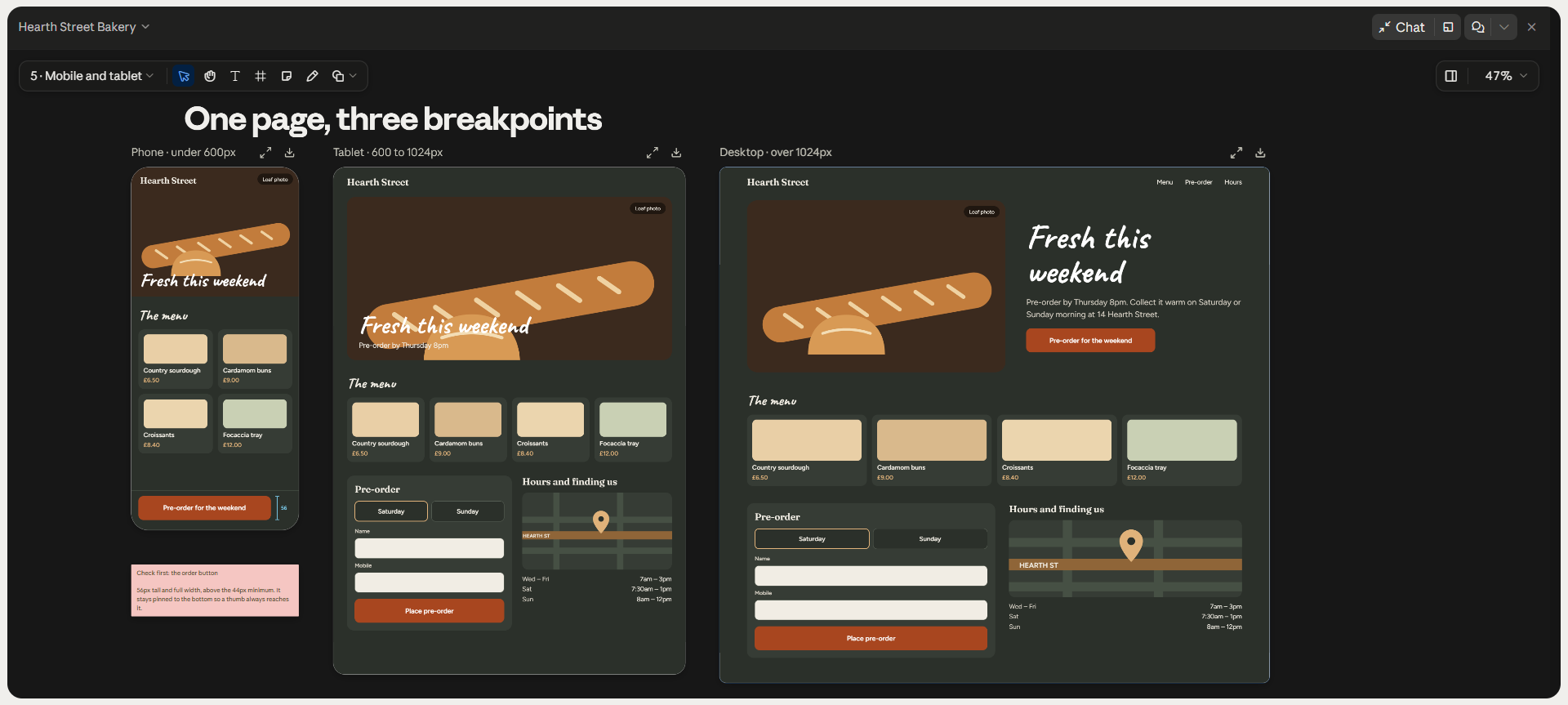
Target devices belong in the brief, before layout decisions harden. Anthropic’s own tips treat responsiveness as a decision for the start of a project. Ask Claude for phone, tablet, and desktop versions of the page. Then adjust each breakpoint, the width where the layout changes, with inline comments.
For the hypothetical bakery, the phone view matters most, since families order from phones. Check the tap size on the order button first.
Test Navigation, Forms, and Interactions
A prototype can look finished and still fail on the first click. Claude Design builds actual HTML, so every link, button, and form can be tested in the preview. Click through the page as a customer would, on each screen size. Anything dead on the canvas stays dead after export.
Forms are the usual weak spot. The bakery’s pre-order form will render and can check fields. Orders still go nowhere until a developer connects the form to email, payments, or a database through API integration.
Claude UI Design: Create Consistent Components
Consistency is where Claude UI design either saves time or creates cleanup work. A design system gives every page the same buttons, cards, and type scale. Without one, styles can drift from prompt to prompt. Across a multi-page site, the small drifts add up to pages feeling stitched together.
Buttons, Cards, Forms, and Navigation
Claude components come out of the design system as named, reusable parts. Requests by name work best, such as “Use the Primary Button component.” Named requests help stop Claude from inventing a new style on every page. Navigation gains the most, because a header change should reach every page at once.
Reusable Colors, Typography, and Spacing
Design tokens are the values behind a design system, such as brand colors, font sizes, and spacing steps. Claude Design stores design systems under Settings, and teams can maintain more than one. Every new project starts from the current token values. A messy source file produces messy tokens, so clean the brand guide before import.
Claude Design vs Claude Code
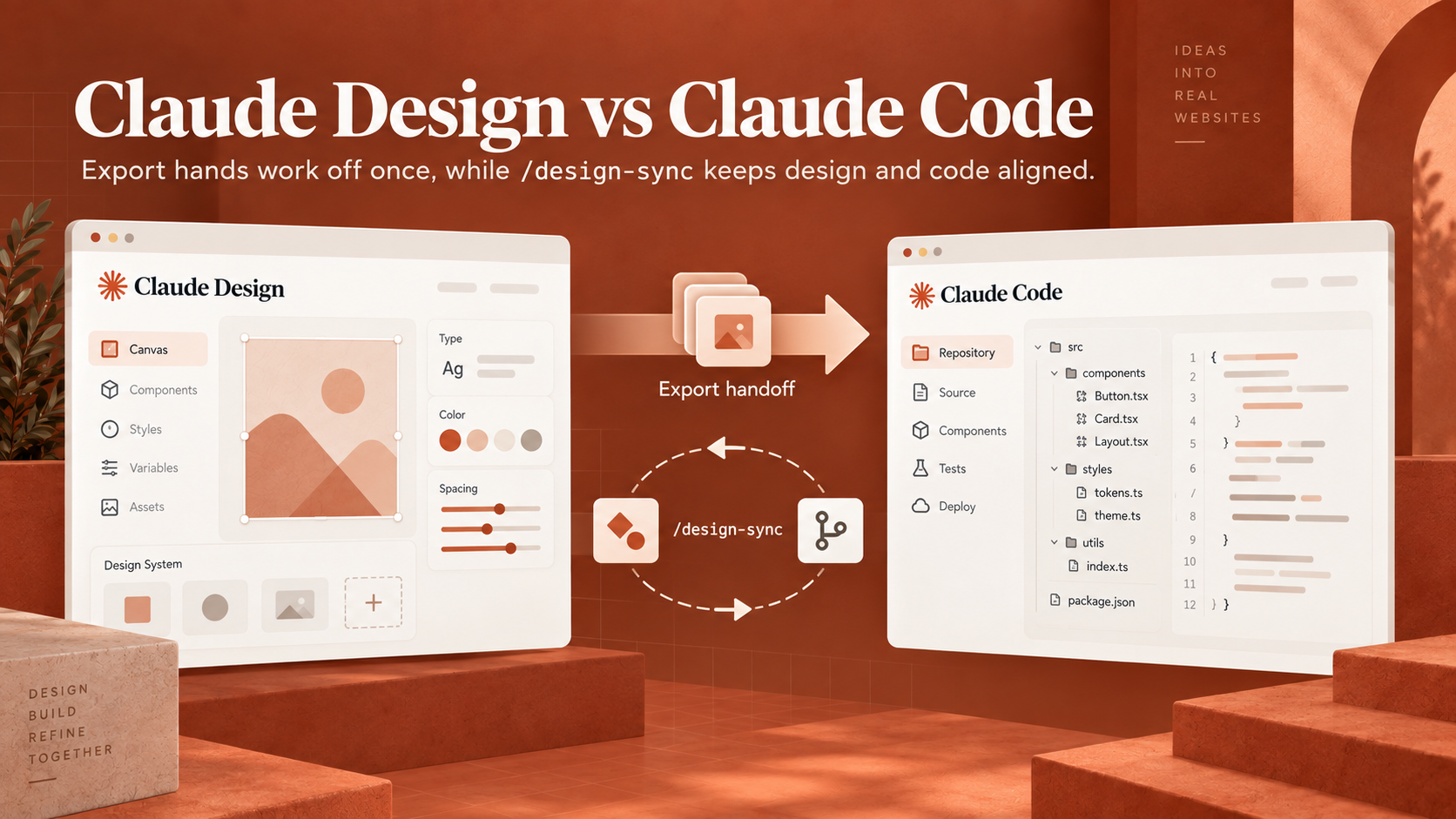
Claude Design is for deciding what to build, and Claude Code is for building the product. Design work happens on a visual canvas with comments and sliders. Claude Code works in a terminal or editor against a code repository. The two tools trade work through a handoff bundle.
Claude Code competes with several other coding agents. For design-led teams, the clearest difference is /design-sync, which is a Claude Code command.
Which Tool to Use for Each Task
The split follows the stage of the project. Claude Design gets anything still open for debate, such as layout, flow, or brand feel. Claude Code gets anything with a database, login, or deployment behind the page. The table maps common tasks to the better tool.
|
Task |
Better Tool |
Reason |
|
Landing Page Concept |
Claude Design |
Fast visual options to compare |
|
Click-Through App Prototype |
Claude Design |
Clickable flows without a code review |
|
Marketing One-Pager |
Claude Design |
Exports to PDF for print |
|
Brand Design System |
Both |
Built on the canvas, synced from code |
|
Production Website |
Claude Code |
Repo, tests, and deployment |
|
Forms with a Backend |
Claude Code |
Needs APIs, storage, and validation |
The two tools are complementary, and neither replaces the other.
Can I Use Claude Design in Claude Code?
Yes, Claude Code includes Claude Design through the /design command. The command imports a design into the codebase or turns existing code into a live prototype. The /design-sync command keeps the design system matched between the repo and canvas. From Claude Design, the Export menu sends a handoff bundle to Claude Code.
The handoff carries the design itself, so Claude Code continues from the work instead of a screenshot. For anything beyond a marketing site, such as AI apps with user accounts, the handoff is only the start of the engineering work.
Claude Design MCP Setup
Claude Design MCP setup is optional, since Anthropic hasn’t published a dedicated server (so far). MCP, the Model Context Protocol, is an open standard for linking AI tools to other apps, and MCP connectors already work inside Claude Design. Claude Code also accepts servers from tools, like Figma. However, a first website rarely needs either.
When You Need an MCP Connection?
MCP earns the setup when a design depends on live information from another tool. One case is a pricing page fed by a product database. Another is a design team wanting Figma or Sketch files synced in real time. For a static bakery page, uploads cover everything MCP would.
Skip the unofficial “claude-design-mcp” projects on GitHub. One version drives a live Chrome browser, and the project’s own docs warn of breakage whenever claude.ai changes. Wider AI integration work, such as connecting Claude to a CRM, belongs with supported connectors.
Connection, Authentication, and Testing
Connection works differently in the two surfaces. In Claude and Claude Design, connectors are added in settings and usually approved through OAuth, the standard screen for granting app access. In Claude Code, the MCP add registers a server, and /mcp handles status and sign-in. A short test prompt confirms the link before real work starts.
One Claude Design Sketch workaround runs through Sketch’s built-in MCP server, which connects to Claude Code or the Claude desktop app. Sketch’s own requirements call for version 2025.2.4 or later, outside the Mac App Store edition.
Export Your Design and Launch Your Website
Claude Design share links aren’t public websites, so launch means handing the prototype to another service. The right export depends on who takes the project next. A marketer publishing alone needs a different path from a team handing code to engineers.
Export and Development Handoff
Every option sits under the Export button, in the top-right corner of a project. A static page needs only a file or a host. A product with a backend needs a developer or Claude Code to finish the build. Each export format suits a different next step, as the table shows.
|
Export Option |
Best For |
|
Standalone HTML |
A static page on any host |
|
Zip Download |
Keeping every project file locally |
|
|
Print or review copies |
|
PPTX |
Slides for PowerPoint |
|
Netlify, Vercel, or Wix |
Publishing a site without a developer |
|
Claude Code Handoff |
Production builds with a backend |
Functionality, Accessibility, and SEO Checks
A site can pass a visual review and still fail visitors and search engines. Claude Design can review a page for accessibility, contrast, and hierarchy when asked. A human pass still matters. Run the checks below, using the Web Content Accessibility Guidelines (WCAG) for contrast.
|
Check |
What to Confirm |
|
Links and Buttons |
Every link lands on a working page |
|
Forms |
Submissions reach an inbox or database |
|
Contrast |
Text meets WCAG AA contrast ratios |
|
Alt Text |
Every image has a plain description |
|
Keyboard Use |
Menus and forms work without a mouse |
|
Titles and Meta |
Each page has a unique title and description |
|
Headings |
One H1 per page, in logical order |
Common Claude Design Problems and Fixes
Most Claude Design problems trace back to missing context or to beta limits. The fixes are usually quick once the cause is clear. Several come from habits covered earlier, like naming components and devices in the brief.
Generic Designs and Inconsistent Styling
Left undirected, Claude falls back on a few favorite looks, which Parrott admits readers would probably recognize. The fix is direction. Named fonts and set colors help, and an imported design system helps most. Inconsistent styling across pages has the same cause and the same cure.
Broken Mobile Layouts and Non-working Buttons
Broken mobile layouts often mean the brief never named the target devices. Ask for phone, tablet, and desktop views, and then fix each view with comments. Non-working buttons are often placeholders with no destination set. Claude needs a follow-up prompt listing each button and target page.
Usage Limits, Export Issues, and Connection Errors
Usage stalls hurt most, because Claude Design stays unavailable until the limit resets. Direct canvas edits cost no usage at all. Very large repositories cause lag, so link them from Claude Code instead. A “chat upstream error” usually clears after opening a new chat tab in the same project.
Export gaps have simple causes. Google Slides export works only at claude.ai/design. Enterprise share links stay internal until an owner turns on external sharing.
Final Verdict on How to Use Claude Design
Claude Design is worth learning for anyone who needs a website or app idea on screen quickly. A clear brief turns into a clickable prototype in a single session, and paid plans already include access. The limits are real, though. Launch still depends on work outside Claude Design.
The payoff is highest for landing pages, prototypes, and one-pagers. Products with accounts or payments get less from Claude Design and more from Claude Code. Learning how to use Claude Design well means treating the canvas as the place to decide and the codebase as the place to ship.
Everything in this Claude Design tutorial assumes a marketing site or a prototype, and anything with logins or live data needs engineering behind the design. Planning the build before committing is the work an AI strategy engagement covers.
Book a Free 30-Minute Meeting
Discover how our services can support your goals — no strings attached. Schedule your free 30-minute consultation today and let's explore the possibilities.
Book a Free Call
