

Introduction
The Short Answer on AI Automation Consultant Access
Why Secure Consultant Access Matters
What Access Does a Consultant Need at Each Project Stage?
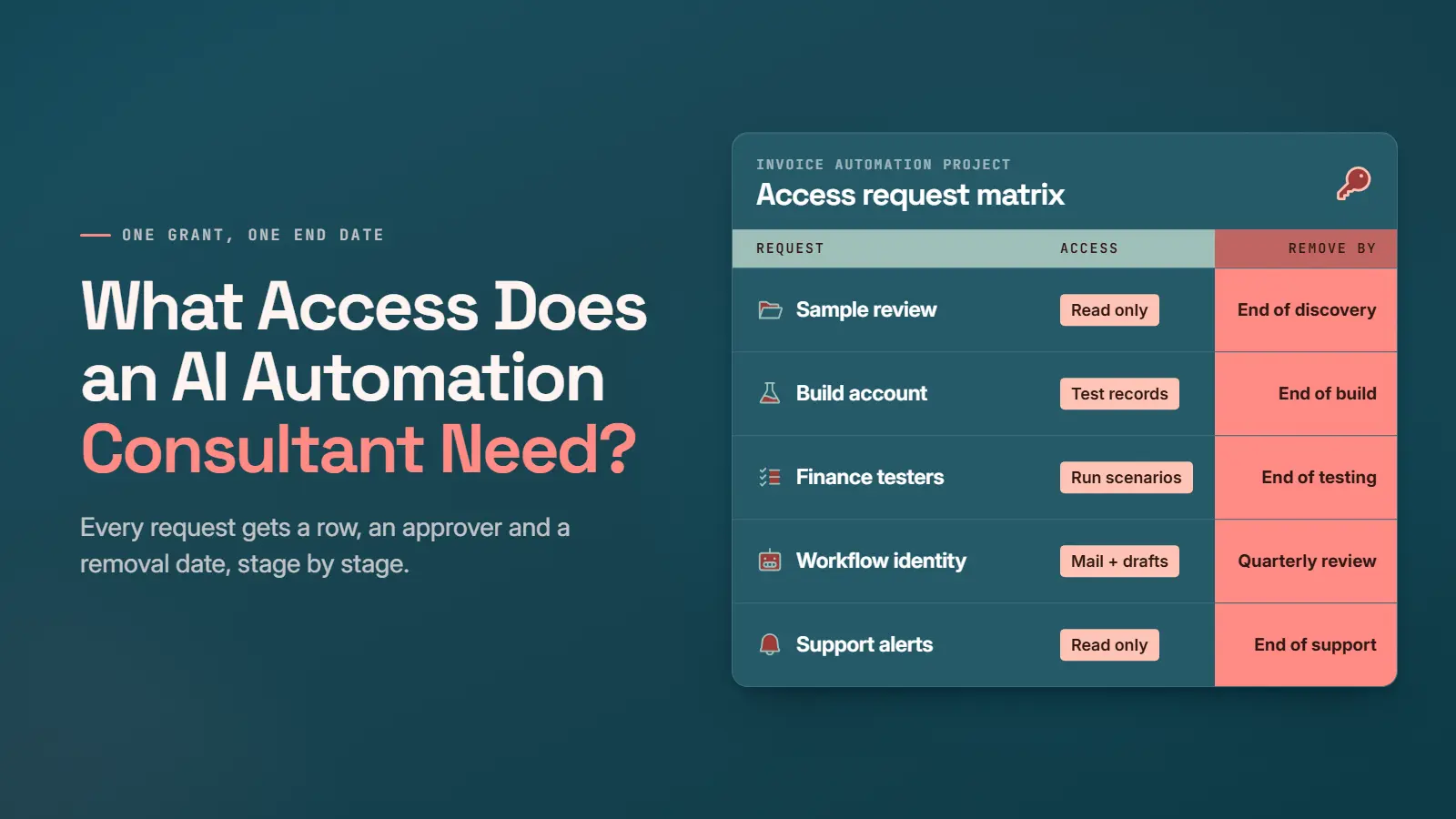
Consultant access should change as the project moves from discovery to support. Early stages often need no login, while later stages need narrow, time-limited roles. Client inputs and approval triggers change too. The table below lays out all five stages.
|
Stage |
What the Client Provides |
Access Needed |
Approval Trigger |
|---|---|---|---|
|
Discovery |
Process map, system inventory, sample inputs and outputs, walkthrough |
No system login |
None |
|
Sandbox Development |
Test workspace with representative data |
View records, configure the workflow, or create test records |
Build needs a system; samples cannot replace it |
|
Testing |
Agreed scenarios, including an invoice missing a supplier ID |
Designated testers run scenarios and review results |
Named finance sign-off |
|
Production Deployment |
Client tech team deploys, or grants a temporary role |
Deployer access kept apart from workflow permissions |
Security review and a set deployment window |
|
Support |
Alerts or selected logs |
Elevated access only on request |
Named approver for each temporary elevation |
Production deployment involves two sets of permissions. The deployer needs enough access to install the build. The workflow itself needs narrower permissions to read the shared inbox and create draft bills. Once the process automation goes live, the deployer’s role ends.

What Information Should You Prepare Before Granting Access?
Which Accounts and Permissions Should You Approve?
Access approval comes down to four client decisions. Who holds each account, what each account can do, where each one runs, and who approves consequential actions. A written record of all four keeps the project easy to audit. Connection design and API detail belong in the integration guide.
Named Accounts and Service Accounts
A named account belongs to one person, while a service account belongs to the running workflow. A service account, or a similar client-controlled identity, lets the invoice workflow run without anyone’s personal login. Mixing the two ties a live workflow to one person’s login. The table compares both account types on four ownership questions.
|
Question |
Named Account |
Service Account |
|---|---|---|
|
User |
One person, such as the consultant |
The running workflow |
|
Owner |
The client, with a named sponsor |
The client, with a named workflow owner |
|
Lifespan |
One project stage |
As long as the workflow runs |
|
Who Can Disable the Account |
Client tech team |
Client tech team |
The two account types work together, since people build the workflow and the service account runs the workflow. Record an owner and a person able to disable each account. The consultant can then finish the build and lose personal access while the workflow keeps creating draft bills.

Moving a workflow out of a consultant’s own account later can mean a rebuild. So, low-code builds should start in a client-owned account.
Data Prism builds in client-owned accounts too. Each engineer gets a personal named login. At project close, Data Prism returns or deletes the project data.
Read, Write, and Administrative Access
Access to an accounting system is rarely one switch. Reading test invoices needs read-only access, while creating draft bills and posting bills are separate write actions. Each action deserves its own decision, from read access up to admin rights. Least privilege means the workflow gets only the access the current task needs.

Each grant in an AI integration should name the records and actions covered, with a reason for each action. The invoice workflow, for example, reads only one shared finance mailbox. Exchange Online lets an admin scope an app’s mail permission to named mailboxes.
For admin access, the default answer is no. Some companies refuse admin rights to any non-employee, even in a test system. When a task needs admin access, ask the client’s tech team to perform the step or approve a narrower, time-limited role.
AI adds another reason to keep write access narrow. The workflow reads outside email, so a hostile invoice can carry text meant to steer the model.
OWASP’s 2025 Top 10 for LLM applications names excessive permissions as a root cause of excessive agency, with a crafted incoming email as one trigger. A workflow limited to draft bills can’t pay anyone, whatever an email says.
Sandbox and Production Access
A sandbox is a test copy of the accounting system, so mistakes there never touch the real books. The consultant can confirm field mapping and create draft bills against test records. A clean test run proves the workflow. Production readiness still needs its own check.
Before deployment, the client confirms the business owns the production account. Someone with authority then approves the exact permissions. The client also schedules the deployment window outside month-end close.
Without a usable test environment, agree on a controlled production test with a few named test suppliers and draft bills only. Write both limits down, because most stories about AI escaping agent sandboxes turn out to be misconfigurations.
Approval for Consequential Actions
Posting a bill is the consequential action in the invoice example, since posting changes the books and starts a payment. The workflow creates only a draft bill. Finance then reviews and posts the bill. Good approval design names the approver and covers every outcome short of a clean yes.

The approver is usually the accounts payable lead or the controller. Each decision goes into the accounting system’s approval history. QuickBooks Online, for example, offers a bill approval workflow on some plans, which requires approval before a bill is recorded and paid.
Incomplete information sends the draft to an exception queue with the reason attached. Withheld approval leaves the draft unposted and returns the query to the accounts payable clerk. Well-built payables automation treats both paths as routine work.
Data Prism used the same pattern in a Shopify build for Lovey Prints. When the workflow could not process a file safely, the file moved to a folder for manual sending. Logging also captured uploads, file movements, sent emails, and exceptions.
How Should Credentials and Sensitive Data Be Handled?
Use a Stage-by-Stage Access Request and Approval Matrix
What Should You Review and Revoke at Handover?
At handover, review every grant the project opened and revoke what no one needs. Build accounts and temporary roles pile up unused at this stage. The Qubole attacker relied on exactly this kind of leftover integration role.
- Assign an internal owner for the workflow, its accounts, and its documentation.
- Revoke access for the consultant and any temporary deployer no longer needed.
- Check the workflow identity’s permissions in a final access review.
- Rotate any credentials shared or exposed during the project, then confirm the workflow still runs.
- Document the support access process and who removes access when a consultant leaves or a support agreement ends.
- Confirm project data was returned, deleted, or retained under the agreed terms.

Removing a person’s account isn’t enough, because integration tokens (the stored keys one app uses to reach another) keep working until someone revokes them. In August 2025, Salesloft and Salesforce revoked all active tokens for the Drift integration after attackers used stolen tokens to export Salesforce data.
When a Lighter Access Plan Is Enough
Verdict on What an AI Automation Consultant Needs
Book a Free 30-Minute Meeting
Discover how our services can support your goals — no strings attached. Schedule your free 30-minute consultation today and let's explore the possibilities.
Book a Free Call