

Automate 10 Tasks With AI Automation for Service Businesses

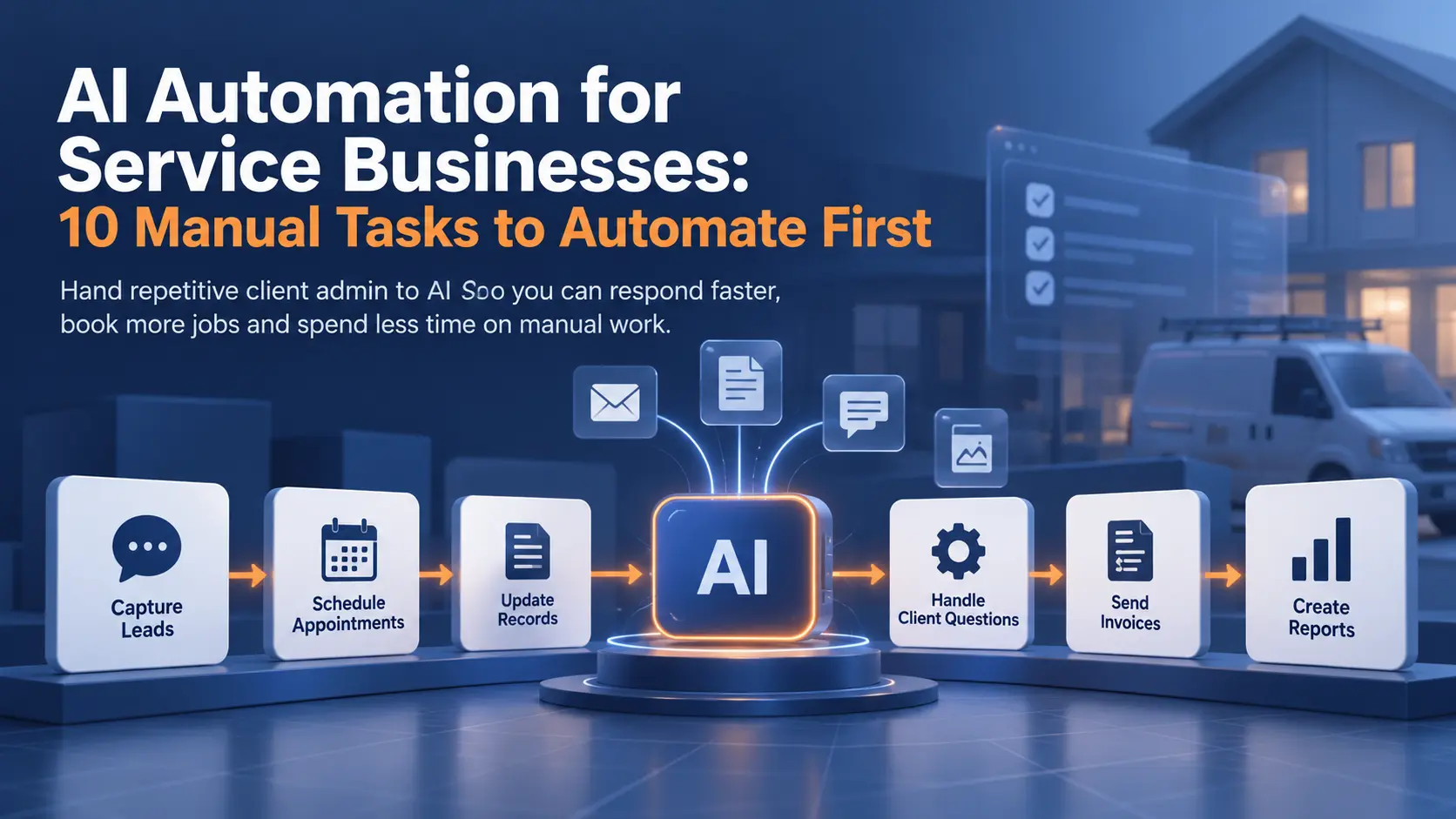
Service task cards for leads, scheduling, records, and invoices feeding an AI chip, under a 10 Manual Tasks headline.
Written byPrincipal Data/AI Architect
Technically reviewed byMuneeb ud DeenBusiness Automation Consultant
Published
Reading time
20 min

Summarize with AI

Introduction

Riley Plumbing, Heating & Air, a home services company in Northern Nevada, booked well under half of its inbound calls. Then the company put an AI voice agent on the phone line. ServiceTitan’s April 2026 webinar recap puts Riley’s booking rate above 80%, and staff now answer zero inbound calls.

Most service businesses lose leads and hours the same way. A new lead waits hours for a reply. Staff types the same client details into several apps. Invoices go out late because nobody had time to send them. So, how much of this work can software handle?

Service business AI automation hands the repetitive part to software, while a person still checks anything unusual. This article explains what AI can take over, ten tasks worth automating this year, and how to choose the first one.

What Is Service Business AI Automation?

Service business AI automation is software, guided by AI models, doing the repetitive work between a business and its clients. Most of the work is client admin, such as answering inquiries and booking appointments. The same software updates records and sends invoices once a job is done. A person steps in only when the software flags a case as unclear.

The software combines two kinds of automation. Rule-based steps move data when the input is predictable, such as copying a paid invoice into the accounting app. Classic process automation covers this fixed-step work.

AI handles the other kind, where the input has no fixed format, such as a free-text email or a scanned form. A model reads the input and pulls out the facts. The rule-based steps then take the clean data. The same model also drafts client replies and routes each new job to the right place.
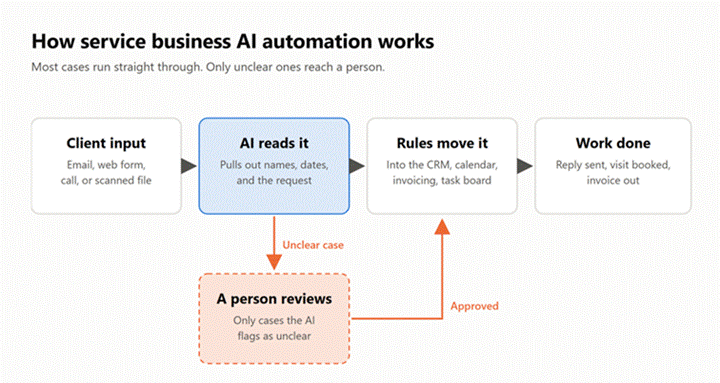
Flow from client input to AI extraction to rules moving data into apps, with unclear cases routed to a person for review.
How service business AI automation works. A person reviews only the cases the AI flags as unclear.

Together, the two kinds produce a workflow able to run on its own most of the time. Picking the models and platforms, then delivering a working system, is the job of AI automation services.

Manual Task Pain Points Holding Your Business Back in 2026

Most manual work in a service business sits between the client and delivery. Nobody hires staff to copy web form details into a CRM, yet the copying can fill hours every week. Each pain point below looks small on one day. Added up over a year, the pain points decide how many clients one team can serve.

  • Slow lead response after hours and on busy days
  • Double data entry across the CRM, calendar, and invoicing app
  • Scheduling back-and-forth by email and phone
  • Chasing late payments one reminder at a time
  • Answering the same client questions every day
  • No time left for weekly reporting

Every item on the list shares one cause. Data arrives in one place and has to reach another, so a person carries the data across by hand. AI automation removes the carrying step. Software moves the data the moment it arrives, and a person only reviews the exceptions.

Does this sound familiar? Count how many of these statements held true in your business last week.

  • A lead waited more than a day for a first reply.
  • Someone typed one client’s details into more than one app.
  • Booking a single appointment took more than two emails.
  • An invoice went past due without a reminder.
  • Staff answered the same question more than five times.
  • The weekly report was skipped or built from memory.

Each statement you checked points to a task in the next section.

An AI automation agency usually opens discovery with these manual task pain points, because each one has a clear before-and-after measure. Reply time and hours of data entry are both easy to count. Counting the hours before any build also sets a baseline for measuring savings later.

10 Manual Tasks to Automate with AI

The ten tasks below follow the order a client meets the business, from first inquiry to final report. Each task describes the problem first and the usual tools second. A real client result closes the task wherever a published project exists. Where none exists, the task names the metric to track instead.
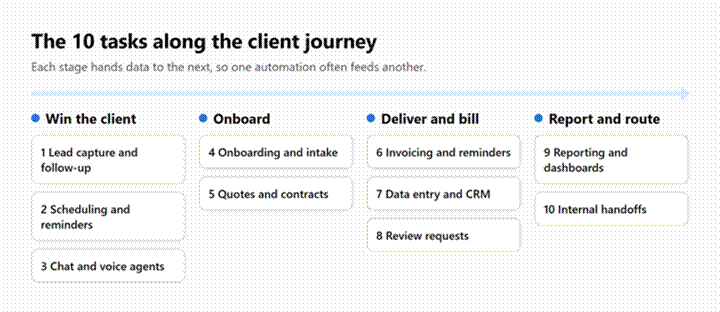
Ten automation tasks grouped into four client journey stages: win the client, onboard, deliver and bill, report and route.
The 10 tasks grouped by stage of the client journey.

1. Lead Capture and Instant Follow-Up

A web inquiry sent in the evening can wait until morning for a reply. AI automation answers the lead right away and asks a few qualifying questions. When the lead fits, the automation books a call. Every inquiry also lands in the CRM with the lead’s source and answers attached.

In practice, a form or ad lead triggers a workflow in Zapier, Make, or n8n. An AI model writes the reply, while the CRM stores the lead. A separate guide to CRM workflows goes deeper on the sales side.

Apsession, an event discovery platform, needed leads from Instagram posts and event flyers. A Python pipeline now scans each flyer with Gemini Vision and removes duplicates. The pipeline then turns the details into lead records. The scans run 24/7 and have replaced manual research entirely.

2. Appointment Scheduling and Reminders

Booking one appointment by email can take several messages. A booking tool shows open slots and sends reminders by email, plus text on most paid plans. AI adds the judgment part, such as reading a reschedule request written in plain English. A model can also match each job to the right staff member.

In practice, Calendly, Acuity, or Cal.com handles the calendar. On top of the calendar, AI agents read incoming messages and update the booking with no staff help.

Movers4Melbourne, a removals company in Melbourne, Australia, swapped its Google Sheets for one Data Prism system. The system assigns drivers and vans to each job and tracks status from booking to completion.

Routine job processing dropped from about 30 minutes to two minutes, a 93% cut. The business now has capacity for six times as many jobs without matching growth in admin work.
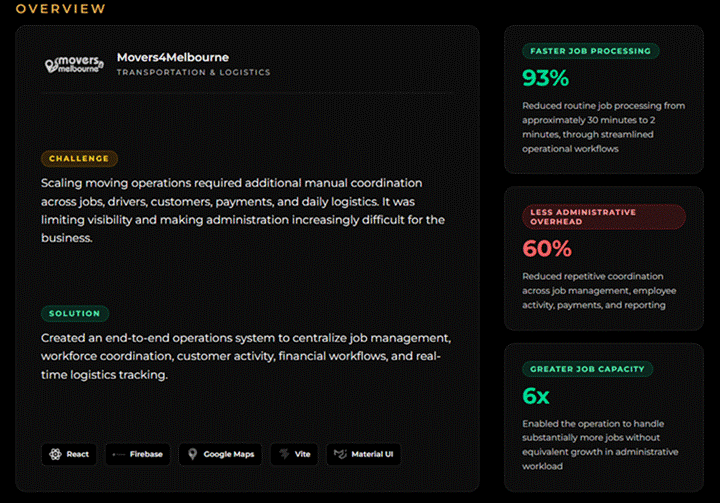
Movers4Melbourne case study card showing 93% faster job processing, 60% less admin overhead, and 6x job capacity.
Results card from the Movers4Melbourne case study, captured October 16, 2026.Source: Data Prism case study

3. Answering Customer Inquiries with AI Chat and Voice Agents

Most service businesses answer the same small set of questions every week. An AI chat or voice agent answers them from the business’s own documents, day or night. When a question falls outside the documents, the agent hands the conversation to a person with the history attached.

In practice, a custom AI chatbot or a tool such as Intercom Fin covers the website. On the phone line, voice platforms such as Retell AI and Vapi do the same job.

Pulse-MD Urgent Care, a group of four clinics in New York, put Hello Patient’s AI agent on its phone lines in April 2026. Missed calls fell from 26% to zero in the first month, by Hello Patient’s count. The agent also handled 30% of calls without staff and returned 208 staff hours.

4. Client Onboarding and Intake Forms

New clients send details in many formats, from email attachments to phone photos. An AI step reads each file and pulls out names, dates, and account details. The details then land in the right fields of the right system. Missing documents trigger an automatic reminder instead of a follow-up call from staff.

In practice, Jotform or Typeform collects the intake. An AI data extraction step reads the attachments, and the same workflow creates the welcome email and client folder.

Lovey Prints, a Shopify store selling personalized art, receives customer photos with every order. A Python workflow now files each photo for the artists and emails proofs to customers for approval. Unmatched files go to a human review folder, and Data Prism puts the cut in manual effort at up to 92%.

5. Quotes, Proposals, and Contracts

A quote often waits days because someone has to rebuild the same document from notes. Generative AI drafts the proposal from the discovery call notes and the price list instead. A staff member checks the numbers, and the contract goes out for e-signature once the client accepts.

In practice, PandaDoc or Proposify holds the templates. A generative AI model fills in scope and pricing from the call notes. The client then signs inside the same tool, so nobody retypes the terms.

The metric to track is quote turnaround time, measured from the first call to the proposal reaching the client.

6. Invoicing and Payment Reminders

Chasing payments is easy to put off, because each reminder feels awkward. Automation sends the invoice when the job closes and sends reminders on a fixed schedule until payment arrives. AI then softens the tone for a long-standing client. AI can also flag a stubborn account for a phone call.

In practice, QuickBooks Online, Xero, or Stripe Invoicing sends the reminders, while a workflow creates each invoice from the finished job. A Data Prism guide covers financial automation in more depth.

Movers4Melbourne’s system also generates a PDF invoice for every job and records each payment. Data Prism reports 60% less administrative overhead across jobs, staff, payments, and reporting.

7. Data Entry and CRM Updates

Copying client details from emails into a CRM is slow, and each copy risks a typo. An AI model can take over the copying by reading each email, form, or post. The model pulls out the CRM fields and updates the record. Rules then sync the clean record to every other app the team uses.

In practice, an API integration connects the CRM to email and accounting. The integration moves the structured fields, while an AI model handles the free-text parts no rule can parse.

FirstList, a real estate platform, faced the same free-text problem, because the property details sat in free-form Facebook posts. An OpenAI model now turns each post into a standard property record. Data Prism reports a 70% drop in manual research effort.

8. Review and Feedback Requests

Happy clients rarely leave a review unless someone asks at the right moment. Automation sends the request by text or email when a job closes, with a direct link to the Google review page. AI then sorts the replies into praise and complaints. For each reply, the AI drafts a response for the owner to approve.

In practice, Birdeye, NiceJob, or a simple Zapier flow sends the requests from the CRM. The tool should send the same review link to every client, because Google’s Maps content policy bans asking only happy customers for reviews.

The metric to track is new reviews per month against jobs completed per month.

9. Reporting and Dashboards

The weekly report is the first job a busy team skips, because building the report takes hours. Automation pulls the numbers from every app on a schedule and loads them into one place. AI then writes a short plain-English summary and flags anything unusual.

In practice, Make or Zapier collects the data, and a warehouse such as BigQuery stores the history. Data Studio (formerly Looker Studio) or Power BI turns the history into dashboards the whole team can read.

BABR, a UK finance and debt recovery firm, needed three employees for a full workday to build one marketing report from six or more sources. Make and Zapier now sync the data daily, so nobody compiles the report by hand.

Lost & Found Marketing, a roofing marketing agency, shows the same pattern at a larger scale. The agency now pulls data from 15 or more platforms into client dashboards, which refresh automatically.

10. Internal Handoffs and Task Assignment

Work stalls between teams when a sale closes and nobody tells operations. Automation creates a task for operations the moment the deal status changes, with an owner assigned and the client details attached. AI can also read the order or the call notes and route the job to the right person.

In practice, the CRM or online store sends each new deal to ClickUp, Asana, or monday.com through a built-in integration or a webhook.

Kaemark, a US furniture manufacturer, linked WooCommerce orders to ClickUp tasks and SQL Server reports across four systems. Data Prism reports 50% to 80% less manual data entry for Kaemark. Operating costs fell by half in the same project.
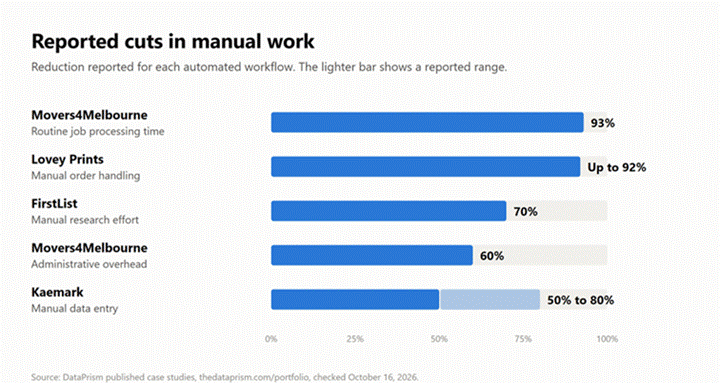
Bar chart of manual work cuts: Movers4Melbourne 93%, Lovey Prints up to 92%, FirstList 70%, and Kaemark 50% to 80%.
Reported reductions in manual work across Data Prism case studies.

Ten tasks make a long list for a small team, and picking the first one is the hard part. The sections below show where each industry usually starts and how to rank the options.

Service Business AI Automation Ideas by Industry

The best first task depends on the industry, because each one has a different bottleneck. A clinic loses time on intake and no-shows, while a law firm loses time on documents and billing. The table below lists three tasks for each industry, plus one example workflow.

Industry

Top 3 Tasks to Automate

Example

Clinics and Healthcare

Intake forms, appointment reminders, patient calls

AI answers calls and books visits at Pulse-MD Urgent Care

Law Firms

Client intake, document drafting, billing reminders

AI drafts the engagement letter from intake answers

Real Estate

Lead follow-up, listing data entry, showing scheduling

Agent data gathered from three sites at Cupid Real Estate

Home Services

Booking and dispatch, quotes, review requests

AI voice agent books inbound calls at Riley Plumbing

Agencies

Client reporting, onboarding, task handoffs

Lost & Found Marketing dashboards refresh from 15 or more platforms

Consultants and Coaches

Discovery call booking, onboarding, invoicing

A booked call triggers the intake form and invoice

Accounting Firms

Document collection, engagement letters, audit sampling

AI reads uploaded documents and fills the client file

Four rows name a real deployment, and the other three describe a typical workflow.

Across every row, the first win is a task done many times a week with predictable steps. Heavier AI work usually comes after a simpler first win.

The rows also show where each industry usually starts. Clinics and law firms start with intake, because every new patient or client brings forms and documents.

Home services and real estate start with calls and leads, since a slow reply can lose the job. Agencies and accounting firms start with reports and document collection, which repeat every month.

Most Promising AI-Driven Ecommerce Automation Strategies in 2026

Many service businesses also sell online, and ecommerce brands face the same manual-task problems at higher volume. Order questions, returns, and product listings come back every day and eat staff time. AI now handles much of this repeat work inside the tools stores already use. Five strategies stand out for 2026.

Shoppers are changing too. Adobe’s 2025 holiday season data shows traffic to US retail sites from generative AI tools rose 693.4% year over year. Adobe’s figures also show the base of AI shoppers is still modest.

AI Customer Support Agents for Order Questions

“Where is my order?” is a constant question in ecommerce support. An AI support agent answers by checking the order status in Shopify or with the carrier, then replies without a staff member. Tools such as Gorgias AI Agent and Intercom Fin handle these order tickets and hand complex cases to a person.

Personalized Abandoned Cart and Post-Purchase Flows

Most online carts never become orders. Baymard Institute puts the average cart abandonment rate at 70.22% across 50 studies. Platforms such as Klaviyo address each abandoned cart with a follow-up email, and AI personalizes the message by product, timing, and customer history.

Personalized email works beyond the cart, too. Llama College, an education platform, replaced 15 to 20+ hours of manual work per newsletter cycle with personalized emails for 3,000+ subscribers.

AI-Generated Product Descriptions

Product descriptions are slow to write across hundreds of items, so they often get rushed. Shopify’s Sidekick assistant and similar tools speed up the job by drafting a description from the product title and a few keywords. A person still checks sizes, materials, and claims before publishing, because AI can invent details.

Inventory and Demand Forecasting

Stockouts and overstock both come from guessing. Forecasting models replace the guess by reading sales history, seasonality, and promotions to suggest reorder points for each product. Apps such as Inventory Planner connect to Shopify and turn the forecast into purchase orders.

Automated Returns and Refund Handling

Returns pile up manual steps between request and refund. Return portals such as Loop Returns and AfterShip Returns generate the label and track the package automatically. Loop’s Smart Exchanges feature uses AI to suggest an exchange before a refund goes out. The return data also flags patterns, such as one product failing repeatedly.

Which Tasks Should You Automate First?

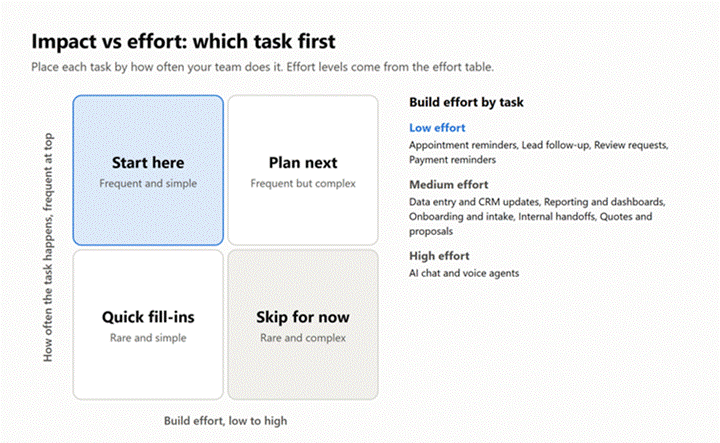
The best first task to automate is a frequent one with fixed steps. Frequency drives the impact, because minutes saved on a daily task add up fast. Fixed steps keep the build effort low, so the risk stays small. Complex AI agents can wait until the first workflow proves the value.

A quick self-audit follows three steps. A free task-audit template covers all three.

  1. List every repetitive task the team did last week.
  2. Estimate the weekly hours spent on each task.
  3. Rank the tasks by hours saved against build effort.
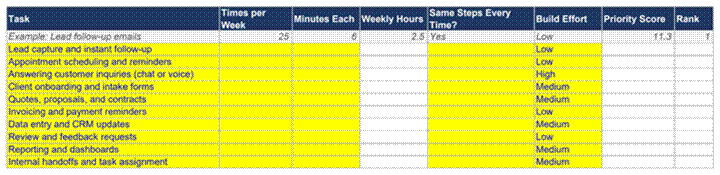
Task-audit spreadsheet listing ten tasks with columns for weekly hours, build effort, priority score, and rank.
The free task-audit template, with the worked example row filled in.

For the third step, the table below roughly estimates build effort for each of the ten tasks.

Task

Build Effort

Why

Appointment Reminders

Low

Off-the-shelf tools cover most needs

Lead Follow-Up

Low

Connects a web form to the CRM

Review Requests

Low

Triggered when a job closes

Payment Reminders

Low

Built into common accounting apps

Data Entry and CRM Updates

Medium

Needs field mapping across apps

Reporting and Dashboards

Medium

Needs clean data from every source

Onboarding and Intake

Medium

AI extraction needs testing on real files

Internal Handoffs

Medium

Depends on clear process ownership

Quotes and Proposals

Medium

Pricing rules need careful setup

AI Chat and Voice Agents

High

Needs a knowledge base and escalation rules

Impact vs effort matrix with a Start here box for frequent, simple tasks and build effort listed for each of the ten tasks.
Impact vs effort matrix. Frequent, simple tasks belong in the top-left box.

The four low-effort rows suit a first project. Before picking one, the readiness scorecard rates how ready a business’s data and systems are today.

Other businesses need a plan before any build, because nobody has documented the process yet. For these businesses, AI consulting starts by mapping the process and ranking use cases.

How to Launch Your First Automation in Seven Steps

A first automation launches in seven steps, from a list of tasks to a working system with an owner. Each step produces something the next step needs.

  1. List every repetitive task from last week, with the minutes each one took.
  2. Pick one task done daily or weekly, with fixed steps and a clear owner.
  3. Map the current steps and every app the task touches, so the manual copying becomes visible.
  4. Build the rule-based workflow first, with no AI step, and confirm the data moves correctly.
  5. Add the AI step for the messy input, with a person checking every output at first.
  6. Launch the workflow, then reduce the review as the error rate stays low.
  7. Name an owner and set an alert for failed runs, so a broken step gets fixed within a day.

Most guides stop at the launch. Steps six and seven decide whether the workflow still runs three months later, because a silent failure can lose leads for weeks before anyone notices.

Where a Person Should Still Approve the Work

A person should approve any step where a mistake reaches a client or moves money. Quotes, refunds, unusual invoice amounts, and replies to complaints all belong in a review queue at first. Routine steps, such as booking confirmations and CRM updates, can run without approval from day one.

Automated texts also need quiet hours. A reminder arriving at 11 p.m. annoys a client more than a slower reply would. Most scheduling and messaging tools let the owner set a sending window, such as 8 a.m. to 8 p.m. in the client’s time zone.

Review can loosen over time. Once a full week of AI drafts goes out with no corrections, the owner can switch from checking every message to spot-checking a sample.

When a Simple Workflow Beats an AI Agent

A simple workflow beats an AI agent whenever the steps stay the same each time. A workflow follows a fixed path, such as form to CRM to reply, so every run is predictable and cheap to test.

An AI agent picks its own steps toward a goal, such as reading a client email, checking the calendar, and proposing a new time. Agents suit tasks with many possible paths, but each agent needs more testing, monitoring, and budget. For a first project, a workflow with one AI step usually delivers most of the value.

What AI Automation Costs a Small Service Business

A first AI automation for a small service business usually costs tens of dollars a month in software. Most of the cost comes from subscriptions to everyday tools, plus usage fees for any AI steps.

Zapier’s Professional plan costs $19.99 a month billed yearly, or $29.99 billed monthly, for 750 tasks. Calendly’s Standard plan costs $10 per seat a month and adds automated meeting reminders, which the free plan lacks.

Voice agents bill by the minute instead. Retell AI charges between $0.07 and $0.31 per minute of call time, with no monthly minimum. A clinic handling 500 minutes of calls a month would pay roughly $35 to $155 in call charges.

Custom builds cost more, because each one needs design, testing on real data, and monitoring after launch. The price depends on the number of apps involved and how much AI judgment the workflow needs.

How to Work Out Whether an Automation Pays Off

An automation pays off when the staff time saved is worth more than the tools and the build. The math needs three numbers: hours saved per week, the hourly cost of the person doing the task, and the monthly tool cost.

Take a hypothetical cleaning company. An office manager earning $25 an hour spends three hours a week copying web leads into the CRM and replying by hand. Automating the task saves about $75 a week, or $3,900 a year.

Zapier’s Professional plan costs about $240 a year on annual billing. So, the lead follow-up workflow pays for itself within the first month, and every later week of savings goes straight back to the business.

DIY Tools or Hire an AI Automation Agency?

DIY tools suit simple workflows, while an agency suits AI-heavy or business-critical automation across several tools. A booking reminder or lead alert can run on Zapier or Make without a developer. A five-app workflow with an AI model needs testing and ongoing monitoring. The cost of a silent failure usually decides the choice.

For a simple workflow, owners building alone can start with no-code automation and a single trigger.

Picking the platform comes next in a DIY build. The guide to automation tools compares the main platforms.

A quick test settles most cases. List every app the workflow touches, then ask what a failed step would cost. One or two apps and a cheap failure point to DIY. Several apps, AI decisions, or a client-facing step point to an agency.

Multi-tool and business-critical workflows usually call for an AI automation agency instead. The agency handles the work from workflow design through monitoring after launch. The manual task pain points a business lists in 2026 decide the scope.

Five Automation Mistakes That Cost Service Businesses Money

Most failed automation projects fail for the same few reasons. Five mistakes come up again and again, and each one carries a clear cost.

Automating a broken process is the first mistake. Software repeats whatever steps it receives, so a messy booking process becomes a fast, messy booking process. Cleaning up the steps on paper before any build avoids paying twice for a rebuild.

Starting with the hardest workflow is the second mistake. A five-app project with AI decisions takes months to get right, and the team loses faith in automation before seeing a single win. A simple reminder or lead follow-up flow builds trust first.

Letting AI reply to clients with no review is the third mistake. One wrong price in a quote or one careless reply to a complaint can cost a client worth far more than the time saved. Review stays on until the drafts prove accurate.

Picking the tool before the task is the fourth mistake. A business buying an AI chatbot because a competitor has one often ends up paying for software nobody uses. The task list from the self-audit should decide the tool, not the other way around.

Leaving the workflow without an owner is the fifth mistake. Apps change their settings, passwords expire, and integrations break without warning. Without an owner and a failure alert, a broken lead form can lose inquiries for weeks before anyone checks.

Keeping Client Data Safe When AI Touches It

Client data stays safe when the business controls which tools see the data and what each tool keeps. Every AI step sends some client information to an outside service, so the tool’s data policy matters as much as its features.

Clinics carry the strictest rules. Under HIPAA, a healthcare provider needs a signed business associate agreement with any vendor handling patient health information, including AI phone and chat tools. Law and accounting firms carry their own confidentiality duties for client files.

A few checks cover most service businesses. The first is choosing business plans with no AI training on customer data. The second is giving each automation access only to the apps the automation needs. The third is keeping a log of what the AI sent and received.

Find the Three Tasks Costing You the Most Time

Each of the ten tasks above saves time, but not the same amount in every business. Most teams guess which task costs the most hours. A free automation audit from Data Prism replaces the guess with a ranked list. Service business AI automation then starts where the payback is fastest.

The audit begins by mapping current workflows and the weekly hours behind each one. From there, the output names the three tasks costing the most time, plus a build plan for the first workflow. The audit is free to request and carries no commitment to a project.

Book a Free 30-Minute Meeting

Discover how our services can support your goals — no strings attached. Schedule your free 30-minute consultation today and let's explore the possibilities.

Book a Free Call

Frequently Asked Questions

Most service businesses can automate lead follow-up, scheduling, intake, invoicing, data entry, reviews, reporting, and handoffs. AI also handles the messy inputs, such as emails, scanned forms, and phone calls.

Lead follow-up, for most service businesses. Every unanswered inquiry is revenue at risk. The build is small, because one AI model links a web form to the CRM already in use.

Not for a first workflow. A lead follow-up flow can run on Zapier’s Professional plan at $19.99 a month billed yearly, alongside tools the business already uses. Custom AI agents cost more, because each agent needs testing before launch and monitoring after.

Rarely, in a small service business. AI takes the repetitive admin, while staff keep the client relationships and judgment calls. A person still reviews any case the AI flags as unclear.

A simple no-code workflow, such as a booking reminder, is the fastest to launch. A multi-app workflow with AI extraction takes longer because each system needs testing on real data before launch.

Book Consultation