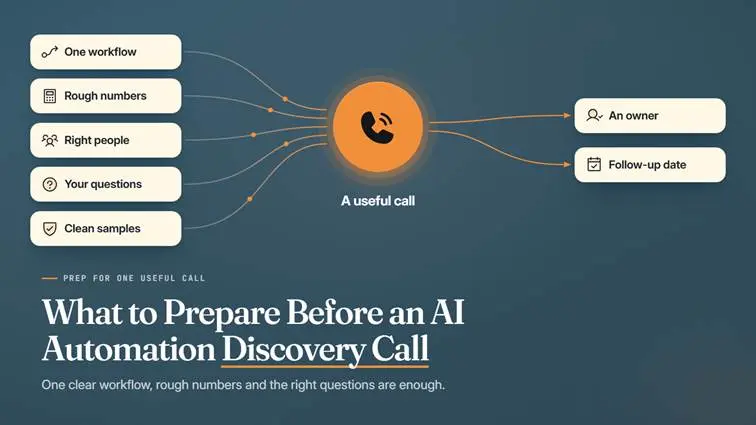


What to Prepare Before an AI Automation Discovery Call

Cover reading What to Prepare Before an AI Automation Discovery Call, with five inputs leading to an owner and follow-up.
Written byPrincipal Data/AI Architect
Technically reviewed byMuhammad Taha Senior AI Architect
Published
Reading time
7 min

Summarize with AI

Introduction

Ford had been relying more and more on automated quality systems, until persistent quality problems pushed the carmaker to hire 350 experienced engineers over three years. Charles Poon, Ford’s vice president of vehicle hardware engineering, admitted the company “mistakenly” believed artificial intelligence plus the design requirements “would produce a high-quality product.”

Ford’s mistake was trusting AI and written requirements without the people who knew the work. A business preparing for an AI automation discovery call faces the same risk on a smaller scale, often unsure what a consultant needs to know. A little preparation helps the provider understand the problem and spot what needs further investigation.

Preparing for an AI automation discovery call takes no technical specification. A clear workflow example, a few approximate numbers, and the right questions are enough to make the conversation useful.

What Should an AI Automation Discovery Call Achieve?

A good AI automation discovery call leaves both sides clear on five points. The call is a first conversation about one workflow your team wants to improve. Your automation provider uses the details you share to decide what to explore next.

  • The business problem and the improvement you want
  • Whether the workflow looks suitable for further investigation
  • Important constraints and missing information
  • Who will provide the missing information
  • The agreed next step

A first call may not produce a complete solution design, a confirmed delivery date, or a final price, because no consultant can fully assess feasibility in one conversation. A Census survey put US business AI use between 17% and 20% from December 2025 to May 2026, so many buyers arrive new to automation.

A call can also come too early. If the process keeps changing, stabilize the steps first. If nobody owns the workflow, name an owner first.

Decision flow titled Is the Workflow Ready for a Call? Stabilize changing steps, name an owner, or book the call.

Prepare One Clear Workflow Example

Pick one specific process before the call, not a broad goal like automating the whole business. A narrow example gives the provider something concrete to judge, since process automation work starts from a single repeatable task. Five details are enough for a first conversation.

Detail

What to Prepare

Trigger

What starts the process, such as a customer email arriving

Main Steps

What staff currently do, in order

End Point

What counts as finished

Exceptions

Situations needing a different approach or human judgment

Example

A sanitized sample of what the team receives and produces

Take a hypothetical support team handling incoming emails. Staff read each message and identify the subject, then forward the email to the correct department. Some emails cover several subjects and need manual review, so a support automation conversation can start here.

Four steps titled One Workflow, Start to Finish: email arrives, identify subject, forward it, and the right team has it.

Exceptions deserve the most attention, so bring a few recent real emails rather than a summary. Then ask what a misrouted email would cost and who would notice. The reply decides how often AI agents should hand unsure cases to a person.

Movers4Melbourne, a Melbourne removals company, now runs each booking through one job system from creation to completion, and PDF invoices go out automatically. The case study reports routine job processing falling from about 30 minutes to two minutes.

Gather Basic Numbers and System Details

An AI automation consultation can size a workflow from rough figures, so approximate numbers work fine. Label every estimate as an estimate. Where a figure is missing, write “Unknown” instead of guessing, because the gaps show where a data quality check should come first.

  • Weekly or monthly task volume
  • Approximate handling time per task
  • Common errors, delays, or repeated work
  • Known operating costs
  • Current tools and systems
  • Known integration restrictions
  • The improvement you want to measure

For the hypothetical support team, a note might read: “We receive approximately 800 support emails each month. Staff estimates that sorting takes two minutes per email, but we have not measured this yet.” Neither figure is a promise of savings.

Next, list each system the work touches. Some software plans limit data connections, which narrows the integration options.

Weak data stalls automation projects. Informatica’s 2026 report, sponsored by Deloitte and based on 600 data leaders, found 50% of agentic AI adopters cite data quality and retrieval issues as deployment barriers.

Automating one step can also move the queue, so note where the work lands next.

Decide Who Should Attend

The person paying for automation rarely knows where the real friction sits, while staff doing the task see the exceptions every day. An automation agency will ask about goals, steps, systems, and budget. Four roles cover the main topics.

Person

Why They May Be Needed

Process Owner

Explains the purpose, priorities, and responsibility for the workflow

Person Doing the Work

Describes the real steps and exceptions

Technical Contact

Answers questions about systems, data, and access restrictions

Decision Maker

Explains budget expectations and approval requirements

Not every role needs a seat on every first call, and one person often covers several. The technical contact can answer open questions in a follow-up message.

Questions to Ask the AI Automation Consultant

Practical automation discovery questions show how a provider thinks and what the next stage involves. The best questions to ask an AI automation consultant draw plain answers, and a good AI consultant also says what still needs checking. Keep these AI automation discovery call questions on this meeting alone.

  1. “What information do you still need?” The reply lists missing details before anyone commits to a next step.
  2. “Does this workflow need AI, or could ordinary automation handle it?” Fit comes first, since a shared template or an inbox rule is sometimes enough.
  3. “What would a further assessment deliver?” The reply clarifies what the next stage includes.
  4. “What would your team need from us?” Client responsibilities and staff time become clear.
  5. “How would you test the workflow and handle exceptions?” A clear reply covers acceptance criteria and human review.
  6. “Who would own the code, workflows, and accounts?” Ownership covers logins, keys, and failure alerts after handoff.
  7. “What support and ongoing costs should we investigate?” Costs continue past the build, so compare the answer with typical agency pricing models.

Share Information Safely and Agree Next Steps

A first discussion should run on sanitized examples or a general walkthrough, so no system access is needed yet. Basic data security still applies. Verizon’s 2026 breach report found 31% of breaches now start with software vulnerabilities, ahead of stolen passwords. Three habits keep the data safe, and a fourth closes the call.

  • Remove personal, financial, and confidential information from samples.
  • Avoid sending passwords, API keys, or production credentials before the call.
  • Confirm permission and an approved sharing method before sharing sensitive records.
  • Record the agreed action, the responsible person, and the follow-up date.

Copy This AI Automation Consultation Checklist

This AI automation consultation checklist pulls every earlier step onto one page. Paste the list into a shared document before the call. Any blank item becomes a question for the meeting.

AI Automation Consultation Checklist with ten ticked items, split into the workflow and the people and plan columns.

The project summary form below fills in the hypothetical support team’s details.

Field

Example (Hypothetical)

Workflow

Sorting incoming support emails

Trigger

A customer email arrives in the shared mailbox

End Point

Each email reaches the correct department

Volume

About 800 emails a month (estimate)

Handling Time

About two minutes per email (estimate, not measured)

Exceptions

Multi-subject emails go to manual review

Goal

Less sorting work, with ambiguous messages kept under human review

Unknowns

Integration options, pending the technical contact

The same hypothetical details condense into a summary to send ahead of the call:

“Our support team manually sorts approximately 800 emails each month. We use a shared mailbox and a help-desk platform. We want to reduce sorting work while keeping ambiguous messages under human review. Handling time is currently an estimate, and our technical contact still needs to confirm integration options.”

Have a workflow worth improving? Use the completed checklist to prepare for a discovery call with Data Prism about AI automation services.

Book a Free 30-Minute Meeting

Discover how our services can support your goals — no strings attached. Schedule your free 30-minute consultation today and let's explore the possibilities.

Book a Free Call

Frequently Asked Questions

No. A plain description of one workflow, with a few recent real examples, is enough to judge fit.

Rough estimates are fine. Mark each figure as an estimate, and write “Unknown” for anything missing.

No. Keep logins, passwords, and API keys private until scope is agreed. Redacted samples or a screen share show enough to judge the workflow.

The workflow owner and one person who does the task daily should attend at minimum. A technical contact and a decision maker can join a follow-up.

The provider asks for more details, proposes an assessment, or calls the workflow a poor fit. Either way, leave with an owner and a follow-up date.

Book Consultation