

How Customer Data Integration Builds One Customer View

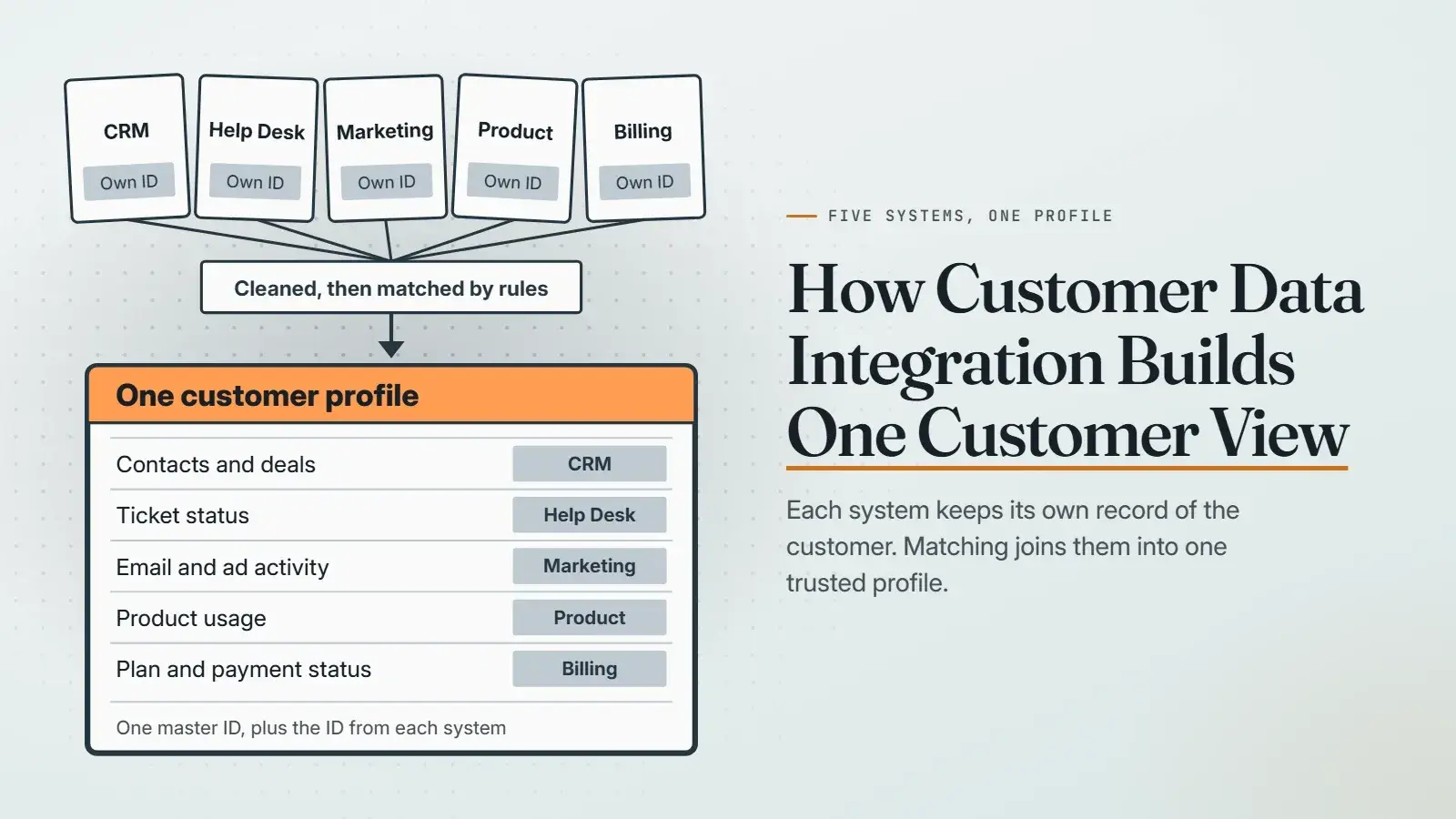
Five systems, each with its own customer ID, matched into one profile that shows which system owns each field
Written byPrincipal Data/AI Architect
Technically reviewed byMuhammad Taha Senior AI Architect
Published
Reading time
13 min

Summarize with AI

Introduction

PureCars launched a unified customer data and marketing platform for car dealers on November 10, 2026. Its launch announcement lists a dealer management system (DMS), a CRM, and several marketing vendors among dealership tools.

No single tool stores the whole customer relationship. PureCars links the split to duplicated outreach and to marketing spend that can’t be attributed to individual customers.

So, what is customer data integration? It’s the process of finding every record a company keeps on one customer and joining them into a single trusted profile.

This article explains how the matching works, walks through three records from CRM, support, and billing as they merge into one, and compares a CDP with a warehouse-first build.

What is Customer Data Integration?

Customer data integration (CDI) is the process of collecting customer records from separate systems and matching the ones that belong to the same person or account. The matched records are stored as one trusted profile. It’s the branch of data integration that focuses on people instead of products. The data integration guide covers the wider practice.

The step that sets customer data apart is identity resolution. A product usually carries a shared code such as a SKU, but a customer may appear as “Jon Smith” in the CRM and “Jonathan Smith” in the help desk. Deciding the two are one person is most of the work.

Why Customer Data Ends Up Scattered

Customer data ends up scattered because every team buys software for its own job. Sales uses a CRM. Finance works in billing software, while support works in a help desk. Each tool creates its own customer record, with its own ID and its own field names.

Salesforce’s Connectivity Benchmark Report for 2026 surveyed 1,050 IT leaders at companies with at least 1,000 employees. The number of apps in enterprises grew from 897 to 957 in a year, and only 27% of them were integrated.

The gaps between the tools are what the data silos guide calls silos. For customer data, a silo shows up as a sales rep who can’t see an unpaid invoice.

Where Does Customer Data Live?

Customer data usually lives in five kinds of systems. The CRM stores contacts, accounts, and deals. Billing stores invoices, plans, and payment status.

The help desk stores tickets, and product databases capture usage. Marketing tools capture email and ad activity. Each system names the customer differently, which is why the matching step exists.

Across these systems, the records hold four types of customer data. Identity data covers names, emails, and phone numbers. Descriptive data covers company, role, and location. Behavioral data covers clicks, logins, and product usage. Transactional data covers orders, invoices, and refunds.

Connecting the CRM to billing and the help desk is the usual first step in CRM and sales data integration. Together, the three answer questions about revenue and renewal risk.

Why a Single Customer View Matters

A single customer view matters because every team can then answer questions about a customer from the same facts. Revenue, churn, and support numbers stop disagreeing between departments. The biggest gains show up in revenue reporting, marketing, and support.

Accurate Lifetime Value and Churn Numbers

Lifetime value and churn need revenue from billing tied to the right customer in the CRM. Without a match, an account with two billing entries looks like two small customers. A downgrade that opens a new billing entry shows up as one lost customer and one new one.

Better Targeting and Personalization

Targeting improves when marketing can see what a customer bought and what they asked support about. A customer with an open complaint can be left out of an upsell campaign. A customer near renewal can get a renewal offer instead of a new-customer discount.

Faster Support

Support gets faster when agents see billing status and recent orders next to the ticket. The agent doesn’t have to ask for an account number or check a second tool. The customer doesn’t have to repeat the history either.

How Customer Data Integration Works

Six steps turn raw customer records into a finished profile. The order matters, because matching dirty data creates bad merges. Each step depends on the one before.

Data Collection

Data collection copies customer records from each system into one place, usually through APIs or managed connectors. A connector pulls new and changed records on a schedule, so the central copy stays current. Keeping raw records as they arrived lets the team rerun matching later.

Cleaning and Standardization

Cleaning puts fields into the same format before any matching happens. Emails are lowercased and trimmed. Phone numbers are converted to one format, such as +14045550182. Without this step, “JON.SMITH@ACME.EXAMPLE” and “jon.smith@acme.example” look like two different people.

Identity Matching and Merging

Identity matching decides which records describe the same customer, using deterministic or probabilistic rules. A deterministic rule merges records only on an exact shared key, such as a cleaned email. A probabilistic rule scores how similar names, phones, and addresses are, then merges above a threshold.

Exact email match merges at once, while other record pairs are scored and merge only above the threshold

Matching also links anonymous activity to known customers. A website visitor stays anonymous until they log in or buy, and the login lets the system attach earlier browsing to the right profile.

Field Ownership Rules

Field ownership rules name one system as the source of truth for each field, so a rule settles every conflict. Billing should own the plan, and the help desk should own ticket status. MDM tools call these survivorship rules.

A written rule beats “most recent wins” for hand-typed fields, where the latest edit may be a typo.

The Golden Record

The golden record is the merged profile that results from matching and field ownership. It carries one master customer ID, plus the ID from each source system. The source IDs keep every merge traceable, so a wrong match can be undone.

Reverse ETL

Reverse ETL is the last step, writing the merged profile back into the CRM and other team tools. Sales then sees billing status inside the CRM. The sales automation guide shows the kind of workflows clean CRM fields make possible.

How to Merge CRM, Support, and Billing Records

Merging CRM, support, and billing records follows the six steps above, applied to one customer. The hypothetical example below uses three records for the same buyer at a company called Acme. Each system stores the buyer differently.

Field

CRM

Help Desk

Billing

Golden Record

Name

Jon Smith

Jonathan Smith

J. Smith

Jon Smith (CRM owns)

Email

jon.smith@acme.example

JON.SMITH@ACME.EXAMPLE

billing@acme.example

jon.smith@acme.example (CRM owns)

Phone

(404) 555-0182

404-555-0182

Not stored

+14045550182 (standardized)

Company

Acme Corp

Acme

Acme Corporation

Acme Corporation (billing owns)

Plan and Status

Not stored

Not stored

Pro plan, paid

Pro plan, paid (via account)

Open Tickets

Not stored

2

Not stored

2

The CRM and help desk records match on a deterministic rule. After cleaning, both emails and both phones are identical, so the system merges them with full confidence.

The billing record needs a different rule, because its email is a shared billing inbox. It matches the Acme account, not the person, on the company domain and a cleaned company name. Domain matching only works for company domains, never for free email domains such as gmail.com.

Jon Smith inherits the plan and payment status through the account link. The finished profile shows a paying customer with two open tickets, which a sales rep should know before a renewal call.

Consolidation, Propagation, and Federation

Consolidation, propagation, and federation are the three ways to combine customer data, and most companies use more than one. They differ in where the data ends up and how fresh it is. The right mix depends on whether a team needs reports or synced tools.

Consolidation copies data from every source into one central store, usually a data warehouse, and matches it there. It suits reporting and analytics, because all history sits in one place.

Propagation copies changes from one application to another as they happen, so a new billing status appears in the CRM within minutes.

Federation leaves data in place and queries the sources on demand. It avoids extra copies, but queries slow down as volume grows.

Customer Data Integration vs CDP vs MDM

Customer data integration is the process, while a CDP and MDM are two kinds of software that can run it. A customer data platform is built for marketing use. Customer master data management is built for governance across operations.

The table compares all three.

Option

What It Is

Main Users

Best Fit

Customer Data Integration

The process of matching and unifying records

Data, RevOps, and IT teams

Any business with several customer systems

Customer Data Platform (CDP)

Packaged software that builds profiles and audiences

Marketing and growth teams

Consumer brands with heavy event data

Customer Master Data Management (MDM)

Governance software for golden records

Data governance and IT teams

Larger firms sharing records with ERP and billing

A CRM is none of the three. It stores the contacts and deals that sales enters, but it doesn’t resolve identities across other systems. A CDP feeds campaigns, while master data management keeps account records consistent across finance and operations.

Customer Master Data Management

Customer master data management keeps one governed master record per customer and shares it with the ERP, CRM, and billing systems. Data stewards approve changes to key fields before they spread. Its survivorship rules work like the field ownership rules above. Vendors include Profisee, Semarchy, Stibo Systems, and Tamr.

MDM programs follow one of four implementation styles. A registry style leaves records in their sources and keeps only a cross-reference index. A consolidation style copies records into a central hub for reporting.

A coexistence style lets the sources and the hub both edit records and keeps them in sync. A centralized style makes the hub the only place where customer records are created. MDM fits better than a CDP when invoices, contracts, and orders must all use the same customer record.

Customer Data Integration Tools

Customer data integration tools fall into three routes, and each can produce the same merged profile. The routes are a CDP, a warehouse-first stack, and custom pipelines. They differ in who runs them and how much control the team keeps.

Customer Data Platforms

A customer data platform bundles collection, identity resolution, and audience building in one product. Twilio Segment, Salesforce Data 360, and Amperity are examples. Salesforce’s CRM isn’t a CDP, but its Data 360 product is. A CDP suits teams whose main goal is audiences and campaigns.

Warehouse-First Stack

A warehouse-first stack does the same job with tools the data team may already use. Fivetran or Airbyte loads source data into Snowflake or BigQuery. Models written in dbt then clean and match the records. A reverse ETL tool such as Hightouch sends profiles back.

Hightouch markets this setup as a “composable CDP.”

Custom Pipelines

Custom pipelines are code written for the business’s own sources, usually in Python with a Postgres database or a warehouse. They fit when sources lack connectors, such as an internal app. Every source change then lands on the team.

The table compares the three routes.

Route

Starts Fastest For

Matching Control

Profiles Live In

CDP

Marketing teams without engineers

Vendor settings

The vendor’s platform

Warehouse-First

Teams already using a warehouse

Full, in SQL

The company’s warehouse

Custom Pipelines

Sources with no connector

Full, in code

The company’s database

The CDP trades control for speed, while the other two routes trade engineering time for control. Buyers comparing tools should check connector coverage for their actual sources and the matching method. Refresh speed and the handling of consent and deletion matter just as much.

Common Customer Data Integration Challenges

Customer data integration challenges usually come from the data and the teams around it. Each one has a known fix, and most fixes are written rules. The table pairs six problems with their fixes.

Challenge

What Goes Wrong

Fix

Duplicate Identities

One person signs up with a work email and buys with a personal one

Add probabilistic rules after exact matching, and review low-confidence merges

Conflicting Fields

The CRM and billing store different addresses

Write field ownership rules before launch

Schema Changes

A vendor renames a field and profiles go missing without an error

Check incoming fields against an expected schema and alert on failures

Legacy Systems

An older system has no API or connector

Use scheduled exports or a custom pipeline for that source

Unclear Ownership

Teams resist sharing data, and nobody fixes bad merges

Name one owner for the golden record

Privacy Upkeep

Each new source adds copies a deletion must reach

Route deletion and opt-out requests through the master ID

Writing the rules before launch heads off most of these problems.

Customer Data Integration Best Practices

Good customer data integration starts with written rules and ends with checks after launch. Projects that skip the rules leave the software to guess. Agreeing on rules takes longer than configuring software.

First, write the matching rules and field ownership down before choosing a tool. A rule that lives only in an engineer’s head breaks when the engineer leaves.

Second, validate and standardize records before checking for duplicates. Data Prism’s local events search engine for Apsession applied the same idea to event records. Its pipeline paired validation and standardization with duplicate detection.

Third, start with deterministic rules on cleaned emails and IDs, then add probabilistic rules for what’s left. Exact rules are easy to explain and rarely merge the wrong people. Data Prism’s real estate agent data collection for Cupid Real Estate shows where such duplicates come from. Its case study names the same agent appearing across several locations as a data-quality concern.

Fourth, track a few numbers after launch. The duplicate rate shows whether matching works, and the count of manual merge fixes shows where the rules fail. A sudden jump in matches can mean a loose rule is folding two people into one profile.

Finally, give the golden record an owner. Collecting records in one place is only aggregation. Integration also cleans, matches, and governs the records, and governance needs a person who reviews merges and fixes rules.

Privacy rules apply to the golden record, because merging data creates a fuller profile than any single system had. The California Privacy Protection Agency’s CCPA FAQ lists rights to know, delete, correct, and opt out of the sale or sharing of personal information. A merged profile makes each request reach further.

Consumers can also limit the use of sensitive personal information, and businesses can’t treat them worse for using their rights. Virginia, Colorado, and other states have similar laws, each with its own thresholds, so companies must check which apply.

Deletion is the hardest test. A delete request has to reach the merged profile and every source system. Copies synced to marketing tools need deleting too, and opt-outs must travel the same way.

Who Needs Customer Data Integration?

Any business that enters the same customer in several systems, and sees the numbers disagree, needs customer data integration. Duplicate CRM contacts are the usual first sign. Revenue reports that don’t match billing are the second.

A small company using a CRM with billing and support built in usually doesn’t need a project. Its CRM is already the customer view, so better data entry rules will do more than new software.

Which Customer Data Integration Route Should You Choose?

The right customer data integration route depends on the systems a business uses and the people it has. A marketing team with no engineers usually gets value sooner from a CDP. A business with a warehouse and a data engineer usually gets more from the warehouse-first route, because customer profiles sit next to finance and product data.

Custom pipelines make sense only when key sources have no connector. Firms that need governed records across finance and operations should look at customer MDM instead.

Everything above depends on agreeing who owns each customer field. For help settling field ownership across your systems, Data Prism’s data integration services start with a free 30-minute call.

Book a Free 30-Minute Meeting

Discover how our services can support your goals — no strings attached. Schedule your free 30-minute consultation today and let's explore the possibilities.

Book a Free Call

Frequently Asked Questions

Salesforce data integration usually runs through Salesforce’s APIs. Data Loader and the Bulk API handle large imports and exports. MuleSoft, which Salesforce owns, connects other apps in real time, and Data 360 unifies customer profiles from many sources.

Customer master data management is a governed program for keeping one master record per customer. Larger firms adopt it when finance, sales, and operations share customer records across ERP and billing, with a governance team owning the rules.

Some do. CDPs and event streams can update a profile within seconds of a website visit or purchase. Warehouse-first stacks usually refresh on a schedule, from every few minutes to nightly, which suits reporting better than live personalization.

Yes. B2B teams match people to company accounts, so they track parent and subsidiary hierarchies. B2C teams match individuals across devices and channels, and often group people at one address into a household for mailing and offers.

A CRM records the sales and service history that teams enter by hand. A CDP collects behavioral data automatically, such as website visits and app events, and matches it into profiles that marketing uses to build audiences.

Book Consultation