

Data Extraction vs Data Collection: Raw Data Into Insights

Usman AshrafAug 31, 2026
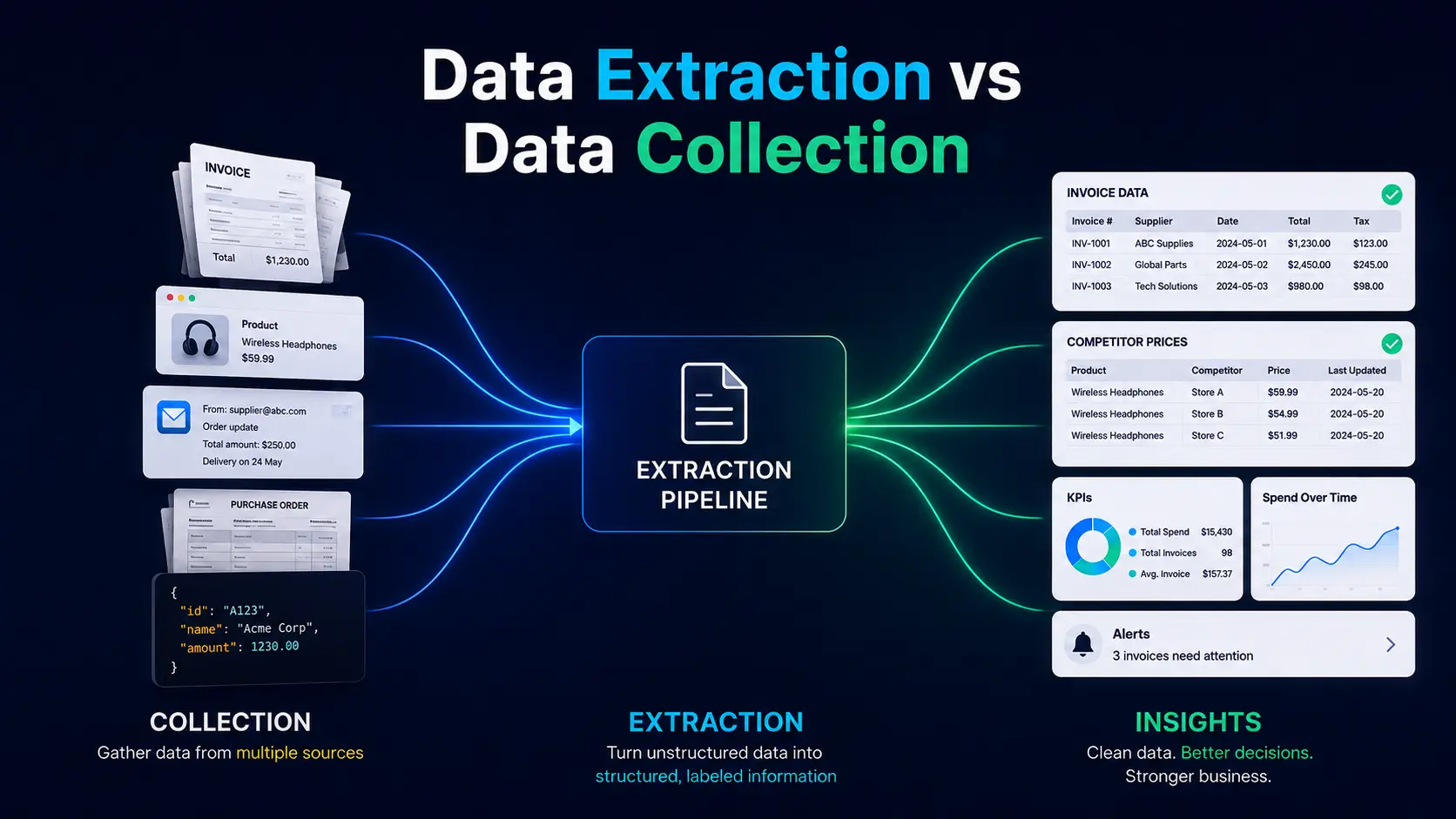
Diagram comparing data collection and extraction, from multiple source types through a pipeline to structured business insights.

Summarize with AI

Introduction

A parts distributor receives 900 supplier invoices every month, and almost all of them arrive as PDFs attached to email. We cost out this exact shape of problem elsewhere. The finance team needs a few details from each file. Somebody has to open every PDF and retype the numbers into the accounting system before anyone can use them.

The same company also tracks competitor prices on 40 websites. The prices are public, and copying them still takes a person most of the day.

Neither problem is a shortage of information. The information exists in both cases. It’s just that it sits in a form software cannot read. The good news is that just two jobs can turn it into something usable. 

Data collection gathers the sources, while data extraction pulls the details out of them and puts them into rows a system can read. This article explains what data extraction is, how it differs from data collection, and when a business should hand the work to a specialist team.

What is Data Extraction?

Data extraction means finding specific pieces of information in a source and pulling them out in a form software can use. Each piece is called a field. An invoice number is a field, and so is a supplier name.

The source can be a web page, a PDF, an email, a scanned image, a report, or a database.

Structured data means information already split into labeled fields. The distributor’s invoices show why the difference matters. A person reads the page and sees everything they need. Software sees one long string of text or one picture. The details have to be found and labeled first.

Extraction turns each invoice into a record with these fields:

  • Invoice number
  • Supplier name
  • Invoice date
  • Line items and quantities
  • Unit price
  • Tax
  • Total

The finance team can then check the record against the purchase order and load it into the accounting system.

Other sources work the same way. A competitor’s website gives product names and prices, and a business directory gives company contact details. A customer email gives order details buried in a paragraph of text.
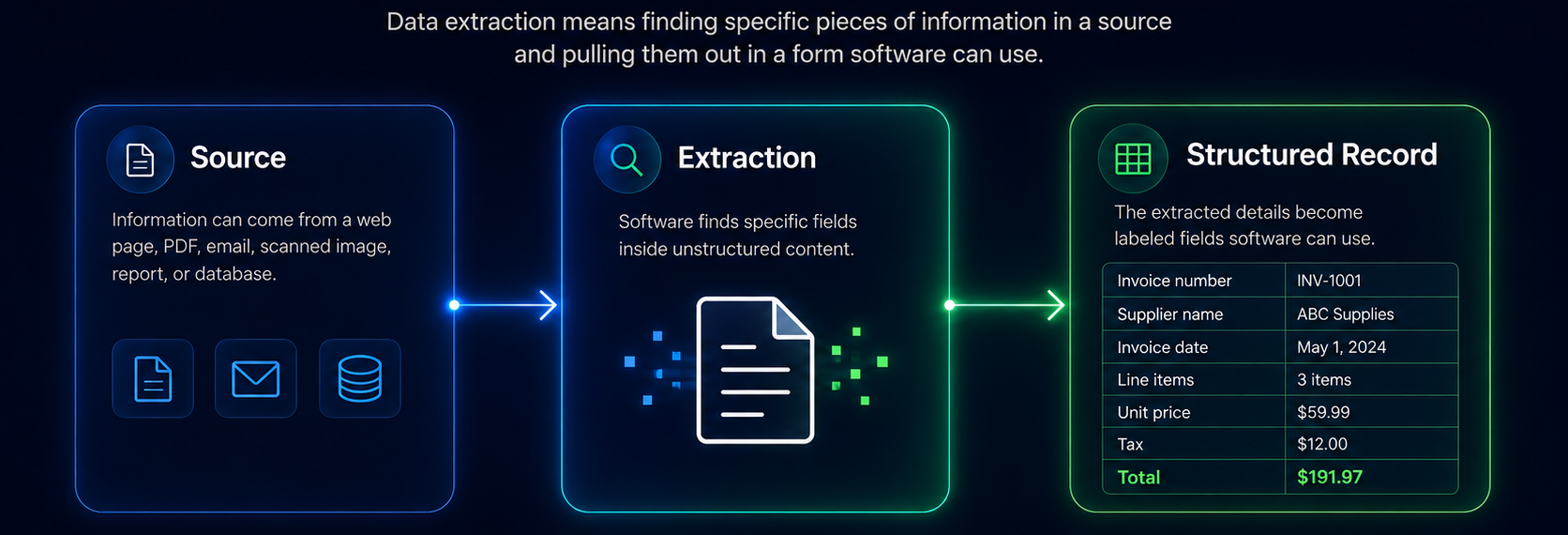
Diagram showing data extraction from source content through field extraction into a structured invoice record.

What is Data Collection?

Data collection means gathering information from the places it already sits, before anyone pulls fields out of it. Collection decides which sources are worth having. It also decides how to get a copy of each one.

Common sources include:

  • Websites and online directories
  • Data feeds published by other systems, known as APIs
  • Databases and internal systems
  • Public records
  • Documents, emails, and shared drives

Collection and extraction answer different questions. Collection asks where the information lives. Extraction asks which parts of it the business needs. For the distributor, collection means taking 900 invoice PDFs out of a shared mailbox and downloading product pages from 40 competitor websites. Extraction starts once the files and pages are in hand.
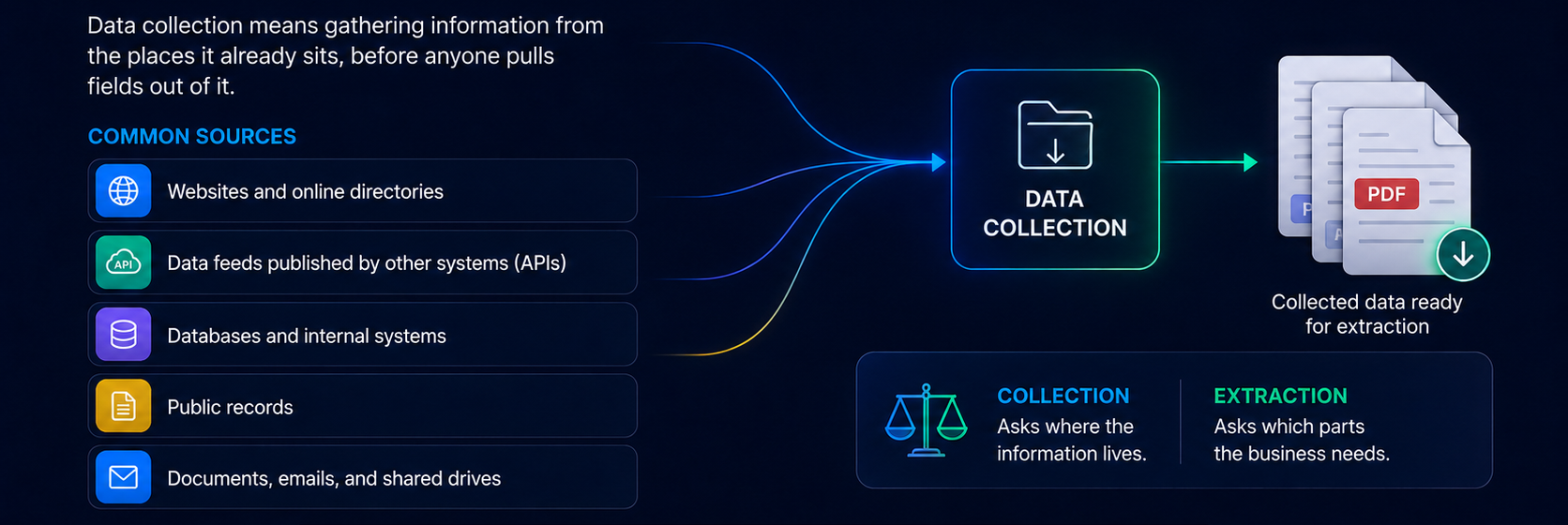
Diagram showing data collection from websites, APIs, databases, public records, and documents into collected data ready for extraction.

Data Extraction vs Data Collection

The two jobs differ in purpose. Collection builds the pile of source material. Extraction turns the pile into fields a system can read.

Aspect

Data Collection

Data Extraction

Main Purpose

Gather information

Pull useful details out of a source

Main Question

Where do we get the data?

What do we need from it?

Sources

Websites, APIs, databases, documents

Websites, PDFs, images, emails, reports

Output

Collected source files

Labeled fields a system can read

Typical Challenge

Finding and reaching the right sources

Finding and labeling the right details

Automation

Collection workflows

Extraction workflows

Business Value

Builds the pool of source material

Turns the material into usable data

Both jobs often run together. One workflow can download a web page and pull its fields in the same run, which makes the difference look unimportant. The difference matters when the data comes out wrong. Missing sources point to a collection problem, and missing fields from sources you already have point to an extraction problem. Each one needs a different fix.

How Does Data Extraction Work?

The complete workflow runs in seven steps. Extraction itself is one of them.

  1. Identify the source: Find where the information exists. Invoice data sits in a shared mailbox, while competitor prices sit on product pages.
  2. Collect the source data: Gather the files, pages, or records in one place. A dataset can only be as complete as the sources behind it.
  3. Define the fields you need: Write down every field before extracting anything. A field described loosely, such as “date,” produces inconsistent results later.
  4. Extract the information: Use the method suited to the source. Fixed layouts suit simple rules, while varying layouts need AI.
  5. Check the results: Test the output against rules a machine can apply. Line items should add up to the invoice total, and every record should carry a supplier name.
  6. Structure the output: Put the fields into a spreadsheet, a database table, or a file another system can load.
  7. Deliver the data: Move the finished records into the accounting system, the sales database, or wherever you need it.

Manual vs Automated Data Extraction

Volume decides more here than anything else.

Factor

Manual Extraction

Automated Extraction

Speed

Slow at volume

Fast at volume

Consistency

Varies by person

Follows set rules

Scale

Limited

High

Repetitive work

Time-consuming

Runs on a schedule

Checking

By hand

Automatic, plus human review

Large datasets

Hard to manage

Well suited

Ongoing work

Repeated effort each time

Runs again on its own

Manual extraction still makes sense for small, one-time jobs. Pulling 60 records out of a report by hand takes an afternoon. Building a workflow for the same job takes longer. A person is also the better choice when the answer needs judgment, such as an unclear contract clause.

Automated data extraction pays off when the same work comes back every month. Ardent Partners’ accounts payable benchmarks for 2025 put the full cost of processing one invoice at $9.40, counting staff time, systems, and overhead. The best-performing 20% of teams spend $2.78. 

At 900 invoices a month, the difference is real money. An automated workflow costs money once, during setup. Each later run costs almost nothing.

How AI Data Extraction Reads Unstructured Sources?

An unstructured source is a document with no fixed layout, such as a scanned receipt or an email written by a person.

AI data extraction reads a source like this by meaning, instead of position. On the other hand, a simple rule works by position. For example, it takes the text in the top right corner and calls it the invoice number. AI reads the document and works out which number is the invoice number, wherever it sits on the page.

One supplier who sends the same template every month suits a simple rule. Vendors who each use their own layout break the rule. Scans, phone photos, and handwritten notes break it too.

Which Technologies Do the Reading?

Reading messy sources takes several technologies, each doing a different part of the job:

  • OCR reads the text off a scan or a photo, so the words become searchable.
  • Computer vision finds the layout, the tables, and the tick boxes on the page.
  • Machine learning models decide which piece of text belongs to which field.
  • Large language models read documents of any layout and return the fields already labeled.

The same order appears across most vendor documentation. Read the text first, find the layout next, then pull out the fields a database can store.

Three Common Routes for structuring data

Most unstructured work follows one of three routes:

  • PDF to extracted fields to checked records to database
  • Email to identified details to finished record to business system
  • Scanned image to OCR and AI extraction to structured data

Where AI Extraction Goes Wrong

AI extraction is not error-free. Models misread handwriting, they pick the wrong number when two numbers sit close together, and some return a confident answer for a value never printed on the page. Every model returns a confidence score, and low scores should go to a person. Similarly, sensitive records deserve a human to read whatever the score says.

The first three paragraphs now run as the intro with no heading, so the definition and the meaning-versus-position point stay together. Both links are unchanged.

What Types of Data Can Businesses Extract?

Businesses extract six broad types of data, and every one follows the same pattern.

Data Type

Typical Sources

Fields Extracted

Customer

Forms, emails, directories, sales system exports

Names, contact details, company, address

Product

Websites, catalogs, supplier files

Product name, product code, price, availability

Financial

Invoices, receipts, statements

Invoice number, dates, amounts, tax, total

Document

Contracts, forms, compliance files

Parties, dates, clauses, reference numbers

Market

Competitor sites, marketplaces, listings

Prices, product range, availability

Operational

Orders, inventory reports, service records

Order number, quantity, supplier, status

Somebody names the fields first, and the workflow produces one clean record per document or page. A field nobody named will not appear in the output.

What Changes When You Scrape a Website?

An invoice lands in your mailbox because a supplier sent it to you. A competitor’s product page is published for their own reasons, and it can be rebuilt or taken down without anyone telling you. The seven steps discussed above do not change, but the source is now outside your control. Retailers still rely on price tracking despite that risk, and research teams still build market datasets from directories and marketplaces.

Two things decide whether the result is worth having. The first is the source, because a stale directory produces stale records, however good the extraction is. The second is checking. Websites change their layout without warning, and a broken extraction starts returning empty fields. An empty field looks the same whether the data was missing or the workflow failed.

Responsible collection matters as much as accuracy. Websites publish rules for automated visitors in a file called robots.txt, set out in RFC 9309. A collection process should follow the rules it finds there. It should also request pages slowly enough for the site to cope.

NOTE: Public data and unrestricted data are not the same thing.
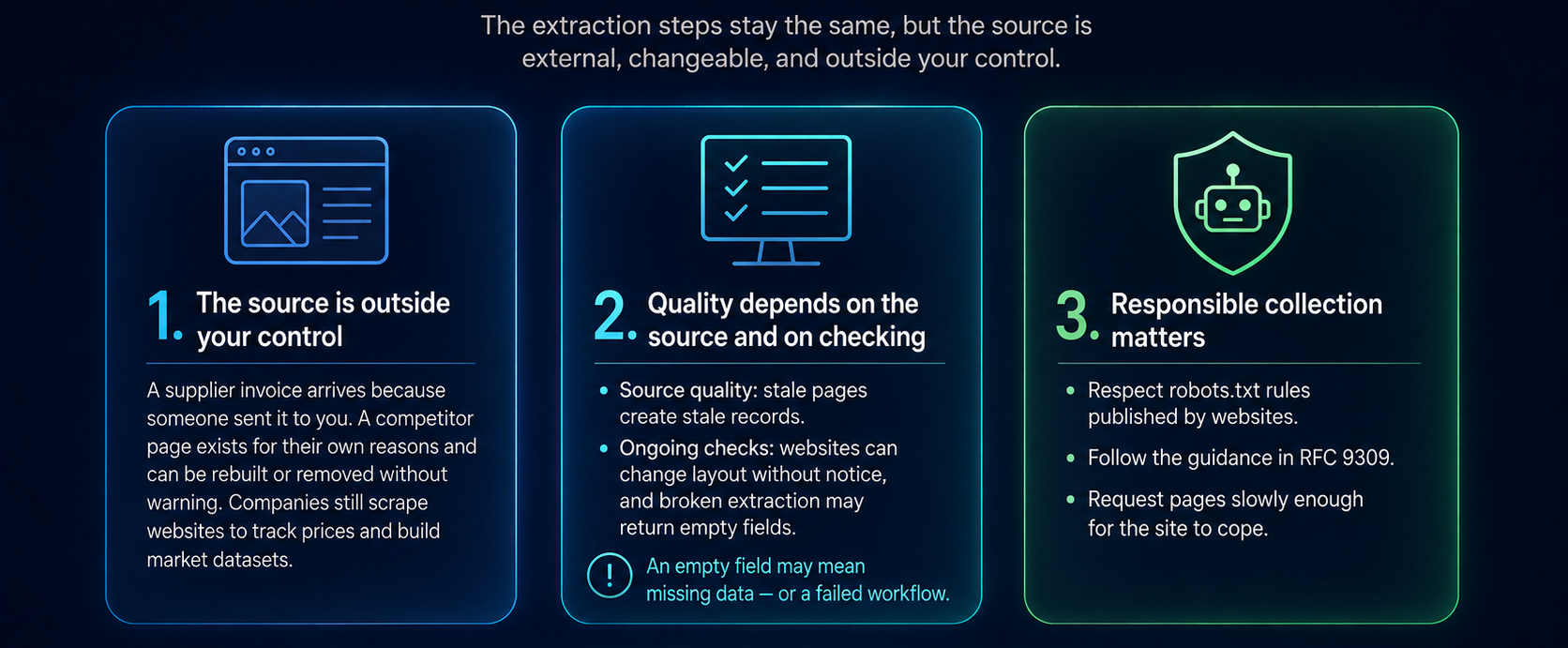
Diagram explaining external-source extraction risks: limited control, variable quality, and responsible data collection.

Where Data Quality Breaks Down?

Six problems break data quality between the source and the finished record. Several of them start earlier, during collection.

  • Missing fields: Not every source carries every field. A supplier who leaves out the purchase order number leaves a gap no model can fill.
  • Inconsistent formats: Dates, addresses, and currencies arrive in different shapes. Somebody has to put them in one format before the records reach a database.
  • Duplicate records: The same company or product arrives twice from two sources. Removing duplicates needs a stable identifier, such as a company registration number.
  • Outdated information: Prices and contact details age quickly. A dataset without a refresh schedule loses value month by month.
  • Extraction errors: OCR misreads characters, and models pick the wrong value from a crowded page.
  • Source changes: Websites get redesigned, and document templates get updated. A workflow can run cleanly for months and then fail overnight.

Monitoring catches the last two. Without it, the first sign of a broken extraction is a decision made on bad numbers.

How to Improve Data Extraction Accuracy?

Accuracy comes from the steps around extraction more than from the extraction tool. Eight habits carry most of the weight:

  1. Define the fields you need before choosing a tool.
  2. Match the method to the source, and do not force AI onto a fixed template.
  3. Write checks a machine can run (our testing checklist is a good starting point), such as line items adding up to the total.
  4. Put dates, currencies, and units in one format as you structure the data.
  5. Remove duplicates using a stable identifier rather than a name.
  6. Watch for source changes, and raise an alert when fields start coming back empty.
  7. Send low-confidence AI output to a person instead of straight to the database.
  8. Track two or three quality measures over time, such as how many records arrive complete.
NOTE: All eight cost less to build at the start than to add after a bad quarter of data.

How Much Does Data Extraction Cost?

Data extraction is priced per project, because the work behind the price varies so widely. Cost follows these factors:

  • Volume and how often the extraction runs
  • Number of sources and how much they differ from each other
  • Source complexity, from clean web tables to photographed receipts
  • Number and difficulty of the fields
  • OCR or AI requirements
  • Depth of checking and human review
  • Output format and integration work
  • Ongoing maintenance as sources change

A single clean source with 10 fields is a small job. A batch of 200,000 scanned documents in mixed layouts is a different project once checking and integration are added. The difference sits in the work, not in the price per document.

Choosing the Right Data Extraction Approach

The right approach follows the source, the volume, and the accuracy the business needs.

Requirement

Suitable Approach

Small one-time dataset

Manual extraction

Repetitive structured data

Automated extraction

Large document collection

Automated extraction with OCR

Complex unstructured information

AI-assisted extraction

Recurring web information

Automated collection and extraction

Company-wide workflow

End-to-end extraction and integration

A price dashboard refreshed every day and a one-time move of archived contracts have almost nothing in common. Both get called extraction anyway.

When Should You Use Data Extraction or Data Collection Services?

Outside help earns its cost when the same work comes back at volume. Volume is the obvious reason. Mixed document formats add work internal teams rarely have spare time for, and many sources add more work. Sources also change, so somebody has to keep the workflow running.

Extraction is the harder job to build, so most teams look for support there first. Well-run automated data extraction services cover the whole path. The work starts with choosing the method and ends with finished records inside the systems you already use.

Collection comes first, and it fails in its own way. Large-scale market research, public web data, product catalogs, and AI training datasets all need reliable gathering before extraction can add anything. Automated data collection workflows find the sources, run on a schedule, and refresh them. Extraction then works from current information instead of stale information.
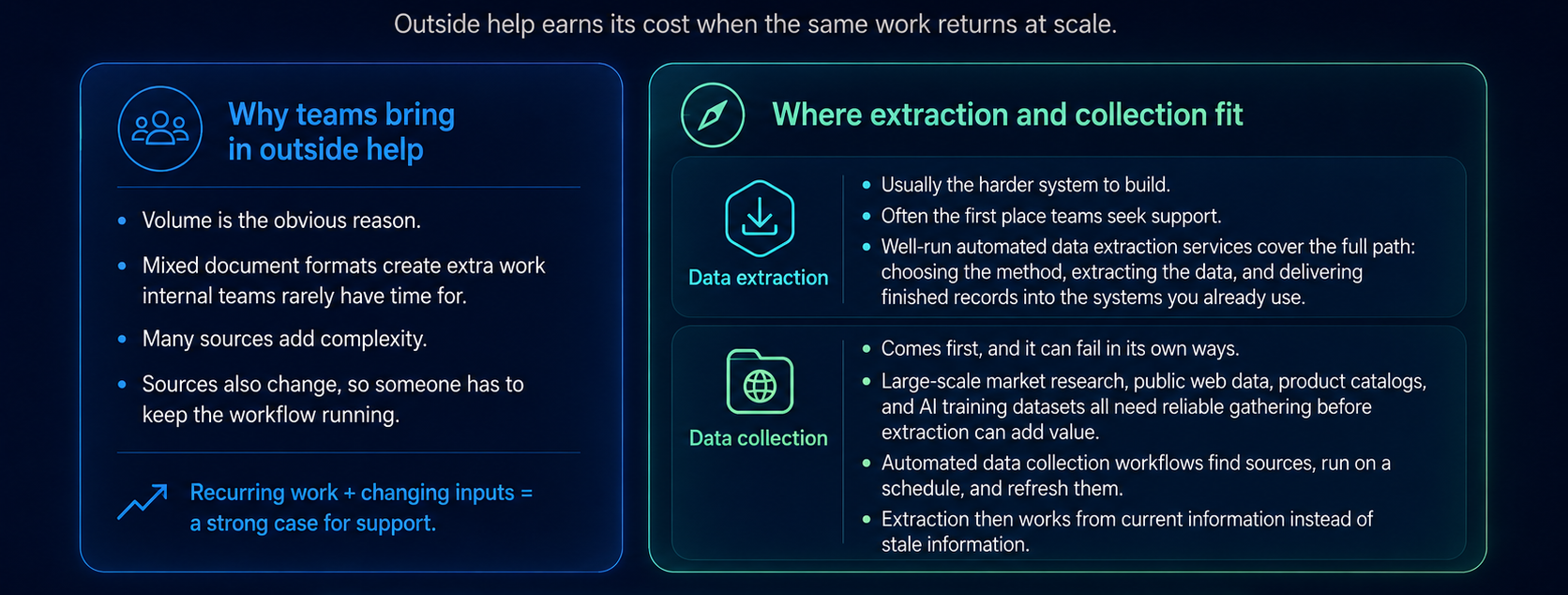
Diagram explaining why teams use outside help for data extraction and collection, including scale, complexity, and recurring workflows.

Data Extraction for AI and Automation

AI systems are only as good as the data they read. A chatbot answering questions from your documents is only as accurate as the extraction behind them. An AI agent working from supplier records will act on whatever the records say, right or wrong.

The pattern repeats across departments. Finance pulls invoice fields into the accounting system. Sales pulls company and contact details into the sales database. Procurement pulls supplier and product information for comparison. Research teams gather sources and turn them into datasets an analyst or a model can query.

Raw information becomes structured data. Structured data feeds the AI system. The system then produces something a person can act on. Skip the middle step, and the answers turn unreliable in ways nobody notices for months.

Final Takeaway

Businesses rarely need more raw information. They need usable information, and the two jobs in this article produce it in order. Data collection gathers the right sources. Data extraction pulls the fields out of them. Checking confirms the result, and integration puts the records where teams, reports, and AI systems can use them.

Everything above assumes somebody owns the workflow from start to finish, and in most companies nobody does. If your reporting still depends on a person retyping PDFs, we’re happy to look at your sources on a free consultation call. We will tell you plainly what should be automated and what should not.

Book a Free 30-Minute Meeting

Discover how our services can support your goals — no strings attached. Schedule your free 30-minute consultation today and let's explore the possibilities.

Book a Free Call

Frequently Asked Questions

Data extraction is the process of finding specific details in a source and pulling them out as labeled fields. The source can be a PDF, a web page, an email, a scanned image, or a database record. The output is a record software can read. An invoice becomes one row carrying its number, date, supplier, and total.

Data collection gathers information from sources, while data extraction pulls the details you need out of what was gathered. Collection answers where the data comes from. Extraction answers what the business needs from it. Most workflows do both, and they fail differently: collection misses sources, extraction misses fields.

AI data extraction uses OCR, machine learning, and language models to find fields by meaning rather than by position on the page. It handles the sources simple rules struggle with, including scanned documents, phone photos, and email written by hand. Accuracy varies by document type, so checking stays part of the workflow.

Data extraction services include specialist teams who design and run extraction workflows for a business. The work usually covers gathering the sources, defining the fields, and then extracting, checking, structuring, and delivering data into an existing system. Companies use them for large volumes, mixed formats, recurring schedules, or AI extraction projects.

Cost depends on volume, source complexity, the number of fields, and how often the work runs. Depth of checking and integration work add to it, as does maintenance when sources change. A single clean source with 10 fields is inexpensive. A large archive of scanned documents in mixed layouts is a project.

Extraction supplies the structured data automated workflows depend on. An invoice becomes a record the accounting system can match against a purchase order. A directory listing becomes a record in the sales database. Without extraction, automation stops at the first step, because nothing structured exists for the workflow to use.

Book Consultation