

Executive Summary: Snowflake vs. Amazon Redshift at a Glance
Introduction to Cloud Data Warehousing
What is Snowflake?
Snowflake is a cloud data warehouse. It separates storage and compute, so you can scale each one as needed and pay only for what you use. It works with AWS, Azure, and Google Cloud.
Key Features of Snowflake
- Separate compute, storage, and services for a flexible cloud-native architecture
- Handle structured and semi-structured data like JSON, Avro, and Parquet
- Auto scale with virtual warehouses, plus built-in concurrency handling, tuning, and optimization
- Support Time Travel, Fail safe recovery, and secure data sharing across accounts and cloud platforms
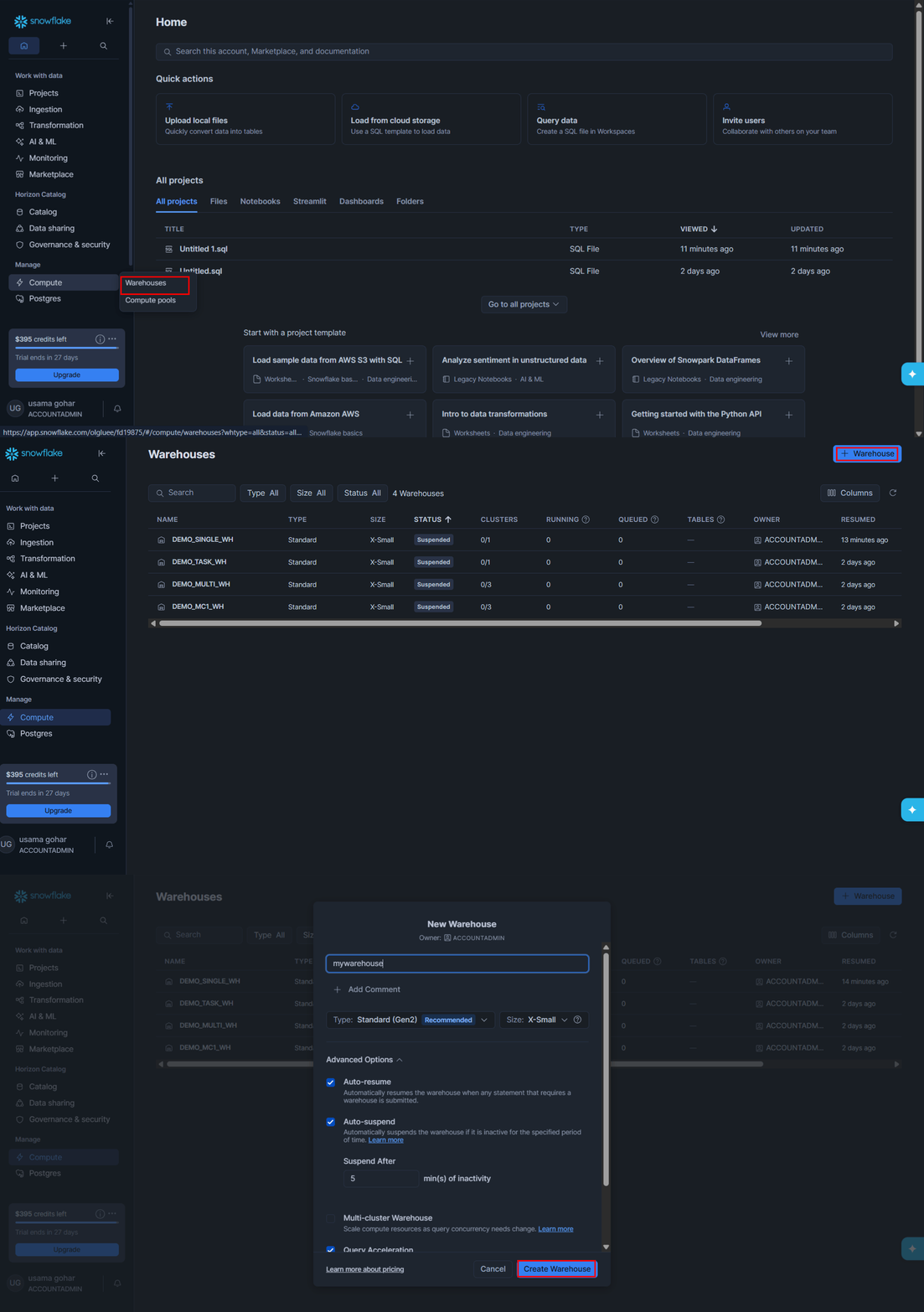
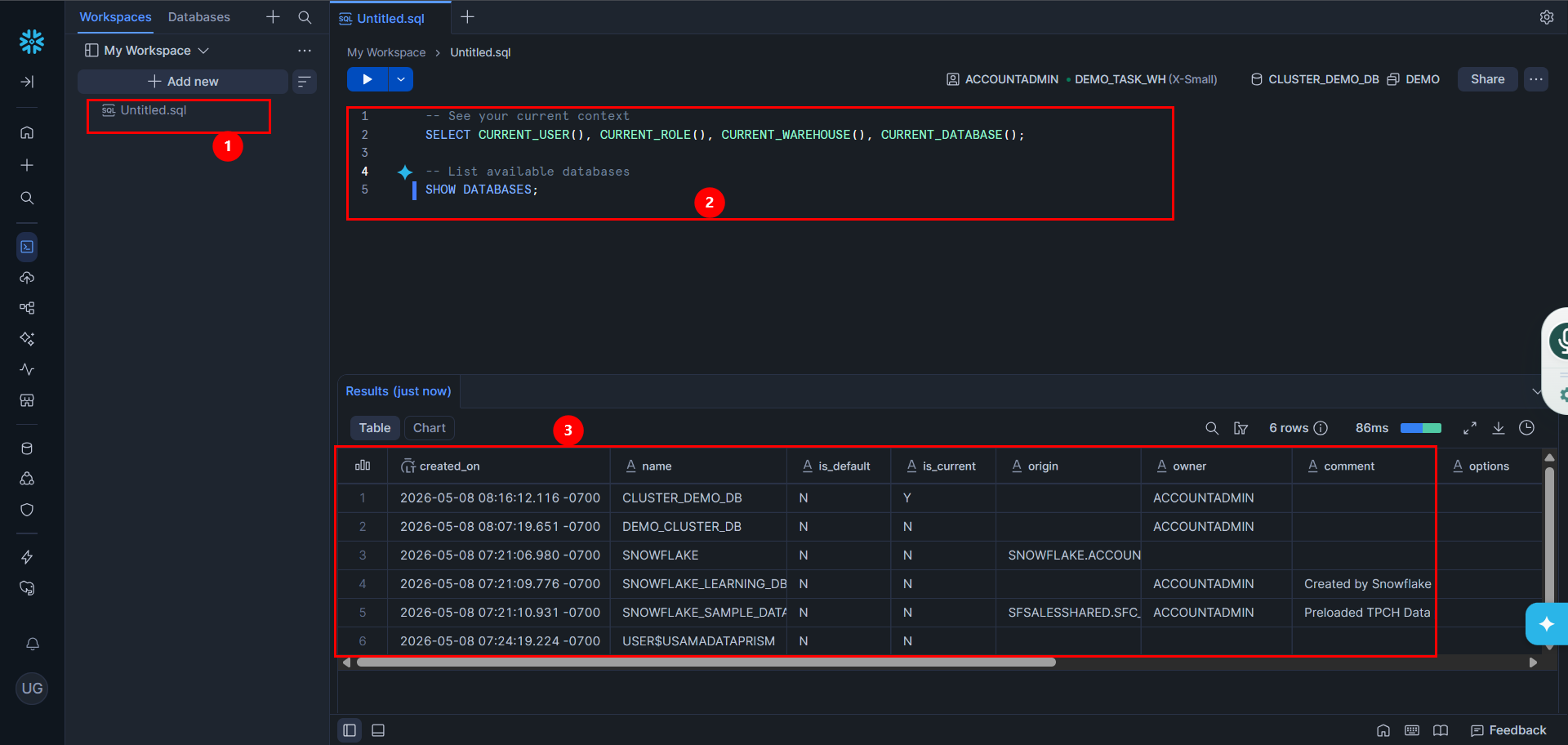
- With a simple setup flow, creating a warehouse takes just a few easy steps.
What is AWS Redshift?
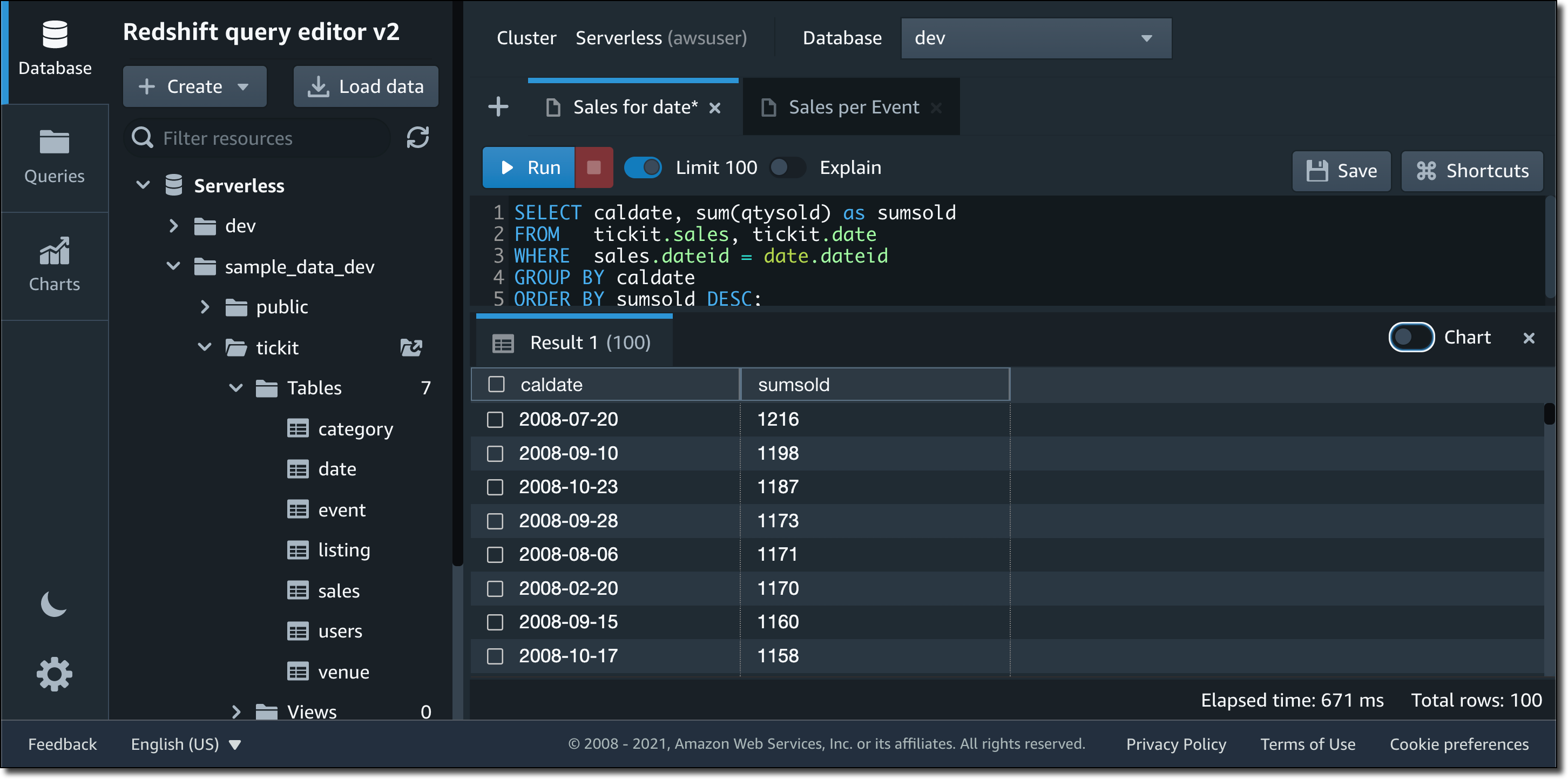
Amazon Redshift is a fully managed cloud data warehouse from Amazon. While historically known as a rigid system that required manual tuning, Redshift has evolved to compete directly with Snowflake's ease of use. The biggest shift is Redshift Serverless. Instead of buying fixed servers (nodes) and hoping you guessed your capacity correctly, Serverless handles the setup and scaling dynamically. You can start querying data right away with Redshift Query Editor or your BI tools.
Key Features of Redshift
● Concurrency scaling to handle unpredictable workloads
● We can query S3 data in-place via Redshift without ETL/ingestion
● Deep integration with many AWS services
Now that we have identified some basic knowledge about Snowflake and Amazon Redshift, let’s dive into the key differences to identify which one of them is more suitable for your needs.
Architectural Breakdown: Decoupled Computing vs. Managed Clusters
❄️ Snowflake: The Multi-Cluster, Shared Data Model
Snowflake engineered its platform to natively separate compute and storage layers, using independent virtual warehouses to eliminate resource contention entirely.
- True Workload Isolation: You can deploy an independent compute cluster for real-time executive dashboards and a separate, isolated cluster for heavy engineering pipelines. Both warehouses read from the same centralized data storage simultaneously, yet they never compete for the same CPU cycles.
- Instant Multi-Cluster Scaling: To manage extreme concurrency spikes, Snowflake auto-scales horizontally by spinning up additional parallel clusters in seconds, automatically shutting them down the moment the query queue clears.
- The Structural Trade-off: The platform provides completely frictionless scaling with zero manual performance tuning. However, this lack of friction means costs can scale out just as fast; a single unoptimized loop or a runaway pipeline can trigger maximum auto-scaling, and Snowflake will execute the job and bill you for it.
📊 Amazon Redshift: Managed Architecture & Serverless
Redshift has transitioned from its legacy, rigid node configurations into a highly elastic, multi-tiered scaling engine designed to support modern distributed applications.
- Redshift Serverless: This framework automatically provisions and dynamically scales compute capacity second-by-second using Redshift Processing Units (RPUs), eliminating the operational overhead of capacity planning.
- Concurrency Scaling: For provisioned clusters facing peak usage spikes, Redshift automatically deploys transient, background capacity to absorb overflow queries, maintaining steady performance levels for end users.
- The Structural Trade-off: Redshift retains the granular "knobs and dials" favored by database administrators. It heavily rewards engineering teams that want strict infrastructure governance and predictable baseline costs, though it requires more architectural foresight than Snowflake’s quick warehouse provisioning approach.
The Performance Reality: Query Speeds and Maintenance Overhead
While both platforms deliver enterprise-grade, sub-second query performance, they require vastly different levels of operational engineering to maintain those speeds.
Ease of Use & Maintenance: Who Does the Chores?
The fundamental difference in performance tuning lies in how much of the "heavy lifting" the platform forces back onto your data engineering team.
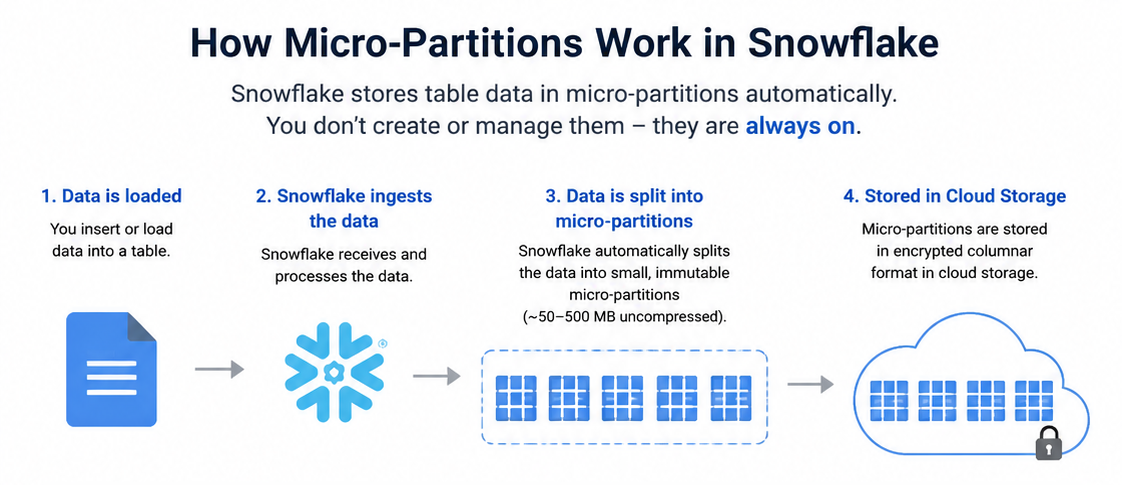
- Snowflake's "Hands-Off" Approach: Snowflake is designed to deliver maximum query performance with zero manual tuning. The system automatically manages micro-partitioning, query optimization, caching, and background data clustering. Users never have to configure distribution keys, define indexes, or manage cluster memory allocation.
- Redshift's AI-Driven Autonomics: Historically, Redshift required strict capacity planning and constant manual tuning by Database Administrators (DBAs). However, AWS has aggressively closed this ease-of-use gap by introducing Redshift Autonomics (Automatic Table Optimization). Redshift now utilizes machine learning to constantly observe your team's query patterns. In the background, it automatically applies the optimal Sort and Distribution keys, executes Auto-Vacuuming, and dynamically manages memory allocation (Auto-WLM) without human intervention. (Find more about Redshift Automatic Table Optimization here.)
The Fivetran Performance Benchmark (Cost vs. Speed)
Performance and cost between the two platforms are highly competitive. The clearest independent evaluation is the Fivetran 2022 Data Warehouse Benchmark, which executed 99 standard TPC-DS analytical queries against a 1 TB dataset across multiple cluster sizes.
Worth noting: Fivetran is a Snowflake partner, but their full methodology and code are public on GitHub.
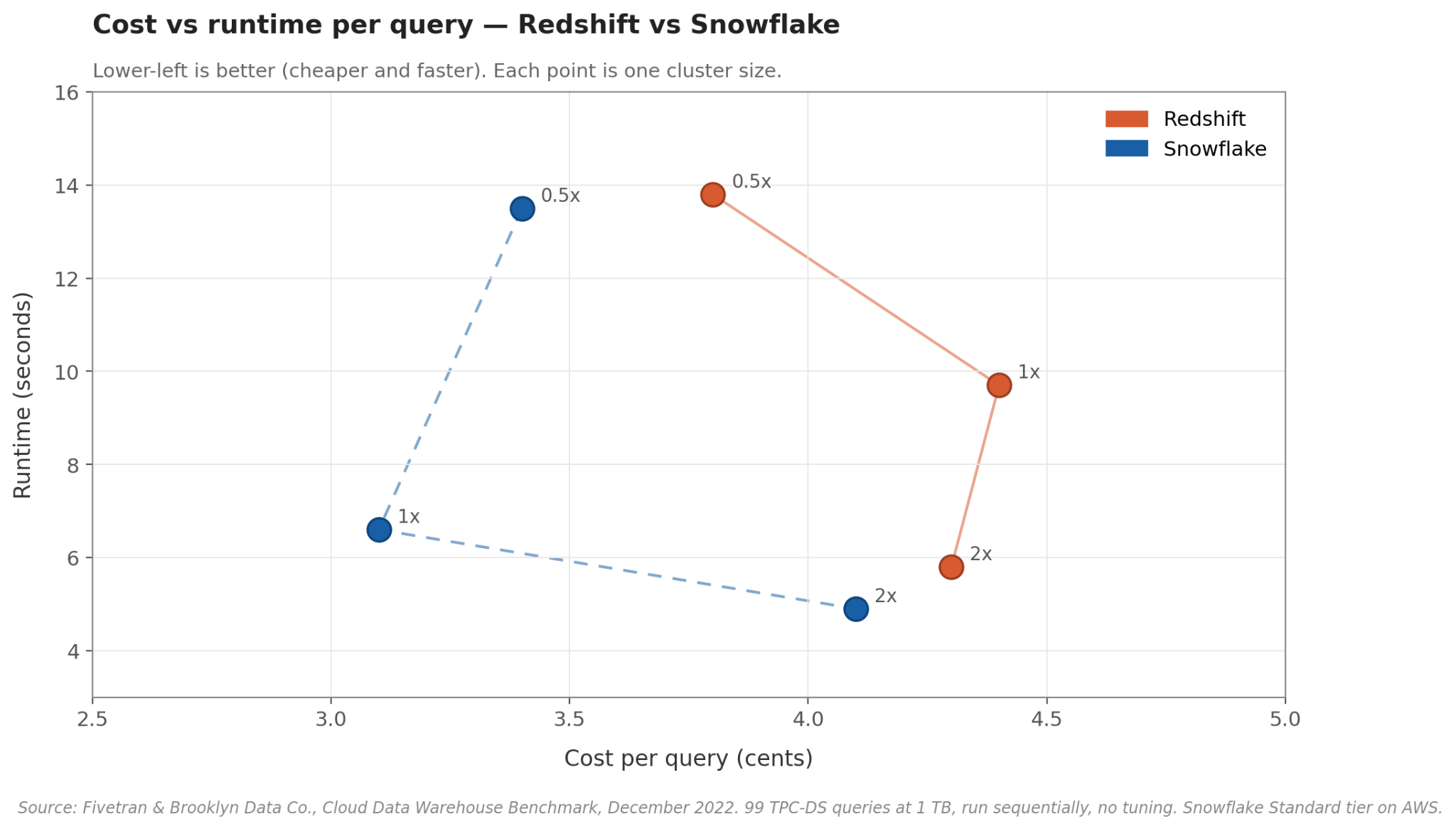
Here is the breakdown of how Snowflake and Redshift perform at a Standard/Medium Cluster Size:
|
Metric |
Snowflake (Large) |
Amazon Redshift (5x RA3) |
|
Average Query Runtime |
6.6 Seconds |
9.7 Seconds |
|
Average Cost per Query |
$0.031 |
$0.044 |
Key Benchmark Takeaways:
- The Medium Cluster Advantage: At a typical mid-size cluster, Snowflake holds a distinct advantage, executing queries roughly 30% faster while remaining more cost-effective per query than Redshift.
- Scaling Closes the Gap: When pushing the workloads to Massive/X-Large clusters, Snowflake remains slightly faster, but the cost gap between the two platforms essentially disappears. Drop down to the smallest cluster sizes, and their performance is nearly identical.
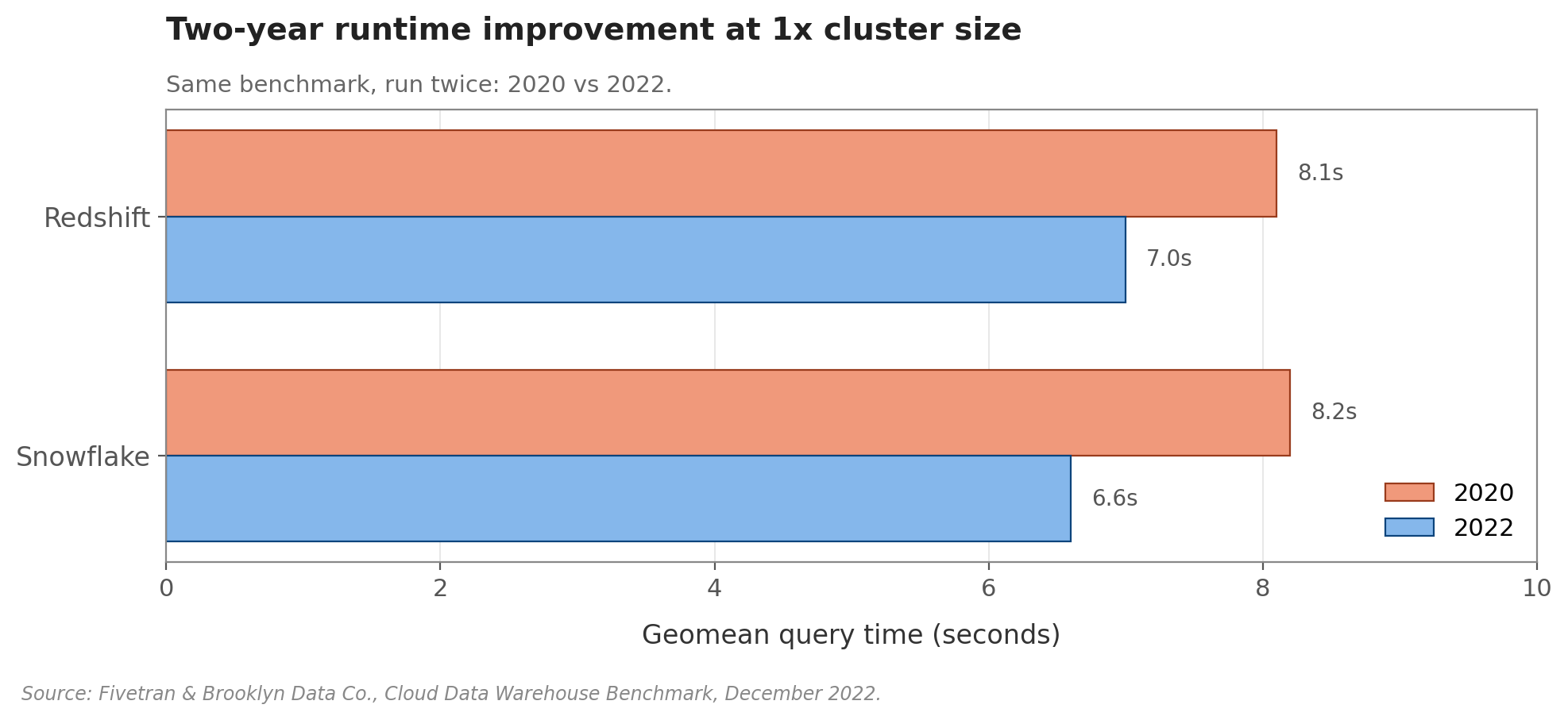
- Continuous Improvement: Both platforms are getting faster. Between the 2020 and 2022 benchmarks, Redshift dropped its average execution time from 8.1 to 7.0 seconds, while Snowflake dropped from 8.2 to 6.6 seconds.
Note: This benchmark data utilizes Snowflake's lowest pricing tier. Upgrading to Snowflake Enterprise or Business Critical editions will multiply compute costs by 1.5x and 2x per credit, respectively. Additionally, these tests ran queries sequentially, meaning they do not account for Snowflake's superior multi-cluster auto-scaling under heavy, concurrent user loads.
Financial Models: Credit Consumption vs. Reserved Node Economics
The financial structure of your data warehouse often dictates the final platform choice. While both platforms charge separately for storage and compute, their billing methodologies cater to entirely different enterprise consumption patterns.
❄️ Snowflake: The Pure Consumption Model
Snowflake operates on a strict, usage-based model. You pay exclusively for the compute credits your virtual warehouses consume while they are actively running queries.
- Per-Second Billing: Warehouse compute is billed per-second (with a 60-second minimum charge every time a warehouse starts, resumes, or scales up).
- Auto-Suspension: When a query finishes and the warehouse becomes idle, it can automatically suspend itself, instantly dropping your active compute costs to exactly $0.
- The Financial Fit: Because you only pay while the "engine is running," Snowflake is highly cost-effective for bursty, unpredictable, or highly variable workloads that peak heavily during business hours and sit dormant overnight.
📊 Amazon Redshift: Provisioned Nodes & Serverless RPUs
Redshift offers two distinct financial paths, allowing teams to choose between usage-based flexibility and predictable, fixed-cost infrastructure.
- Provisioned Clusters & Reserved Instances (RIs): If you deploy fixed node clusters (like modern RA3 nodes), you pay an hourly rate for that baseline capacity. However, if your enterprise runs steady, 24/7 workloads, AWS allows you to purchase 1-year or 3-year Reserved Instances (RIs). These long-term commitments can drop your hourly compute cost by up to 75%, providing predictable, locked-in budgets.
- Redshift Serverless: To compete directly with Snowflake, Redshift Serverless bills on a per-second basis (also with a 60-second minimum). It scales and charges based strictly on the active Redshift Processing Units (RPUs) consumed by your queries.
- The Financial Fit: While Redshift Serverless handles variable workloads beautifully, Redshift Provisioned Clusters remain the undisputed financial winner for steady, high-volume, constantly running workloads where RI discounts can be fully leveraged.
Pricing Model Comparison
|
Financial Dimension |
Snowflake |
Amazon Redshift |
|
Primary Compute Metric |
Virtual Warehouse Credits |
Provisioned Node Hours or Serverless RPUs |
|
Billing Increment |
Per-second (60-second minimum) |
Per-second (60-second minimum) |
|
Storage Billing |
Flat monthly rate per compressed TB |
Flat rate per TB for Redshift Managed Storage |
|
Enterprise Cost Control |
Pre-purchased capacity commits |
Reserved Instances (RIs) offering up to 75% off |
|
Optimal Economics |
Workloads that scale rapidly and sleep often |
Workloads that run consistently 24/7 |
Pipeline Agility: Ingesting Semi-Structured JSON and Ecosystem Integrations
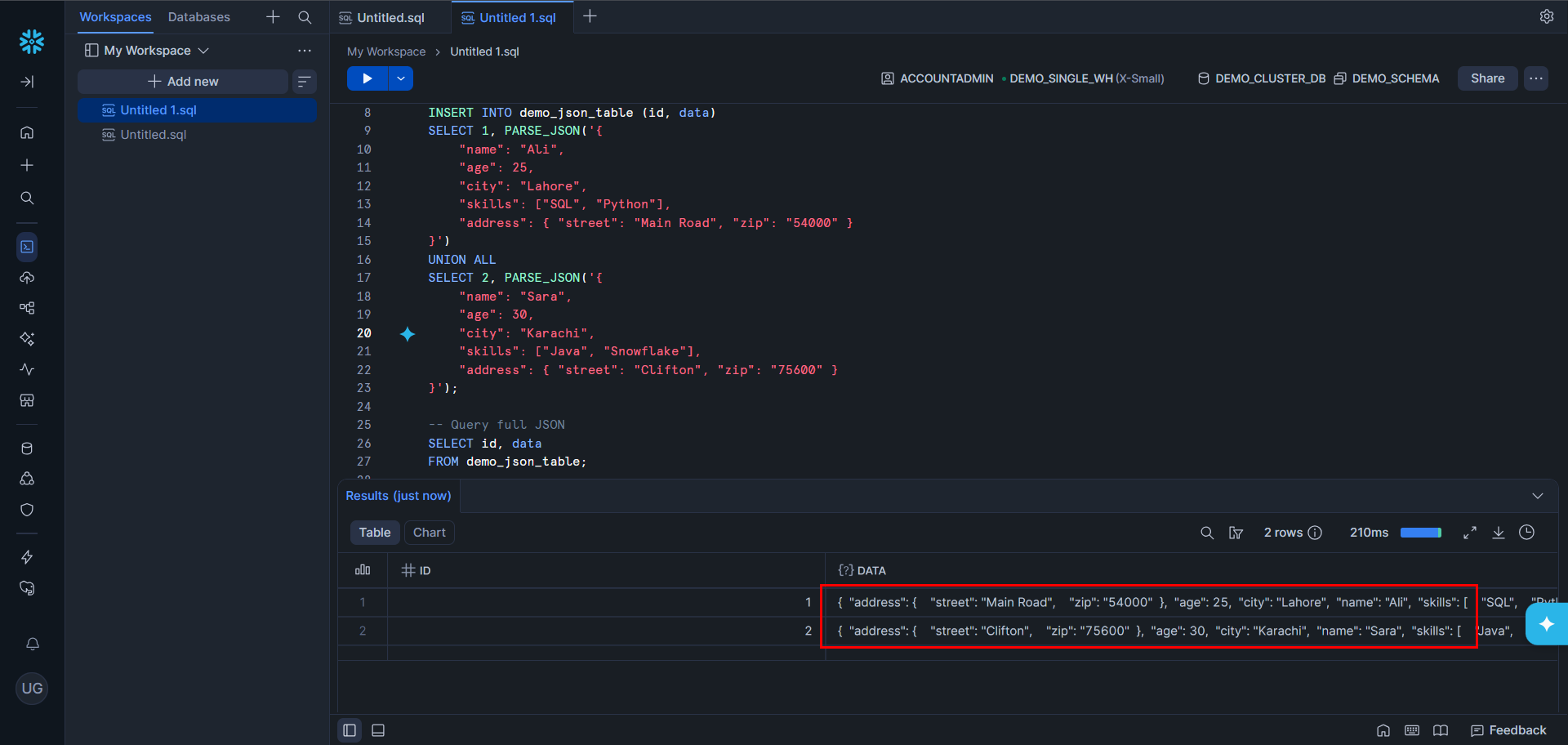
Snowflake natively supports semi-structured data (JSON, Avro, Parquet, XML, ORC) via the VARIANT type — no pre-defined schema needed. It auto-optimizes to columnar format, supports Apache Iceberg for open-format external storage, and integrates broadly with ETL tools (Fivetran, dbt), BI platforms (Tableau, Looker, Power BI), and ML environments. Runs across AWS, Azure, and GCP.
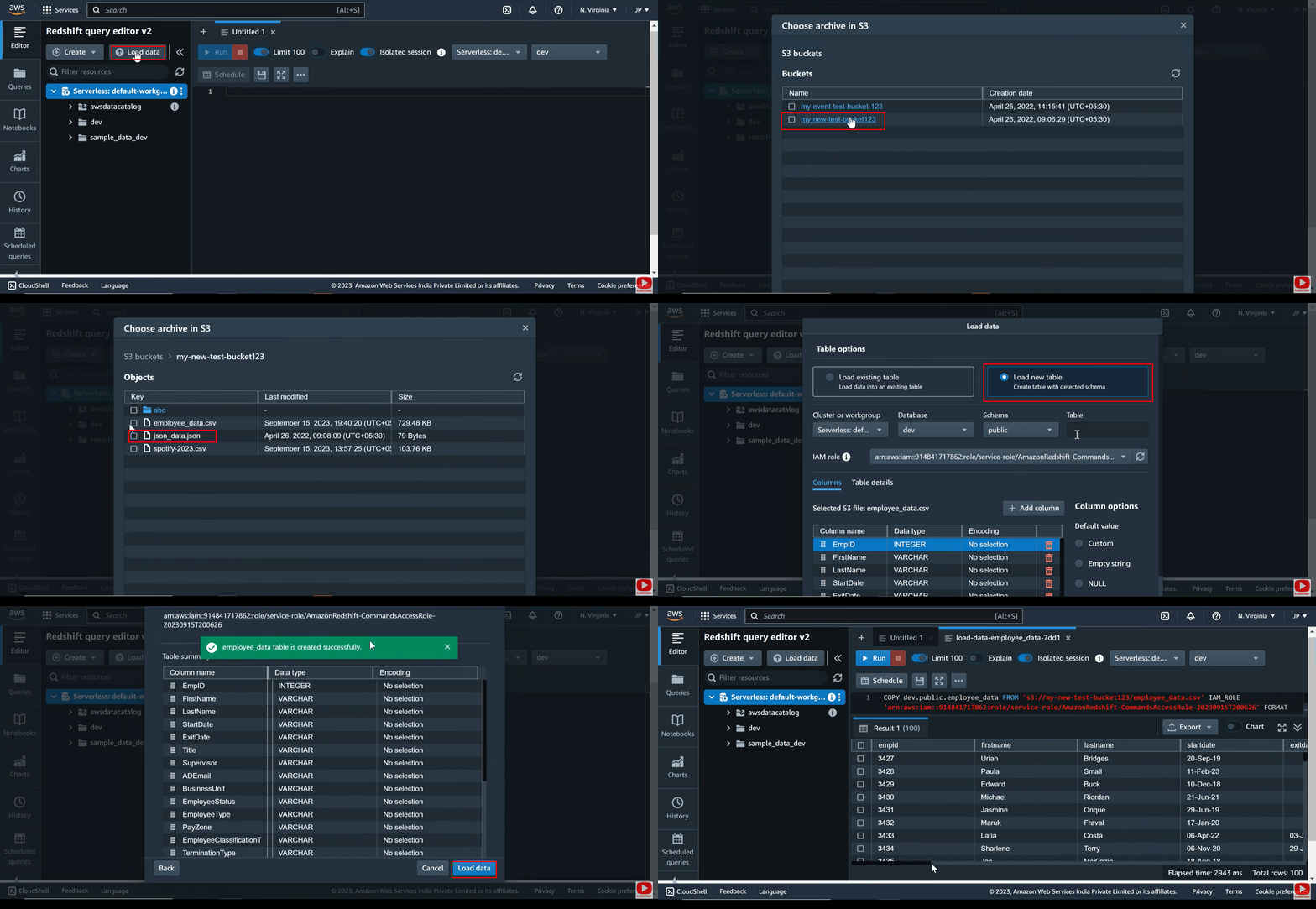
Redshift was structured-data-first but has evolved, Spectrum enables S3 querying and SUPER types handle semi-structured data in native tables. Nested data querying is less intuitive than Snowflake's VARIANT. Redshift is best suited for AWS-native stacks (S3, Glue, Lambda, SageMaker).
Enterprise Governance: Security, Compliance, and Cloud Availability
Both platforms provide enterprise-grade security and compliance frameworks capable of supporting highly regulated industries like finance and healthcare. However, their structural approach to infrastructure isolation differs.
❄️ Snowflake: Secure Out of the Box
Snowflake manages security natively, wrapping all data assets in a secure layer controlled by its Cloud Services tier.
- Turnkey Protection: Features end-to-end data encryption (at rest and in transit), Multi-Factor Authentication (MFA), and advanced Role-Based Access Control (RBAC) out of the box.
A complete list of Regulatory Compliance can be found here.
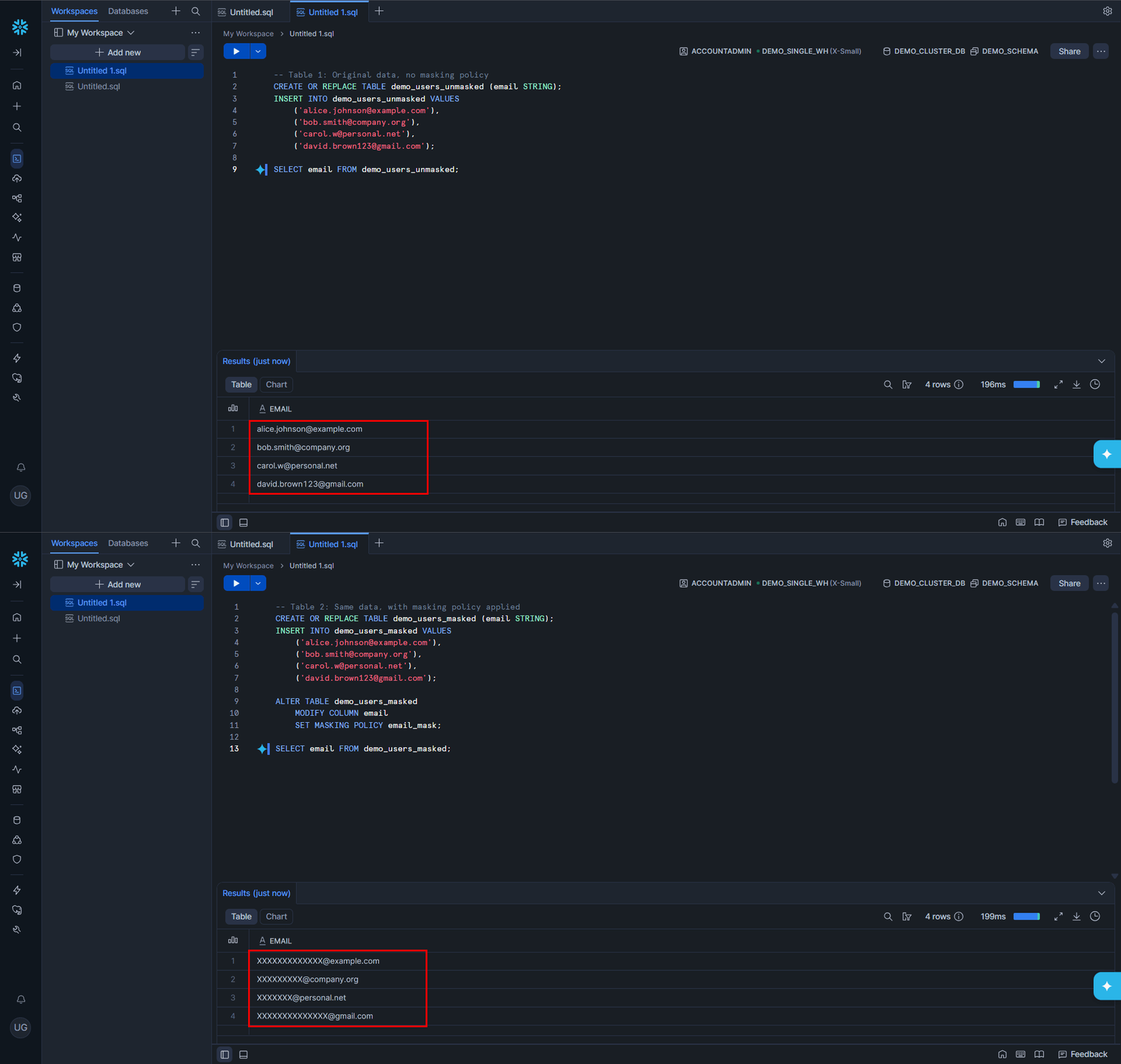
- Granular Governance: Supports advanced data masking, row-level security, and comprehensive access history auditing to track data lineage.
- High Availability: Automatically replicates metadata and data across multiple availability zones within the hosting cloud provider's region, enabling instant failover without manual engineering intervention.
📊 Amazon Redshift: VPC-Native Isolation
Redshift approaches security from a network-first perspective, treating your data warehouse as a component of your broader cloud architecture.
- Network Control: Runs directly inside your Amazon Virtual Private Cloud (VPC), allowing network administrators to isolate cluster traffic using native AWS security groups, IAM policies, and KMS encryption keys.
A complete list of Regulatory Compliance can be found here.
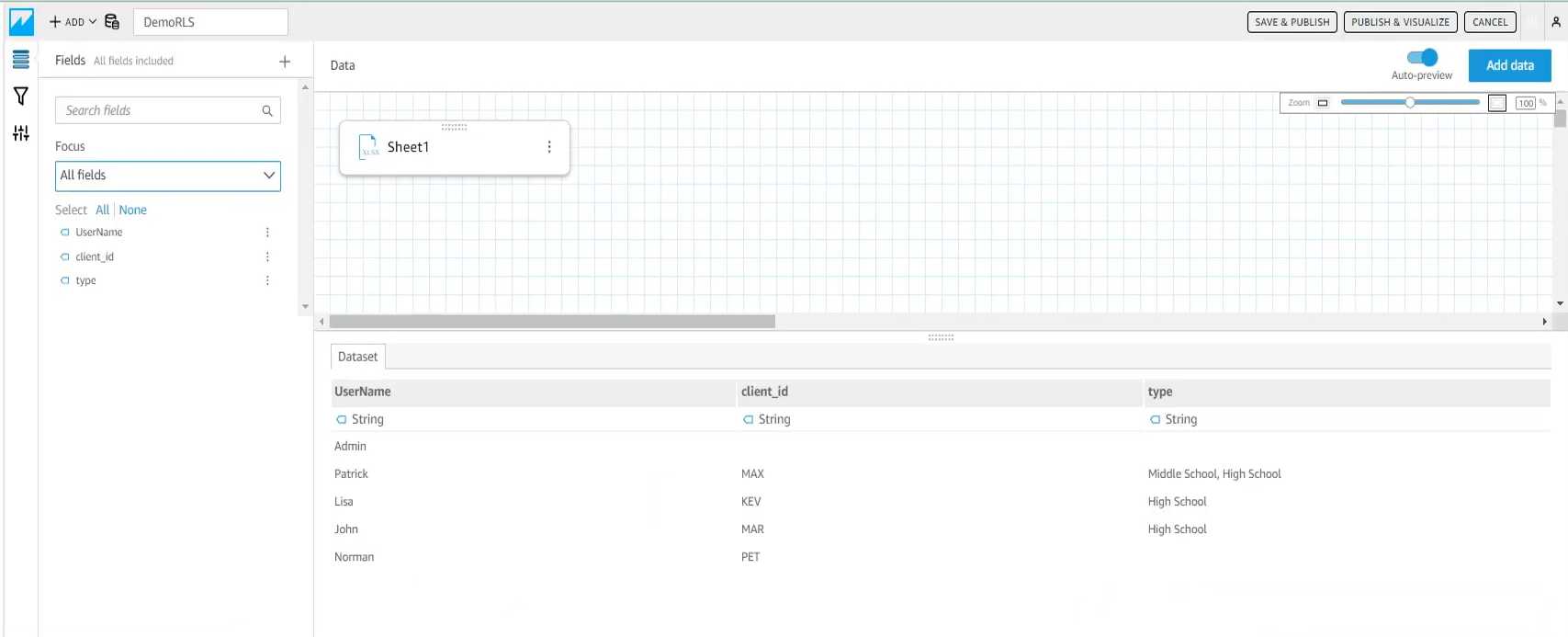
- Access Control: Employs explicit column-level and row-level access permissions managed via standard database privileges combined with AWS IAM roles.
- High Availability: Offers automated cluster snapshots, cross-region replication, and multi-AZ deployments. However, unlike Snowflake's hands-off failover, many high-availability patterns in Redshift require explicit upfront architectural planning and active ongoing maintenance.
Zero-Copy Collaboration: Modern Data Sharing Frameworks
Modern data architectures must not only analyze data internally but also enable zero-copy collaboration across distinct business units, vendors, and clients.
- Snowflake’s Data Sharing Dominance: Data sharing is arguably Snowflake’s most disruptive feature. Through its Secure Data Sharing mechanism, you can grant read-only access to live schemas or tables to external organizations instantly. This occurs completely without data duplication, data movement, or ETL overhead—even if the consumer operates on an entirely different cloud provider (e.g., sharing from AWS to Google Cloud).
- Redshift Data Sharing: Redshift supports robust cross-cluster data sharing, allowing distinct clusters to read shared data with zero replication. However, this feature is fundamentally optimized for ecosystems operating within the same AWS Organization. Establishing sharing connections with external, non-AWS partners typically requires extra network approvals and structural overhead.
Head-to-Head Comparison Matrix
Weighing the Trade-offs: Platform Pros & Cons
Conclusion: Making the Right Architectural Choice
Book a Free 30-Minute Meeting
Discover how our services can support your goals — no strings attached. Schedule your free 30-minute consultation today and let's explore the possibilities.
Book a Free Call